For graphic designers and digital artists, fonts are the lifeblood of visual communication. The ability to effectively manage and deploy typefaces is not merely a convenience; it is a critical component of a streamlined and efficient workflow. Adobe Photoshop, a cornerstone of creative industries, has long presented challenges for users attempting to navigate extensive font libraries. While the built-in "Favorites" tab in Photoshop's character panel offers a rudimentary level of organization, it often falls short of the sophisticated needs of professionals dealing with numerous projects, diverse clients, and ever-expanding collections of type. This is where dedicated font management software and plugins emerge as indispensable tools, transforming the way designers interact with their typographic resources.
The Limitations of Native Font Management
The inherent limitations of Photoshop's native font management capabilities have been a persistent source of frustration for many designers. The "Favorites" tab, while functional for a small, curated selection of frequently used fonts, quickly becomes unwieldy as font libraries grow. Users often find themselves scrolling through an endless list, struggling to recall specific font names or locate the exact typeface required for a particular project. This inefficiency not only consumes valuable creative time but can also lead to the underutilization of a designer's extensive font collection, with less frequently used but potentially perfect fonts being overlooked. The lack of robust organizational features means that managing fonts on a per-project or per-client basis within Photoshop itself is a cumbersome and often impractical endeavor.
Introducing Font Management Software: A New Era of Typographic Control
The advent of specialized font management software has revolutionized how designers handle their typography. These powerful tools go far beyond the basic functionalities offered by operating systems and design applications, providing comprehensive solutions for organizing, activating, previewing, and deploying fonts. The core principle behind these applications is to allow users to manage their font libraries without needing to install every single font directly onto their system. This approach is crucial for maintaining system performance, preventing font conflicts, and ensuring a clean and manageable font list.
Key Features of Modern Font Managers
Modern font management software is designed with the professional designer in mind, offering a suite of features that address the pain points of traditional font handling. These features collectively empower users to take complete control over their typographic assets.
Collections and Playlists: A cornerstone of effective font management is the ability to group fonts into logical categories. Font management software allows users to create custom "collections" or "playlists" of fonts. These can be organized by project, client, script type, brand guidelines, mood, or any other criteria that suits the designer's workflow. FontBase, for example, enables users to create and manage collections, activating them with a single click. Similarly, Fontshelf introduces the concept of personalized font playlists, offering a level of customization previously unavailable to Photoshop users. This allows for rapid access to specific sets of fonts, such as those required for a sports-themed project, an entertainment campaign, or a specific studio's branding.
Watched Folders: For designers who frequently download new fonts or work with fonts stored in various locations, the "Watched Folders" feature is invaluable. This functionality allows users to designate specific folders on their computer to be monitored by the font manager. The fonts within these folders are then displayed within the font manager's interface without requiring them to be physically moved or installed system-wide. This is particularly useful for managing fonts in a "Downloads" folder, ensuring that newly acquired typefaces are easily accessible for preview and activation.
Font Activation and Deactivation: Perhaps the most significant advantage of font management software is its ability to activate and deactivate fonts on demand. Instead of installing hundreds or thousands of fonts directly into the operating system - which can slow down performance and lead to conflicts - users can selectively activate only the fonts they need for a particular task. Once the task is complete, these fonts can be deactivated, keeping the system's active font list lean and efficient. This feature significantly reduces system load and prevents the common issue of a cluttered and confusing font dropdown menu in applications like Photoshop. Activating a font makes it available for use in design tools such as Photoshop, Figma, and others.
Advanced Preview and Comparison: Font managers offer sophisticated preview capabilities that go far beyond what most design applications provide. Users can preview fonts in various sizes, weights, and styles, often with the ability to type custom text. This allows for a quick and accurate assessment of how a typeface will appear in a design context. Some tools, like Typeface 3, offer live customization of preview size and style, making the browsing experience delightful. Features like "Playground" in FontBase allow users to experiment with applying styling to various page elements and even export generated CSS for web projects. The ability to compare multiple fonts side-by-side is also a crucial feature, aiding designers in making informed decisions.
OpenType Feature Support: For designers who require granular control over typographic details, support for OpenType features is essential. OpenType is a font format that supports advanced typographical features such as ligatures, stylistic alternates, swashes, and more. Font management software that offers extensive OpenType feature support puts these powerful tools at the fingertips of designers, enabling them to achieve sophisticated typographic effects.
Integration with Font Libraries: Many font managers integrate directly with popular font foundries and services. For instance, FontBase offers seamless access to Google Fonts, allowing users to use any font from Google's extensive library with a single click. Adobe Fonts (formerly Typekit) is another prominent service that grants Creative Cloud users access to a vast library of high-quality fonts directly within their workflow. Monotype Fonts provides a cloud-based solution for discovering, licensing, and deploying fonts, offering access to over 250,000 fonts and the ability to import existing libraries.
Exploring Leading Font Management Solutions
The market offers a diverse range of font management tools, each with its unique strengths and target audience. Understanding these options can help designers choose the solution that best fits their needs and budget.
FontBase: The Free, Designer-Centric Option
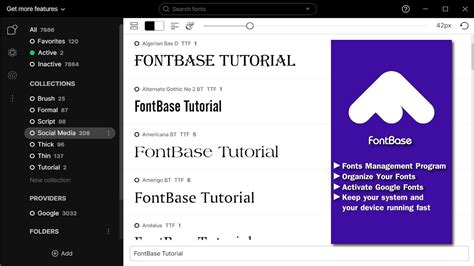
FontBase is frequently highlighted as a font manager of the new generation, built by designers, for designers. It is notable for being completely free while offering a robust set of professional features and a beautiful, intuitive user interface. Key features include:
- Collections: Create and manage custom font collections, with the ability to activate them instantly. Default collections are also provided for immediate use.
- Watched Folders: Add any folder from your computer to have its fonts displayed within FontBase, ideal for organizing downloaded fonts.
- OpenType Features: Access a comprehensive set of supported OpenType features.
- Playground: A preview tab for experimenting with styling and exporting CSS for web projects.
- Google Fonts Integration: Use any font from Google's library with a single click.
Fontshelf: The Photoshop Plugin Solution
Fontshelf is specifically designed as a plugin for Adobe Photoshop, addressing the limitations of the native font management system directly within the application. Its core strength lies in its ability to create personalized font playlists or collections, simplifying the font selection process and enhancing workflow efficiency.
- Personalized Playlists: Create multiple, named font playlists for unparalleled organization, catering to different brands, projects, or styles (e.g., Sports, Entertainment, Studio).
- Streamlined Workflow: Quickly find the right typeface among vast options, saving designers time and allowing them to focus on design rather than font management.
- Efficient Organization: Add, delete, and hover over new font collections with ease, streamlining the creative process.
Eagle App: The All-in-One Asset Manager
Eagle App is a comprehensive digital asset management tool that extends its capabilities to font management. It's ideal for designers who manage a wide array of digital files beyond just fonts.
- Holistic Asset Management: Organizes all your design files, including fonts, 3D files, MP4s, GIFs, PSDs, and more.
- Font Activation: Activate and deactivate fonts with a single click.
- Advanced Sorting and Tagging: Sort fonts using tags, ratings, and annotations, making it easy to categorize and find hundreds of fonts without creating a mess.
- Multiple Preview Options: Preview fonts in various ways to aid in selection.
Connect Fonts: Cloud-Based Team Collaboration
Connect Fonts offers a cloud-based platform for sorting, organizing, and comparing fonts. It is particularly beneficial for teams and individuals working with a large number of fonts across multiple clients.
- Cloud-Based Accessibility: Sort, organize, and compare fonts in a single cloud-based platform, accessible from any device.
- Team Sharing: Easily share fonts with team members.
- Efficient Organization: Organize fonts by project, style, mood, or custom categories, reducing the risk of using incorrect font files.
- Auto-Complete Search: Features an auto-complete search bar for quick font discovery.
Typeface 3: Minimalist and Focused
Typeface 3 boasts a minimal interface with a singular focus on your fonts, making the browsing experience delightful and efficient.
- Minimalist Interface: Clean design that prioritizes font browsing and previewing.
- Live Customization: Easily adjust preview size and styling in real-time.
- CSS Value Copying: Quickly copy CSS values for web projects.
- Tagging System: Maintains large font libraries through a robust tagging system.
Flipping Typical: Browser-Based Font Overview
Flipping Typical is a web browser-based font management tool that provides a quick overview of owned fonts. It measures elements before and after changing their font family, offering a practical way to explore available typefaces. It is a completely free tool.
FontExpert: Comprehensive System Font Analysis
FontExpert is a robust font manager that offers extensive features for previewing, managing, and examining your system for font errors.
- System Font Examination: Detects and helps resolve font errors within your system.
- Font Grouping: Create font groups and attach font collections for detailed organization.
- Search Capabilities: Search for fonts within your overall library and specific collections.
- File Operations: Easily copy, move, and delete font files, alongside activation and deactivation.
Font Manager: User-Friendly Desktop Solution
Font Manager is designed to provide an easy way for average users to manage desktop fonts without resorting to command-line tools or manual configuration file editing. While primarily intended for the Gnome Desktop Environment, it is compatible with other Gtk desktop environments.
How Does Font Management Software Handle Font Metadata? - Graphic Design Nerd
Understanding Font Management Fundamentals
To effectively utilize font management software, it's helpful to understand some basic concepts.
What is a Font Format?
A font format is a specific file type designed to hold font data. The font itself is the manifestation of a typeface, which is the visual design of the letters. For a typeface to be usable, it must exist as a font file. Common font formats include TrueType (.ttf), OpenType (.otf), and PostScript Type 1.
Why is Font Management Software Important?
While operating systems provide basic font installation and management, font management software offers significantly more advanced capabilities. These include:
- Cataloging and Organization: Creating custom collections, tags, and groups.
- Inspection and Comparison: Detailed previews and side-by-side comparisons.
- Activation/Deactivation: On-demand activation to reduce system load and prevent conflicts.
- Font Validation: Checking font files for errors and integrity.
- Integration: Seamless connection with font libraries and creative applications.
The Power of Font Activation
Activating a font allows it to be used in design software like Photoshop or Figma. The key benefit of this feature is that it eliminates the need to install every font onto your system. You can activate a font when you need it for a project and deactivate it when you're done. This keeps your system running smoothly, prevents a cluttered font menu, and ensures you're not bogged down by unnecessary active fonts.
Native Font Managers in Operating Systems
Both Windows and macOS come equipped with built-in font management tools that offer fundamental organizational functionalities.
Windows Font Manager
The Windows operating system includes a native font manager that allows users to view, install, and uninstall fonts. It provides basic font organization functions and the ability to activate or deactivate fonts, offering a foundational level of control for users who don't require more advanced features.
Font Book (macOS)
Font Book is the native font manager for Mac operating systems. It enables users to easily install, activate, and preview typefaces. Font Book also allows for the creation of font collections and provides information regarding font licenses. A crucial feature is its font validation capability, which helps ensure the integrity of font files.
Adobe Type Manager (ATM) Light
Adobe Type Manager (ATM) Light was a significant system software component developed by Adobe. Its primary function was to automatically generate high-quality screen font bitmaps from PostScript outlines in Type 1 or OpenType formats. Although discontinued in 2005, Adobe still makes ATM Light available for users who need it for older operating systems. ATM Light allowed for the scaling of fonts on legacy systems without the characters appearing jagged. It also introduced "font smoothing," which improved onscreen font appearance by intelligently rendering characters using the computer monitor's color palette. Furthermore, ATM Light enabled users to print PostScript fonts on non-PostScript printers, a valuable feature in its time.
In conclusion, while Photoshop's built-in features have served as a starting point, the landscape of font management has evolved dramatically. Dedicated font management software and plugins offer designers the power, flexibility, and efficiency needed to master their typographic resources, transforming a potentially frustrating aspect of the creative process into a streamlined and enjoyable experience. Whether opting for a free, feature-rich solution like FontBase, a Photoshop-specific plugin like Fontshelf, or a comprehensive asset manager like Eagle App, investing in effective font management is an investment in a more productive and professional design workflow.