Printing vibrant and accurate colors is a persistent challenge for printing services providers (PSPs) striving to meet customer expectations. A fundamental concept in achieving this is understanding the "color gamut," which refers to the range of colors a specific printing system can reproduce. The interplay of inks, substrates, and printing technology significantly influences how accurately colors are reproduced. While the human eye possesses an unparalleled ability to perceive a vast spectrum of colors, translating these visual experiences into printed reality involves navigating the distinct characteristics of different color spaces.
The Foundation of Color: RGB vs. CMYK
The digital world primarily operates within the RGB (Red, Green, Blue) color space, a system that employs additive color mixing. By varying the intensity of red, green, and blue light emitted from a display, a wide array of colors can be generated. In contrast, the CMYK (Cyan, Magenta, Yellow, and Key/Black) color space is the cornerstone of the printing industry, utilizing subtractive color mixing. This process creates colors by subtracting varying amounts of cyan, magenta, yellow, and black inks from a white or light background, effectively absorbing certain wavelengths of light and reflecting others.
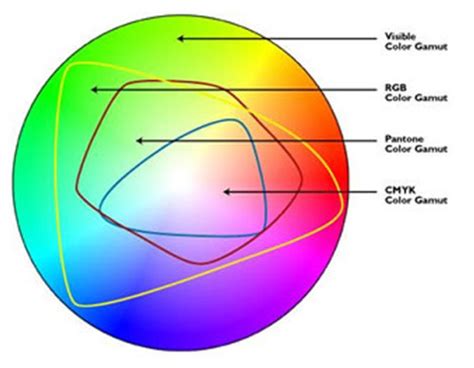
In additive color models like RGB, colors are produced by emitting light, with white resulting from the combination of all primary colors and black representing the absence of light. CMYK, as a subtractive model, operates on the principle of inks reducing the amount of light reflected from a surface. Here, white is the color of the substrate (e.g., paper), and black is ideally produced by the combination of inks, though a dedicated black ink (Key) is crucial for depth and contrast.
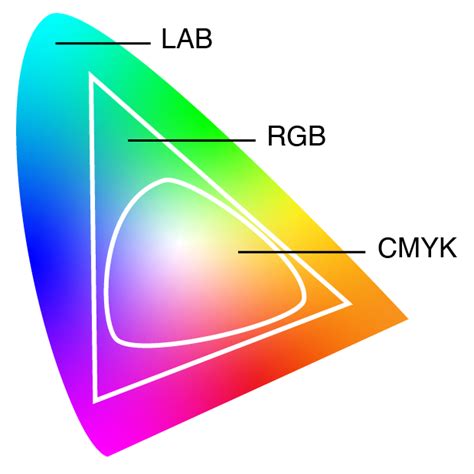
The fundamental difference lies in their application: RGB is inherently designed for electronic displays where light is emitted, allowing for a broader and more vibrant range of colors, particularly in deep blues and blacks. Computer monitors, which display RGB colors, typically possess larger color gamuts than printing devices that rely on CMYK inks. This disparity means that an image viewed on an RGB monitor may appear less vivid when printed using CMYK. Consequently, printing an image necessitates transforming it from its original RGB color space to the printer’s CMYK color space, a process that often involves a degree of approximation.
Deconstructing the CMYK Color Model
CMYK stands for Cyan (C), Magenta (M), Yellow (Y), and Key (K). The "K" for black is a historical convention from traditional printing, where the black plate was known as the "key plate" because it provided the sharpest details and defined the darkest areas of an image. This key plate was essential for aligning the other color plates, thus the term "key" became synonymous with black.
In the CMYK model, pairwise combinations of cyan, magenta, and yellow inks are intended to produce red, green, and blue, respectively. For example, mixing cyan and magenta yields red, magenta and yellow produce green, and cyan and yellow create blue.
- Cyan (C): Absorbs red light.
- Magenta (M): Absorbs green light.
- Yellow (Y): Absorbs blue light.
- Black (K): Used for depth, contrast, and to achieve true black.
Technically, the combination of pure cyan, magenta, and yellow inks should produce black. However, in practice, achieving a deep, true black solely through these three inks can be challenging and may result in muddy or desaturated tones. This is where the "Key" or black ink becomes indispensable. It is used to achieve true black (C=0, M=0, Y=0, K=100) and to create richer, deeper blacks when combined with other colors (a "rich black," often with a composition like C=60, M=60, Y=60, K=100).
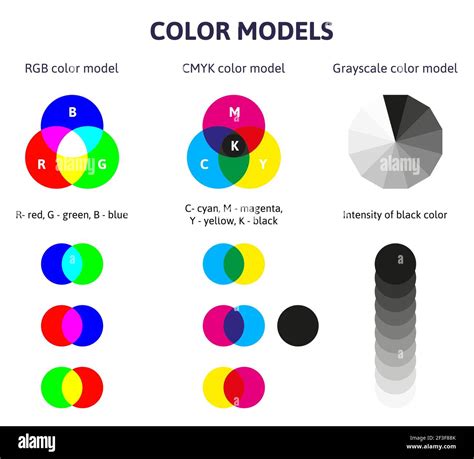
The CMYK color model is a subtractive system where inks reduce the amount of light reflected from a white background. White is the inherent color of the substrate, and black is achieved through the combination of inks. This contrasts sharply with additive models like RGB, where colors are created by emitting light.
Color Gamut: The Spectrum of Possibility
The term "color gamut" generally refers to the entire range of colors and tones that an imaging system, whether it's a display or a printing device, can reproduce. It's essentially the spectrum of colors a particular technology is capable of producing. For printing devices, the CMYK color gamut is central to their color reproduction capabilities. This is often referred to as the "four-color process."
While the human eye can perceive approximately 100 million distinct colors, the gamut of most printing devices is significantly smaller. Basic CMYK printing typically covers about 50% of the colors found in standardized color systems like Pantone, although more advanced printers can achieve wider ranges. This means that certain colors, especially highly saturated or "neon" colors, which are easily displayed on an RGB screen, cannot be accurately reproduced in print using standard CMYK inks.
Factors Influencing Color Gamut and Appearance
Several critical factors influence the appearance of digitally printed colors and the achievable color gamut:
- Ink Formulation: The quality and type of inks used are paramount. "Clean pigments" render colors more faithfully. For instance, a purer magenta ink will have fewer impurities, leading to more accurate color reproduction. Dyes can offer vibrant colors but may have less durability and color stability over time compared to pigments, which provide better longevity and color stability, though they might result in a slightly narrower color gamut.
- Substrate: The printing surface, or substrate, plays a significant role. Different substrates interact with inks in various ways, affecting color vibrancy, saturation, and overall appearance. For example, printing on a textured or colored paper will alter how the ink colors are perceived compared to printing on a smooth, white paper.
- Printing Technology: The specific printing equipment, including the printhead technology and ink deposition accuracy, directly impacts the color gamut. Industrial inkjet systems, for instance, have inherent limitations that can affect their ability to reproduce a wide range of colors accurately.
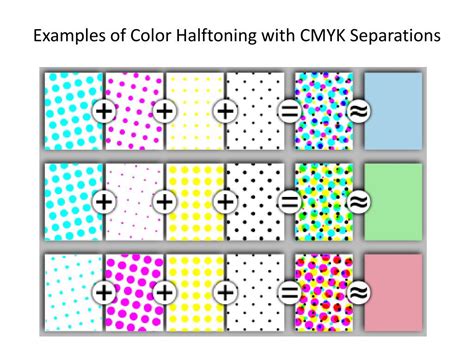
- Halftoning (Screening): To create the perception of continuous tones and intermediate colors, printers employ halftoning. This technique involves varying the size and spacing of small ink dots to simulate different shades and colors between the primary inks.
- Light Sources and Illuminants: The light source under which an image is viewed significantly affects color perception. Different light sources (natural daylight, fluorescent, incandescent) emit varying spectra of light, causing shifts in how colors appear.
- Color Temperature and White Balance: The color temperature of the light source (measured in Kelvin) influences the perceived warmth or coolness of an image, potentially introducing biases towards yellowish or bluish tones.
- Display Technologies: The type of monitor used for image editing and proofing impacts color representation. Advanced display technologies like OLED or wide-gamut monitors can reproduce a broader range of colors, offering more accurate color representation during the design phase.
Achieving a Wider Color Gamut in Printing
Reproducing colors closest to what the human eye perceives requires meticulous control over these variables. Achieving an extended color gamut in industrial inkjet printing systems presents various challenges, including limitations in printhead technology, ink deposition accuracy, and color management capabilities.
Calibration and Color Management
A wider color gamut in industrial inkjet printing necessitates precise calibration and the implementation of effective color management systems.
- Calibration: This is a crucial step that involves accurately adjusting and aligning devices at every stage of the printing process, from input devices like cameras and scanners to output devices like monitors and printers.
- Color Profiles: Color profiles are essential components of color management. They contain vital information about the color characteristics and capabilities of specific devices, such as cameras, monitors, and printers. These profiles act as a translator, ensuring that colors are represented consistently across different devices.
- Color Management Systems (CMS): These systems utilize color profiles and sophisticated algorithms to maintain color consistency and ensure accurate color reproduction across various devices. They bridge the gap between different color spaces, such as RGB and CMYK.
Color Gamut Extension Methods
To further expand the achievable color gamut, various techniques are employed:
- Under Color Removal (UCR): This method reduces the amount of cyan, magenta, and yellow inks in neutral areas of an image, replacing them with black ink. This can lead to brighter and more saturated colors.
- Gray Component Replacement (GCR): Similar to UCR, GCR also replaces some CMY inks with black ink, but it does so in a more systematic way, particularly in neutral and near-neutral areas, to achieve greater consistency and control over gray balance.
What is the difference between RGB and CMYK?
Color Standards and Their Gamuts
Different color standards define specific color gamuts, providing a framework for generating colors. While individual devices aim to adhere to these standards, the standards themselves dictate the achievable range.
- sRGB: The most common standard, widely used for computer monitors, televisions, and cameras. Created by HP and Microsoft, it offers good compatibility with minimal lag but has a more limited gamut compared to some other standards.
- Adobe RGB: Designed to encompass most colors achievable by CMYK printers, Adobe RGB offers a broader color gamut than sRGB and is intended for more realistic color depiction, particularly in photography and graphic design.
- DCI-P3: Developed for digital cinema capture and projection, DCI-P3 has a wider color gamut than sRGB and is rooted in its standards. It's also found in some modern consumer electronics.
- NTSC: An older standard from the 1950s, it has a wider gamut than sRGB but is less relevant for modern displays, though it's still used for comparing and specifying color gamuts, particularly in professional video and photo editing.
- EBU: Created by the European Broadcasting Union, this standard is relevant for videography, graphic design, and consumer products utilizing ultra-high definition resolutions like 4K.
When designing artwork, it's crucial to be aware of the target output device's color gamut. If you design in a program like Adobe Photoshop, InDesign, or Illustrator, colors detected outside the CMYK range will often trigger an "out-of-gamut" warning. This pop-up typically shows a triangle with an exclamation mark, indicating that the chosen color may not print accurately. The software may even suggest a similar color within the printable spectrum.
The Practical Implications for Designers and Printers
For designers, understanding the difference between RGB and CMYK is essential for ensuring color accuracy in their printed materials. Designing artwork intended for print in CMYK from the outset can help avoid unexpected color shifts. If artwork is created in RGB, converting it to CMYK before printing is a critical step. This conversion process can involve subtle adjustments, as some hues might shift slightly. Fine-tuning these colors is vital to preserve the vibrancy and accuracy of the original design.
For printing services providers, offering advanced printing technologies and robust color management systems is key to meeting client demands for accurate and vibrant color reproduction. Technologies like Mimaki's UV-LED inks and eco-solvent inks, combined with systems like the Mimaki Advance Pass System 4 (MAPS4) and Variable Dot Technology, aim to maximize print quality beyond just color gamut by ensuring sharp output, smooth tones, and finer detail.
Specific brand colors, often defined by precise Pantone values, can be particularly challenging to reproduce accurately using only standard CMYK inks due to the inherent limitations of the subtractive color mixing process. This is where specialized printing solutions, such as those offering expanded ink sets (e.g., printers with eight-color cartridges like the OKI ColorPainter H3-104s, or presses featuring 6-color printing like the HP Indigo 7900 Digital Press), or even the integration of spot colors alongside process colors, become invaluable.
Ultimately, a wider color gamut allows for more accurate color reproduction, ensuring that colors are represented faithfully and with greater precision. It enhances the ability to reproduce vibrant and saturated colors, subtle tonal variations, and smooth gradients, leading to a more visually appealing and accurate final printed product. The commitment to controlling variables, from ink quality and substrate selection to precise calibration and effective color management, is what enables the creation of prints that closely match the intended design and the perceived colors of the human eye.