Video stands as the most compelling medium for storytelling, a powerful tool for creatives, brands, and individuals alike to connect and engage audiences. In this landscape, generative AI emerges as a significant accelerant for human creativity. Adobe's strategic vision centers on empowering creative professionals by integrating generative AI across its Creative Cloud suite, enhancing both power and efficiency. The Premiere Pro team has actively engaged with the professional video community to identify how generative AI can effectively address real-world challenges in their workflows. The core value lies in accelerating the editing of existing content, whether by adding objects, removing distractions, or seamlessly extending clips directly on the timeline. This article delves into the exciting prospect of integrating generative AI video workflows into Adobe Premiere Pro through brand-new tools designed to achieve precisely these aims: making shots longer, adding or removing objects, and generating missing B-roll.
The realization of this vision hinges on advanced video AI models. The rapid pace of research and innovation in this domain suggests that professional-level results are achievable within the coming year. Premiere Pro has a history of fostering a rich partner and plugin ecosystem, establishing it as a flexible and extensible tool adaptable to diverse workflows.
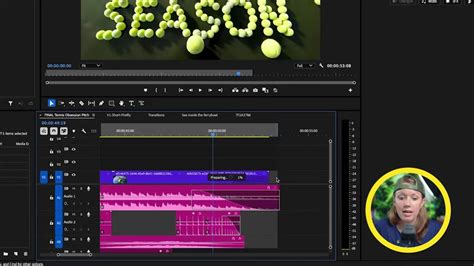
Extending and Enhancing Video Clips with Generative Extend
The Generative Extend tool is specifically designed to make shots a little longer by intelligently generating entirely new frames at either the beginning or end of a clip. This capability offers editors crucial flexibility, providing extra media to fine-tune edits, allow a shot to breathe for an additional beat, or add a few frames to seamlessly cover a transition. The underlying technology leverages new AI-based smart masking and tracking tools, making the selection of moving objects over time significantly easier and faster than ever before.
Furthermore, the integration of generative AI within Premiere Pro aims to reduce the time spent searching for B-roll footage in stock libraries. By utilizing simple text prompts, users can generate video clips that precisely fit the narrative requirements of their projects. As Adobe continues to innovate in the rapidly evolving field of Generative AI, a commitment to open platforms and partnerships ensures that customers can select the most suitable models for their specific use cases. Recognizing that different AI models may produce varied results, Adobe is dedicated to transparency through Content Credentials. These credentials function akin to a nutrition label for content creation, assuring consumers that they will always know which models were employed in the creation of the media they are viewing.
AI possesses the transformative power to supercharge productivity and lower the barriers to entry for working in new mediums. For video editors and content creators eager to enhance their workflows and expand their creative potential, Generative Extend represents a potential breakthrough. This article explores how Generative Extend functions, its practical applications, and its seamless integration with other AI tools within Premiere Pro, all designed to help users stay ahead in a competitive landscape.
Step-by-Step Guide to Using Generative Extend
Implementing Generative Extend within your Premiere Pro workflow is designed to be intuitive and efficient. Follow these steps to harness its power:
1. Set Up Your Project
Begin by opening Adobe Premiere Pro and loading your existing video project. It's crucial to organize your timeline effectively. Identify the specific clips that require extending or enhancing. This pre-editing organization will streamline the application of Generative Extend.
2. Apply Generative Extend
Once your clip is selected on the timeline, navigate to the "Sequence" tab. Within this tab, you will find and select the "Generative Extend" tool. A dialog box will then appear, presenting several preferences you can set for the extension process. These preferences are vital for achieving the desired outcome:
- Target Area: This setting allows you to specify precisely where the extension should occur. You can choose to focus the generation on the background elements of the clip or emphasize the subject, depending on your creative needs.
- Motion Tracking: Depending on the nature of your footage, you can select between static or dynamic motion adjustments. Static adjustments are suitable for clips with minimal camera movement, while dynamic adjustments are essential for footage featuring camera pans, zooms, or subject movement to ensure a natural blend.
3. Let AI Do the Work
After configuring your preferences, click "Apply." The Generative Extend tool will then analyze the selected clip. It will intelligently generate extensions that blend seamlessly with the existing footage, aiming to maintain visual continuity and aesthetic consistency. You can review the AI-generated content in real-time, observing how it integrates with your original media to ensure it aligns with your creative vision.
4. Fine-Tune the Results
While the AI performs the initial generation, you retain full creative control. Open the "Effect Controls" panel. Here, you can adjust keyframes to refine the generated content or manually tweak specific elements. To further enhance the final product, consider using additional features within Premiere Pro such as color grading, adding text overlays, or incorporating transitions.
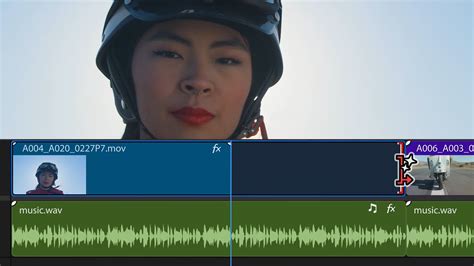
Real-World Applications of Generative Extend
The versatility of Generative Extend makes it an invaluable tool across a wide spectrum of video production scenarios. Its ability to intelligently extend and enhance footage opens up numerous creative and practical possibilities:
1. Extending Backgrounds for Commercials
Imagine you are working on a luxury car advertisement that requires an extended shot of a vehicle driving through picturesque landscapes. The original footage might be too short to convey the desired mood or pace. Generative Extend can seamlessly lengthen the background elements, ensuring a smooth and imperceptible transition between the original footage and the AI-generated content. This allows for a more immersive and polished final product without the need for reshoots or extensive stock footage sourcing.
2. Filling Gaps in Documentary Footage
Documentary filmmaking often involves piecing together narratives from diverse sources, and sometimes critical B-roll footage might be missing or insufficient. If you encounter gaps in your documentary's B-roll, Generative Extend can effectively fill these voids with AI-generated visuals. The tool is designed to match the lighting, mood, and overall aesthetic of the existing scene, providing a cohesive and unbroken visual flow that maintains the viewer's immersion in the story.
3. Enhancing Creative Projects
From music videos that demand dynamic visual sequences to short films aiming for a specific artistic vision, Generative Extend empowers creators to push creative boundaries. It allows for the extension or modification of scenes in ways that would traditionally require additional filming or complex compositing. This capability is particularly useful for achieving specific pacing or visual effects that might otherwise be cost-prohibitive or technically challenging.
4. Seamlessly Extending Action Sequences
For action-oriented content, maintaining momentum is key. If an action sequence needs a few extra seconds to build tension or showcase a particular move, Generative Extend can add those crucial frames. The AI's ability to track motion ensures that the generated extensions remain consistent with the original action, preserving the dynamism and impact of the scene.
5. Adapting Footage for Different Aspect Ratios
While not its primary function, the ability to generate new frames can indirectly assist in adapting footage for different aspect ratios, especially when combined with tools like Auto Reframe. By extending the edges of a shot, there can be more "room" for reframing without losing essential on-screen elements.
Integration with Other Premiere Pro AI Tools
Generative Extend is not an isolated feature but part of a growing suite of AI-powered tools within Premiere Pro, each designed to streamline different aspects of the editing process. When used in conjunction, these tools can dramatically accelerate workflows and unlock new creative avenues:
1. Auto Reframe
While Generative Extend focuses on enhancing the duration and content of existing footage, Auto Reframe is designed to automatically adjust the aspect ratios of your video for different platforms. This is particularly useful for social media content, where videos need to be optimized for vertical (e.g., TikTok, Instagram Stories) or square formats, in addition to standard horizontal ones. Auto Reframe intelligently keeps the subject in frame, ensuring your content looks polished across all viewing environments.
2. Scene Edit Detection
This intelligent AI tool is invaluable for long-form content. Scene Edit Detection analyzes raw footage and automatically identifies scene changes, creating precise cuts. This significantly streamlines the editing process for projects like documentaries, webinars, or corporate videos, saving editors countless hours of manual cutting and conforming.
3. Content-Aware Fill for Video
Borrowed from the powerful capabilities of Adobe Photoshop, Content-Aware Fill for Video allows you to remove unwanted objects from your footage. Whether it's a distracting passerby, a piece of equipment, or an unsightly blemish, this feature uses AI to analyze the surrounding pixels and generate a seamless fill, masking the object's presence without leaving obvious artifacts. This is incredibly useful for cleaning up shots and achieving a professional polish.
Remove Any Object From Video In After Effects Tutorial | CONTENT-AWARE FILL | Under 3 Minutes.
4. Speech-to-Text for Captions
Accessibility and SEO are paramount in today's media landscape. Premiere Pro's Speech-to-Text feature automatically generates accurate captions directly from your audio. This tool is a game-changer for educational content, YouTube tutorials, or any video where clear communication and accessibility are key. It not only saves time but also ensures your content reaches a wider audience.
Adobeâs AI-driven Speech to Text automates captioning and boosts accessibility, generating accurate captions directly within Premiere Pro.
Tips to Maximize Generative Extend
To fully leverage the power of Generative Extend and integrate it effectively into your professional workflow, consider these strategic tips:
1. Plan Ahead During Pre-Production
The most effective use of Generative Extend often begins before editing even starts. During the pre-production and shooting phases, identify scenes that might potentially need extending or enhancing. Consider shots where a slightly longer duration could improve pacing or where backgrounds might need subtle augmentation. Planning ahead allows you to capture footage with the intention of using AI tools, ensuring better integration and more natural results.
2. Embrace the Time-Saving Workflow
Generative Extend is designed to automate repetitive and time-consuming tasks. By offloading the effort of extending footage or meticulously filling gaps, editors are freed to concentrate on the more creative and strategic aspects of storytelling. This shift allows for a more engaging and fulfilling editing experience.
3. Ensure Seamless Integration
Generative Extend is built to work harmoniously within the Premiere Pro interface. This ensures a smooth transition from traditional editing methods to AI-enhanced processes. Familiarize yourself with its placement and function within the software to make its application feel like a natural extension of your existing toolkit.
4. Foster Enhanced Creativity
By automating the mechanical aspects of editing, Generative Extend liberates your creative energy. This newfound freedom allows for greater experimentation with advanced editing techniques. You can explore dynamic transitions, intricate layered effects, and unique color grading styles with more time and less pressure.
5. Strive for Professional Results
Whether your goal is extending a scene, filling in narrative gaps, or creating fluid transitions, Generative Extend consistently produces polished, professional-grade results. The AI's ability to maintain visual continuity elevates the overall quality of your videos, making them more impactful and engaging for your audience.
Frequently Asked Questions about Generative Extend
To further clarify the capabilities and application of this innovative tool, here are answers to some common questions:
Generative Extend: What is it?
Generative Extend is an advanced AI-powered tool integrated into Adobe Premiere Pro. Its primary function is to intelligently fill gaps and extend existing video footage. Crucially, it achieves this while meticulously maintaining natural elements such as lighting, motion, and texture, ensuring that the generated content appears indistinguishable from the original footage.
How does Generative Extend assist video editors?
This tool significantly aids video editors by automating tasks that are traditionally repetitive and labor-intensive. These include extending backgrounds for more dynamic shots, filling in missing segments of footage, and ensuring consistent visual continuity throughout a project. By taking on these duties, Generative Extend saves editors considerable time and effort, allowing them to focus on creative aspects.
Can Generative Extend be used for all video types?
Absolutely. Generative Extend is a versatile tool applicable to a wide array of projects. Its utility spans commercials, social media clips, documentaries, music videos, corporate productions, and much more. Its adaptability makes it a valuable asset for diverse video content creation needs.
Does Generative Extend negatively impact video quality?
No, Generative Extend is engineered to preserve and enhance video quality. The AI meticulously analyzes the surrounding elements of the footage and generates new content that is consistent with the original's resolution, color, and detail. The goal is always to produce high-quality, visually coherent results.
Is Generative Extend difficult for beginners to use?
Not at all. The tool has been designed with user-friendliness in mind. The step-by-step process outlined earlier, combined with intuitive controls within Premiere Pro, makes Generative Extend accessible even for those new to AI-powered editing features. The interface guides users through the process, ensuring a relatively smooth learning curve.
What kind of content can be generated?
Generative Extend is capable of generating various types of content to fill temporal gaps in video. This can include extending backgrounds, creating plausible motion for objects or camera movement, and generating textures that match the existing scene. The AI aims to create content that is contextually relevant and visually consistent with the surrounding frames.
Are there limitations to Generative Extend?
Like any AI tool, Generative Extend works best when provided with sufficient context and relatively stable footage. Highly complex scenes with rapid, unpredictable motion or intricate details might present challenges. However, the ongoing advancements in AI are continuously improving the tool's capabilities to handle more complex scenarios. For optimal results, it's often beneficial to use the tool on footage that isn't excessively chaotic or visually noisy.
How does Generative Extend differ from traditional methods of extending clips?
Traditionally, extending clips involved either using existing footage from a longer take, finding suitable stock footage, or resorting to complex visual effects work. Generative Extend automates the creation of entirely new, contextually appropriate frames, significantly reducing the manual effort, time, and cost associated with these traditional methods. It essentially "imagines" what should come next based on the provided context.
Can Generative Extend be used to add entirely new objects to a scene?
While Generative Extend's primary function is to extend existing footage by generating new frames that are contextually relevant, Adobe is also developing tools that focus on adding or removing specific objects. Features like Content-Aware Fill for Video are dedicated to object manipulation. Generative Extend, in its current form, focuses more on temporal extension and background completion rather than introducing entirely novel foreground elements. However, the broader integration of generative AI in Premiere Pro aims to encompass these object-based manipulations as well, often through specialized tools or future iterations.
What are the implications of using AI-generated content?
The use of AI-generated content carries significant implications, particularly regarding authenticity and transparency. Adobe's commitment to Content Credentials is a crucial step in addressing this. By providing metadata that indicates the use of AI tools in content creation, creators can maintain trust with their audience. This transparency is vital for distinguishing between human-created and AI-assisted or AI-generated media, fostering a more informed consumption landscape.
How does Generative Extend handle complex motion or textures?
Generative Extend employs sophisticated AI models that analyze motion vectors, optical flow, and textural patterns within the existing frames. This analysis allows it to generate new frames that attempt to replicate the complexity of the original motion and texture. While the results are often remarkably convincing, extremely dynamic or intricate details might still present challenges, requiring manual refinement for absolute perfection. The effectiveness is heavily dependent on the quality and nature of the source material.
What is the future of generative AI in video editing?
The future of generative AI in video editing points towards increasingly sophisticated tools that can automate more complex tasks, offer greater creative control, and further accelerate the production pipeline. We can anticipate AI that can generate entire sequences based on script prompts, perform advanced color grading with simple instructions, and even assist in narrative structuring. The integration of generative AI is poised to fundamentally transform how video content is created, making powerful editing capabilities more accessible to a broader range of creators.
How can I learn more about advanced Premiere Pro techniques, including AI tools?
For individuals serious about elevating their video editing skills and mastering tools like Generative Extend, comprehensive training is invaluable. Resources such as Miracamp's Adobe Premiere Pro Course offer an intensive program covering everything from AI tools to perfecting transitions, motion graphics, and color grading. Such programs, often led by industry professionals from major studios, provide practical skills and insider knowledge essential for career advancement in video editing.
ð Join Miracamp's Adobe Premiere Pro Course today and transform your editing process into a seamless, creative journey!
tags: #generative #fill #premiere #pro