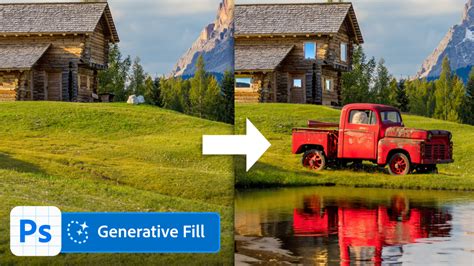
Adobe has recently launched the Generative Fill feature in Photoshop, a groundbreaking integration that brings Adobe Firefly generative AI capabilities directly into design workflows. This feature is poised to redefine how creatives conceptualize and produce digital content, offering a powerful new dimension to image editing and creation. Adobe claims that the new Firefly-powered Generative Fill feature is the world’s first co-pilot in creative and design workflows. This innovative tool offers users a novel way to work by enabling them to easily add, extend, or remove content from images using simple text prompts. The beta release of Photoshop marks Adobe’s first Creative Cloud application to deeply integrate Firefly, with a clear roadmap ahead that is expected to transform workflows across Creative Cloud, Document Cloud, Experience Cloud, and Adobe Express.

Accessibility and Integration: Bringing AI to Your Fingertips
The Generative Fill feature is currently available in the desktop beta app of Photoshop and is slated for general availability in the second half of 2023. For those eager to explore its capabilities sooner, Generative Fill is also accessible as a module within the Firefly beta app. This dual availability ensures that both seasoned professionals and those new to AI-powered design can engage with the technology. Furthermore, to foster a community of learning and sharing, Adobe is hosting interactive live stream sessions on May 23rd, where users can connect with designers and Creative Cloud experts. These sessions, running from 8 am to 4 pm PST, will showcase tips and tricks for using Photoshop and Firefly, providing invaluable insights into maximizing the potential of these new tools.
Empowering Creativity: How Generative Fill Transforms User Workflows
The integration of next-generation AI across Photoshop’s core tools unlocks unprecedented creative workflows for users. This feature significantly aids in the ideation phase, offering precise creative control for the creation of production-quality content. Generative Fill automatically analyzes and matches the perspective, lighting, and style of existing images, enabling users to achieve their desired results with remarkable efficiency and reduced manual effort. The feature promises to expand creative expression and productivity, simultaneously enhancing the creative confidence of creators by allowing them to generate digital content instantaneously using natural language and concepts.
The Engine Behind the Magic: Powered by Adobe Firefly
At its core, Generative Fill is powered by Adobe Firefly, an AI model meticulously designed to generate images that are safe for commercial use. Firefly has been trained on Adobe Stock’s extensive library of hundreds of millions of professional-grade, licensed, high-resolution images. This robust training dataset is crucial, as it helps ensure that Firefly will not generate content that infringes upon the intellectual property (IP) of others or brands. This commitment to ethical AI development provides users with a greater sense of security when incorporating AI-generated elements into their projects.
From Idea to Image: The Power of Simple Text Prompts
Generative Fill empowers users to leap from idea to image with astonishing ease, utilizing simple text prompts. Users can add, extend, or remove content from images to achieve astounding results. A key advantage of this feature is its non-destructive editing capability. Newly generated content is created in generative layers, allowing users to rapidly iterate through a myriad of creative possibilities. If a particular generation isn't satisfactory, users can easily reverse the effects without impacting the original image. This flexibility is a significant boon for creative exploration and experimentation.
How to use Photoshop Generative Fill for object removal, background replacement & image expansion.
The Mechanics of Magic: Understanding Generative Fill's Process
Artificial intelligence is fundamentally reshaping how we create and edit visuals, and Generative Fill is at the forefront of this transformation. The feature employs artificial intelligence to analyze an image and generate new content within a user-selected area. At its heart, AI Generative Fill is a sophisticated tool that allows users to modify parts of an image by simply selecting a region and describing what they envision appearing there. Even individuals without advanced editing skills can achieve complex modifications with just a few clicks, democratizing sophisticated image manipulation.
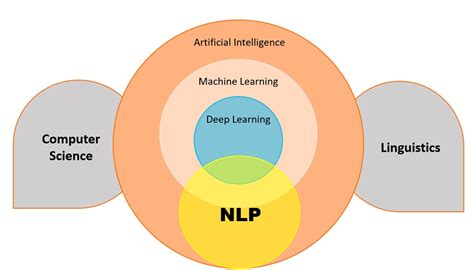
Generative Fill relies on deep learning, particularly diffusion models, which are trained on vast datasets of images. When a user selects a region or enters a prompt, the AI does more than just replicate surrounding pixels; it intelligently interprets the context and the user's intent.
The User's Simple Journey: A Step-by-Step Approach
Although the underlying technology is complex, the user experience with Generative Fill is designed to be remarkably simple. The process typically involves the following steps:
- Select an area in the image: The user highlights the specific region they wish to edit. This selection can be precise or a broader area, depending on the desired outcome.
- Enter a text prompt: A short text input guides the AI on what to generate within the selected area. While some tools can operate based on image context alone, prompts allow for more accurate, creative, and specific results.
- Generate content: The AI processes the selection and the prompt to create new content. Photoshop typically offers multiple variations, allowing the user to choose the best fit.
The capability extends beyond single-object edits. For instance, an entire group of unwanted people in the background can be removed to create a cleaner, more focused image. This is made possible by the underlying technologies that allow the model to analyze the image's structure, including edges, depth, lighting, and texture.
The Technological Backbone: Computer Vision, NLP, and Diffusion Models
Behind the seemingly effortless operation of Generative Fill lies a sophisticated interplay of advanced technologies:
- Computer Vision: This technology assists the AI model in analyzing the structural elements of an image, such as edges, depth perception, lighting conditions, and surface textures. This contextual understanding is vital for generating seamless and integrated content.
- Natural Language Processing (NLP): NLP enables the tool to interpret user prompts written in everyday language. This allows users to communicate their creative intent clearly and effectively to the AI.
- Diffusion Models: These powerful models are responsible for creating the new content. They begin with random visual noise and progressively refine it into a realistic image, guided by both the surrounding pixel data and the user's text prompt.
A Spectrum of Tools: Generative Fill Across Different Platforms
Generative Fill is not confined to a single application; it is being integrated into various tools catering to different skill levels and creative needs.
- Photoshop’s Generative Fill: Available in the beta version, this is a professional-grade feature embedded within a familiar and powerful editing workflow.
- Adobe Firefly Beta App: This standalone module provides direct access to Firefly’s generative capabilities, allowing for focused experimentation.
- DALL-E 3: This advanced AI model now supports inpainting (editing within an existing image) and outpainting (extending an image) through prompt-based workflows, offering another avenue for generative image manipulation.
- ArtSmart: This platform specializes in sketch-to-image generation and concept development, incorporating Generative Fill as part of its AI suite.
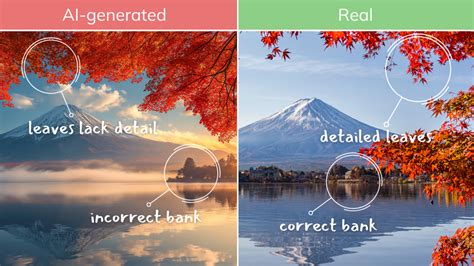
While Generative Fill offers remarkable speed and creative potential, it's essential to recognize its limitations. It excels when fast, natural-looking edits with minimal manual effort are desired. However, in high-stakes or sensitive contexts, the AI can sometimes introduce errors or unintended results. Even the most advanced AI tools are not infallible, and imperfections may emerge upon close inspection, particularly in high-resolution or print applications.
Industry Applications: Diverse Use Cases for Generative Fill
The impact of AI Generative Fill is being felt across various industries, each leveraging its capabilities in unique ways.
- Design and Marketing: Generative Fill can rapidly create marketing assets, product mockups, and social media content. It allows for quick iteration of visual concepts and the generation of diverse imagery for campaigns.
- E-commerce: For online retailers, Generative Fill can be used to create product lifestyle shots, remove distracting backgrounds, or even generate variations of product images to appeal to different customer segments.
- Photography: While some photographers may approach AI-generated content with caution, Generative Fill offers powerful tools for retouching, extending canvases, or even creating entirely new elements to enhance a scene, saving significant time on complex edits.
- Content Creation: Bloggers, digital artists, and other content creators can use Generative Fill to produce compelling visuals quickly, enhancing their articles, websites, and portfolios.
Navigating the Nuances: Limitations and Considerations
Despite its impressive capabilities, Generative Fill is not a panacea for all image manipulation needs. Understanding its limitations is crucial for effective use.
Practical Constraints: Image Size and Processing
A notable limitation of Generative Fill is its current restriction on generated area size, typically capped at around 1000 pixels in length. If a selected area exceeds this limit, the generated material may be upsampled and stretched, potentially leading to a blurry or out-of-place appearance. This can be mitigated by making multiple, smaller selections. Furthermore, Generative Fill relies on cloud processing. This necessitates an active internet connection and introduces a delay in processing speed, though it is generally faster than many standalone AI image generators.
The Challenge of Text and Logos
Generating legible and accurate text within images remains a significant challenge for most AI generative tools, including Generative Fill. While it may produce text-like shapes or jumbled letters, creating coherent and meaningful text is largely beyond its current capabilities. Similarly, generating logos or intricate graphic designs presents difficulties, likely due to a combination of copyright concerns and the complexity of the training data.
Object Generation Imperfections
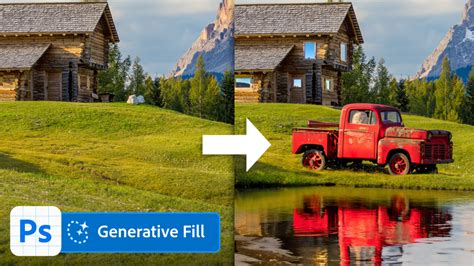
While Generative Fill can create entirely new objects, these creations are not always perfect upon close inspection. For example, a generated truck might have inconsistently sized tires, peculiar door handle placement, or a missing license plate. Even seemingly simple objects like a bench may exhibit subtle inaccuracies. The AI also struggles with combining multiple complex concepts within a single prompt. For instance, generating "a dog sitting on a park bench" might yield an awkward or unrealistic result. Splitting such prompts into sequential steps (e.g., generating the bench first, then the dog) can improve outcomes, but it highlights the ongoing development in this area.
Creative Exploration: Beyond Basic Edits
Generative Fill opens up exciting avenues for creative exploration, pushing the boundaries of what's possible in image editing.
Artistic Transformations and Style Transfer
One fascinating application discovered is the ability to apply artistic effects to images by leveraging Generative Fill with specific density settings. By using a 40% density, users can transform an image into a watercolor-like effect or apply distinct art styles. For example, entering "Pencil sketch" as a prompt with varying densities can yield different artistic interpretations. Furthermore, by experimenting with prompts like "Art Deco" or "Futuristic," users can reimagine the style of an existing scene, transforming it into something entirely new, such as an Art Deco rendition or a futuristic diner concept. This demonstrates the tool's potential not just for manipulation but for stylistic reinvention.
The process for applying these artistic effects typically involves:
- Entering a prompt.
- Choosing a foreground color.
- Setting a specific density (e.g., 40% for a watercolor effect).
- Applying the generative fill.
The density setting can be adjusted within Photoshop's Quick Mask mode, where the brightness value directly influences the density of the mask, and thus the intensity of the applied effect. This allows for nuanced control over the artistic output.
Canvas Extension and Image Expansion
Generative Fill's ability to extend beyond the original frame of an image is another remarkable capability. This feature is particularly useful for photographers who may need to adjust aspect ratios or add context to existing images. For instance, a horizontal photo can be expanded vertically by adding blank canvas space and then using Generative Fill to intelligently populate these new areas. This can be a lifesaver when client needs change late in the production process. While this feature works best for web-resolution images, it showcases the potential for seamless image expansion and creative reframing.
Content-Aware Fill on Steroids: Enhanced Removal Capabilities
For many photographers, the most impactful aspect of Generative Fill will be its enhanced content-aware fill capabilities. It functions as a significantly more powerful version of existing tools, capable of filling large and complex areas without falling into the trap of repeating patterns that often plague traditional fill or healing processes. Removing distracting elements like cars from complex backgrounds or eliminating telephone poles against intricate patterns can be achieved with remarkable ease and speed. This dramatically reduces the time previously spent on laborious cloning and spot healing.
Ethical Considerations and the Future of AI in Creativity
The advent of powerful AI tools like Generative Fill inevitably raises ethical questions and prompts discussions about the future of creative work.
Copyright, Ownership, and Disclosure
The commercial use of AI-generated content, including that produced by Generative Fill, is a developing area. While Adobe has stated that images created with Photoshop's Generative Fill can now be used commercially, thanks to its training on licensed Adobe Stock images, the broader implications of AI-generated content on copyright law and intellectual property are still being debated and regulated globally. There's a growing need for clear guidelines on disclosure when AI has been used in content creation, particularly in professional and journalistic contexts.
The Value of Human Creativity
The ability to generate stunning visuals on demand raises questions about the perceived value of human skill and effort. If an AI can create a perfect sunset in seconds, does it devalue the photographer's dedication to capturing fleeting natural light? The integration of AI tools necessitates a re-evaluation of artistic processes and the unique contributions of human creators. The debate is likely to intensify as AI capabilities continue to advance.
Pricing and Accessibility
The computational resources required to run advanced AI models are significant. Adobe's pricing models for its Creative Cloud suite, which includes access to Generative Fill, are a subject of ongoing discussion within the creative community. Whether such powerful tools will eventually be available through a credit-based system or remain part of subscription packages is yet to be fully determined.
The Evolving Landscape: What Lies Ahead
Generative Fill represents a significant leap forward in AI-powered creative tools. While still in its early stages, its potential is immense. We can anticipate future iterations offering higher resolutions, improved handling of intricate details, and even more natural and seamless image generation. For photographers and designers, it offers a powerful means to accelerate workflows, explore new creative avenues, and overcome complex editing challenges. The "Pandora's Box" of AI-generated content has been opened, and tools like Generative Fill will only become more sophisticated and integrated into our creative processes.
The journey of Generative Fill is far from over. As the technology matures, it promises to unlock even more innovative applications, further blurring the lines between human and artificial creativity. Its integration into Photoshop signifies a new era of design, where imagination, powered by intelligent algorithms, can be brought to life with unprecedented speed and ease.