In the dynamic world of digital imagery, two prominent software applications stand out: GIMP (GNU Image Manipulation Program) and Adobe Photoshop. Both aim to provide users with comprehensive tools for manipulating and adjusting photographs, catering to a wide spectrum of users from beginners to seasoned professionals. However, they diverge significantly in their development philosophy, accessibility, and feature sets, sparking an ongoing debate about which offers the superior solution. This article will delve into the intricacies of GIMP vs. Photoshop, weighing their respective advantages and disadvantages to help you navigate the choice between these powerful image editing giants.
The Pervasiveness of Photoshop and Cost Considerations
Adobe Photoshop has long held the title of the industry-standard software for photo editing and manipulation. Its ubiquity is such that the act of editing an image is often colloquially referred to as "Photoshopping." This status is not without reason; Photoshop consistently pushes the boundaries of what's possible in image editing, a feat facilitated by an incredible amount of funding that allows for a vast team of skilled professionals to develop and refine the software. This dedication to innovation means Photoshop is a staple in the arsenal of photographers worldwide, integrating numerous AI-powered smart selection tools and non-destructive editing features. Beyond digital photography, Photoshop extends its capabilities to graphic design, illustration, and other creative fields, offering intelligent tools for creating mock-ups for branding assets and web design.
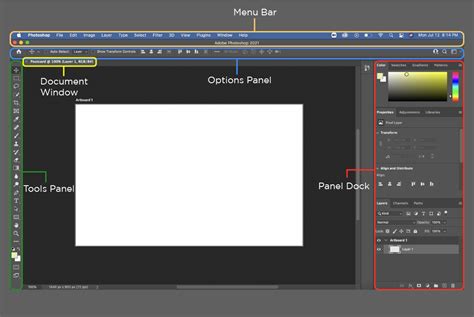
However, this unparalleled power and industry dominance come with a significant price tag. Photoshop operates on a subscription-based model, a shift from its earlier perpetual license. While the current subscription cost, starting at a relatively accessible monthly fee, might seem reasonable even for hobbyists, it remains a recurring expense. This affordability dilemma has historically led to widespread piracy and continues to be a major factor in the Photoshop vs. GIMP debate, prompting many to seek alternatives. For those who require Photoshop for professional work, especially when collaborating with agencies or clients who exclusively use Adobe products, the subscription is often a necessary investment.
GIMP: A Free Alternative with Distinctions
GIMP, or the GNU Image Manipulation Program, stands as a compelling champion for users seeking a powerful yet free image editing solution. As an open-source software, GIMP is not only free to download and use but also modifiable for those with the technical expertise to alter its code. This open-source nature fosters a brilliant and active community of enthusiasts who contribute to its development, creating new features and extensions.
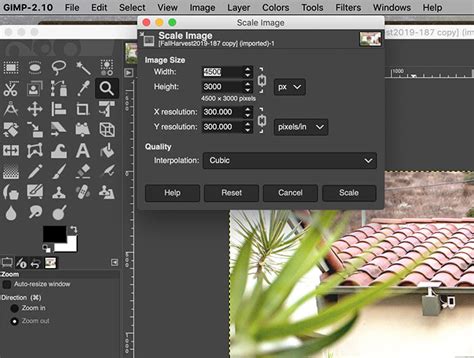
One of GIMP's most significant advantages is its complete freedom from cost. This allows beginners to explore the world of photo editing without any financial commitment, a crucial factor for an often expensive hobby. Furthermore, the open-source aspect makes GIMP highly modifiable. This feature is particularly beneficial for professionals or hobbyists working in specialized niches that require custom editing tools. The vibrant community constantly develops new features and plugins, expanding GIMP's capabilities beyond its core offerings.
GIMP's interface is also fully customizable. Users can arrange features and tools wherever they find most convenient, streamlining their workspace and potentially speeding up their workflow. While Photoshop is a broad application catering to digital photography, graphic design, and illustration, GIMP is built with a singular focus on digital photo editing. This means every feature, tool, and adjustment is geared towards photographic manipulation, ensuring that users aren't presented with tools that may seem important but have no relevance to photography.
The resource efficiency of GIMP is another notable advantage. Photoshop, a substantial application, recommends a minimum of 20 GB of free space on a hard drive and 16 GB of RAM for handling even moderately sized documents. In contrast, GIMP is a significantly lighter program, requiring far less disk space for installation (around 200 MB) and recommending a minimum of 4 GB of RAM, with 8 GB providing a smoother experience. This makes GIMP an excellent choice for users with less powerful hardware or those who prioritize system performance.
For tasks requiring the application of the same adjustment to multiple photographs, GIMP, like Photoshop, offers batch processing capabilities, though they may require slightly different arrangements to achieve.
Decoding the Ongoing Debate: GIMP vs. Photoshop Capabilities
The ongoing debate between Photoshop and GIMP often centers on several pivotal questions: Is GIMP on par with Photoshop's capabilities? Why opt for Photoshop when GIMP is free? What truly sets Photoshop apart from GIMP? Are the advantages of Photoshop worth its substantial price tag?
While opinions vary, a common sentiment is that GIMP, while not universally considered equal to Photoshop in every single aspect, holds its ground remarkably well, lending significant weight to these questions.
Interface and User Experience
One of the most frequently cited differences between GIMP and Photoshop lies in their user interfaces and user experience (UI/UX). Many users complain about GIMP's UI, describing it as dated, although this does not typically affect the software's performance. GIMP is slowly working to address this, but it's not their primary focus. Photoshop, on the other hand, is known for its polished and intuitive interface, designed for efficiency and ease of use, especially for professionals.
GIMP's open-source nature has led to some design choices that can be inconvenient for users accustomed to conventional Windows program layouts, such as its default multiple-window setup. While variants like GIMPshop aim to emulate Photoshop's single-window experience, GIMP itself maintains its distinct approach. Photoshop's interface is simple in design yet packed with features, and its integration with other Adobe Creative Cloud apps further enhances its usability for professionals working within a broader Adobe ecosystem.
Core Editing Tools and Functionality
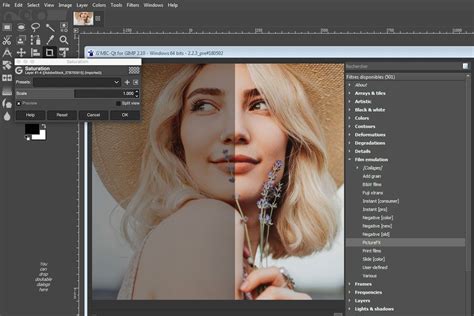
When it comes to basic image adjustments, the differences between GIMP and Photoshop can be subtle. For instance, the Exposure adjustment might show only a tiny variation in how darks are treated. However, as adjustments become more dramatic, like Contrast, the distinctions become more noticeable. An increment of 30 in Contrast might yield a much more dramatic effect in GIMP compared to Photoshop. Similarly, when adjusting saturation, Photoshop tends to produce even-across-tones and more contrasty results, while GIMP offers a more subtle boost to colors, leaving the tones largely unaffected.
Gimp vs. Photoshop | The Ultimate Comparison (2023)
Photoshop's array of smart selection tools, such as the Object Selection tool and Quick Selection tool, are highly effective and can be further enhanced by the "Select Subject" button for rapid selection of prominent subjects. GIMP also features smart selection tools, with its Foreground Select Tool being particularly powerful. Both programs offer robust retouching tools like the Heal and Clone tools, which perform comparably for timely and professional results.
Advanced Features and Workflow
Photoshop excels in offering cutting-edge features, many of which are powered by AI. Tools like Generative Fill are revolutionizing image editing, a capability not yet matched by GIMP. Photoshop also provides seamless integration with its Camera Raw program for opening and processing RAW files, a crucial step for many photographers. GIMP, unfortunately, does not natively open RAW files and requires users to download separate free software like RawTherapee or Darktable for conversion.
One of GIMP's most significant limitations, and a frequent point of contention for users transitioning from Photoshop, is its lack of fully integrated non-destructive editing. In GIMP, changes directly affect the image file being edited. Photoshop, conversely, offers true non-destructive editing, allowing any edit to be reverted back to the original image data without altering it. While GIMP has made strides in this area, it still lacks features like adjustment layers and smart objects, which are fundamental to Photoshop's workflow for many professionals. GIMP has, however, promised adjustment layers in a future version (GIMP 3.2).
Another critical difference lies in color management. GIMP has only recently introduced a form of CMYK support for image proofing, a feature long requested by its users. However, Photoshop boasts full CMYK support, making it easy to set and switch between color profiles, with more accurate CMYK proofing results. GIMP primarily handles the sRGB color profile, which can be a limitation for users who require precise color matching for print media. While GIMP offers CMYK soft-proofing, it may not suffice for professionals dealing with specific client requirements or CMYK-formatted files.
File Handling and Exporting
GIMP's native file format is XCF, which is essential for retaining all edits and layers. To save in standard image formats, users must export their files. GIMP offers a variety of export options. Photoshop, on the other hand, provides a more robust and controlled exporting process, allowing users to edit both image and canvas size at this stage, with a preview to verify resizing. Photoshop also has its native PSD format, which is highly compatible across various applications, including GIMP.
Resource Requirements and Portability
Photoshop is a resource-intensive application. Adobe recommends at least 20 GB of free hard drive space and 16 GB of RAM for optimal performance. This can pose a challenge for users with older or less powerful computers. GIMP, in stark contrast, is a remarkably lightweight program. Its installation requires minimal disk space, and it runs smoothly with as little as 4 GB of RAM, making it accessible on a wider range of hardware.
Portability is another area where GIMP shines. It can be downloaded and installed on multiple computers, and even installed on a USB drive for use on any machine without installation. Photoshop, while available on Mac, Windows, and iPad, has limitations on the number of installations per license and lacks a dedicated Linux version, unlike GIMP. However, Photoshop does offer a mobile version as part of its subscription, allowing for editing on the go, a feature GIMP currently lacks.
Community, Plugins, and Future Developments
GIMP's open-source nature fuels a strong and active community. This community contributes significantly to its development, creating a vast ecosystem of free plugins and extensions that can bridge many of its functional gaps. For users seeking additional tools, extension packs are readily available. The availability of extensive online resources, forums, and video tutorials dedicated to GIMP further aids users in mastering its capabilities.
Photoshop, benefiting from Adobe's substantial financial backing, has a dedicated team of developers constantly innovating and releasing new features. It also boasts a massive community of creators who produce a wealth of tutorials, articles, and courses. The Adobe ecosystem offers seamless integration with other Adobe products like Lightroom and Illustrator, as well as access to Adobe Stock templates and assets.
GIMP vs. Photoshop: Which is Right for You?
The choice between GIMP and Photoshop ultimately hinges on individual needs, budget, and professional requirements.
GIMP is an excellent choice for:
- Beginners and hobbyists: Its free nature allows for experimentation without financial risk.
- Users on a budget: It provides powerful editing capabilities without any cost.
- Linux users: GIMP is a robust option for those operating on Linux systems.
- Users with limited hardware: Its low resource demands make it suitable for less powerful computers.
- Those who value customization: The open-source nature allows for significant modification.
- Individuals or small businesses focused on online content: For users who primarily share their work online and don't require strict CMYK print workflows.
Photoshop is the preferred choice for:
- Professionals in photography, graphic design, and digital art: Its industry-standard status and advanced features are often prerequisites for professional work.
- Users requiring cutting-edge AI features: Tools like Generative Fill offer unparalleled capabilities.
- Those who need seamless RAW file processing: Photoshop's integrated Camera Raw offers a streamlined workflow.
- Users who demand non-destructive editing: Essential for complex and iterative editing processes.
- Professionals requiring full CMYK support: Critical for print-based work.
- Individuals and businesses already invested in the Adobe Creative Cloud ecosystem: Its integration with other Adobe apps provides a cohesive workflow.
- Users who prioritize a polished, intuitive interface and extensive learning resources.
In conclusion, while Photoshop remains the undisputed industry leader with its advanced features and professional polish, GIMP presents a remarkably capable and accessible alternative. GIMP's open-source ethos, cost-effectiveness, and strong community support make it a formidable contender, particularly for users who do not require the absolute cutting-edge features or the professional certifications that often come with using Adobe products. Understanding the strengths and limitations of each tool allows users to make an informed decision that best aligns with their artistic vision and practical requirements in the vast landscape of digital image editing.