In the dynamic world of digital creation, validating your skills is paramount for career advancement and creative fulfillment. Earning industry certifications for Adobe Creative Cloud applications, particularly in Visual Design using Adobe Photoshop, offers a tangible way to demonstrate your expertise. This article delves into the significance of becoming an Adobe Certified Professional (ACP) in Visual Design, the specific skills validated by the Adobe Photoshop certification, and the pathways to achieving this esteemed credential.
The Value of Adobe Certified Professional Credentials
Adobe Certified Professional (ACP) specialty credentials serve as a testament to your mastery of Adobe's powerful creative tools. Supercharging your creativity and career growth, these certifications are more than just certificates; they are industry-recognized validations of your skills. For multidisciplinary creators who can fluidly work across different products and formats, the possibilities unlocked by these credentials are vast. Specialty credentials are automatically awarded to Adobe Certified Professionals who successfully complete an eligible pair of certifications, highlighting your ability to integrate knowledge from multiple Adobe applications.
Specialty Credentials: Expanding Your Expertise
Adobe offers a range of specialty credentials designed to recognize a broader spectrum of digital creative skills. These credentials are automatically awarded when you achieve specific combinations of Adobe Certified Professional certifications.
Creativity with Entrepreneurship
This specialty credential, a collaboration between Adobe and ESB (Entrepreneurship and Small Business), is designed for those who wish to turn their creative expertise into entrepreneurial success. It combines any of the nine Adobe Certified Professional certifications with ESB's Entrepreneurship and Small Business exam. This dual validation demonstrates not only your proficiency with Adobe's design tools but also your understanding of core business principles. It proves you have what it takes to build a thriving business from your creative vision, transforming your ideas into a successful venture.
Creativity with AI
Developed by Adobe and Pearson, the "Creativity with AI" specialty credential recognizes creative professionals who adeptly combine design expertise with emerging Artificial Intelligence tools. To qualify, you need to earn any of the nine Adobe Certified Professional credentials and pair it with Pearson’s Generative AI Foundations credential. This credential is a powerful indicator that you are not just keeping pace with technological advancements but are actively leading the way, working smarter, faster, and more imaginatively by leveraging AI.
Key Adobe Certified Professional Design Specialties
Adobe offers several core ACP certifications, each focusing on a distinct area of digital design:
- Adobe Certified Professional in Marketing Design
- Adobe Certified Professional in Visual Design
- Adobe Certified Professional in Video Design
- Adobe Certified Professional in Web Design
This article, however, will focus on the crucial "Adobe Certified Professional in Visual Design Using Adobe Photoshop" certification.
Becoming an Adobe Certified Professional in Visual Design Using Adobe Photoshop
Validating your knowledge of Adobe Photoshop, widely regarded as the world's most powerful imaging and design software, is a significant career step. The Adobe Certified Professional in Visual Design certification attests to your proficiency in using Photoshop for a myriad of visual design tasks.
The Foundation: Hands-on Experience and Instruction
Becoming an Adobe Certified Professional typically requires a solid foundation, often estimated at around 150 hours of hands-on experience and instruction. This practical experience is crucial for truly mastering the software and understanding its application in real-world design scenarios.
Preparing for the Photoshop Certification Exam
The journey to certification involves dedicated preparation. Adobe provides a wealth of resources to help you gear up and get inspired.
Exam Guide and Objectives
A critical first step is to thoroughly review the exam guide. This document outlines the specific exam objectives, detailing precisely what you need to know to pass the certification. Understanding these objectives allows for targeted study and ensures you focus on the most important areas. The exam guide for Visual Design Using Adobe Photoshop is based on the 2021 version, though resources for earlier versions (2018-2020) are also available through Certiport.
The exam objectives are structured into key domains, each covering essential aspects of working with Photoshop in a professional design context.
Practice Tests and Learning Resources
To truly prepare for the certification and gain a realistic feel for the in-app exam experience, taking practice tests is highly recommended. CertPREP practice tests, powered by GMetrix, offer a valuable tool for assessing your readiness and identifying areas that may require further study.
Beyond practice tests, a variety of learning resources are available:
- Courses: Comprehensive, easy-to-follow textbooks and eBooks are available from Adobe Press, often including videos, activities, and downloadable files to enhance the learning process.
- Tutorials and Projects: Free Adobe tutorials offer a flexible way to learn the basics, refine existing workflows, or discover new sources of inspiration. These can be invaluable for both beginners and experienced users looking to deepen their understanding.
Core Competencies Assessed in the Visual Design Exam
The Adobe Certified Professional in Visual Design exam, specifically using Photoshop, rigorously assesses a candidate's ability to utilize the software effectively across various design tasks. The objectives are broken down into several key areas:
1. Working in the Design Industry
This section focuses on the professional context of design work. It covers critical concepts essential for collaborating with colleagues and clients, as well as fundamental legal, technical, and design-related knowledge.
- Understanding Purpose and Audience: Identifying the purpose, audience, and audience needs for preparing images is crucial. This involves determining if content is relevant to client goals, target audience demographics, accessibility requirements, and user experience, ensuring an appropriate design for target devices. Understanding how images will be used (video, print, web) is also a key consideration.
- Communication in Design: Demonstrating knowledge of techniques for communicating design plans with peers and clients is vital. This includes understanding terms like sketches, specifications, design process, wireframes, prototypes, iterations, change orders, drafts, and the importance of a feedback loop. Basic project management concepts, such as project scope and scope creep, along with cloud utilization and file management, are also assessed.
- Copyright, Permissions, and Licensing: Understanding legal and ethical considerations for using third-party content is paramount. This includes identifying copyright, permissions, and licensing requirements, as well as understanding terms like Creative Commons, public domain, intellectual property, derivative work, commercial use, attribution, work for hire, fair use, and fair dealing. Knowing when and how to obtain permission to use images of people and locations, including model and location releases, is also critical.
- Digital Image Terminology: A strong grasp of digital image terminology is essential. This covers understanding image resolution, image size, file types, pixels, raster and vector graphics, paths, objects, type, rasterizing, rendering, resampling, and resizing. Crucially, it includes understanding the difference between image size measured in pixels versus document size measured in inches or centimeters. Knowledge of how color is created in digital images, including color modes (CMYK vs. RGB vs. grayscale), bit depth, and gamut, is also assessed.
- Design Principles and Best Practices: Applying fundamental design principles is at the heart of visual design. This involves visually communicating through the use of design elements (space, line, shape, form, color, texture) and principles (emphasis/focal point, unity/harmony, variety, balance, alignment, proximity, repetition, rhythm, scale, movement, negative space, gestalt). Proficiency in using typographic adjustments to create contrast, hierarchy, and enhance readability/legibility, including understanding terms like font, size, style, color, alignment, kerning, tracking, leading, and scale, is also key. Knowledge of common photographic and cinematic composition terms, such as aspect ratio, rule of thirds, foreground, background, color, tone, contrast, framing, depth of field, field of view, and white balance, is also evaluated.
2. Project Setup and Interface
This objective area focuses on setting up the application for an efficient and effective workflow, as well as managing digital assets.
- Document Creation: Creating documents with appropriate settings for web, print, and video is a fundamental skill. This includes setting appropriate dimensions, resolution, color mode, bit depth, and background for both print and onscreen images. The ability to create new document presets for recurring project needs is also assessed.
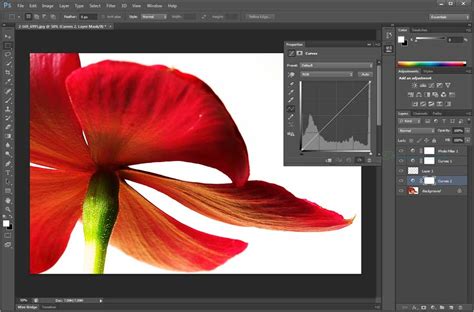
- Workspace Navigation and Customization: Familiarity with the Photoshop interface is crucial. This involves identifying and manipulating elements like the Options bar, menus, panels, toolbar, and artboards. Organizing and customizing the workspace, including managing tabbed documents, showing, hiding, nesting, and docking panels, saving and resetting workspaces, and utilizing shortcuts and menus, is also important. Configuring application preferences, such as units, rulers, guides, grids, performance settings, scratch disks, and interface options, contributes to an efficient workflow.
- Non-Printing Design Tools: Utilizing non-printing design tools within the interface to aid design and workflow is essential. This includes navigating documents through panning and zooming, rotating the canvas, and using rulers (showing, hiding, and changing measurement units). The effective use of guides and grids for alignment and layout, including adding, removing, locking, and customizing their appearance, as well as creating guide layouts and utilizing snap or align options, is also covered.
- Importing Assets: The ability to import assets into a project from various sources, such as cameras and scanners, is a key skill. This includes placing assets as embedded or linked elements, or simply copying and pasting them. Proficiency with the Adobe Camera Raw interface for importing and processing raw image files is also assessed.
- Color, Swatches, and Gradients: Managing colors effectively is critical for visual design. This involves setting active foreground and background colors, creating, customizing, and organizing gradients, and managing swatches. Understanding the Color Picker, Eyedropper tool, and hexadecimal values is part of this.
- Brushes, Styles, and Patterns: Working with creative assets like brushes, styles, and patterns is integral to Photoshop's capabilities. This includes opening, browsing, and searching libraries of included assets, as well as creating, using, editing, and organizing custom brushes, styles, and patterns.
3. Organizing Documents
This objective area delves into the structure of documents, particularly the use of layers and managing them for efficient workflows.
- Layer Management: Mastering layers is fundamental to non-destructive editing and complex compositions. This involves using the Layers panel to add, delete, hide/show, lock/unlock, and duplicate layers. Organizing layers in complex projects by renaming, creating layer groups, deleting empty layers, and selecting, grouping, or linking layers is crucial. Understanding the different types of layers (background, pixel, adjustment, type, fill, shape, vector, Smart Object, artboard layers) is also assessed.
- Modifying Layer Visibility: Adjusting a layer's opacity, blending modes, and fill opacity allows for sophisticated visual effects. Creating and editing masks (layer masks, clipping masks) is essential for selectively revealing or hiding parts of a layer, enabling precise control over compositions.
- Destructive vs. Nondestructive Editing: Differentiating between and performing destructive and nondestructive editing techniques to meet design requirements is a key skill. Nondestructive editing, primarily through Smart Objects, Smart Filters, and adjustment layers, preserves original image data, allowing for flexibility and re-editing. Destructive editing, such as direct painting, adjustments, erasing, and rasterizing, permanently alters pixels.
4. Creating and Modifying Visual Elements
This objective area covers the core tools and functionality of Photoshop that directly affect the visual outcome of a document.
- Creating and Editing Visual Elements: Proficiency in creating and editing both raster and vector images is assessed. This includes using core tools like the Crop, Pencil, Clone Stamp, and various Eraser tools for raster manipulation, as well as the Pen, Curvature Pen, and Shape tools for vector creation.
- Typography: Adding and manipulating text effectively is crucial for visual design. This involves using type tools, adjusting character and paragraph settings to enhance legibility, readability, and hierarchy, and understanding concepts like kerning, tracking, and leading. The ability to convert text to graphics (rasterizing type) is also covered.
- Selections: Making, managing, and manipulating selections is a cornerstone of Photoshop. This includes using a variety of tools like Quick Selection, Lasso, Magic Wand, Marquee, and AI-powered tools like Select Subject and Object Selection. Refining selections using methods like feathering, expanding, contracting, inverting, and the Select and Mask workspace is also assessed. Saving and loading selections as channels provides a powerful way to manage complex selections.
- Transforming Graphics: Modifying the canvas or artboards, including resizing, cropping, and resampling, is essential. The ability to rotate, flip, and modify individual layers, objects, selections, groups, and graphical elements using transforming, warping, and distorting tools is also evaluated. Understanding the difference between resizing and resampling is critical.
- Retouching and Reconstruction: Applying basic reconstructing and retouching techniques to manipulate digital graphics and media is a core skill. This includes using auto-correction methods, healing tools, clone tools, Content-Aware tools, and the Liquify filter. Evaluating and adjusting the appearance of objects, selections, or layers using various tools and adjustments, as well as applying photographic changes using tools like the Burn and Dodge tools, is also assessed.
- Filters and Styles: Modifying the appearance of design elements using filters and layer styles is a key aspect of Photoshop. This includes understanding the difference between destructive filters and non-destructive Smart Filters, as well as creating, managing, applying, and modifying layer styles.
5. Publishing Digital Media
This final objective area covers the crucial step of saving and exporting documents or assets for various platforms.
- Preparing Images for Export: Checking documents for errors and ensuring they meet project specifications before export is vital. This includes setting the correct color space, resolution, pixel dimensions, and metadata.
- Exporting and Saving: Saving in the native Photoshop (.psd) format, understanding its compatibility and options for saving locally or in the Cloud, is fundamental. Equally important is saving in appropriate image formats (e.g., JPEG, PNG, GIF) for the intended purpose, considering file format, bit depth, color space, resolution, and pixel dimensions. Exporting project elements, such as layers, selections, or assets to libraries, is also covered.
The ULTIMATE Guide To Layers In Photoshop (FREE Masterclass)
Why Pursue Adobe Certification?
Becoming an Adobe Certified Professional offers a multitude of benefits that can significantly impact your career trajectory.
Standing Out in the Job Market
By validating your expertise with industry-leading Adobe Creative Cloud applications, you gain credibility and a competitive edge. This helps you impress employers, clients, and collaborators across diverse fields such as brand marketing, digital media, video production, and graphic design. In an evolving job market, certifications are increasingly recognized as an important indicator of talent, drive, and creativity.
Demonstrating Expertise and Value
Certification boosts your credibility and enhances your value in the job market. Studies indicate that a significant percentage of hiring managers view certifications as important for demonstrating creative problem-solving and visual design skills. Furthermore, many agree that candidates with these skills, especially when backed by certifications, deserve higher compensation. Certifications also signal high-quality candidates to employers.
Unleashing Creative Potential and Confidence
Preparing for certification naturally elevates your skillset and boosts your confidence in your abilities. This empowerment allows you to translate any idea or inspiration into exceptional creative work, unleashing your full creative potential.
Earning Employer Trust and Recognition
Employers who have hired certified individuals often report that they produce higher quality work and are better at innovating. Certifications can also signal dedication and a clear career aspiration, which hiring managers highly value. As one freelance graphic designer noted, having certifications in Photoshop, Illustrator, and Premiere Pro immediately instills trust and confidence in their ability to handle design and video work.
The Path Forward: Getting Certified
The journey to becoming an Adobe Certified Professional in Visual Design Using Adobe Photoshop is structured and supported by a range of resources. Certification is more accessible than ever, with options to schedule an online exam or visit a Certiport Authorized Testing Center. By investing in this certification, you are not just acquiring a credential; you are making a significant investment in your creative career and professional development.