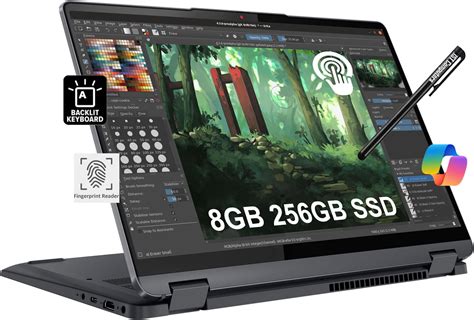
For photographers, graphic designers, and other creative professionals, selecting the right laptop for Adobe Photoshop is not merely a matter of preference; it's a critical decision that directly impacts workflow efficiency and the quality of final output. Photoshop, with its intricate layers, high-resolution image handling, and demanding editing processes, requires robust hardware to perform at its peak. This comprehensive guide delves into the essential specifications to consider and highlights some of the top HP laptops that are exceptionally well-suited for running Photoshop.
What to Look for in a Photoshop Laptop
When embarking on the quest for the ideal Photoshop laptop, a meticulous examination of key specifications is paramount. These components work in concert to ensure a fluid and responsive editing experience.
Processor and Graphics: The Engine of Performance
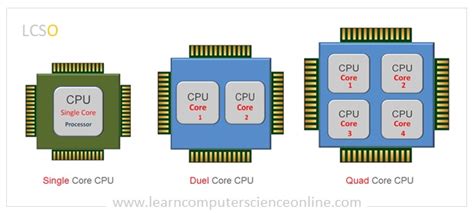
A fast, multi-core processor is the bedrock of smooth Photoshop performance. When evaluating laptops, prioritize models equipped with recent Intel Core i5, i7, or i9 processors, or their AMD Ryzen equivalents. For an elevated performance experience, particularly with tasks that benefit from hardware acceleration, consider laptops featuring dedicated graphics cards from NVIDIA or AMD. These dedicated GPUs can significantly speed up certain Photoshop functions, such as applying complex filters, rendering 3D elements, and utilizing AI-powered features like "Select Subject" or "Neural Filters." This added graphical power provides more than enough capability to manage large photo libraries and resource-intensive projects without compromise.
RAM: The Memory for Multitasking
Photoshop is notoriously memory-hungry, often referred to as RAM-intensive. While Adobe officially recommends a minimum of 8GB of RAM, this is often insufficient for anything beyond basic edits. For a substantially better performance, especially when working with large files, multiple high-resolution images, or complex layers, 16GB of RAM is a more realistic starting point. For professional workflows that involve extensive multitasking and very large datasets, 32GB of RAM is highly recommended. Some high-end, professional-grade laptops even offer up to 64GB of RAM, catering to the most demanding workflows where every ounce of speed and responsiveness counts. The ability to upgrade RAM post-purchase can also offer valuable flexibility for future-proofing your investment.
Storage: Speed and Capacity for Your Creative Assets
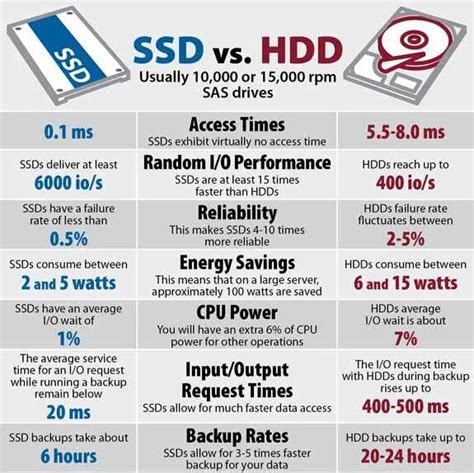
The speed of your storage solution profoundly impacts Photoshop's ability to load and save files quickly, as well as the overall responsiveness of the application. Fast Solid State Drive (SSD) storage is non-negotiable for a smooth Photoshop experience. Aim for a minimum of 512GB of SSD storage. However, if you frequently work with numerous high-resolution images, extensive RAW files, or large project files, 1TB or more of storage is highly ideal. Some laptops offer dual-drive configurations, combining the speed of an SSD for the operating system and applications with the larger capacity of a Hard Disk Drive (HDD) for bulk storage, though NVMe SSDs are the current standard for maximum speed. NVMe SSDs, in particular, offer sequential read speeds that can reach up to 7000 MB/s, drastically reducing load times and speeding up operations like saving, opening files, and generating previews.
Display: Color Accuracy and Visual Fidelity
A high-quality display with exceptional color accuracy is absolutely crucial for effective photo editing. What you see on your screen directly translates to your final output, whether it's for web or print. An OLED display offers superior color accuracy, deeper blacks, infinite contrast ratios, and superior visual quality, making it an excellent choice for discerning professionals. At a minimum, look for Full HD (1920 x 1080) resolution. However, 4K displays offer significantly sharper image quality and more detail, which is invaluable for intricate editing. IPS panels are also excellent, typically offering better color reproduction and wider viewing angles compared to TN panels. For professional work, prioritize displays that provide 100% sRGB or, ideally, 100% Adobe RGB or DCI-P3 color gamut coverage. Many high-end laptops come factory-calibrated, ensuring colors are accurate right out of the box, and some even include built-in color calibration tools for ongoing adjustments.
Portability and Battery Life: Editing on the Go
If your creative endeavors often take you away from a desk, consider the laptop's weight and battery life. Slim, lightweight laptops with long-lasting batteries are ideal for mobile creatives who need to edit on the go. However, it's important to acknowledge that more powerful components, such as high-performance processors and dedicated graphics cards, often come with a trade-off in terms of battery life and increased weight. Striking the right balance between power and portability is key to finding a laptop that meets your specific needs for both performance and mobility.
Connectivity: Essential Ports for Your Peripherals
Ensure the laptop is equipped with a sufficient array of ports to accommodate your essential peripherals. This typically includes USB-A for legacy devices, USB-C for modern accessories and charging, and HDMI for connecting external monitors. Thunderbolt support is a significant advantage, enabling high-speed data transfers and the ability to connect to external GPUs or high-resolution displays. For photographers, an integrated SD card reader is an invaluable convenience, allowing for easy and quick transfer of photos directly from camera memory cards.
What’s the difference? | USB-C vs THUNDERBOLT?
Top HP Photo Editing Laptops for Photoshop
HP offers a diverse range of laptops that cater to various needs and budgets, making them a strong contender for creative professionals relying on Photoshop. Here are some of their top recommendations well-suited for running Photoshop:
HP Pavilion Laptop 15-eg3097nr: The Budget-Conscious Powerhouse
The HP Pavilion series consistently offers a compelling balance of performance and affordability, making it an excellent choice for Photoshop users on a budget who still require a capable laptop for photo editing. This model provides solid performance for everyday Photoshop tasks, powered by its 13th Gen Intel Core i7 processor and a generous 16GB of RAM. While it may not feature a dedicated GPU, the integrated Intel Iris Xe graphics are capable of handling most standard Photoshop functions adequately. The 15.6-inch Full HD display offers good color accuracy for general photo editing, and its relatively slim and lightweight design enhances its portability for on-the-go work.
Key Specifications:
- 15.6" diagonal FHD display
- 13th Generation Intel Core i7 processor
- Intel Iris Xe Graphics
- 16GB RAM
- 512GB SSD Storage (typical configuration)
HP ENVY x360 2-in-1 Laptop 15t-ew100: Versatility Meets Performance
For creatives who value versatility and the ability to adapt their workspace, the HP ENVY x360 offers a premium 2-in-1 design. This convertible laptop is perfect for seamlessly transitioning between desktop and tablet-style editing. Its touch-enabled display, often paired with an included stylus, makes it ideal for precise retouching, digital painting, and detailed masking within Photoshop. The powerful 13th Gen Intel Core i7 processor and 16GB of RAM ensure smooth performance even when tackling complex edits. The innovative 360-degree hinge allows users to work in various modes - laptop, tent, stand, or tablet - adapting to their environment whether they are in a studio, a coffee shop, or on location.
Key Specifications:
- 15.6" diagonal FHD touch display
- 13th Generation Intel Core i7 processor
- Intel Iris Xe Graphics
- 16GB RAM
- 1TB SSD Storage (typical configuration)
HP ZBook Studio 16 inch G10 Mobile Workstation PC: Professional-Grade Powerhouse
When absolute performance is paramount and budget is less of a concern, the HP ZBook Studio line represents the pinnacle of HP's mobile workstation offerings. Designed for demanding professional creative work, it delivers workstation-class power in a package that remains remarkably portable for its capabilities. The 16-inch 4K UHD+ display offers exceptional color accuracy and stunning detail, crucial for pixel-perfect editing. Under the hood, the combination of a top-tier Intel Core i9 processor, powerful NVIDIA RTX professional graphics (such as the RTX A1000 or higher), and up to 64GB of RAM ensures that even the most complex Photoshop projects, including those involving large files, intricate compositions, or 3D elements, can be handled with unparalleled ease and speed.
Key Specifications:
- 16" diagonal 4K UHD+ display
- Intel Core i9 processor
- NVIDIA RTX A1000 Graphics (or higher)
- Up to 64GB RAM
- 1TB or 2TB NVMe SSD Storage
Frequently Asked Questions About Laptops for Photoshop
Addressing common queries can further illuminate the decision-making process for selecting the best laptop for your Photoshop needs.
Is a Gaming Laptop Good for Photoshop?
Yes, gaming laptops can be excellent for Photoshop. They typically feature powerful processors, high-end dedicated graphics cards (NVIDIA GeForce RTX series being common), and ample RAM, all of which are highly beneficial for intensive photo editing tasks. However, it's important to note that some gaming laptops may compromise on color accuracy or battery life, which are critical considerations for professional creative work. Despite these potential trade-offs, the raw performance offered by gaming laptops makes them highly capable for demanding workloads, including video editing.
How Much RAM Do I Need for Photoshop?
Adobe officially recommends a minimum of 8GB of RAM. However, this is a baseline and will likely result in a sluggish experience for most users. A more practical recommendation for smooth performance is 16GB of RAM. For users consistently working with large files, multiple high-resolution images, or complex projects, 32GB of RAM will provide a significantly better experience. For professionals engaged in the most demanding workflows, 64GB of RAM can offer unparalleled performance.
Is a Dedicated GPU Necessary for Complex Photo Editing Tasks in Photoshop?
While not strictly mandatory for basic photo editing, a dedicated GPU can significantly enhance performance in Photoshop, especially for tasks that leverage GPU acceleration. These include a wide range of filters, 3D functions, and AI-powered features. A dedicated GPU offloads graphical processing from the CPU, leading to faster rendering, smoother brush strokes, and quicker application of effects. For users who frequently utilize these advanced features or work with very large files, a dedicated GPU is highly recommended.
Can I Use a 2-in-1 Laptop for Photoshop?
Absolutely. 2-in-1 laptops can be fantastic tools for Photoshop, particularly if you enjoy or require the precision offered by a stylus for retouching, digital painting, or detailed masking. When choosing a 2-in-1 for Photoshop, look for models that offer good pen sensitivity, pressure levels, and a high-quality, responsive touchscreen. Crucially, ensure that the 2-in-1 laptop you select also meets the performance specifications required to run Photoshop smoothly, paying close attention to the processor, RAM, and storage.
How Important is Color Accuracy for Photoshop Work?
Color accuracy is paramount for professional photo editing. The display on your laptop is your primary window into the image, and if it's not representing colors accurately, your edits will not translate correctly to other devices, prints, or client reviews. Look for laptops with displays that cover a high percentage of color gamuts like sRGB (minimum 100%) or Adobe RGB. Some high-end laptops come factory-calibrated, or they offer built-in color calibration tools, which are invaluable for ensuring consistent and reliable color reproduction across your workflow. OLED displays generally excel in color accuracy and contrast.
What Operating System Works Best for Laptops for Photoshop?
Photoshop runs exceptionally well on both major operating systems: Windows and macOS. The choice between them often comes down to personal preference, existing ecosystem, and specific hardware availability. Both platforms offer robust support for Photoshop, and performance is largely dependent on the hardware specifications of the laptop rather than the operating system itself. Ensure that whichever OS you choose, the laptop's hardware meets or exceeds the recommended system requirements for the version of Photoshop you intend to use.
How Much Storage Do I Need in Laptops for Photoshop?
Storage capacity is a critical consideration for Photoshop users, as image files, especially RAW files from professional cameras and high-resolution images, can consume a significant amount of space. Aim for a minimum of a 512GB SSD to comfortably accommodate your operating system, Photoshop application, and a reasonable library of images. For professionals who manage extensive photo libraries, work with many large files concurrently, or store project backups, 1TB or even 2TB of SSD storage is highly recommended. The speed of the storage, particularly NVMe SSDs, is also vital for fast loading and saving times.
Should I Consider Battery Life in Laptops for Photoshop?
Yes, battery life is an important factor, especially if you plan to work extensively outside of a stationary setup or travel frequently. Laptops with longer battery life allow for extended editing sessions without the need to constantly search for a power outlet. However, it's essential to find a balance. High-performance components that are crucial for Photoshop often consume more power, which can reduce battery life. Many modern laptops offer impressive battery life even with powerful hardware, but always check reviews for real-world battery performance under demanding tasks.
Can I Use Touchscreen Laptops for Photoshop?
Touchscreen laptops can indeed be used for Photoshop and can offer an enhanced user experience, particularly for tasks requiring fine motor control and artistic input. Many touchscreen laptops come with stylus support, which is invaluable for detailed drawing, retouching, masking, and applying intricate brushwork with greater precision than a mouse or trackpad. When considering a touchscreen laptop for Photoshop, prioritize models with good pen input features and ensure the underlying hardware is powerful enough to run Photoshop smoothly.
What Are the Benefits of a Dedicated Graphics Card in Laptops for Photoshop?
A dedicated graphics card (dGPU) provides significant benefits for Photoshop users. It greatly improves performance, especially in graphically intensive tasks such as rendering complex images, applying demanding filters, manipulating multiple layers, and working with 3D elements. The dGPU offloads these graphics-intensive operations from the CPU, allowing the processor to focus on other tasks and leading to a more responsive and efficient editing experience compared to relying solely on integrated graphics. Laptops equipped with NVIDIA GeForce RTX or AMD Radeon Pro series GPUs are particularly well-suited for these tasks.
Do I Need a 4K Display in Laptops for Photoshop?
A 4K display can be highly advantageous for Photoshop users. Its significantly higher pixel density provides greater detail and clarity, making it easier to discern fine details within images, which is crucial for professional editing. A 4K resolution also offers a larger workspace, allowing more interface elements and toolbars to be visible simultaneously, and can improve color accuracy and overall visual fidelity. While not strictly essential for all users, a 4K display enhances the editing experience by providing a sharper, more detailed view of your work.
Would External Monitors Be Useful with Laptops for Photoshop?
Yes, external monitors can be incredibly useful when working with Photoshop on a laptop. They provide additional screen real estate, which is invaluable for multitasking and organizing your workspace. Many external monitors also offer higher resolutions, better color accuracy, and larger screen sizes than laptop displays, allowing for more precise editing and a more comfortable viewing experience. Connecting an external monitor can help you work more efficiently and ergonomically, especially on detailed and extensive projects.
What Role Does the Processor Play in Laptops for Photoshop?
The processor (CPU) is a fundamental component in any laptop and plays a crucial role in Photoshop performance. It dictates the speed at which tasks are executed, from opening the application and loading files to applying adjustments, running filters, and rendering final images. A more powerful processor with more cores and higher clock speeds will generally result in faster processing times and a more fluid overall experience, especially when dealing with complex operations and large datasets.
Is Color Accuracy Important in Laptops for Photoshop?
Color accuracy is absolutely vital in laptops for Photoshop. It ensures that the colors you see on your screen accurately represent the true colors of your image. This is critical because your edits need to translate correctly to other devices, print, and client deliverables. Look for laptops that specify wide color gamut coverage (e.g., 100% sRGB, 100% Adobe RGB, or high DCI-P3 coverage) and ideally, those that offer factory calibration or color management tools for precise and reliable color reproduction.
When Should I Upgrade My Laptop for Photoshop?
Consider upgrading your laptop for Photoshop when you consistently experience significant slowdowns, frequent application crashes, or when new Photoshop features are released that your current hardware cannot adequately support. If your workflow is being noticeably hampered by your laptop's performance, leading to lost productivity or frustration, it's likely time to consider an upgrade to a machine with better specifications that can ensure continued efficiency and access to the latest editing tools.
Would Using an External GPU Benefit Laptops for Photoshop?
Using an external GPU (eGPU) can significantly benefit laptops for Photoshop, particularly those with limited or integrated graphics capabilities. An eGPU setup provides additional graphics processing power that can be directly connected to your laptop via Thunderbolt. This can substantially enhance performance in rendering, applying GPU-accelerated filters, and real-time previews, allowing you to work more efficiently on complex projects without needing to purchase an entirely new laptop.
Can Older Laptops Still Be Effective for Photoshop?
Older laptops can still be effective for Photoshop if they meet the basic system requirements of the software version you intend to use. While they might not offer the lightning-fast performance of newer machines, performance can often be improved by upgrading key components like RAM (if possible) and switching to an SSD for storage. However, for optimal performance, especially with the latest versions of Photoshop and demanding workflows, newer hardware with more powerful processors and dedicated graphics cards is generally recommended.
Does the SSD Type Matter in Laptops for Photoshop?
Yes, the type of SSD absolutely matters in laptops for Photoshop. NVMe SSDs are significantly faster than older SATA SSDs. This speed difference can drastically reduce application loading times, file opening and saving times, and the overall responsiveness of the system when working with large files. Choosing a laptop with an NVMe SSD will contribute to a much more efficient and less frustrating Photoshop workflow.
The Synergy of Hardware for Creative Workflows
A lot of what makes the best laptops for Adobe Photoshop also contributes to making them excellent for video editing: a well-balanced combination of raw performance, reliable battery life, and a display that is both bright and vivid. Whether you are just beginning to explore the intricacies of photo editing or are a seasoned professional who can wield tools like the lasso with surgical precision, there is a plethora of outstanding laptop options available to suit every skill level and budget.
The advent of new hardware generations means that laptops equipped with the latest NVIDIA RTX 50-series GPUs are now available for creators with demanding Photoshop needs. Similarly, Intel's Core Ultra 200-series and AMD's Ryzen Pro series processors offer enhanced performance for creative applications. Professional editors can leverage the enhanced capabilities of a discrete graphics card by enabling Photoshop's hardware acceleration features, which are designed to power through demanding tasks more rapidly and efficiently.
A high-resolution OLED display is also an increasingly important consideration. Beyond offering the rich hues and deep contrasts that OLED technology is celebrated for, many of these displays also boast wide color gamut coverage - often wide enough to render subtle color variations that might otherwise be imperceptible. For beginners or those looking to manage their budget more carefully, laptops featuring last-generation hardware will still provide more than enough performance to move Photoshop edits along swiftly, even those models that do not include a discrete graphics card.
Best Laptop for Photoshop Overall: Lenovo Yoga Pro 9i 16 Gen 9
The Lenovo Yoga Pro 9i 16 Gen 9 stands out as a nearly perfect laptop for content creators. It features a stunning 16-inch display, a powerful Intel Core Ultra 9 185H processor, and an NVIDIA GeForce RTX 4050 GPU. This combination delivers impressive performance for intricate photo filters, 3D effects, and powerful AI features within Photoshop. The OLED display panel is truly gorgeous, covering an exceptional 105.7% of the DCI-P3 color gamut, far surpassing many competitors. Its robust performance is complemented by respectable battery life, lasting nearly 10 hours on a full charge in testing, and a comfortable, bouncy keyboard. While its audio quality is a notable drawback, and configuration options can be somewhat limited, its strengths in display quality and creative performance make it a top-tier choice.
Best Laptop for Photoshop Under $1,000: Asus Zenbook 14 OLED (Q425M)
For those seeking exceptional value, the Asus Zenbook 14 OLED (Q425M) is a standout budget-friendly option. It masterfully combines a powerful Intel Core Ultra 100H series processor, capable Intel Arc integrated graphics, ample RAM, and fast SSD storage with a stunning 14-inch FHD OLED touchscreen. Starting at an incredibly accessible price point, this laptop frequently sees discounts, making it an even more attractive proposition. Its battery life is extraordinary, often exceeding 15 hours on our tests, allowing for extended untethered work sessions. While its display panel brightness might not be ideal for direct outdoor sunlight, and it lacks traditional USB-A and HDMI ports, its overall performance, crisp OLED visuals, and wallet-friendly price make it an outstanding choice for Photoshop users on a budget.
Best Laptop for Photoshop Under $1,500: Acer Swift X 14 (2024)
The Acer Swift X 14 (2024) offers a potent combination of graphics power and affordability, making it an excellent choice for Photoshop users who require more robust graphical capabilities without breaking the bank. Starting at an attractive price, it can be configured with an Intel Core Ultra 7 155H processor and an NVIDIA RTX 4050 discrete graphics card, providing substantial performance for creative tasks. The laptop also boasts a crisp 14-inch CineCrystal OLED display panel that delivers vivid colors. Weighing just 2.6 pounds, it is incredibly portable, fitting easily into most bags. While its battery life is respectable for a laptop with a discrete GPU, it may not last a full workday under heavy Photoshop use. For those needing even more power, configurations with an RTX 4070 GPU, 32GB of RAM, and 1TB of storage are available.
Best 2-in-1 Laptop for Photoshop: Lenovo Yoga 9i 2-in-1 Aura Edition
The Lenovo Yoga 9i 2-in-1 Aura Edition is a spectacular choice for those who appreciate versatility and a premium visual experience. Its OLED display makes colors truly pop, offering stunning vibrancy and contrast. The integrated speakers, built into the hinge, deliver surprisingly robust sound with good bass. The keyboard is exceptionally comfortable and responsive, and the overall design is svelte and portable for a 2-in-1 device. It also offers a commendable battery life of over 12 hours. While its performance might be considered middling for its price point compared to non-convertible laptops, its combination of a fantastic, portable cinema-like display, excellent audio, and the flexibility of a 2-in-1 design makes it a top pick for photographers who also engage in digital art or require precise pen input.