The landscape of professional design software has been dramatically reshaped with recent developments surrounding Affinity Designer, its sister applications Affinity Photo and Affinity Publisher, and their publisher, Serif. Following Serif's acquisition by Canva in 2024, a series of significant announcements and changes have redefined the accessibility and pricing of these powerful creative tools. This article delves into the intricacies of Affinity Designer's price, exploring its historical value, the impact of the Canva acquisition, and what this means for designers across various platforms.
The Shift to "Free": Understanding the New Affinity Ecosystem
A pivotal moment in the evolution of Affinity Designer's accessibility was the announcement on October 30th, coinciding with a mysterious preceding tease on October 30th. On this date, the iPad versions of Affinity's entire suite - Affinity Photo, Affinity Publisher, and Affinity Designer - were made entirely free. This move followed Serif's acquisition by Canva in March 2024, which subsequently launched an extended free trial for all its applications across iPad and Mac.
Initially, users downloading these applications encountered a seven-day free trial period. However, upon attempting to purchase, the listed price was $0. This meant that while the apps downloaded as trials, the purchase price had been effectively set to zero. Once acquired and registered with an Affinity account, the app became permanently available to the user. This offered an unprecedented level of access to professional-grade design tools.
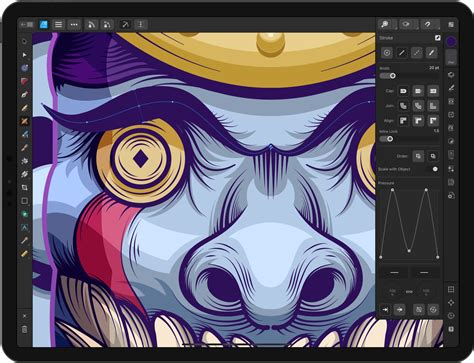
While the iPad versions experienced this dramatic pricing shift, the downloadable versions for Mac initially remained at their full price. This created a bifurcated experience, with different access models depending on the operating system.
Historical Value and User Investment
For years, the Affinity suite has been lauded for its exceptional value proposition, particularly when contrasted with subscription-based alternatives like Adobe Creative Cloud. Many creative professionals and enthusiasts opted for Affinity precisely because of its one-time purchase model, which offered perpetual ownership of the software. For instance, one user reported spending $324.96 CAD on licenses for V1 and V2 of the Affinity suite over four years, a stark contrast to the estimated $4,419.48 CAD for Adobe Creative Cloud at its annual prepaid rate during the same period.
Beyond cost savings, users were often drawn to Affinity's technical prowess. Features such as 32-bit color and OCIO support were considered unmatched in the vector editing space. Furthermore, Affinity's non-destructive filters and effects were seen as a significant improvement over comparable Adobe tools. This blend of affordability and advanced functionality solidified Affinity's position as a strong contender in the professional design software market.
The Canva Acquisition and Its Ramifications
The acquisition of Serif by Canva on March 26, 2024, marked a significant turning point. This event triggered a cascade of changes, some of which have been viewed with concern by the existing user base. Leading up to a major announcement teased for October 30th, several shifts occurred: the Affinity forums transitioned to read-only on October 6th, and the option to purchase a universal license was discontinued.
These changes suggested a move away from the traditional licensing model that had endeared Affinity to its users. The implication was that while one might download and retain the app on their device, the nature of ownership was evolving.
Mac Versions: A Tale of Two Stores
As the news of the acquisition and subsequent changes broke, the availability of Mac versions of Affinity apps presented a complex picture. While the Mac App Store in the US continued to list the applications, they had been removed from the UK store. Crucially, in territories where they remained available on the Mac App Store, the Mac versions were still being offered at their full price, creating a disparity with the free iPad offerings.
Creative Freedom: The Core Promise of Affinity
Despite the evolving pricing and licensing structures, the core promise of "creative freedom" has remained central to Affinity's messaging. The company emphasizes that all the design and photo editing tools needed are available in one app, now notably for free on macOS and Windows.
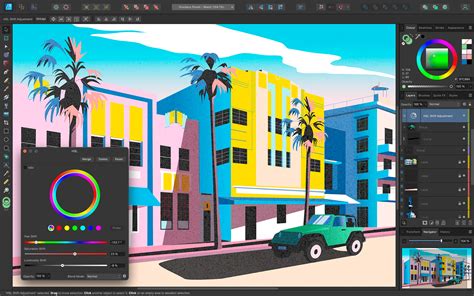
Affinity is designed to adapt to the user's workflow, rather than the other way around. It incorporates built-in Vector, Pixel, and Layout studios, offering users the flexibility to rearrange panels and customize their workspace by mixing and matching favorite tools. Multiple studio setups can be saved, switched between instantly, and even shared with others or downloaded from the community. This level of customization is designed to "flex to your workflow."
One Space to Craft It All
A key feature highlighted is the ability to seamlessly transition between design, image editing, and layout tasks without leaving the document. This integrated approach aims to streamline the creative process.
A Platform That Can Keep Up With You
Affinity is engineered for speed, smoothness, and precision. Its real-time update mechanism means that every adjustment, filter, and layer effect is visible instantly. This allows users to see their work exactly as it will export, facilitating pixel-perfect designs.
Non-Destructive Editing: Preserving Creative Integrity
The commitment to non-destructive editing is a cornerstone of Affinity's philosophy. This ensures that original layers and files remain intact, providing peace of mind for creative exploration. Without the need for smart objects or workarounds, users can stack, tweak, erase, reorder, or remove edits without permanently altering their source material.
Fully-Fuelled Photo Editing
Affinity offers a comprehensive suite of tools for professional photo editing, from intricate image composites to non-destructive RAW editing.
- Advanced Retouching: Tools for flawless and undetectable image touch-ups.
- Epic Image Compositing: The capability to transform single images into complex, multi-layered masterpieces.
- Full RAW Editing: Non-destructive RAW editing with precise control from initial adjustments to final export.
- Stacks, Batch & Macros: Features designed to automate workflows and save significant time without requiring plugins.
Advanced Vector Design
Affinity's vector design capabilities are robust, suitable for creating comprehensive UI systems or sketching logo ideas efficiently. The design process is intended to feel intuitive and natural.
- Curve Editing: Precision tools for sculpting lines with total control over curves, nodes, and paths.
- Shapes: A versatile Shape Builder tool for creating and customizing geometric elements.
- Gradients: Tools for crafting gradients that add depth, color, and texture.
- Image Trace: Functionality to convert flat images into fully editable vectors, providing a clean and scalable foundation.
Page Layout Powerhouse
For publishing projects, whether books, brochures, or multi-section reports, Affinity provides powerful layout management tools.
- Layout Management: Features like Smart Master Pages, AutoFlow, document-wide style systems, column guides, and baseline grids ensure consistent and editable layouts.
- Advanced Typography Controls: Tools for meticulous text crafting, including kerning, leading, line spacing, ligatures, artistic text, OpenType features, and variable font support.
- Press-Ready Output: Options for setting up documents with bleed and margins, running pre-flight checks, and exporting with crop and registration marks, with CMYK and spot color support.
- Data Merge: The ability to integrate spreadsheet or database content directly into designs.
Interoperability and File Handling
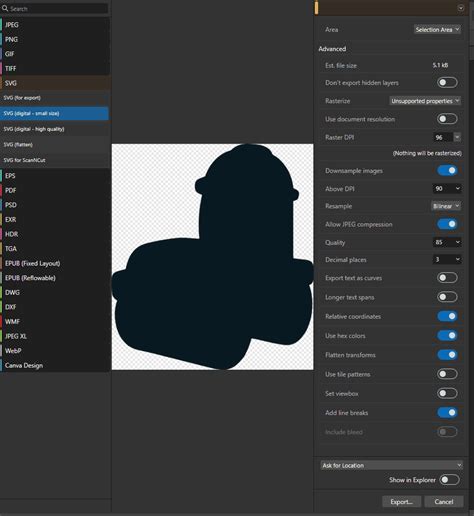
Affinity's ability to import and work with industry-standard file formats is a significant advantage. Users can import PSDs, AIs, IDMLs, DWGs, and other file types, with structure, layers, and creative intent preserved. This interoperability is further enhanced by the fact that, with Affinity being free, collaborators can open and edit files without encountering licensing barriers.
"Zero Bucks Given": The Reality of Affinity's Free Access
The statement "Zero bucks given" encapsulates the current pricing model. Affinity is indeed free, allowing users to access every tool within the Pixel, Vector, and Layout studios, along with all customization and export features, without restrictions or payment. This generous offering applies to the core application.
Integration with Canva AI
A notable aspect of the new ecosystem is the integration with Canva's AI tools. Users on a Canva premium plan can unlock these powerful AI features directly within Affinity, enhancing workflows with generative capabilities. These AI tools include features like Generative Fill, Expand, and Edit, as well as image and vector generation, background removal, and more.
Local Files and AI Training
Canva has emphasized that content within Affinity, which primarily uses local files, is not used to train AI features. Users have control over their data within Canva's settings, with clear distinctions made between local Affinity usage and content uploaded to Canva.
"Made in Affinity": Testimonials and Industry Impact
The sentiment from users like Sphelele “Ellsphee” Gumede, an Illustrator, highlights the perceived commitment of Affinity to supporting creatives. The statement, "Affinity continues to push boundaries and proves once again that they are way ahead of the curve. Since its inception, Affinity has been committed to supporting creatives, and these new updates and features further solidify this commitment," reflects a positive reception to the ongoing development and accessibility of the software.
"Stop Renting Software": A Philosophy of Ownership
The rallying cry "Stop renting software" directly contrasts with the prevailing subscription models in the industry. Affinity's approach, particularly with its one-time purchase history and now its free access model, aligns with a desire for perpetual ownership of creative tools. This philosophy is deeply resonant with many who have felt constrained by the ongoing costs and limitations of rental-based software.
The "Freemium" Model and Future Implications
While Affinity is now largely free, the introduction of Canva's AI tools, which are paywalled behind a Canva Pro subscription, introduces a "freemium" element. These AI features, such as text-to-image diffusion models, are processor-intensive and run in the cloud. The distinction between "Gen AI" and "ML" counterparts, with the latter being less complex and running locally, is also a key aspect of this new offering.
The integration of these AI features, while potentially powerful, comes with a cost, leading to a tiered access model where core functionality is free, but advanced AI capabilities require a premium subscription.
Concerns and Criticisms: The "Enshitification" Debate
The transition has not been without its critics and concerns. The requirement to log in with a Canva account for what is essentially a free, local application has been described as "ridiculous" and indicative of "future enshitification plans." This move, critics argue, allows Canva to potentially revoke access to the software at any time, on their terms.
Furthermore, there are concerns about license validation. Some users have noted that the program appears to invalidate licenses if the computer's date is set too far into the future, suggesting a need for periodic online validation or app updates. This contrasts with the previous model where users owned their licenses outright. The shift from owning a perpetual license to receiving the software on an ongoing basis from Canva, even if free, represents a fundamental change in the user-software relationship for some.
Graphic Designer Q&A: Adobe VS Affinity?? 🧐
The "AI" Debate and Copyright Concerns
The integration of AI tools also raises questions about their utility for specific creative workflows and potential copyright implications. The generative AI features, often trained on vast datasets of existing work, present a complex legal and ethical landscape that many creators are still navigating. The decision to invest in alternative, open-source solutions like Graphite, an open-source Rust-based 2D graphics package, reflects a desire for greater control and a commitment to different development philosophies.
Understanding the New Affinity by Canva App
The newly released "Affinity by Canva" desktop application integrates all the core functionality of Affinity Designer, Photo, and Publisher into a single interface. This unified app offers advanced photo editing, graphic design, and page layout tools. Key features include:
- Design Workflows: Unified access to vector, pixel, and layout tools.
- Customization: Ability to combine vector and pixel work, customize workspaces with floating toolbars and studio presets.
- Performance: Real-time performance engine for smooth editing.
- Non-Destructive Editing: Applied across layers, filters, and adjustments.
- File Compatibility: High-fidelity import of PSD, AI, PDF, SVG, IDML, and more.
- Export Options: One-click presets or custom slice-based output, with quick export direct to Canva.
Powerful Photo Editing Capabilities
- Live Filters and Adjustments: Instant preview of all edits.
- Full RAW Editing: Tone mapping and lens correction.
- Advanced Retouching: Inpainting brush, healing tools, dodge and burn.
- Batch Processing: Recordable macros, HDR merge, panorama stitching.
Pro Vector Design Tools
- Precision Drawing: Pen, node, and pencil tools.
- Live Shape Editing: Booleans and shape builder.
- Flexible Gradients: Full control over gradient creation.
- Pixel-Perfect Vectors: For illustration and layout.
Advanced Page Layout Features
- Linked Text Frames: With autoflow and live text wrapping.
- Smart Master Pages: With overrides and reusable layouts.
- Pro Typography: Ligatures, stylistic sets, drop caps, variable fonts.
- Print-Ready Output: CMYK, spot colors, preflight, bleed support.
- Data Merge: From CSV with tokens, image merge, and conditional logic.
Canva AI Studio Integration
The integration of Canva AI Studio provides access to:
- Generative Features: Fill, Expand, Edit, Generate Images and Vectors.
- AI-Powered Tools: Remove Background, Subject Selection, Colorize, Depth Selection, Super Resolution, Portrait Blur, Portrait Lighting.
- AI Generation History: A record of AI-generated content.
Pricing Structure and Availability
Currently, Affinity is available on Windows and macOS, with an iPad version in development. The core application is free to download and use, requiring only a free Canva account for access. However, unlocking the advanced Canva AI tools within Affinity necessitates a premium Canva plan (Pro, Business, Enterprise, Education).
Enterprise and Educational Access
For organizations, Affinity can be accessed through Canva Enterprise or Canva Districts accounts, offering SSO integration. Educational institutions, including schools, districts, and higher education, are also catered for through specific offerings.
Frequently Asked Questions (FAQs)
Is Affinity really free?Yes, Affinity is free. Users can access all tools in the Pixel, Vector, and Layout studios without restrictions. The app will also receive free updates.
What about Canva AI tools?Canva's powerful AI tools are accessible within Affinity if you have a premium Canva plan.
Why did Canva make Affinity free?Canva's stated reason is a belief that "every designer deserves access to tools that respect their craft" and a desire for a "shift from gatekeeping to generosity." They also indicate that their core business model is sufficient to support this offering.
Do I need a Canva account to use Affinity?A free Canva account is required to download and activate Affinity. For access to Canva AI tools, a premium Canva plan is necessary.
What is the new Affinity by Canva app?It's a unified desktop application combining Affinity Designer, Photo, and Publisher, offering advanced design, photo editing, and page layout tools. It also integrates Canva AI features for premium users.
Are the AI tools free?No, Canva AI features within Affinity are only available to users with a Canva premium account.
What platforms is Affinity available on?Currently, Affinity is available on Windows and macOS. An iPad version is in development.
Can I open files from older Affinity versions in the new app?The new "Affinity by Canva" desktop version can open files created in Affinity V2 or V1. However, older versions (including V2 on iPad) cannot open files created in the newer "Affinity by Canva" app.
Can I install Affinity on multiple devices?Yes, you can install Affinity on as many devices as you like.
Can Affinity import other file types?Yes, Affinity can import PSDs, AIs, IDMLs, DWGs, and other file types, preserving structure, layers, and creative intent.
What languages is Affinity available in?Affinity is available in English, French, German, Italian, Spanish, Portuguese, Japanese, Chinese, Bahasa Indonesian, and Turkish, with more languages planned.
What if I already own Affinity V2 licenses?Your Affinity V2 license (via Serif) remains valid, and Serif will continue to support activation servers for these older versions. However, these apps will not receive future updates. For the best experience and new features, using the new "Affinity by Canva" app is recommended.
Do I need to be online to use Affinity?You need to be online to download and activate your license with your Canva account. After activation, there is no requirement to be online for core functionality, even for extended offline periods. However, some features like product help, lessons, stock libraries, and Canva integrations (including AI tools) do require an internet connection. Regular online connections are recommended for updates.