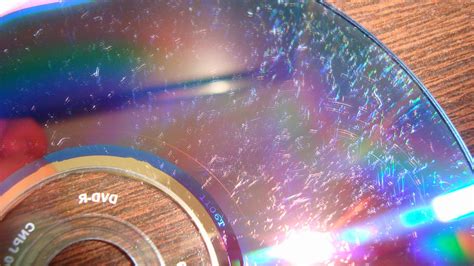
A scratched Xbox 360 disc can be a source of immense frustration, transforming anticipated gaming sessions into a series of frustrating skips, glitches, or outright disc read errors. The core of the issue lies in how your Xbox console interacts with game discs. An Xbox console utilizes a laser to meticulously gather data from the surface of your game discs. When this surface is marred by scratches, the laser's path is disrupted. This refraction of the laser beam is precisely what leads to the dreaded skipping or complete failure to play. Fortunately, a scratched disc doesn't always mean the end of your favorite game. Various methods, ranging from common household items to specialized tools, can be employed to address these imperfections and potentially restore your disc to playable condition.
Understanding the Nature of Disc Damage
Before delving into repair methods, it's crucial to grasp why scratches impede disc functionality. The data on an Xbox 360 disc is stored in microscopic pits and lands on a reflective layer. The laser beam, a focused light source, reads these variations to interpret the game's data. A scratch acts as an obstacle, scattering the laser's light and preventing it from accurately reading the underlying data. The depth and severity of the scratch play a significant role in its impact. Minor surface scratches might be fixable with simple interventions, while deeper gouges can be more challenging, potentially affecting the integrity of the data layer itself.
The physical state of the disc is paramount. A disc that has been tilted or bumped during play is particularly susceptible to developing scratches. This was evident in one user's experience where a bump caused a noticeable circular scratch, leading to an error during game reloading. Such damage, especially if it's a deep, circular scratch, can be quite challenging to repair. It might necessitate grinding down a significant amount of material from the disc's surface. Even if the data layer isn't directly compromised, alterations in the disc's thickness or flatness can introduce optical problems, further hindering the laser's ability to read the data correctly.
Household Remedies for Minor Scratches
Several common household items can be surprisingly effective for addressing minor disc scratches. These methods often work by either filling in the scratch or gently abrading the plastic around it to create a smoother surface for the laser.
The Toothpaste Technique
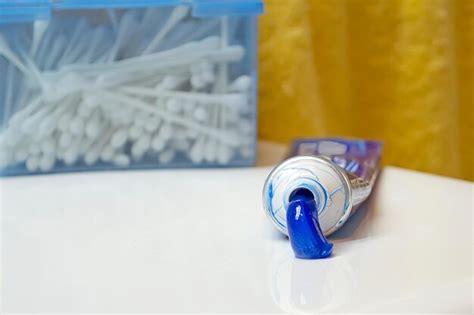
Toothpaste, specifically non-gel, white toothpaste, is a popular and often effective solution. Toothpaste functions as a mild abrasive, sanding down the plastic surrounding the scratch. This process effectively smooths out the rough edges, allowing the laser to pass over the area without significant disruption.
To begin, give the disc a thorough rinse under warm water to remove any loose dirt or grime. It's imperative to use a microfiber or other soft cloth to dry the disc off after rinsing. When drying, employ straight strokes from the center of the disc outwards to the edge, deliberately avoiding circular motions, as these can inadvertently create new scratches. Once the disc is dry, apply a small bead of plain, white toothpaste onto the scratched area. Using a small cotton swab, gently buff the toothpaste along the length of the scratch in small, circular motions, akin to waxing a car. Continue this buffing process until the scratches appear to be smoothed out. After you've finished buffing, give the disc another rinse to remove all traces of toothpaste and dry it once more with a soft cloth, again using straight strokes. Finally, insert the repaired disc into your Xbox console and test if it plays. Some users have reported that this method, or variations of it, can take multiple attempts, with some success reported after up to ten tries.
The Lip Balm Solution
Lip balm, particularly a colorless, flavorless, and glitter-free variety, can also be used to fill in minor scratches. The wax in the lip balm can create a smooth surface that aids the laser in reading the disc.
Begin by applying a layer of lip balm directly onto the scratch, running it up and down the length of the imperfection. After applying several layers, use a soft cloth to gently buff the lip balm into the scratch using small circular motions. Continue buffing until all excess wax has been removed from the disc's surface. Once you've buffed out all of the excess lip balm, you can try using the disc again.
The Magic Eraser Method
A Magic Eraser, a common cleaning tool found in most supermarkets, can also be employed. This method involves gently polishing the disc's surface.
Ensure the disc is clean before proceeding. Scrub in straight lines from the center of the disc outwards. After you've finished polishing the scratches with the Magic Eraser, run the disc under a water tap to rinse away any residue and dry it off with a soft cloth. Once the disc has been polished and rinsed, you can try playing it again.
Specialized Disc Repair Kits
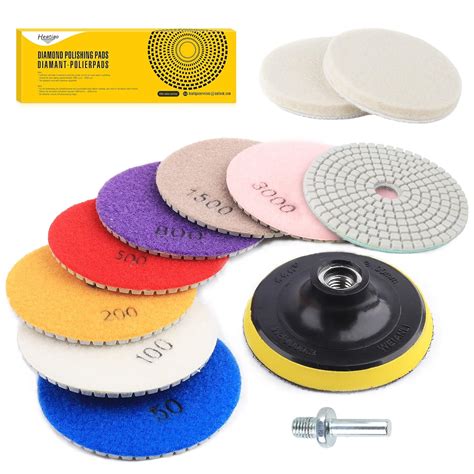
For more persistent or deeper scratches, specialized disc repair kits offer a more robust solution. These kits are widely available online and at electronics retailers. While the exact process can vary depending on the specific kit, they generally involve a mechanism to spin the disc and a polishing pad.
Before using a repair kit, it's advisable to rinse the disc with warm water to remove any debris and dust. Dry it thoroughly with a microfiber cloth, taking care not to spray cleaning solutions onto the label side of the disc. When using a repair tool, ensure the "read" side of the disc is facing the scrubbing pad. You will likely need to operate a crank or press a button to make the disc spin. The tool will then spin the disc, rubbing the cleaning pad across the "read" side. Many repair kits include a buffing cloth; use this to vigorously buff the disc after the repair process. Vigorous buffing helps ensure the disc can be read by the console. After using the repair kit and buffing, insert the disc into your Xbox console and test its functionality. If the disc still doesn't work, you can often repeat the repair process.
Advanced and Cautionary Methods
Some methods involve more significant interventions, requiring extreme caution to avoid further damage.
Controlled Heating
Heating the back of the disc can sometimes slightly melt the plastic coating and fix minor scratches. However, this method carries a significant risk.
It is crucial to avoid using heating methods that apply a lot of heat, such as a stove, as this will likely melt your disc beyond repair. A gentler approach, like holding the disc under a lamp for a short period, might be considered. The key is to apply just enough heat to slightly soften the plastic without causing it to deform or melt. If you opt for this method, hold the disc briefly and then immediately place it in your Xbox console. Start up the console and see if your disc works. Overheating, or holding the disc under heat for too long, can permanently damage the disc.
How to Fix a Scratched DVD
The Car Wax Polish
After employing one of the above methods, applying a small amount of car wax to the repaired surface can provide an additional layer of protection and refinement. Car wax can help fill in any remaining microscopic imperfections and prevent future scratches by creating a smoother, more resilient surface.
Preventing Future Scratches
Prevention is always better than cure. Understanding how discs get scratched can help you avoid them in the future.
- Handle with Care: Always hold discs by their edges or the center hole. Avoid touching the data-reading surface.
- Proper Storage: Store discs in their original cases or specialized disc wallets when not in use. Keep them away from direct sunlight, extreme temperatures, and dusty environments.
- Console Care: Ensure your Xbox 360 console is placed on a stable, level surface. Avoid bumping or tilting the console while a disc is inside, especially during gameplay or when the disc is being read or written.
- Cleaning: Regularly clean the inside of your console's disc drive if dust accumulation is a concern, following the manufacturer's guidelines.
Considerations for Blu-ray Discs
It's important to note that most of these methods are designed for standard optical discs. Many of these methods will not work very well with Blu-ray discs, which have a different structure and material composition. If you are dealing with a scratched Xbox One or Xbox Series X/S game, which use Blu-ray technology, you may need to seek out specialized Blu-ray repair services or consider digital solutions.
When All Else Fails: Digital Installation
For Xbox 360 consoles that have been modified or have the capability to install games to the hard drive, a viable alternative to repairing a scratched disc is to install the game digitally. Borrow a friend's copy of your Xbox game and install it on your Xbox before using your version. This allows you to play the game directly from the hard drive, bypassing the need to read from the scratched disc entirely. This is a particularly effective solution if the disc is severely damaged and beyond simple repair.