Have you ever found yourself in a situation where you need to view or make minor edits to a Photoshop Document (PSD) file, only to be met with the daunting prospect of needing a costly Adobe Photoshop subscription? This is a common predicament, especially for individuals who don't regularly engage in graphic design but occasionally require access to this versatile file format. While Photoshop is undoubtedly a powerful and indispensable tool for professionals, its subscription model can be a barrier for casual users, students, or those with infrequent needs. Fortunately, the digital landscape offers a variety of solutions that allow you to open and even work with PSD files without ever needing to install or pay for Adobe Photoshop itself.
What Exactly is a PSD File?
At its core, a PSD file is the native image file format for Adobe Photoshop. It stands for Photoshop Document. The true power of the PSD format lies in its ability to preserve layers. Unlike flattened image formats such as JPEG or PNG, a PSD file saves an image with all its constituent elements - text, shapes, effects, and individual adjustments - intact on separate layers. This layered structure is a significant advantage, as it allows for complete editability. You can meticulously modify any layer, convert the image into another format, and share it with others, all while retaining the original design's integrity and flexibility. This is why designers, photographers, and web developers often rely on PSD files for their projects, as they provide unparalleled control and non-destructive editing capabilities.
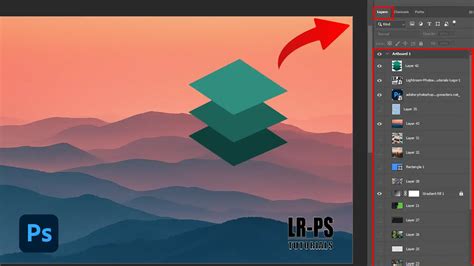
The Advantages of Layered Editing
The layered nature of PSD files is a cornerstone of modern digital image manipulation. For graphic designers, this means they can craft intricate visuals by building them up layer by layer. Each layer can be treated independently, allowing for precise adjustments to color, opacity, blending modes, and effects without impacting other parts of the image. This granular control is essential for creating professional-looking graphics, from logos and icons to complex illustrations and web designs. Photographers also benefit immensely from PSDs, using them to non-destructively enhance and refine their images. They can adjust exposure, color balance, remove blemishes, or apply filters, all on separate layers, ensuring that the original image data remains untouched. Furthermore, PSD files are crucial for web development, where a designer might slice a layout into smaller images for faster loading times. The ability to maintain smart objects within PSDs is another key feature, enabling designers to embed high-resolution graphics that can be resized without any loss of quality, a vital aspect for creating sharp logos, banners, and other design assets.
Accessing PSD Files: A World Beyond Photoshop
The need to view or edit PSD files without Photoshop is a widespread one. Many users, particularly students who might only need to interact with these files for specific assignments, find themselves in this situation. The good news is that a robust ecosystem of free and affordable tools has emerged to address this very need. These solutions range from simple viewers that allow you to see the contents of a PSD file to more advanced editors that can handle layers and effects, and even converters that transform PSDs into more universally compatible formats.
Tools for Windows Users
For those operating on a Windows PC, several excellent options exist to open PSD files.
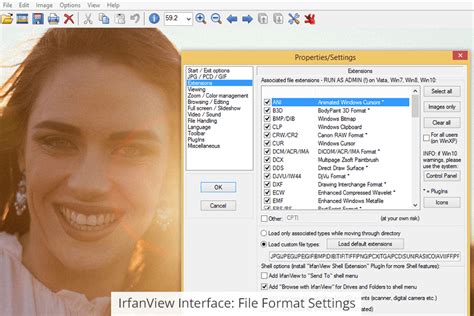
IrfanView: This free image viewer and converter is a lightweight yet powerful tool. While its primary function is viewing and converting, it can render Photoshop files that have been previously flattened. It's important to note that while IrfanView excels at opening and viewing PSDs, direct editing or saving of PSD images might require conversion to another format first. Nevertheless, for a quick preview, IrfanView is exceptionally fast and efficient, requiring minimal system resources.
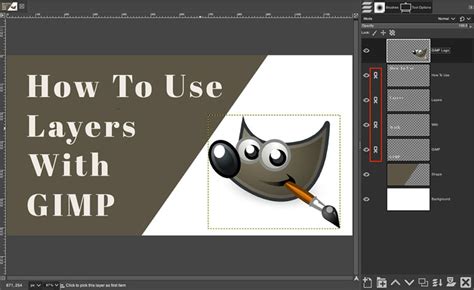
GIMP (GNU Image Manipulation Program): Often hailed as the most capable free alternative to Photoshop, GIMP is a heavyweight contender in the realm of image editing. It boasts native support for the PSD format, meaning you don't need to install any additional plugins to open and work with Photoshop files. GIMP can process every layer of a complex PSD image, offering a level of editing functionality that rivals its paid counterpart. GIMP is also remarkably versatile, available not only for Windows but also for macOS, Linux, and even Android (through unofficial ports like XGIMP).
Paint.NET: Building upon the simplicity of Microsoft Paint, Paint.NET offers a more refined and capable image editing experience. While it can open various image formats, its ability to handle PSDs can be enhanced with the help of third-party plugins. These plugins can unlock the potential to edit individual layers within a PSD file, bringing some Photoshop-like functionality to the platform. However, users should be aware that installing a large number of plugins might occasionally lead to application instability.
XnView: This is arguably the most comprehensive tool on this list, supporting an astonishing array of over 500 audio, video, and image formats, and capable of exporting to over 70. XnView is an excellent choice not only for viewing PSD files but also for converting them into more common formats. It offers different installation settings to suit your needs, from a minimal version to an extended one with all available templates and plugins. XnView is also multi-platform, with versions available for Windows, macOS, and Linux.
Artweaver: Artweaver offers a tiered approach with a free version and a paid "Pro" upgrade. The free version provides a solid foundation for viewing PSD images and performing basic edits. Its interface is intuitive, allowing you to open files directly from your system or within the application. For users whose primary goal is simply to open and view PSD files without the need for advanced editing, the free version of Artweaver is more than sufficient, aligning with the list's focus on cost-free solutions.
Cloud-Based Solutions
In an era of ubiquitous cloud storage, leveraging online services is another practical way to access PSD files.
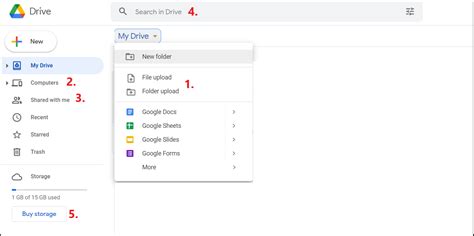
Google Drive: While not a dedicated image editor, Google Drive offers a convenient way to preview PSD files. Simply upload your PSD to your Google Drive account, and the service will process it, allowing you to view the image directly within your browser. This is particularly useful for quickly checking the contents of a file or sharing it with others, eliminating the need for specific software installation.
Photopea Online Editor: This is a standout web-based application that truly bridges the gap. Photopea functions as a powerful online editor that can open, edit, and convert PSD files without any loss of quality. It impressively supports layers, masks, and effects directly from Photoshop, making it an ideal solution for those who need to make quick adjustments or convert PSDs to other formats like JPG or PNG. Its accessibility as an online tool means no software installation is required, making it perfect for occasional use.
How To Edit Psd File In Photopea Tutorial
Solutions for macOS Users
Mac users often have a more streamlined experience when it comes to viewing PSD files.
Preview and Quick Look: macOS comes equipped with built-in applications that offer native support for opening PSD files. The Preview app, which is the default image viewer on Macs, can open many PSD files, allowing you to view their contents. Additionally, Quick Look, a feature that allows you to preview files by pressing the spacebar when a file is selected, can also often display PSD previews. These built-in tools provide immediate access without any downloads.
Mobile Access: iPhones and Beyond
Accessing PSD files on the go, especially on smartphones, can be more challenging, as mobile operating systems typically lack native support for this format.
iPhone Apps: For iPhone users, specialized apps are available. The Image Converter and Adobe Photoshop Mix for iOS are examples of applications that can handle complex formats like PSD, allowing you to view and sometimes even make basic edits to your files directly on your device. While these might not offer the full editing suite of desktop software, they are invaluable when you need to access a PSD file without a computer.
Converting PSD to More Common Formats
For many users, the ultimate goal after opening a PSD file is to convert it into a more universally compatible format, such as JPEG or PNG. This is particularly relevant when sharing files with individuals who do not have access to specialized software or when preparing images for web use.
Batch Conversion Tools: For users with a large volume of PSD files to convert, manual conversion can be time-consuming. Tools like Any2Pic have been recommended for their efficiency in batch processing, allowing users to convert numerous files to JPG or other formats with ease while maintaining quality. This addresses a common pain point for those needing to process many files simultaneously.
Online PSD Viewers and Converters: Beyond Photopea, several online services offer free PSD viewing and conversion capabilities. These platforms often require no registration or software installation. Users can upload their PSD files securely, view them in a web browser, and then download them in a preferred format. Services like Jumpshare, for instance, not only allow viewing but also offer collaboration features like commenting and password protection for shared files. These online tools are designed to be accessible across various operating systems and devices.
Beyond Viewing: Thumbnail Previews
For users who prefer to see PSD file previews directly within their file explorer, specific utilities can be installed. On Windows, a "PSD codec" can enable thumbnail previews, allowing you to identify PSD files at a glance without needing to open them individually. Similarly, on macOS, Quick Look and Preview provide this functionality natively. For users who also use Adobe Bridge, it offers a robust previewing system.
The ability to open and manage PSD files without a Photoshop subscription is more accessible than ever. Whether you need a quick preview, basic edits, or full conversion, a diverse range of free and online tools can meet your requirements, ensuring that the power of layered imaging remains within reach for everyone, regardless of their software investment.