In the dynamic world of digital content creation, video editing tools have become indispensable for individuals and businesses alike. Kapwing has emerged as a popular online platform, offering a suite of tools for video trimming, cropping, subtitle addition, and AI-powered features like auto-subtitling and background removal. However, like any tool, Kapwing has its limitations. Users may encounter prolonged waiting times for AI-generated clips, inconsistent AI output quality, and a general lack of advanced editing capabilities compared to other platforms. Furthermore, repurposed clips might not always focus on key highlights, necessitating significant manual editing. For those seeking more stable AI results, comprehensive editing tools, and potentially more affordable pricing, exploring alternatives to Kapwing is a logical step. This article delves into a range of powerful platforms that can elevate your video creation process, catering to diverse needs from quick social media edits to professional-grade productions.
Vizard: The Smart Editing Powerhouse
Vizard stands out as an advanced video editing platform designed to streamline the entire editing process through smart, AI-enhanced features. Its intuitive interface makes it an excellent choice for both professional and casual video creators. Vizard offers a robust set of tools that go beyond basic editing, providing users with greater control and efficiency.
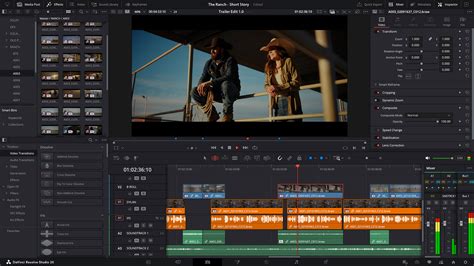
The platform is particularly well-suited for those who require smart editing tools to produce high-quality content efficiently. While a free plan with limited features is available, Vizard truly shines for professional and semi-professional video editors seeking advanced capabilities. For users looking for more advanced editing options such as multi-track editing, keyframe animation, and motion graphics, Vizard provides a level of customization that surpasses Kapwing. Moreover, platforms like Vizard allow for real-time collaboration, making them better suited for team-based projects or content creation workflows involving multiple contributors.
Synthesia: AI-Powered Avatars for Professional Videos
Synthesia revolutionizes video creation by leveraging AI to generate videos featuring lifelike avatars. This makes it an ideal solution for businesses aiming to produce professional videos quickly, particularly for training, presentations, and corporate communications. The platform allows users to upload documentation, such as case studies, training materials, or pitch documents, and uses AI to generate a video based on this content.
The NEW Way to Create Realistic Talking AI Avatars
Synthesia's Starter plan begins at $30 per month, with Enterprise plans available offering custom pricing based on usage and features. This makes it a powerful tool for organizations looking to scale their video production without the need for extensive filming or on-screen talent. The ability to create consistent, branded video content with AI avatars saves significant time and resources.
Powtoon: Engaging Animated Presentations and Videos
Powtoon is an online platform that empowers users to create animated presentations and videos. It offers a range of customizable templates and basic animation tools, making it accessible even for those without extensive technical skills. This makes Powtoon a strong recommendation for educators creating e-learning materials or businesses developing internal training content.
The platform provides a user-friendly environment to bring ideas to life through engaging animations. While a free plan with limited features is available, some advanced functionalities require a paid subscription. Powtoon is particularly effective for creating explainer videos and marketing content where visual appeal and clear communication are paramount.
Clipchamp: Browser-Based Simplicity for Social Media
Clipchamp is a browser-based video editor that simplifies the video creation process. Its drag-and-drop interface allows for quick edits such as trimming, adding transitions, and applying templates, making it particularly effective for generating content for social media platforms like YouTube and Instagram.
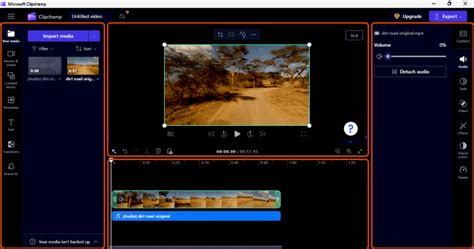
While Clipchamp offers advanced features like 4K exports and AI-powered text-to-speech in its premium plan, it is primarily geared towards users who need fast, straightforward edits rather than complex video production. For users needing a fast, visually appealing output without diving into complex editing, Clipchamp is a great option. It is also a more affordable alternative to Kapwing, offering a solid free tier for basic editing needs.
Canva: Design Versatility Meets Video Editing
Canva is a versatile design tool that has expanded its capabilities to include robust video editing features alongside its renowned graphic design tools. Canva's video editing tools are characterized by their simplicity and ease of use, making it a popular choice for individuals and teams needing to quickly create content for social media, presentations, or marketing campaigns.
The platform provides a variety of features such as trimming, adding animations, transitions, background removal, and voiceovers. If you are a user looking for basic to moderate video editing, especially for short-form content like social media posts, explainer videos, and presentations, Canva is an excellent choice. Its user-friendly interface makes it easy to navigate, especially for those already familiar with Canva for graphic design. Canva is best for those who need a fast, visually appealing output without diving into complex editing.
Pictory: Transforming Text into Engaging Videos
Pictory leverages AI to transform text-based content, such as scripts, blog posts, and articles, into fully edited videos. These videos are often enhanced with subtitles, voiceovers, and background music. The platform excels at quickly generating videos from written content and creating highlight reels, making it particularly useful for repurposing long-form content like webinars, podcasts, and blog articles into shareable social media clips.
The NEW Way to Create Realistic Talking AI Avatars
If you need to convert text into video, Pictory is a highly recommended tool for text-driven video projects. The Standard plan starts at $19/month, with the Premium plan at $39/month, offering a cost-effective solution for content repurposing.
Renderforest: All-in-One Branding and Video Creation
Renderforest is a comprehensive platform often used for creating intro videos, promotional content, explainer animations, and social media visuals. It provides a wide array of tools to help users build their brand identity and create professional-looking content.
Renderforest offers a free plan with basic features, and its paid plans start from €14.99 monthly, providing access to more advanced features and higher quality outputs. It is useful for both business as well as personal use, loaded with suitable video editing and video management features. Despite not having any technical skill, you can at ease produce animations, professional intros, music visualizations, and slideshows with the help of Renderforest.
Veed.io: Accessible Professional Videos on a Budget
Veed.io offers a variety of features suitable for content creators, marketers, educators, and businesses. The platform allows users to perform basic editing tasks like trimming, cropping, adding text, and applying filters, making it ideal for quick edits, especially for social media content like YouTube videos, Instagram posts, or short tutorials.
Veed.io also includes AI-driven features such as automatic subtitles, translations, and even AI avatars, which help streamline the video creation process. I would recommend using Veed if you are looking for accessible, professional-looking videos within a restricted timeframe. The free plan has a limitation of 10 minutes of upload time, with pricing for premium plans designed to be competitive.
InVideo: Streamlined Content Creation with Templates and AI
InVideo offers over 5,000 customizable templates, making it accessible for users with little video editing experience. InVideo's AI-driven features, such as text-to-video conversion and voice generation, streamline video production, making it a strong option for users who want to create content quickly and efficiently. You can create videos based on prompts; simply type in a description of the video you want to generate, and InVideo will create a video with a script and music tailored to your prompt from their media library.
However, InVideo may not be suitable for users who need more complex editing capabilities. Issues like slow exporting times for longer videos and restrictions on template switching can cause frustration for those working on more intricate projects or under tight deadlines. Nevertheless, for users seeking rapid content creation with a wide selection of templates, InVideo is a compelling choice.
Magisto (Acquired by Vimeo): AI-Powered Polished Videos
Magisto, now acquired by Vimeo, uses AI to transform video clips into polished, professional-looking videos. This makes it a fast solution for businesses needing marketing videos with minimal effort. The platform analyzes your footage and automatically applies editing techniques to create a compelling narrative.
Magisto offers a free plan with limited features, allowing users to test its capabilities. Its AI-driven approach simplifies the video editing process, making it accessible even for those with no prior editing experience. The integration with Vimeo means users can benefit from a larger ecosystem of video tools and distribution channels.
Dynamic Mockups: Visualizing Products with Impact
Dynamic Mockups is a platform that allows users to create realistic mockups of their products, often used for marketing and promotional materials. While not a direct video editor in the same vein as Kapwing, it offers a unique way to visualize products within video contexts, adding a professional and engaging layer to marketing content.
This tool is particularly useful for e-commerce businesses or product designers who need to showcase their creations in a dynamic and appealing manner. The ability to embed a full editing suite directly into a print platform or to capture screen recordings with or without sound further enhances its utility for integrated content creation workflows.
Renderforest: Beyond Simple Video Editing
Renderforest is a versatile online platform that extends beyond basic video editing to offer a comprehensive suite of tools for creating animations, intros, music visualizations, and slideshows. It is a free cloud-based presentation software that is useful for both business as well as personal use, backed by round-the-clock live customer support.
The NEW Way to Create Realistic Talking AI Avatars
Renderforest is loaded with suitable video editing and video management features. Despite not requiring any technical skill, users can easily produce professional animations, intros, music visualizations, and slideshows. It is also possible to create 3D online videos for stunning corporate presentations and benefit from templates for explainer animations or whiteboard videos. Producing promo videos is fun with this software.
Picsart: A Comprehensive Creative Suite
Picsart is a widely recognized platform that offers a broad spectrum of creative tools, including photo editing, graphic design, and video editing. Its user-friendly interface and extensive library of templates, effects, and editing options make it a powerful alternative for content creators.
Picsart's video editing capabilities allow for trimming, merging clips, adding music, text overlays, and applying filters. It's a great option for users who want a single platform to handle various aspects of their creative projects, from initial design concepts to final video output. The platform's appeal lies in its accessibility for beginners while offering enough depth for more experienced users.
Clipchamp: A Reimagined Approach to Video Editing
As mentioned previously, Clipchamp stands out for its browser-based approach to video editing. It simplifies the process of video creation, making it accessible and efficient. Users can upload videos, photos, and music to create slideshows and professional-grade video content.
Clipchamp provides access to a host of credible video editing features, including trim and cut options, split and combine functionalities, and the ability to add still photos and audio tracks. Adjusting audio levels is also straightforward. This makes it a robust tool for users who need to produce polished videos without the complexity of traditional desktop editing software.
WeVideo: Professional-Grade Video for Everyone
WeVideo helps users create stunningly gorgeous professional-grade videos and offers an impressive video editing solution. This video editing software comes equipped with screencasting capabilities, making it versatile for various content creation needs. It is mobile-friendly and can be run on Android native and iOS native devices.
WeVideo allows users to upload their company logo or any other image to overlay onto the video player for brand awareness. The social sharing feature facilitates easy distribution of videos on social media channels, helping users gain wider coverage and prominence. The SW Score ranking system underscores its effectiveness within its category.
Veed: Impactful Videos for Audience Growth
Veed is an online video editing tool that enables anyone to create impactful videos and grow their audiences. It sports handy features such as the ability to trim videos and filter them according to various looks. Users can add images, crop them, add text, or draw on them.
Veed also functions as a social media video-creating tool, capable of producing videos tailored to specific channels. Users can experiment with tools to rotate, trim, add images, stickers, emojis, and more. It even allows for the creation of video memes online by uploading a target video, editing it, and downloading the result after quick rendering.
Animoto: DIY Video Creation Made Easy
Animoto is a video maker with a do-it-yourself architecture that can create attractive videos within minutes. The drag-and-drop UI eliminates all prerequisites of video editing experience. Creators can add photos and video clips and choose a storyboard template to get started quickly.
Users can adjust every element of their videos, including colors, fonts, and music, to personalize content according to their brand. The drag-and-drop interface seamlessly integrates photos and videos into pre-built templates, which are versatile and offer high flexibility for edits.
FlexClip: Innovative Video Creation in Three Steps
FlexClip is an online video-making software that allows creators to generate innovative, high-quality videos, slideshows, and movies in no time. The solution offers over 1,000 pre-built templates, saving significant time and effort. A vast media library within the platform provides an enormous stock of royalty-free music, photos, and videos, facilitating a hassle-free editing process.
A wide variety of animated elements, like dynamic texts, widgets, overlays, and logos, help users enhance the engagement rates of their generated videos. Some of FlexClip's versatile features include easy trimming, adding animated texts, color grading, voice recording, and video export facilities. The solution utilizes browser-native processing technology to speed up the entire process and ensure proper security and privacy. With FlexClip, creators can complete their editing process in just three simple steps.
OpenShot: Advanced Features for Professional Videos
OpenShot is a video editing software for businesses and individuals to create beautiful, professional-looking videos using its advanced features. Video creators can quickly trim down videos to retain the best moments. They can use the available powerful animation framework to add fade, slide, bounce, and other effects to create more engaging videos.
The software also supports adding watermarks, background videos, and audio tracks. OpenShot includes a Video Effects Engine that can remove backgrounds, adjust brightness, invert colors, and more. Users can visualize their audio files as waveforms and output them as part of their video. Furthermore, creators can render beautiful 3D animated titles and effects, along with slow-motion, speed-up, slow-down, and reverse features.
InVideo AI: Effortless Video Generation
InVideo AI aims to simplify video creation, making it quick and easy without the arduous task of assembling documents, editing audio, or designing special effects. With just a thought, InVideo AI can generate a script that perfectly fits a topic before creating scenes and adding voiceovers to bring it all together.

InVideo AI provides an array of options designed specifically with professionals in mind, offering essential tools to make highly effective videos. Users can change visuals quickly, adding and refining clips and music using an intuitive editor. The platform allows for the output of stunning 4K videos with crystal-clear audio, resembling professional production quality at a fraction of the time and cost.
Wideo: Animated Marketing Videos for Professionals
Wideo is a web-based animated marketing video creation platform explicitly built for digital agencies, SMBs, and marketing professionals. This tool offers templates through which users can create videos easily and quickly by adding their own images and videos, then animating them in just a few clicks.
Wideo is a useful online video creation platform for users to edit, create, and share online videos. It is effective in increasing social media engagement and boosting CTRs. It is cost-effective while maintaining full creative control. Wideo comprises a wide collection of animations and elements through which users can choose templates according to their specific needs.
RunwayML: Machine Learning for Video Editing
RunwayML is a comprehensive video editing software for every video creator, enabling them to edit videos without coding by utilizing machine learning tools. The software streamlines the entire video editing process directly from the user's browser, providing various tools and features like masking, color correction, composting, generation, and VFX.
With its rotoscoping functionalities, creators can turn any video into a green screen for quick editing. The Inpainting feature automatically removes unwanted elements and objects from videos, facilitating fast and consistent editing. Creators can also modify their content using a multiband video stream format, access advanced AI-generated analysis and metadata, and utilize accurate depth maps for more realistic visuals. An optical flow feature helps users understand object movement through relative motion analysis.
Vidnoz AI: Revolutionizing Video Creation
Vidnoz AI is presented as a game-changer in video creation, designed to bring visions to life while saving time and money, increasing ROI and efficiency. Gone are the days of spending hours or days trying to piece together a stunning video. With Vidnoz AI, users can create captivating videos faster than ever.
This cutting-edge video generator allows users to start with an extensive library of ready templates and avatars or begin from scratch, offering complete creative freedom. Users can type in the exact words they want their AI avatar to speak, choose from a diverse range of voices, and seamlessly integrate their vision into the video. Vidnoz AI streamlines the video creation process, saving time and cutting costs significantly by eliminating the need for expensive video production teams or complex software. It is designed to cater specifically to professionals, delivering outstanding results for business owners, marketers, and trainers.
Recast Studio: Fast and Easy Video Building
Recast Studio is a creative platform through which users can build videos quickly and easily using pre-built templates and an intuitive interface. The software enables users to choose from a variety of templates carefully crafted for different categories and customize them accordingly. Users can drag and drop their elements onto the canvas and customize color, size, and animation to suit their brand identity.
Recast Studio provides an intuitive timeline and filter effects to help create engaging videos easily. Users can access a stock media library with millions of premium and free stock videos, illustrations, images, music, and icons. One can select from hundreds of models in multiple poses and expressions.
StudioBinder: Production Management for Filmmakers
StudioBinder is a cloud-based production management solution that helps creators develop and manage video, film, and TV production processes smoothly. It allows professionals to write formatted scripts and visualize scenes with shot lists and storyboards. It includes a full-featured call sheet software with beautiful and customizable templates that automatically link to pull weather data, maps, and hospital details.
Users can easily switch between shot lists and storyboard views. It allows professionals to customize aspect ratios and add their images. The shot list and storyboard feature comes with quick hotkeys to edit, add, or duplicate new shots. The storyboarding software offers fast and efficient visualization tools along with an all-in-one production workflow solution, and the option to import scripts easily from any screenwriting software.
Other Notable Platforms
Beyond these core alternatives, several other platforms offer unique strengths. Dynamic Mockups provides a way to integrate video editing within other creative workflows. Renderforest is recognized for its extensive template library suitable for various branding needs. Picsart offers a comprehensive suite of creative tools, including video editing, for a holistic approach. Clipchamp, as previously detailed, excels in browser-based simplicity. WeVideo provides professional-grade tools with screencasting capabilities. Veed focuses on creating impactful videos for audience growth, and Animoto simplifies DIY video creation with its drag-and-drop interface. FlexClip streamlines video creation into three simple steps with a vast media library. OpenShot offers advanced features for professional-looking videos, while InVideo AI focuses on effortless video generation from prompts. Wideo specializes in animated marketing videos, and RunwayML harnesses machine learning for advanced video editing. Vidnoz AI aims to revolutionize video creation with AI avatars and templates, and Recast Studio offers fast and easy video building. Finally, StudioBinder provides robust production management tools for film and TV professionals. Each platform, in its own way, addresses the need for powerful and versatile video creation tools that can serve as compelling alternatives to Kapwing, offering enhanced features, improved workflows, and greater creative control.