Are you sometimes blocked in your painting process, and you don’t know your next step? Do you feel that the colour you used in the background is not the right colour? Should it be darker, lighter or completely different? Many artists, whether they are just starting out or are seasoned professionals, face these creative hurdles. The digital realm, however, offers unique solutions to overcome such challenges, and the Procreate app on the iPad stands out as a powerful tool for exploration and refinement.
When an artist is stuck in their painting process and is not sure how to continue, playing with the app Procreate on an iPad can be incredibly helpful. This digital environment allows for experimentation without the commitment or mess of traditional media, making it an ideal space to brainstorm and test ideas. You can try out different colour backgrounds, emphasize light and dark areas, and add some patterns, all without ruining your painting. This freedom to iterate is a significant advantage of digital art.
The Procreate app is a one-time purchase of $9.99, with no subscription fee, making it an accessible investment for artists looking to enhance their workflow. This cost is often considered well worth it for the extensive capabilities it offers.
Unlocking Creative Flow with Procreate's Iterative Process
When you ‘paint’ in Procreate, you can try out colours, composition, and more without getting your hands dirty! This means you can experiment with a vast array of possibilities. For instance, if you're unsure about your background colour, Procreate allows you to instantly swap it out for dozens of alternatives. You can test a darker shade to create mood, a lighter tone for vibrancy, or an entirely different hue to see how it impacts the overall composition. This ability to preview changes in real-time is invaluable for making informed artistic decisions.
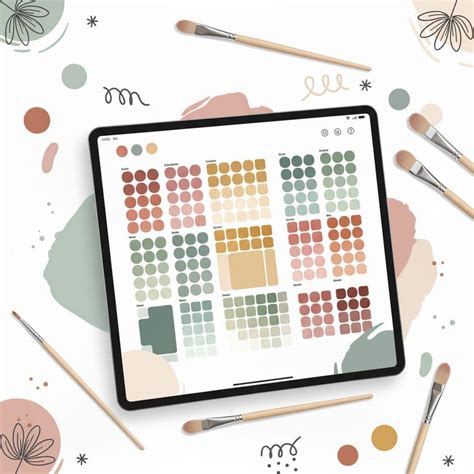
Furthermore, Procreate excels at helping artists visualize the interplay of light and shadow. You can quickly add placeholder shapes or gradients to test how different lighting scenarios would affect your subject matter. This is particularly useful for developing a strong sense of form and volume in your artwork. Similarly, the app makes it easy to integrate patterns, whether as subtle textures or bold decorative elements, allowing you to explore how they might enhance or detract from your piece before committing to them.
The Power of Layering and Non-Destructive Editing
At the core of Procreate's utility for overcoming creative blocks lies its robust layering system. Each element of your artwork can exist on its own layer, meaning changes made to one layer do not affect others. This non-destructive workflow is a game-changer. If you decide a particular colour choice on a background layer isn't working, you can simply delete or modify that layer without impacting your foreground subject or any other elements. This is a stark contrast to traditional painting, where altering a background might require repainting large sections of the canvas.
The ability to duplicate layers also provides a safety net. You can create a copy of your entire painting or specific elements before making significant changes. This way, if an experiment doesn't yield the desired result, you can always revert to a previous state. This iterative approach, facilitated by Procreate's features, encourages bolder experimentation and reduces the fear of making irreversible mistakes.
Exploring Procreate's Tools: Brushes, Colors, and Gestures
For those new to digital art or Procreate specifically, the "Beginners Series" is an excellent resource. Whether teaching yourself or others, this series is your go-to for discovering the fundamentals of Procreate. It helps you get to grips with brushes, tools, gestures, and more in an easy and practical way. This series is a great place to start.
The "Beginners Series" is designed to empower you with all the skills you'll need to discover the basics of digital art and your own creative potential. It offers a four-part journey that walks you step-by-step through Procreate's essential tools and features, enabling you to start creating digital art right away.
Part One: The FundamentalsThis section focuses on familiarizing you with the Procreate interface and its core functionalities. You'll learn your way around Procreate and start creating digital art right away with basic tools like the brush, color selection, and essential gestures. Understanding these building blocks is crucial for a smooth learning curve. Gestures, for instance, like the two-finger tap for undo or the three-finger scrub for clearing a layer, significantly speed up the workflow once mastered.
Part Two: Painting ToolsOnce you've got the basics down, this part delves deeper into Procreate's more advanced features. You'll explore colors, brushes, layers, and effects as you create a beautiful night scene. This practical application of tools helps solidify your understanding. You'll learn how to select colours effectively, understand different brush properties (like opacity, flow, and wetness), and begin to utilize layers for more complex compositions. Experimenting with blending modes for layers can drastically alter the mood and appearance of your artwork, adding depth and sophistication.
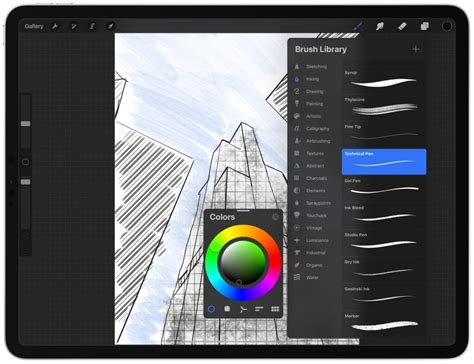
Part Three: Editing ToolsWith your newfound skills, this section guides you through Procreate's powerful editing tools. You’ll discover how they work in conjunction with your painting and drawing techniques. This includes features like selection tools, transform functions (scale, rotate, distort), adjustments (hue, saturation, brightness, contrast), and filters. These tools allow for fine-tuning your artwork, correcting mistakes, and achieving specific artistic effects, further enhancing the non-destructive nature of digital art creation.
Brush Selection and Experimentation
While the app offers a vast library of brushes, many artists find a few favorites for their workflow. For example, the brush ‘Evolve’ is frequently mentioned as a versatile option. However, the true power lies in exploring the diverse brush sets available. Procreate allows for deep customization of existing brushes and the creation of entirely new ones. This means you can tailor tools to your specific needs, whether you're aiming for a watercolor effect, a charcoal texture, or a sharp, graphic line.
Don’t be afraid to try out all the different brushes. Each brush has unique characteristics that can influence the stroke's texture, opacity, and behavior. Experimenting with brush settings like grain, streamline, and shape can lead to unexpected and exciting results. This exploration is key to developing a personal artistic style.
Beyond the Basics: Color Theory and Advanced Techniques
For artists who find themselves consistently struggling with color mixing, where their colour mixes turn into mud and they don’t know why, specialized training can be immensely beneficial. Joining a "Colour Bootcamp" can provide targeted instruction. In such a bootcamp, you will learn all about colour theory, single pigmented paints, colour values, and more. This knowledge is foundational for understanding how colours interact and how to achieve clean, vibrant mixes.
Understanding colour theory is not just about mixing paint; it's about understanding how colours affect mood, perception, and the overall harmony of a piece. Learning about colour values (lightness and darkness) is critical for creating depth and form, even before you start thinking about hue and saturation. Mastering these concepts will help you take a big step in your painting process, leading to more confident and successful colour choices. At the end of such a bootcamp, you will be mixing colours like a colour Pro!
Blend Modes Procreate Tutorial #procreatetutorial #procreatetips #digitalcalligraphy
A YouTube Tutorial for Visual Learners
To further assist artists in their Procreate journey, a YouTube tutorial can be an invaluable resource. Such a tutorial would typically explain step-by-step how to upload a painting into Procreate and how to work on it to gather ideas. This visual demonstration can demystify the process for beginners and offer new strategies for experienced artists. Watching someone else navigate the app and apply techniques can be incredibly insightful and inspiring.
The creator of such a tutorial might share their personal workflow, highlighting how they use Procreate to overcome creative blocks, experiment with different elements, and refine their artwork. The hope is that by sharing these processes, it can help viewers in their own painting process.
Engaging with the Procreate Community
The journey of learning Procreate, like any artistic endeavor, can be greatly enhanced by community interaction. If you have any questions after exploring tutorials or the app itself, reaching out is encouraged. Checking out a creator's YouTube Channel for more tutorials and subscribing for ongoing content is a great way to stay updated and continue learning. The digital art community is often very supportive, with forums, social media groups, and Q&A sessions providing platforms for artists to connect, share their work, and seek advice.
Thinking Laterally: Procreate Beyond Painting
While the focus is often on painting, Procreate's capabilities extend far beyond. Its precise drawing tools, animation features, and text integration make it suitable for a wide range of creative projects, including illustration, graphic design, comic creation, and even simple animation. The ability to export work in various formats (like PSD files that retain layers for Photoshop) ensures compatibility with other professional software, making Procreate a versatile addition to any digital artist's toolkit. The iterative nature of Procreate also lends itself to concept art, where rapid idea generation and visualization are paramount. Artists can quickly sketch out multiple character designs, environment concepts, or prop variations, using the app's flexibility to explore different directions without significant time investment. This makes it an indispensable tool for game development, film pre-production, and any field requiring extensive visual ideation.
The core advantage of Procreate lies in its ability to provide a low-stakes environment for high-stakes creative decisions. When faced with a dilemma about colour, composition, or detail, the digital canvas becomes a playground for exploration rather than a source of anxiety. By embracing the tools and techniques available within Procreate, artists can transform moments of creative block into opportunities for discovery and innovation, ultimately leading to stronger, more resolved artworks.