While traditional computing tasks might seem confined to desktops and laptops, the reality is that many of these functions have migrated to our smartphones. Photo editing is a prime example, offering powerful capabilities on a smaller screen, even without the precision of a mouse and keyboard. Among the plethora of photo editing applications available, Adobe offers a streamlined yet potent solution for iPhone users: Photoshop Express Photo Editor. This guide will delve into how to leverage this app to transform your mobile photography, exploring its features from basic adjustments to advanced AI-powered enhancements.
Understanding Photoshop on Mobile: Express vs. Full Power
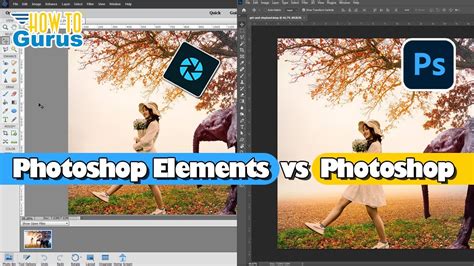
It's crucial to understand that Photoshop on your iPhone, in the form of Photoshop Express Photo Editor, is a distinct application from its desktop counterpart. While it carries the renowned Photoshop name, it's a "cut-down, simplified version of Photoshop for smaller screens and less powerful devices." This means you won't find the exact, exhaustive feature set of Photoshop desktop. However, for the vast majority of mobile photo editing needs, Photoshop Express provides an extensive and user-friendly array of tools.
For those seeking a more robust, desktop-like experience on a tablet, Adobe offers "Adobe Photoshop for the iPad." This version is a more fully featured mobile Photoshop, bringing support for the PSD format, layers, advanced retouching features, and sophisticated selection tools. However, this powerful application is not free; it requires a subscription to a Creative Cloud plan that includes Photoshop.
Getting Started with Photoshop Express on iPhone
To embark on your photo editing journey with Photoshop Express, the first step is to download the app, which is available for free on both iOS and Android platforms. Once installed, you'll be ready to dive in.
To begin editing, tap "Photo Editor & Retouch" within the app. This action will prompt you to pick an image from your iPhone's gallery. Once your chosen photograph is loaded, a world of editing possibilities opens up.
Essential Editing Tools at Your Fingertips
Photoshop Express Photo Editor equips you with a comprehensive suite of tools to refine and enhance your images. Here's a closer look at some of the key functionalities:
Correcting Imperfections with the Heal Brush
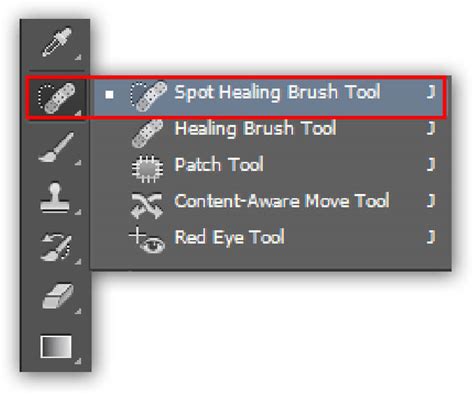
The Heal brush is an indispensable tool for correcting blemishes and inconsistencies within your image. Whether it's a stray hair, a distracting spot, or an unwanted element, the Heal brush allows you to seamlessly blend the surrounding pixels to erase imperfections. Beyond simple blemish correction, this versatile tool can also be used to clone or erase certain areas of your photograph, giving you granular control over the composition.
Transforming Backgrounds with the Background Tool
The Background tool offers a creative way to alter the context of your subject. It allows you to apply various effects to the background of a picture. This can range from subtle enhancements to dramatic transformations, enabling you to isolate your subject or create entirely new visual narratives.
AI-Powered Magic: Insert Objects
Photoshop Express Photo Editor proudly features AI generation capabilities built-in. A particularly exciting example is the Insert Objects button. By tapping this, you can enter a text prompt, and the AI will generate an object or animal based on your description. You can then drop in an AI-generated animal or object anywhere you like within your image, opening up a realm of creative possibilities for composites and imaginative edits.
Adobe Photoshop | How to add objects with generative AI in Photoshop
Enhancing Visual Appeal: Filters and More
Beyond the more advanced tools, Photoshop Express offers a range of features designed to quickly enhance the overall look and feel of your images:
- Filters: You can apply filters to entire images. These can range from subtle adjustments like a warm filter to dramatic shifts like a pop color filter, instantly changing the mood and aesthetic of your photograph.
- Image Combination: The app allows you to combine images together, enabling you to create collages or blend elements from different sources.
- Overlays: Enhance your images with stickers, scribbles, and text on top of your pictures. This is perfect for adding personality, context, or artistic flair.
- Borders: To frame your creations, you can drop in a wide selection of borders. Simply swipe left and right to see all the available tools, offering a variety of styles to complement your photos.
Exploring Adobe's Photo Ecosystem: Lightroom and Adobe Express
While Photoshop Express is a powerful standalone app, it's part of a larger Adobe ecosystem designed to cater to various creative needs.
Adobe Lightroom: The Professional's Choice for Mobile
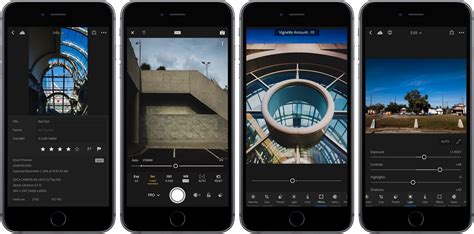
Lightroom is another compelling option available for both iOS and Android. As the companion app to Photoshop, it's renowned for its professional-grade photo management and editing capabilities. With Lightroom, you can perform extensive adjustments to color, tone, and detail.
Similar to Photoshop Express, you can utilize a significant portion of Lightroom's functionality for free. However, for access to more advanced features, such as the powerful healing brush and batch editing capabilities (allowing you to apply edits to multiple photos simultaneously), a subscription is required. This subscription costs $4.99 per month or $49.99 per year.
Adobe Express: For Graphic Design and AI Art Creation
For those whose creative aspirations extend beyond traditional photo editing and into the realm of graphic design and AI-powered art creation, Adobe Express is a valuable tool to consider. This app, also available for iOS and Android, is specifically tailored for crafting visually appealing content quickly.
Adobe Express is ideal for tasks like quickly creating social media posts. You can either start with one of your own images or select from a vast library of many templates, streamlining the design process. Its AI art generation features further empower users to create unique visual assets with ease.
Beyond the Basics: Advanced Considerations
When using Photoshop Express on your iPhone, it's beneficial to keep a few advanced concepts in mind to maximize your editing potential.
Understanding Layer-Based Editing (on iPad)
While Photoshop Express on iPhone doesn't natively support true layer-based editing in the same way as desktop Photoshop, it's important to note that Adobe Photoshop for the iPad does bring support for layers. This fundamental feature allows for non-destructive editing, where each adjustment or element is placed on its own layer, enabling you to modify or remove them independently without affecting other parts of the image. For iPhone users, this means that while you can combine images and add text or stickers, these are often applied more as direct modifications to the base image rather than distinct, editable layers.
The Role of AI in Modern Photo Editing
The integration of AI in Photoshop Express, particularly with features like "Insert Objects," signifies a major shift in photo editing. This technology democratizes complex editing tasks, allowing users to achieve sophisticated results with simple text prompts. AI can also assist in tasks like intelligent object selection, background removal, and even stylistic transformations, making powerful editing accessible to a broader audience.
Creative Cloud Subscription Benefits
For users who find themselves frequently utilizing Adobe's suite of creative tools, a Creative Cloud subscription offers a comprehensive solution. As mentioned, this subscription unlocks advanced features in mobile apps like Lightroom and provides access to the full Photoshop experience on iPad. Beyond the apps themselves, Creative Cloud offers cloud storage, font libraries, and other resources that can significantly enhance a creative workflow.
By understanding the different Adobe offerings and the capabilities of Photoshop Express on your iPhone, you can transform your mobile device into a powerful portable photo studio, capable of producing stunning images with both precision and creative flair.