Adobe's Generative Fill technology has emerged as a groundbreaking innovation, fundamentally altering the landscape of digital image editing and creation. While game-changing AI models like ChatGPT (GPT-4) have captured significant attention, it is Adobe's integration of Generative Fill directly into Photoshop that has, perhaps surprisingly, been hailed as the best AI invention of 2023 by TIME. This powerful AI capability has been democratized, placed directly into the hands of millions of users through the world's most popular image editor. For decades, Adobe Photoshop has been a complex, often intimidating, yet revolutionary program in the digital image software market. Each year, its features grew more intricate, but Generative Fill represents a significant shift, rendering vast swathes of complicated workflow practices obsolete with a single update. This has, in turn, made becoming a Photoshop expert more accessible than ever before.

From Editing to Creation: A New Artistic Horizon
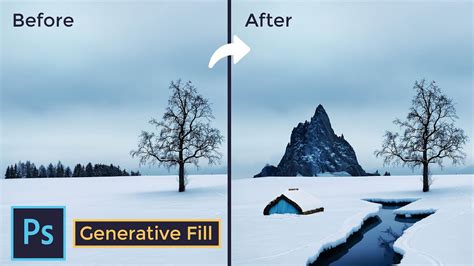
Traditionally, Adobe Photoshop has been perceived primarily as an editor - a sophisticated tool designed to enhance, correct, or modify existing visual content. However, the advent of Generative Fill marks a pivotal transition, propelling Photoshop firmly into the domain of digital creation. This feature signifies a paradigm shift, moving beyond mere content alteration to the actual conjuring of new elements into existence. It effectively extends the creative canvas of users beyond the inherent confines of a captured image. Generative Fill achieves this by analyzing the surrounding pixels within an image and synthesizing entirely new, previously non-existent parts with a remarkable degree of sophistication that can only be described as ‘creative intelligence.’ For creative professionals, this translates into an unprecedented ability to not only retouch existing imagery but also to reimagine and invent new visual narratives. Designers can now conceive and fabricate scenarios, objects, and environments within Photoshop that were previously either impossible to achieve or prohibitively time-consuming.
The Contextual Editing Journey: A Path Paved by AI Empowerment
To fully grasp the significance of Generative Fill, it is essential to trace the evolutionary path that led to its development. A crucial stepping stone was the introduction of "Content-Aware Fill" in 2019. This tool leveraged early AI capabilities to intelligently fill selected areas within an image, demonstrating a nascent understanding of what might logically exist behind a removed object. This marked an early move towards contextual editing, where the software began to interpret the image content it was processing, rather than merely treating it as a collection of pixels. Over the subsequent years, Adobe progressively enhanced its AI-powered features, introducing increasingly nuanced tools for background masking and subject selection that often seemed to anticipate user intent. These advancements in AI techniques laid the essential groundwork for Generative Fill, as Adobe’s algorithms developed a more sophisticated capacity for interpreting complex image data. Generative Fill, therefore, stands on the shoulders of these preceding innovations, harnessing a deeper comprehension of image content to fill gaps with new material that is not only contextually appropriate but also harmonizes seamlessly with the existing visual composition.
Integrating Generative Fill into the Professional Workflow
The true measure of any new feature's success lies in its ability to integrate seamlessly into the established workflows of its intended users. Professionals in fields such as photography, graphic design, and digital art have meticulously honed their creative processes over years of practice, and any disruption can be as much of a hindrance as a benefit. Adobe's Generative Fill is designed to slot effortlessly into existing workflows, functioning with the intuitive simplicity characteristic of Photoshop's user interface while simultaneously delivering unparalleled creative power. The feature is engineered to intuitively understand the professional's intent, often requiring minimal user input to yield high-quality results. Furthermore, it serves a dual purpose: acting as a reactive tool for fixing and filling needs, and as a proactive asset in the creative process itself. Whether employed during the initial ideation phase, where a concept is still taking shape, or during the final refinement of a composition, Generative Fill operates in synergy with the artist's creative vision. This seamless integration is a testament to Adobe's ongoing commitment to building upon its AI framework in ways that enhance the user experience without introducing unnecessary complexity.
Generative Fill in Action: Practical Applications and Workflows
The practical application of Generative Fill transforms the way users approach image manipulation. The process typically begins with uploading an image, after which users can select specific areas for modification. Tools like "Magic Edit" (in some platforms) allow for the addition, removal, or alteration of elements through simple text prompts. For instance, if a photographer has an image of a landscape and wishes to add a flock of birds to the sky, Generative Fill eliminates the need for painstaking manual creation of each individual bird. This capability is powered by Generative Adversarial Networks (GANs), a sophisticated type of AI algorithm that understands the content and context of an image.
Generative Fill's utility extends beyond mere addition; it is equally adept at tasks such as removing unwanted objects, altering backgrounds, or even subtly changing the overall mood of a photograph. The introduction of Generative Fill signifies a move towards more intelligent and context-aware editing tools. To utilize this feature within Photoshop, a Creative Cloud membership that includes Photoshop is currently required. Upon activation, the generated content appears on a new layer, offering flexibility for further adjustments. If the initial results are not satisfactory, users can regenerate options by clicking "Generate" again.
For professionals like Graphic Designer Virtual Assistants, staying abreast of the latest technological advancements is crucial for maintaining competitiveness and providing maximum value to clients. Mastering Generative Fill enables them to rapidly produce diverse design options, which is particularly advantageous for businesses requiring a high volume of visual content within tight deadlines. As AI technology continues its rapid evolution, Generative Fill is expected to become even more sophisticated and capable. Proficiency in this feature not only enhances a virtual assistant's skill set but also demonstrates a commitment to innovation and continuous learning - qualities highly prized in the professional sphere.
The core process involves selecting an area within an image and providing a text description of the desired modification. For example, in a photograph of a street scene, if one wishes to add an antique car to a specific location, a selection can be made, and the prompt "Antique car" entered. Photoshop, leveraging its underlying generative AI technology, will then create variations of an antique car that fit the context of the scene. This process is made more user-friendly through Photoshop's direct integration, featuring a clean interface and a Contextual Task Bar that offers commands like "Select Subject" or "Remove Background." Clicking these reveals a text field for descriptive prompts.
Upon clicking "Generate," Photoshop presents multiple AI-generated variations. These are typically displayed within a specialized "Generative Layer," which also includes a mask corresponding to the selected area. This ensures that edits are non-destructive and easily adjustable. Importantly, Generative Fill aims to produce results at the same resolution as the original photograph, a significant improvement over older methods that relied on pixel duplication from elsewhere in the image, which could lead to repetitive patterns.
Beyond Simple Edits: Expanding Creative Possibilities
Generative Fill's capabilities extend far beyond basic object removal or addition. It excels in tasks such as altering backgrounds, changing clothing, or even extending the canvas of an image, a process often referred to as "outpainting." When extending the canvas, users can utilize the Crop tool to define new dimensions for the image. The software then intelligently generates content to fill these newly created areas, making informed guesses based on the existing image data and its training. For instance, a photographer might shoot a horizontal image but later need a vertical version for a specific layout. Generative Fill can expand the canvas above and below the original image and then fill these expanded areas, effectively transforming the aspect ratio.
In cases of object removal, Generative Fill analyzes the context of the image to generate a plausible replacement for the removed area. For example, if an image contains two people and one is removed, the tool attempts to generate what would logically be behind that person, rather than simply cloning pixels from adjacent areas. While this process can be remarkably effective, it is not infallible. In some instances, the AI might misinterpret the intent, such as attempting to replace a removed person with another random person if no specific prompt is given. Explicitly typing a prompt like "Remove person" can often yield the desired outcome.
Replacing elements is another powerful application. For example, an image featuring a dessert could be modified by selecting the original elements and prompting for "Blueberries" to transform it into a blueberry tart. Similarly, a glass of cold brew coffee in the background could be replaced with a "Pint of beer." Adding arbitrary items to empty spaces can be more challenging, with success often depending on the size and shape of the selection made and how well it approximates the intended object's context.
Generative Fill can also be employed in more precise ways, such as modifying clothing on a person. However, the results can be unpredictable, and achieving the desired outcome may require multiple prompt iterations and revisions. Individuals with a keen eye for fashion may find Photoshop's generated clothing choices to be less than ideal.
The Underpinnings of Generative Fill: AI and Machine Learning
At its core, Generative Fill relies on advanced artificial intelligence and machine learning techniques, particularly diffusion models. These models are trained on vast datasets of images, enabling them to understand visual patterns, textures, lighting, and context. When a user provides a selection and a text prompt, the AI analyzes the surrounding pixels and interprets the prompt to generate new content. This process involves computer vision for image structure analysis (edges, depth, lighting, texture) and natural language processing (NLP) for understanding user prompts. The diffusion model then begins with random noise and gradually refines it into a coherent image that aligns with both the contextual information from the surrounding pixels and the instructions from the text prompt.
The AI doesn't simply duplicate surrounding pixels. Instead, it synthesizes entirely new content that is contextually relevant. This is a significant leap from earlier "content-aware" technologies, which primarily relied on sampling and blending existing image data. Generative Fill actively "imagines" what should be in a given space, leading to more natural and integrated results, even in complex scenarios with challenging lighting and intricate patterns.
Limitations and Ethical Considerations
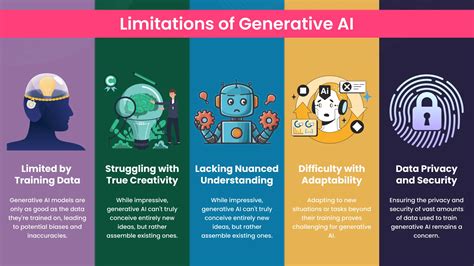
Despite its impressive capabilities, Generative Fill is not without its limitations. As of its beta release, it has certain constraints, such as a maximum generation area size of approximately 1000 pixels. Larger areas may require upsampling, potentially leading to a loss of detail or a blurry appearance. Workarounds involve making multiple smaller selections. Furthermore, Generative Fill relies on cloud processing, necessitating an active internet connection and introducing a slight delay in processing times compared to purely local Photoshop tools.
One of the most significant limitations is the AI's struggle with generating coherent and accurate text. While it can produce text-like shapes or jumbled letters, creating legible text that conveys specific meaning is currently very difficult. This also extends to generating logos or other specific graphical elements where precision and distinctiveness are paramount. The more obscure or complex the request, the less reliable the results tend to be.
Generating detailed objects from scratch can also present challenges. While a generated object might appear plausible at first glance, closer inspection can reveal inconsistencies, such as mismatched tire sizes on a vehicle, awkward positioning of design elements, or missing details like license plates. The software also sometimes struggles to combine multiple distinct concepts within a single generation. For instance, a prompt like "dog sitting on a park bench" might yield less than ideal results, whereas breaking it down into generating the bench first, then the dog on the bench, can lead to a more acceptable, though still imperfect, outcome.
The ethical implications of Generative Fill are also a significant topic of discussion. The ease with which images can be altered or entirely fabricated raises questions about authenticity, artistic integrity, and the potential for misuse. For photographers, particularly those involved in contests or client work, the blurred lines between reality and AI generation necessitate a consideration of personal ethics and artistic responsibility. The ability to effortlessly remove distractions or extend a scene can dramatically change the narrative of an image, prompting debates about the definition of a "photograph" and the value of traditional photographic skills.
The Future of Generative Fill and AI in Imaging
The introduction of Generative Fill marks a pivotal moment in the evolution of digital imaging. While currently in a beta phase and disclaimed for commercial use by Adobe, its trajectory suggests a future where AI-generated content will become increasingly sophisticated and integrated into professional workflows. Questions surrounding copyright for AI-assisted creations, the regulation of AI-generated content, and the potential impact on artistic communities are all areas that will continue to be explored.
Adobe's extensive stock image library and its established position in the creative software market may provide it with an advantage in navigating copyright complexities. However, the long-term implications for photographers and digital artists are profound. The ability to generate perfect sunsets on demand, for example, could devalue the work of photographers who dedicate significant time and effort to capturing fleeting natural light. Even minor alterations, such as extending a canvas by a few inches, can introduce AI-generated elements that challenge traditional notions of photographic authorship.
The pricing model for such powerful cloud-based processing is also a subject of speculation. Server time and the high-powered GPUs required for AI model computation are not free, and Adobe's history with pricing adjustments suggests that Generative Fill might eventually be subject to a credit-based system or other subscription tiers.
Regardless of these uncertainties, it is clear that AI-generative tools are here to stay and will only improve. Future iterations can be expected to handle higher resolutions, offer greater detail, and generate more natural-looking images. Even in its current form, Generative Fill represents a powerful tool for photographers, particularly those who spend considerable time on tasks like spot healing and cloning out distractions. Its effectiveness in eliminating time-consuming edits promises to significantly streamline post-processing workflows.
Adobe's commitment to user experience is evident in the seamless integration of Generative Fill into Photoshop, making powerful AI capabilities accessible to a broad spectrum of users, from beginners to seasoned professionals. As AI continues to reshape the creative landscape, tools like Generative Fill are not just about efficiency; they are about expanding the very definition of digital artistry and empowering creators to bring their most ambitious visions to life.
Generative Fill Across Different Platforms and Tools
While Adobe Photoshop's Generative Fill is a prominent example, the underlying technology is being adopted and adapted across various platforms and tools, catering to different skill levels and professional needs.
- Photoshop's Generative Fill: As detailed, this is a professional-grade feature integrated into a familiar editing workflow, offering advanced capabilities for both editing and creation.
- Canva's Magic Edit: This tool within Canva's platform offers generative fill functionality, allowing users to add, remove, or edit elements within their designs using simple prompts. It is designed for ease of use, making it accessible to a wider audience.
- Collov AI Design Studio: For the interior design realm, Collov AI's platform incorporates AI tools that go beyond initial creation, offering editing capabilities akin to Generative Fill. This includes partial remodeling, furniture adjustments, and lighting modifications, all within a cohesive workflow that mirrors Adobe's ethos of seamless integration.
- Other AI Image Generators: Tools like DALL-E 3 have also incorporated inpainting and outpainting features, enabling users to modify existing images based on text prompts. Platforms such as ArtSmart specialize in sketch-to-image generation and concept development, often including generative fill capabilities within their AI suites.
These diverse implementations highlight the widespread adoption of generative fill technology, demonstrating its versatility and its potential to revolutionize image creation and manipulation across numerous industries. The common thread is the ability to use AI to analyze an image, interpret user prompts, and generate new content that seamlessly integrates with the existing visual context. This blend of creativity and efficiency is poised to redefine how digital visuals are produced and consumed.
tags: #powered #by #generative #fill