The digital art landscape is constantly evolving, with new tools and technologies emerging to empower creators. For artists seeking a balance between affordability and functionality, the iPad 10th generation presents a compelling option, particularly for those looking to dive into the popular Procreate app. While it may not boast all the premium features of its higher-end siblings, the iPad 10 offers a surprisingly robust drawing experience, making it an exciting choice for beginner digital artists and budget-conscious professionals alike.
A Modern Design for a Broader Creative Vision
The first thing that strikes you about the iPad 10th generation is its decidedly modern and sleek aesthetic, a significant departure from the design language of its predecessor, the iPad 9. This visual upgrade extends beyond mere looks; the increased screen size offers a broader canvas for your drawings, a crucial element for any artist. This larger display provides ample space for detailed work, allowing for a more expansive and less cramped creative process.
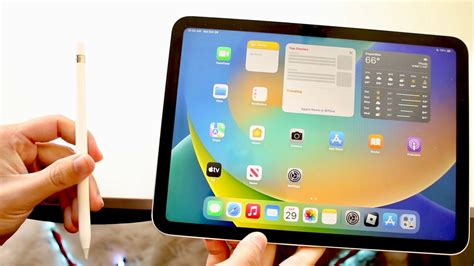
Beyond its functional benefits, the iPad 10’s design also caters to personal expression. The device comes in a variety of vibrant and "funky" colors, allowing users to choose a hue that resonates with their personality and artistic style. Whether you prefer an understated gray or a bold, vibrant red, there's an option to match your aesthetic.
A notable design innovation on the iPad 10 is the placement of its front-facing camera. Unlike many other iPad models where the camera is situated on the shorter, portrait-oriented side, the iPad 10 features a landscape-oriented camera. This strategic placement is incredibly convenient, particularly for video calls, ensuring a more natural and engaging viewing experience when you're connecting with others while you create or collaborate.
Procreate on iPad 10: Features and Performance
The fundamental question for many artists is: does Procreate work on the iPad 10th generation, and how well? The answer is a resounding yes. Procreate operates smoothly on the iPad 10, and based on user experience, it's a joy to draw on and create digital art. The iPad 10th generation is indeed good for drawing, offering a compelling combination of features that make it an amazing drawing tablet.
Enhanced Layer Capacity for Complex Creations
One of the significant improvements over the iPad 9th generation is the iPad 10’s increased layer capacity. Layers are the backbone of digital art, providing the essential ability to add, tweak, and manipulate individual elements of an artwork without impacting other parts. The iPad 10 offers a more generous number of layers, which is a critical advantage for artists working on complex illustrations, detailed paintings, or intricate designs. This enhanced layer capacity directly translates to a more flexible and forgiving creative workflow, allowing for greater experimentation and refinement.
The Apple Pencil 1st Generation Experience
The iPad 10th generation works with the Apple Pencil (1st generation). This pairing is essential for achieving the precision and natural feel that digital artists crave. While the Apple Pencil 1st generation is supported, it's important to note the charging and pairing mechanism. Due to the iPad 10's USB-C connector, pairing and charging the Apple Pencil involves a slight modification. You'll need to use a cable to charge the Apple Pencil, and a converter is necessary for this process. Fortunately, the adapter is often included, mitigating any significant inconvenience. This charging method is an upgrade from the iPad 9th generation, which had a more fragile charging setup where the Pencil could potentially be damaged if the iPad was moved awkwardly while it was connected.
Procreate Beginners Series: Part One | The Fundamentals
Understanding the Display and Refresh Rate
When assessing any drawing tablet, the display quality and responsiveness are paramount. The iPad 10th generation, while excellent for its price point, has some distinctions compared to more premium iPad models.
The Absence of Anti-Reflective Coating
A notable difference is the lack of an anti-reflective coating on the iPad 10’s display. This feature is present on higher-end models like the iPad Pro, iPad Air, and iPad mini. Without this coating, the screen can function almost like a mirror, leading to noticeable reflections of your surroundings, including your camera, yourself, and the Apple Pencil. This can be a minor distraction for artists who work in brightly lit environments.
Non-Laminated Display and the Gap Effect
Furthermore, the iPad 10 does not feature a laminated display. In non-laminated displays, there are three distinct layers, each separated by a small gap. This layering results in a slight, perceptible gap between the tip of the Apple Pencil and the actual drawing on the screen. While this gap is minimal, some artists may find it affects the precision and immediate feedback they desire during fine linework or detailed sketching. For comparison, laminated displays fuse these layers together, minimizing or eliminating this gap for a more direct drawing feel.
The 60Hz Refresh Rate and Stroke Lag
Like most iPad models (with the exception of the larger iPad Pro models), the iPad 10th generation has a 60Hz refresh rate. This means the screen updates 60 times per second. While perfectly adequate for general use, artists who make long, fast strokes in Procreate might notice a slight lag or delay between moving the Apple Pencil and seeing the mark appear on the screen. This is a common characteristic of displays with lower refresh rates and can impact the fluidity of very rapid drawing or painting.
Despite these display-related considerations, the iPad 10’s 10.9-inch screen is still a significant asset. It provides ample space for drawing and painting, making it a viable and enjoyable tool for digital art creation. The overall experience is still very positive, especially when considering the price.
Storage Considerations for Your Digital Art Journey
When investing in a tablet for digital art, storage capacity is a critical factor to consider. Procreate itself, along with your artwork, can consume a considerable amount of space, especially if you work on large canvases or create numerous pieces.
A simple yet effective rule of thumb applies here: if you plan to work on extensive artworks, or if you intend to download offline content such as videos from streaming services like Netflix, YouTube, or Skillshare for reference or learning, it is highly recommended to opt for the 256GB model. This larger storage option will help you avoid the potential headache of constantly managing and saving your files to external hard drives, ensuring a smoother and more uninterrupted creative workflow.
Procreate's Capabilities and Evolution
Procreate, developed by the Tasmanian software company Savage Interactive, has been a cornerstone of digital art creation on the iPad since its initial release in 2011. The app has consistently evolved, incorporating new technologies and user-centric features.
Core Features and Creative Potential
Procreate is renowned for its extensive suite of powerful yet intuitive features designed to facilitate every stage of the creative process, from initial sketching to polished illustration. It comes packed with hundreds of features that professionals rely on, including:
- Transform and Warp Tools: For manipulating and reshaping elements within your artwork.
- Layers with Blend Modes: Essential for non-destructive editing and achieving sophisticated visual effects.
- Selections: Precise tools for isolating and editing specific areas of your canvas.
- Effects: A range of filters and adjustments to enhance your artwork.
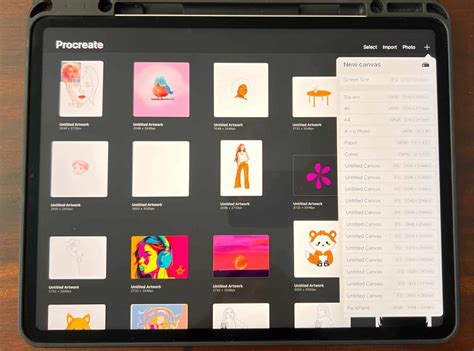
The app boasts over 300 handcrafted brushes, encompassing a wide spectrum of artistic tools such as pencils, inks, charcoals, and specialized brushes that create beautiful painterly textures. Each brush can be extensively customized within the Brush Studio, or users can download thousands of additional brushes to suit virtually any artistic style imaginable.
Drawing Assist and Precision Tools
Procreate has been engineered to be completely intuitive and touch-perfect on the iPad. When paired with an Apple Pencil, it offers a refined digital artistic experience. The app includes features designed to enhance precision and streamline the drawing process:
- Drawing Assist: This feature provides stabilization for strokes, smoothing out jittery lines and making it easier to achieve clean, consistent results.
- Streamline: A similar tool that offers stroke smoothing, helping to create fluid curves and lines.
- QuickShape: This tool automatically refines geometric shapes, turning hand-drawn circles, squares, and other forms into perfect iterations.
- Page Assist: Transforms the iPad into an ultimate sketchbook, ideal for creating comics, graphic novels, or storyboards by managing multiple pages within a single canvas.
Animation and 3D Painting Capabilities
Procreate has expanded its capabilities beyond traditional 2D art. The app now supports animation, allowing artists to bring their creations to life with motion. Furthermore, Procreate enables artists to paint on 3D models, supporting popular file formats like .USDZ and .OBJ. This opens up new dimensions for adding color and texture to 3D assets with the full power of Procreate’s brush engine.
Brush Engine and Photoshop Compatibility
The current versions of Procreate utilize Valkyrie, a proprietary graphics engine that underpins its customizable brush options and the ability to import brushes from Adobe Photoshop. This interoperability ensures that artists can leverage their existing brush libraries and workflows.
Procreate Dreams: Expanding into Animation
Savage Interactive has also introduced Procreate Dreams, a dedicated animation app that aims to make animation more accessible. While Procreate itself offers animation features, Procreate Dreams is designed from the ground up for motion graphics and character animation, building upon the user-friendly principles of the original Procreate app.
Accessibility and Inclusivity
Savage Interactive emphasizes that art is for everyone, and Procreate reflects this philosophy with a suite of built-in features designed to make art creation accessible to a broader audience. The app has received recognition for its outstanding design and innovation, including two Apple Design Awards, highlighting its commitment to making creative tools accessible.
Content Ownership and Licensing
Regarding content ownership, any art created with the default tools and brushes within Procreate and Procreate Pocket, including time-lapse videos, is considered the user's intellectual property. Artists have the freedom to use their creations however they see fit, though the developers appreciate attribution. However, it's important to note that the 3D objects included in the downloadable Procreate Model pack are not licensed for commercial use. While users can paint on these models and share their work, they cannot be used for personal licensing or sale. Additionally, fonts bundled with Procreate (Eina 01, Impact, and Jack Armstrong BB) are licensed for personal use only, while other fonts may be system fonts or those downloaded by the user.
iPad 10th Generation: A Smart Choice for Aspiring Digital Artists
In conclusion, the iPad 10th generation represents an exciting collection of updates and features that position it as a strong contender for aspiring digital artists, Procreate users, and anyone seeking a capable drawing tablet on a budget. The modern design, larger screen, increased layer capacity, convenient camera placement, and improved Apple Pencil charging method are all significant improvements that can substantially enhance a digital art journey.
While the absence of an anti-reflective coating and a laminated display, along with the 60Hz refresh rate, are considerations, they do not detract from the iPad 10's overall value proposition. For its price, it delivers a good enough drawing experience on Procreate, making it a joy to use for creating digital art. The 10.9-inch display, coupled with support for the Apple Pencil 1st generation and enhanced layer capabilities, solidifies its status as an amazing drawing tablet.
When acquiring your iPad 10 for drawing and Procreate, consider essential accessories. A case with an integrated Pencil holder is highly recommended to prevent your Apple Pencil from getting lost. Ultimately, the iPad 10th generation proves that powerful creative tools can be accessible, offering a fantastic entry point into the world of digital art.
tags: #ipad #10th #generation #procreate