Color is a fundamental aspect of our visual world, playing a crucial role in art, design, and everyday communication. The way we perceive and reproduce color is governed by sophisticated systems known as color models. Among the most prevalent are the additive and subtractive color models, which, while both aiming to create a spectrum of visible colors, operate on fundamentally different principles. Understanding the distinction between these models is paramount for anyone working with visual media, from graphic designers and photographers to those involved in printing and digital display technologies.
The Foundation of Color Perception: Light and Pigment
At its core, the difference between additive and subtractive color lies in how they interact with light. Our perception of color is a complex interplay between the light sources in our environment and the surfaces that reflect or absorb that light.
Additive Color: The Brilliance of Emitted Light
The additive color model is based on the principle of mixing light itself. It starts with black, representing the absence of light, and then "adds" different wavelengths of light to create new colors. The primary colors in the additive model are Red, Green, and Blue (RGB). When these three primary colors of light are combined at their full intensity, they produce white light. By varying the intensities of red, green, and blue light, a vast array of secondary hues and brightness levels can be simulated.
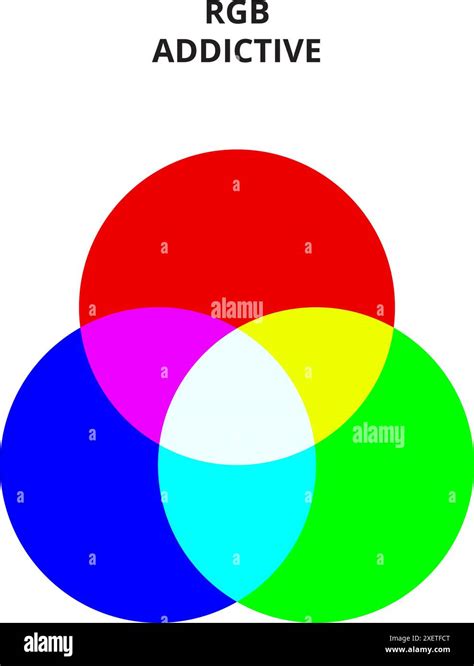
This model is fundamental to any device that emits light to create images. Televisions, computer monitors, smartphones, tablets, and digital cameras all utilize the additive RGB color model. On these devices, tiny elements called sub-pixels emit red, green, or blue light. By activating these sub-pixels in various combinations and intensities within each pixel, the device can generate millions of colors that coalesce to form the images we see. Because these devices produce light, the colors generated often appear brighter and more vibrant, encompassing a wider spectrum, or "gamut," of colors.
Subtractive Color: The Art of Absorbed Light
In contrast, the subtractive color model operates on the principle of absorbing, or "subtracting," wavelengths of light from a white surface. This model is employed when working with physical materials like inks, dyes, or paints. The primary colors in the subtractive model are Cyan, Magenta, and Yellow (CMY). When these colorants are applied to a surface, they absorb certain wavelengths of light and reflect others. The reflected light is what our eyes perceive as color.
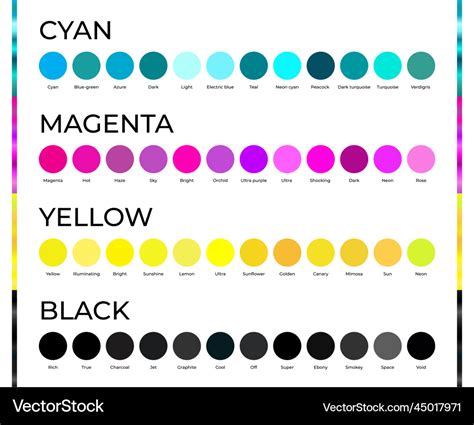
A blank sheet of paper, for instance, appears white because it reflects all wavelengths of visible light. When cyan ink is applied, it absorbs red light and reflects green and blue light. Magenta ink absorbs green light and reflects red and blue. Yellow ink absorbs blue light and reflects red and green. The combination of these inks effectively subtracts specific wavelengths from the incident white light, resulting in the perception of a particular color.
In theory, mixing equal amounts of cyan, magenta, and yellow should produce black by absorbing all light. However, in practice, due to impurities in the pigments, this combination often results in a muddy brown color rather than a true black. To overcome this limitation and achieve deeper, more accurate blacks, a fourth ink, Black (K, for "Key"), is added. This leads to the widely used CMYK color model for printing. The "K" signifies that black is the "key" color, often used for text and fine details in printing.
The Practical Implications: RGB vs. CMYK
The fundamental differences between additive (RGB) and subtractive (CMYK) color models have significant implications for how we work with color in various creative and technical fields.
Working with Digital Displays vs. Print Media
The most common application of the RGB model is in digital displays. When you design an image on your computer monitor, you are working within the RGB color space. This model allows for a broad range of bright and saturated colors, as it is based on emitted light.
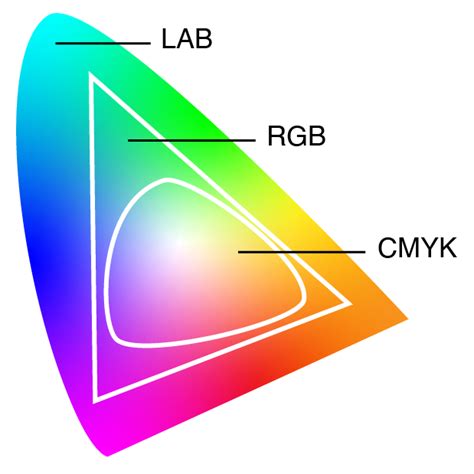
Conversely, the CMYK model is the standard for color printing. Printers use CMYK inks to reproduce images on paper and other substrates. Because printing relies on reflected light and the absorption properties of inks, the CMYK color space is generally more limited than RGB, particularly in its ability to reproduce highly saturated and bright colors. This difference is often the source of frustration when colors on a screen do not match their printed counterparts.
The Gamut Difference and Color Conversion
The range of colors that a particular color model can reproduce is referred to as its "gamut." The RGB color space typically has a wider gamut than CMYK, meaning it can represent more colors, especially those that are very bright and vibrant. When a design created in RGB is intended for print, it must be converted to CMYK. This conversion process can lead to a loss of color information, as CMYK may not be able to accurately reproduce all the colors present in the RGB file. Consequently, colors that appeared brilliant on screen might look duller or different when printed.
For designers whose final output is print, it is often recommended to work in CMYK mode from the outset. This allows them to have a more accurate representation of how the colors will appear in the final printed piece. However, some professionals advocate for working in RGB for as long as possible, even for print projects. The rationale is that all photographic imagery is captured in RGB, and by retaining the wider RGB gamut, designers have more flexibility. They can then perform the conversion to CMYK at a later stage, ideally within the design software itself, using specific conversion profiles to manage the color transformation.
The choice of color model is crucial for achieving the best results. If a project is primarily for screen display, RGB is the appropriate choice. For print, CMYK is essential. Attempting to use one model for the primary purpose of the other can lead to unexpected and often undesirable outcomes. When working with print providers, it is important to understand their workflow. Providing them with a CMYK file ensures that the conversion process is handled by a professional or managed within your chosen software, rather than relying on the printer to perform the conversion, which can introduce variability.
The Role of Black in Printing
The addition of black ink (K) to the CMY primaries in the CMYK model is a practical necessity. As mentioned, mixing only cyan, magenta, and yellow does not produce a pure black due to the inherent impurities in the inks. Black ink is not only crucial for achieving true black tones but also for printing black text efficiently and cost-effectively. Printing black text using only one black ink is significantly more economical than attempting to reproduce it by combining three separate CMY inks.
The concept of "halftoning" or "screening" is also integral to CMYK printing. This technique involves breaking down continuous tones into a pattern of small dots of varying sizes and spacing. By printing these dots in overlapping patterns, printers can create the illusion of intermediate colors and smoother gradients, effectively expanding the perceived color gamut of the CMYK inks.
Color Management: Bridging the Gap
To ensure accurate color reproduction across different devices and media, color management systems are employed. These systems use device-dependent profiles, such as ICC (International Color Consortium) profiles, to map colors accurately between different color spaces, like RGB and CMYK. While there's no universal formula that perfectly converts between RGB and CMYK due to their inherent differences, color management tools provide the best available method for achieving consistent and predictable color results.
Ultimately, whether you are a designer, photographer, or simply someone interested in visual media, a solid understanding of the additive and subtractive color models is fundamental. It empowers you to make informed decisions about your projects, ensuring that the colors you envision are accurately translated from your screen to the printed page, or vice versa. By choosing the right color model for the specific task at hand and understanding the nuances of color conversion, you can significantly enhance the quality and impact of your visual creations.
tags: #is #cmyk #additive #or #subtractive