In the competitive landscape of professional video editing software, where Adobe Premiere Pro, Avid Media Composer, and Final Cut Pro often dominate the conversation, a powerful and surprisingly accessible alternative has steadily risen to prominence: DaVinci Resolve. Developed by Blackmagic Design, this application has evolved from its origins as a high-end color grading system into a fully integrated post-production suite, aiming to consolidate multiple specialized tools into a single, cohesive platform. Whether you're a seasoned filmmaker or an aspiring enthusiast, understanding the capabilities of DaVinci Resolve is crucial for anyone serious about creating professional-grade video content.
The Unbeatable Value Proposition: Free and Professional-Grade
One of DaVinci Resolve's most compelling attributes is its pricing model. The core application, offering a remarkably robust set of professional tools, is entirely free to download and use. This "free" aspect is not merely a marketing ploy; it represents a genuine commitment to making high-level video editing accessible. For users who find the free version's capabilities sufficient, there are no ads, no watermarks, and no limitations on core editing functions. This generous offering is likely subsidized by Blackmagic Design's extensive hardware portfolio, allowing them to provide a powerful software solution at no initial cost.
While the free version is exceptionally capable, it does come with certain limitations. The most significant restriction for some workflows is the export ceiling of 4K resolution at 60 frames per second. For those requiring higher resolutions or frame rates, or seeking additional advanced features, DaVinci Resolve Studio offers a compelling upgrade. For a one-time fee of just under $300, users gain access to features such as 32K resolution and 120fps exports, advanced AI tools (powered by the DaVinci Neural Engine), HDR10+ format support, digital cinema package creation for theatrical distribution, and enhanced noise reduction. Crucially, all future updates, regardless of their magnitude, are included in this single purchase, presenting a stark contrast to subscription-based models.
A Deep Dive into the Integrated Workflow: The Seven Pages
DaVinci Resolve is not simply a video editor; it's a comprehensive post-production environment meticulously organized into seven distinct functional areas, referred to as "Pages." These pages are arranged logically to follow the typical post-production workflow, allowing users to seamlessly transition between different stages of their project.
Media Page: The Foundation of Your Project
The Media page serves as the initial entry point for importing and organizing all your raw footage, audio files, and other assets. Here, you can manage your media library, create bins for organization, and set up project parameters such as resolution and frame rate. This foundational step ensures that your project is built on a well-structured and easily navigable media foundation.
Cut Page: Speed and Simplicity for Quick Edits
Introduced in version 16, the Cut page is designed for rapid assembly and trimming of footage. It offers a streamlined interface with fewer options, making it an ideal starting point for newcomers to video editing or for professionals who need to perform quick edits efficiently. While it simplifies the traditional editing process, it still allows for the application of effects and adjustments made in the more advanced Edit page, ensuring a consistent workflow.
Edit Page: Precision and Control for Detailed Assembly
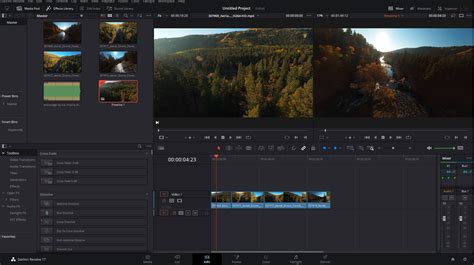
The Edit page is the heart of traditional non-linear editing (NLE) within DaVinci Resolve. It provides a familiar timeline-based interface with a comprehensive suite of tools for precise cutting, trimming, and arrangement of clips. Features like slip, slide, roll, and ripple edits, along with a highly customizable, keyboard-driven workflow, cater to the demands of professional editors who require speed and accuracy. The Edit page also supports a vast array of codecs natively, including RED RAW, Blackmagic RAW, ProRes, and H.265, ensuring compatibility with professional camera formats.
Fusion Page: Advanced Visual Effects and Motion Graphics
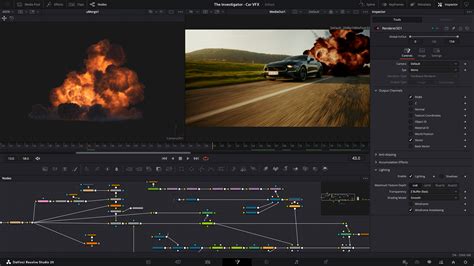
For users venturing into the realm of visual effects (VFX) and motion graphics, the Fusion page is Resolve's answer to applications like Adobe After Effects. It employs a powerful node-based compositing workflow, which, while presenting a steeper learning curve than layer-based systems, offers unparalleled flexibility and organization for complex visual elements. From intricate green screen keying and 3D compositing to sophisticated particle systems and animated title sequences, Fusion is a robust tool for creating high-end visual content directly within the Resolve environment. Complex graphics can be saved as templates and accessed directly from the Edit page timeline.
Color Page: Industry-Leading Color Correction and Grading
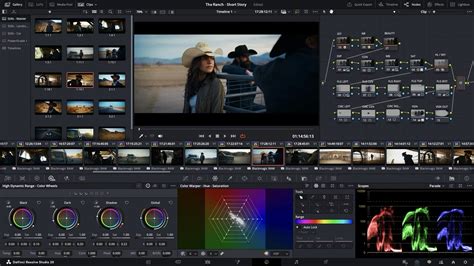
DaVinci Resolve's origins lie in color grading, and the Color page remains its undisputed strength. This section offers an incredibly powerful and intuitive node-based workflow that allows for granular control over every aspect of an image's color and luminance. Photographers transitioning to video will find this page particularly familiar and potent. Tools like Power Windows (trackable masks for selective adjustments), Qualifiers (isolating specific hues, saturations, or luminances), and extensive color wheels and HDR palettes enable precise color manipulation. The node-based system allows for a non-destructive and highly organized approach to color correction and grading, making it the industry standard for achieving cinematic looks.
Understanding Nodes in Color Grading // Davinci Resolve 18
Fairlight Page: A Full-Fledged Digital Audio Workstation
Audio post-production is often an overlooked but critical component of filmmaking. The Fairlight page transforms DaVinci Resolve into a complete Digital Audio Workstation (DAW). It provides a professional multi-track mixer with comprehensive tools for equalization (EQ), dynamics processing (compression, gating, limiting), panning, and more, for every individual track. This integrated approach eliminates the need to export audio to separate software, streamlining the post-production pipeline. The Studio version further enhances audio capabilities with AI-powered tools like Voice Isolation, which is remarkably effective at removing background noise from dialogue.
Deliver Page: Exporting Your Masterpiece
The final stage of the post-production process is handled by the Deliver page. Here, users can configure and render their final video project for various platforms and formats. This includes setting resolution, frame rate, codec, and other export parameters. The efficiency of the rendering process is significantly influenced by the user's hardware and whether they are using the free or Studio version, with the latter generally offering faster render times.
Performance and Hardware Considerations
DaVinci Resolve is a resource-intensive application, particularly for its more demanding features like Fusion and advanced color grading. Its performance is heavily reliant on the Graphics Processing Unit (GPU). The software is engineered to leverage modern GPUs, resulting in smoother playback of complex timelines, even on moderately specced machines. However, for optimal performance, especially when working with high-resolution footage, complex effects, or the Studio version's advanced features, a powerful GPU is highly recommended. While older or underpowered hardware may struggle, the software's ability to scale with hardware capabilities means that even a modest system can often run the free version, albeit with potential compromises in speed and responsiveness.
Collaboration and Emerging Technologies
Blackmagic Design has also been at the forefront of integrating collaborative features and cloud-based workflows. The introduction of Blackmagic Cloud has been a significant advancement, enabling multiple usersâeditors, colorists, VFX artists, and sound designersâto work concurrently on the same project timeline from different locations. Changes made by one user are instantly reflected for all collaborators, fostering a more efficient and integrated remote workflow. Furthermore, the ongoing integration of AI-powered features, such as the DaVinci Neural Engine in the Studio version, continues to push the boundaries of what's possible in post-production, offering tools like Magic Mask for rapid object selection and advanced noise reduction.
DaVinci Resolve vs. the Competition: A Comparative Look
When evaluating DaVinci Resolve against its primary competitors, several key differentiators emerge. The most striking is the unparalleled value offered by the free version, which provides professional-grade tools that rival many paid applications. The one-time purchase model for the Studio version also stands in contrast to the perpetual subscription fees often associated with Adobe Creative Cloud, offering a predictable and potentially more cost-effective long-term solution.
However, the decision to switch to DaVinci Resolve may depend on an individual's existing workflow and ecosystem. For those deeply embedded in the Adobe ecosystem, the seamless integration and Dynamic Link functionality between Premiere Pro, After Effects, Photoshop, and Illustrator might be a significant hurdle to overcome. Similarly, while Fusion is exceptionally powerful, Adobe After Effects arguably maintains a larger community, a wider array of third-party plugins, and a more accessible entry point for certain motion graphics tasks.
Who Should Try DaVinci Resolve?
DaVinci Resolve is an excellent choice for a wide range of users:
- Budget-Conscious Professionals: If you require professional-grade tools but are operating on a tight budget, the free version is an absolute no-brainer.
- Colorists and Cinematographers: For those who prioritize color grading and correction, Resolve's Color page is the industry standard and offers unparalleled power and precision.
- Multidisciplinary Creatives: If your workflow extends beyond simple editing to include VFX, motion graphics, and audio post-production, Resolve's integrated suite can significantly streamline your process.
- Aspiring Filmmakers and Students: The free version provides an exceptional learning platform, allowing individuals to develop professional editing skills without financial barriers.
- Those Seeking a Lifetime License: The one-time purchase of DaVinci Resolve Studio offers lifetime access to all future updates, providing long-term value.
Who Might Hesitate?
There are specific scenarios where DaVinci Resolve might not be the immediate best fit:
- Deeply Embedded Adobe Users: If your workflow is heavily reliant on Adobe's Dynamic Link and you collaborate with others exclusively using Adobe products, switching can be disruptive.
- Primarily Motion Graphics Designers: While Fusion is powerful, After Effects may offer a more extensive ecosystem for certain complex motion graphics tasks.
- Users with Older or Underpowered Hardware: Resolve's demanding nature means that users with significantly outdated or low-spec machines might face performance issues.
Conclusion: An Evolving Standard in Post-Production
DaVinci Resolve has firmly established itself as a formidable force in the post-production industry. Its continuous evolution, marked by significant updates like version 20, introduces new features and refines existing ones, enhancing its already impressive capabilities. The combination of a powerful free version, a competitively priced Studio upgrade, an integrated workflow across multiple disciplines, and a commitment to innovation makes it an essential tool for anyone serious about filmmaking and video content creation. For creatives looking to elevate their work and streamline their workflow, DaVinci Resolve is no longer just an option; it's a compelling necessity.