DaVinci Resolve has evolved from a specialized color grading tool into a comprehensive post-production suite. While Adobe Premiere Pro, Avid Media Composer, and Apple’s Final Cut Pro offer robust video editing capabilities, DaVinci Resolve distinguishes itself by integrating industry-leading color grading, a fully-fledged Digital Audio Workstation (DAW) in Fairlight, powerful VFX and motion graphics compositing in Fusion, and a custom-built video editing application across its Edit and Cut pages. This integrated approach, coupled with a rapid pace of updates, presents a compelling alternative to subscription-based models. As one user aptly put it, "Cloud licensors are like slumlords. You have to keep buying from me and the more you’re loyal, the more you’ll get penalised." This sentiment is echoed by the observation that subscription prices from competitors have consistently risen, making the perpetual license model of DaVinci Resolve Studio an attractive proposition.
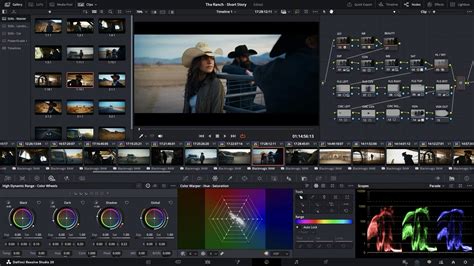
The All-in-One Post-Production Powerhouse
The core strength of DaVinci Resolve lies in its "five standalone apps jammed into one" philosophy. This means that instead of juggling multiple software packages for different stages of post-production, users can manage their entire workflow within a single application. This unified environment streamlines the editing process, reduces the learning curve associated with disparate software, and fosters a more cohesive creative flow. The integration extends to practical workflow considerations; for instance, knowing how to create proxies in Resolve and still utilize them in another Non-Linear Editor (NLE) can be a significant time-saver for those who occasionally switch between applications.
Navigating the Pages: Edit, Cut, and Beyond
DaVinci Resolve organizes its functionalities into distinct "pages," each dedicated to a specific aspect of post-production. The Edit and Cut pages serve as the primary video editing environments. The Cut page is designed for rapid assembly and quick edits, ideal for content creators who prioritize speed. The Edit page offers a more traditional, in-depth editing experience with greater control over timelines, clips, and effects. Beyond editing, the Color page is renowned for its industry-leading color grading tools, providing unparalleled precision and creative control. The Fusion page is a node-based compositing environment for advanced visual effects and motion graphics, while Fairlight offers a professional-grade audio post-production suite.
Project Management and Workflow Efficiency
Effective project management is crucial for any video editing endeavor, and DaVinci Resolve excels in this area. The application offers robust tools for organizing projects, managing media, and creating backups. A particularly useful feature for many users is the ability to save a project with all its associated files as an archive after uploading a video. This ensures that all project assets are neatly bundled and readily accessible for future reference or revisions.
For many projects, especially those involving a moderate number of video and audio tracks, the rendering times for 4K videos are within reasonable limits. For instance, one user reported needing a render factor of approximately 1.2 on a Ryzen 1700 processor, meaning a 10-minute video took about 12-13 minutes to export. In some cases, even a MacBook Air with an M1 processor proved faster for editing, highlighting the software's adaptability across different hardware configurations, though performance is significantly enhanced when connected to an external monitor.
How to Organize Files in DaVinci Resolve (Beginner-Friendly System)
The 10-Bit Challenge and the Studio Solution
The increasing adoption of 10-bit color depth by modern cameras, offering greater flexibility and detail in post-production, presents a particular point of differentiation between the free and Studio versions of DaVinci Resolve. While the free version struggles to handle 10-bit H.264/H.265 files, often recognizing only the audio track or nothing at all, the Studio version provides full support. This limitation in the free version can be a significant hurdle for users working with footage from cameras like the Lumix G9 or Lumix S5.
To overcome this in the free version, users often resort to converting these files to intermediate codecs like ProRes 422 or HQ using tools such as ffmpeg. However, these converted files are considerably larger than the original camera files, increasing storage requirements and potentially impacting editing performance. This is where the Studio version offers a tangible advantage, seamlessly handling these higher-quality formats without the need for transcoding.
DaVinci Resolve Studio: Unlocking Premium Features
The DaVinci Resolve Studio version, available for a one-time purchase of approximately €300 (or £245), offers a range of enhancements over its free counterpart. While the core functionalities are present in both, the Studio version unlocks several advanced features and performance optimizations that can significantly benefit professional workflows.
Noise Reduction & Motion Blur
One of the most significant selling points of DaVinci Resolve Studio is its advanced noise reduction capabilities. This feature has been a crucial tool for professionals for over a decade, effectively cleaning up noisy footage without introducing excessive artifacts. While third-party plugins like Neat Video can also achieve excellent results, they often come at an additional cost and require extra time for integration and processing. Resolve Studio's built-in noise reduction is a powerful, integrated solution. Furthermore, the Studio version includes a color page motion blur effect, allowing users to add realistic motion blur to shots that may have lacked it or were sped up in post-production. Achieving the best results with this feature often involves creating compound clips or using the "render in place" function before applying the motion blur.

Enhanced Codec Support
DaVinci Resolve Studio acts as a "Swiss army knife" for post-production codecs. With the exception of ProRes RAW, it boasts support for virtually every camera format and codec encountered in professional workflows. This extensive codec support has made it a staple for on-set dailies and ensures that editors can work with footage directly from the latest and most advanced cameras without the need for time-consuming transcoding.
Magic Mask and AI-Powered Tracking
Rotoscoping, the painstaking process of isolating elements frame by frame, is a task that few editors enjoy. DaVinci Resolve Studio's Magic Mask feature, powered by AI and motion vector tracking, significantly simplifies this process. It intelligently separates foregrounds from backgrounds, creating "garbage mattes" with remarkable speed and accuracy. While similar tools exist in other NLEs, Resolve's Magic Mask shines through its ease of integration within the Fusion page, where users can further refine the generated masks using an array of polygon and paint tools to achieve a perfect alpha channel.
Text-Based Editing and Audio Transcription
The introduction of text-based editing and automatic subtitle generation in DaVinci Resolve Studio represents a paradigm shift in the editing workflow. This AI-driven feature analyzes a clip's audio track and automatically transcribes spoken words, complete with punctuation and grammar. These transcripts are placed on a dedicated subtitle track, allowing users to edit the video by simply manipulating the text. This is transformative, enabling users to create entire initial edits by selecting and arranging text segments, a process that can even be handled by individuals with no prior video editing experience. The ability to search for specific words or phrases across multiple clips further enhances content collation and organization, eliminating the need for tedious manual scrubbing through footage.
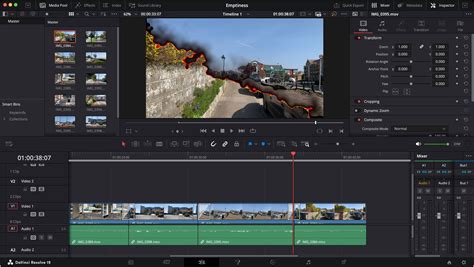
Intellitrack Point Tracker and Voice Isolation
The Intellitrack Point Tracker is another AI-powered tool exclusive to Resolve Studio that automates the often-challenging task of tracking objects. Instead of relying on contrast points, this tracker analyzes object characteristics, enabling more robust and accurate tracking for tasks such as match moving or stabilization.
In the realm of audio, the Voice Isolation feature performs a remarkable job of separating dialogue from background noise, effectively muting or reducing ambient sounds. This tool is also highly effective at mitigating reverb in large spaces or echoes from public address systems, offering a built-in solution comparable to professional audio plugins like Waves Clarity.
Remote Monitoring and Rendering
Collaboration and remote workflows are increasingly important in modern production. DaVinci Resolve Studio facilitates this with its Remote Monitoring feature, allowing users to stream their timeline in real-time to an iPhone or iPad using a free Blackmagic ID and the Remote Monitor app. This is invaluable for client approvals or director feedback.
For rendering, the Remote Rendering feature allows users to offload export tasks to another computer on their local network. This means that while one machine is busy encoding a video, the primary workstation remains free for continued editing, color grading, or audio mixing. This capability is crucial for scaling post-production facilities and maximizing efficiency, though each computer involved in remote rendering requires a Studio license.
Timeline Scene Cut Detection
When working with footage that has baked-in edits or flat, textless files, the Timeline Scene Cut Detection feature in Resolve Studio is invaluable. It automatically identifies scene cuts within a video file on the timeline, allowing each shot to be color-graded individually without the need for an EDL or source camera footage. The AI's estimations can be refined by easily joining or deleting detected cut points, offering a flexible and efficient grading workflow.
Clean Feed to Second Computer Monitor
For editors who lack dedicated professional monitoring hardware, DaVinci Resolve Studio offers a valuable feature: a "clean feed" to a second computer monitor. This allows for full-screen playback of the video on an additional display, providing a more accurate representation of how the final output will appear, even without a calibrated REC.709 monitor. This is essential for critical evaluation of color and detail.
Price and Perpetual Licensing
The pricing structure of DaVinci Resolve Studio is a significant draw for many users. A perpetual license, costing around £245 or €300, provides lifetime access to the software, including all future updates. This stands in stark contrast to the ongoing subscription fees associated with competitors like Adobe Premiere Pro. Furthermore, purchasing specific Blackmagic Design hardware, such as the Speed Editor, often includes a complimentary copy of DaVinci Resolve Studio, presenting an even more cost-effective entry point for professionals. This perpetual license model ensures that users retain access to their purchased software indefinitely, avoiding the risk of losing access to projects should they decide to discontinue subscription payments.
The Value Proposition: Is DaVinci Resolve Studio Worth It?
The question of whether DaVinci Resolve Studio is "worth it" ultimately depends on individual workflow needs and priorities. For users who regularly work with 10-bit footage, require advanced noise reduction, or benefit from AI-powered tools like Magic Mask and text-based editing, the Studio version offers compelling advantages. The speed improvements in rendering, particularly with H.264/H.265 files and when utilizing an NVIDIA GPU, can be substantial, leading to significant time savings on export. The inclusion of features like Remote Rendering and advanced codec support further solidifies its position as a professional-grade tool.
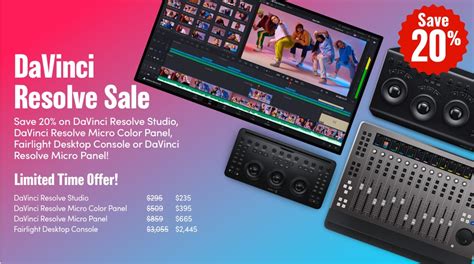
While the free version of DaVinci Resolve is incredibly powerful and sufficient for many users, the Studio version unlocks a layer of professional tools and performance enhancements that can justify the one-time investment. The perpetual license model, combined with the software's continuous development and the integration of cutting-edge AI features, makes DaVinci Resolve Studio a strong contender for professionals seeking a comprehensive, cost-effective, and future-proof post-production solution. The addition of 3D tools, embracing frameworks like Universal Scene Descriptor (USD), indicates Blackmagic Design's commitment to expanding Resolve's capabilities and fostering greater collaboration within creative pipelines, even if some of these tools are still in their nascent stages compared to dedicated VFX software. For those who demand the utmost in color grading, efficiency, and advanced feature sets, DaVinci Resolve Studio is not just worth it; it's a powerful investment in their creative toolkit.