Adobe Photoshop Express is a powerful and streamlined mobile application designed to empower users to create, edit, and enhance their images with remarkable ease. It bridges the gap between complex desktop photo editing software and the on-the-go needs of modern mobile users. Whether you're a social media influencer, a budding blogger, a casual photographer, or simply someone who wants to make their pictures shine, Photoshop Express offers a robust suite of tools to transform your ideas into unique, high-quality visuals. The app is built on Adobe's renowned imaging technology, simplifying its sophisticated features into quick actions and intuitive interfaces, making professional-grade editing accessible to everyone.

Understanding Adobe Photoshop Express: A Mobile-First Photo Editor
Photoshop Express is more than just a photo editing app; it's a comprehensive mobile studio that simplifies the extensive capabilities of Adobe Photoshop into a user-friendly experience. It provides a fast and straightforward way to edit photos specifically for social media, catering to the needs of mobile photographers, social media influencers, bloggers, and anyone who desires to enhance their pictures before sharing them online. The app's design prioritizes efficiency and accessibility, allowing users to capture screenshots using the Print Screen key or in-app capture options on Windows, and offering a seamless editing workflow on mobile devices.
Downloading Photoshop Express is free of charge, providing a significant amount of functionality without any initial cost. While the core features are robust and cater to a wide range of editing needs, certain premium features require a subscription. This tiered approach allows users to explore additional premium features by purchasing a subscription plan, offering flexibility based on individual requirements. To begin, users can register for a free account, which unlocks the full potential of the free version. Existing Creative Cloud members can enjoy the benefits of the full version of Photoshop Express, integrating it further into their Adobe workflow.
The app is available on the Google Play Store for Android devices and the Apple App Store for iOS devices, including iPhones and iPads. Photoshop Express Discover, a complementary web platform, offers a space to explore, engage with, and exchange creative content, further extending the app's community and inspiration.
Core Editing Features: From Basic Adjustments to Creative Enhancements
At its heart, Photoshop Express is about making your photos stand out. The app offers a diverse array of adjustment and correction options, allowing for both subtle refinements and dramatic transformations.
Essential Image Adjustments and Corrections
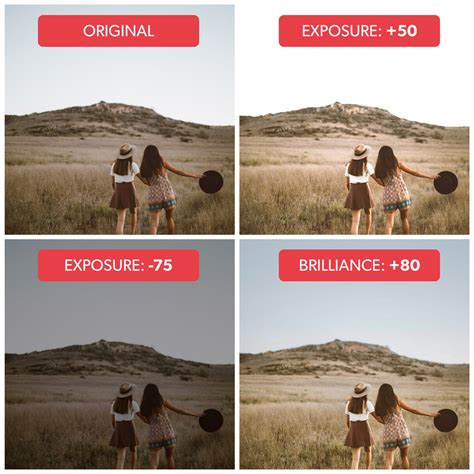
Upon opening the app and selecting a photo, users are presented with a wealth of tools to refine their images. The Auto-Enhance feature is a powerful starting point, automatically adjusting key parameters such as exposure, contrast, highlights, shadows, whites, blacks, temperature, tint, vibrance, and clarity to optimal values. This one-tap solution is perfect for quickly improving a photo that might be underexposed, overexposed, or lacking in contrast.
For more granular control, users can manually adjust various aspects of their image:
- Exposure: Controls the overall brightness of the photo, determining how much light was captured during the shot.
- Contrast: Manages the difference between the dark and light areas of an image, adding punch and depth.
- Highlights: Allows for the fine-tuning of the brightest parts of a photo, preserving detail without blowing out the highlights.
- Shadows: Enables control over the darkest areas of an image, revealing hidden details and preventing them from becoming completely black.
- Whites: Similar to highlights but with a broader tonal range, controlling the brightest areas of the photo.
- Vibrance: Enhances less-saturated colors more than highly saturated ones, preventing skin tones from looking unnatural.
- Clarity: Adds depth to an image by increasing local contrast, making textures and details more prominent.
- Dehaze: Effectively removes atmospheric haze from photos, improving clarity and contrast in landscapes or images taken in foggy conditions.
- Sharpen: Enhances the contrast between specific pixels, making edges appear crisper and details more defined.
Noise Reduction and Detail Enhancement
Photoshop Express also addresses common image imperfections with its noise reduction tools:
- Reduce Luminance Noise: This feature targets and reduces noise that appears as graininess or speckling, often caused by shooting in low light.
- Reduce Color Noise: This tackles color artifacts that can manifest as flat, muddy colors in areas that should be smooth.
Additionally, users can employ the Sharpen tool to bring out finer details and textures, making images appear more crisp and professional.
Transforming Composition: Cropping, Straightening, and Rotating
The foundation of a great photograph often lies in its composition. Photoshop Express provides essential tools to perfect the framing and orientation of your images.
- Cropping: Users can easily crop their photos to remove unwanted elements, improve focus, or change the aspect ratio. The app offers preset aspect ratios suitable for various social media platforms (e.g., 1:1 for Instagram squares) as well as a "Free Size" option for custom cropping.
- Straightening: This tool allows you to correct tilted horizons or skewed perspectives, ensuring your images appear balanced and professional.
- Rotating and Flipping: The Rotate tab offers options to rotate images in 90-degree increments or flip them horizontally or vertically, providing complete control over the image's orientation.
The image resize options are particularly useful for preparing images for specific platforms or for reducing file sizes while maintaining image quality. These options scale down photos to a selected long edge while preserving the photo's current crop ratio.
Adding Artistic Flair: Filters, Text, and Stickers
Beyond basic corrections, Photoshop Express excels at adding creative elements that personalize and enhance images.
Instant Filters and Custom Looks
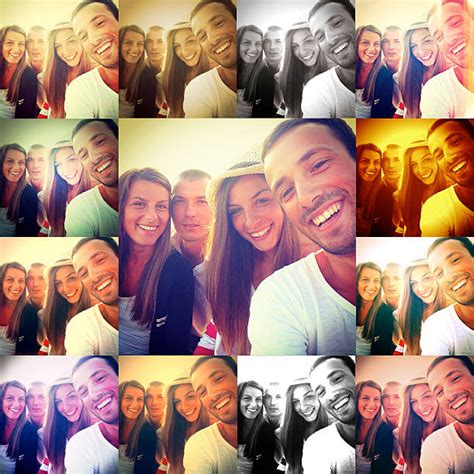
Photoshop Express allows users to apply instant Looks (filters) from a diverse range of eye-catching effects. These filters can dramatically alter the mood and aesthetic of a photo with just a few taps. Users have the ability to control the intensity of each filter, ensuring a subtle or pronounced effect as desired. A particularly powerful feature is the ability to create and save your customized Looks, allowing you to develop a signature style and apply it consistently across multiple images.
Text Styles and Overlays
Adding text to photos is a common requirement for social media posts, announcements, or personal messages. Photoshop Express provides a user-friendly way to incorporate text through its Text Styles options. Users can choose from a curated list of text templates or add their own custom text, which can then be stylized with various font options.
Stickers and Borders
To further enhance visual appeal and convey messages, the app offers a wide selection of stickers. These can add personality, humor, or emphasis to your images. Additionally, you can frame your photos with borders, with options to adjust both inner and outer border dimensions to create a polished look.
Advanced Retouching and Repair Tools
For those moments when a photo needs more than just a simple tweak, Photoshop Express offers advanced retouching and repair capabilities, including AI-powered features.
Healing and Cloning
- Healing Brush: This tool allows you to seamlessly remove blemishes, dust spots, or unwanted small objects by sampling surrounding pixels and blending them into the edited area.
- Clone Stamp: Similar to the healing brush, the clone stamp tool allows you to copy pixels from one area of an image and paint them over another, useful for removing larger distractions or replicating textures.
Blemish Remover and Red Eye Corrector
These specialized tools are invaluable for portrait photography, allowing users to quickly and effectively remove skin imperfections like pimples and reduce or eliminate the red-eye effect often seen in flash photography.
Creating Dynamic Collages
Photoshop Express makes it incredibly easy to combine multiple photos into visually appealing collages. The process is intuitive:
- Select Photos: Choose the images you wish to include in your collage.
- Choose Layout: The app will suggest various grid layouts, or you can customize them.
- Edit and Replace: You can easily edit, replace, or delete any photo within the collage. Swapping photos is as simple as long-pressing and dragging-and-dropping them into different cells.
- Add Text and Stickers: Personalize your collage further by adding text and stickers.
- Customize Borders and Backgrounds: Apply borders to individual photos or the entire collage, and choose from a variety of background patterns or solid colors to complete your design.
Integration and Sharing: Connecting Your Creative Workflow
Photoshop Express is designed to integrate seamlessly with your existing digital ecosystem and facilitate easy sharing of your creations.
Creative Cloud and Lightroom Integration
The app allows you to connect to Adobe Creative Cloud and Lightroom directly from within Photoshop Express. This integration enables you to upload images to the Creative Cloud, making them accessible on your desktop for further editing with applications like Photoshop CC. While there isn't a direct, ongoing sync feature between Photoshop Express and Photoshop CC for projects, this cloud connectivity ensures your mobile edits can easily become part of a larger desktop workflow.
Exporting and Sharing Options
When you're satisfied with your edits, Photoshop Express provides control over the quality of your exported or shared images through a quality scale. This ensures that your photos meet the requirements for different platforms, whether you're posting to social media or archiving them. Sharing directly to social media platforms is also streamlined within the app.
Photoshop Express vs. Photoshop CC: Understanding the Differences
It's important to distinguish Photoshop Express from its more powerful desktop counterpart, Adobe Photoshop CC. While both are part of the Adobe family, they serve different purposes and offer distinct feature sets.
Photoshop Express: Simplicity and Accessibility
Photoshop Express is a streamlined version of Photoshop optimized for mobile devices. Its strength lies in its simplicity and accessibility, offering quick edits, one-tap filters, and easy-to-use retouching tools. It's ideal for users who need to make fast, impactful edits on the go. However, it lacks advanced features like sophisticated layer management, the Pen tool, Channels, advanced masking, and the fine control over parameters found in Photoshop CC. It also has limited support for RAW files compared to the desktop version.
Photoshop CC: Comprehensive Powerhouse
Photoshop CC is a full-featured desktop application designed for professionals and serious hobbyists. It provides advanced tools for detailed and complex photo editing, graphic design, digital art, advanced compositing, and precise control over every aspect of an image. Features like advanced layer manipulation, sophisticated color grading (curves, levels), and robust RAW file support are its hallmarks.
The key takeaway is that Photoshop Express is built for speed, ease of use, and mobile convenience, while Photoshop CC is built for depth, precision, and complex creative projects.
How to make collage in adobe photoshop express
A Suite of Features for Every Creative Need
Photoshop Express is packed with features designed to make photo editing fun and easy, living up to its promise of "PHOTO EDITING MADE FUN AND EASY."
- AI Image Generator: Leverage state-of-the-art AI to create unique images from text prompts.
- Beauty Editor: Includes retouching tools from our beauty editor for refining portraits.
- Camera Film Effects: Apply a wide range of camera filters for moody film effects, Kawaii styles, or a vintage feel from our retro camera.
- Thousands of Customization Options: From stickers to overlays, enjoy countless ways to customize and edit photos.
- Background Eraser: Clean up images by removing distracting backgrounds.
Whether you're a beginner looking for quick enhancements or an experienced user needing to make rapid edits on the go, Adobe Photoshop Express provides a high-quality, accessible, and powerful platform to make photo magic happen.