Wondershare Filmora has positioned itself as a user-friendly video editing solution, aiming to bridge the gap between absolute beginners and more advanced users. With a promise of professional effects and a flexible interface, it has garnered a significant user base. However, a closer examination of user feedback reveals a mixed bag of experiences, highlighting both its strengths and notable weaknesses, particularly concerning billing practices, customer support, and performance.
Navigating the Filmora User Interface and Core Functionality
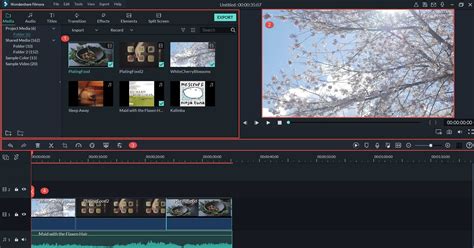
Filmora is designed with a clean, modern, and uncluttered user interface. This deliberate approach aims to provide easy access to the program's features without overwhelming the user, a stark contrast to some more complex professional editing suites that can resemble "the control console of a space shuttle." The interface is typically divided into three main sections, though users can adjust layouts to suit their workflow.
The first section serves as a library and effects area. Here, users can organize all their video, audio, and image assets. It's also the gateway to a wide array of effects, filters, and transitions. A notable tool within this area is the Instant Cutter, which allows for the efficient pre-processing of footage by isolating and rendering segments quickly. This can significantly save time by trimming or cutting raw footage before it even reaches the main library.
The second section is the preview window, where users can play back individual clips, specific sections of a project, or the entire project before exporting. This provides a crucial visual feedback loop during the editing process.
The third, and arguably the most central, section is the timeline. This is where the bulk of the editing work takes place. Users can add, arrange, and individually edit video clips, audio, and image files. Filmora's timeline operates on a "magnetic" system, meaning assets automatically snap together, simplifying the process of keeping the project organized. The software supports up to 100 tracks for video, audio, or images, offering substantial room for layering and complexity. Editing itself is described as a simple drag-and-drop process, with intuitive tools for cutting, lengthening, shortening, and deleting files.
Core Editing Tools and Customization
Filmora offers a range of editing tools designed to provide control over the final look of the video. These include:
- Transform Tool: Allows for adjustments to rotation and sizing of assets.
- Compositing: Enables the application of blend modes to overlays and transitions, adding depth and visual interest.
- Stabilization Module: As the name suggests, this tool helps to smooth out shaky footage.
- Lens Correction: This feature can be applied to footage from a wide range of action cameras, with presets available due to known lens properties. Manual adjustments are also possible.
- Drop Shadow: Adds a shadow effect to images or videos, and can also be used to enhance titles for a more professional appearance.
- Auto Enhance: This tool attempts to improve less-than-perfect footage. However, user feedback indicates its effectiveness can be hit-or-miss, depending heavily on the initial quality of the footage.
Beyond these, a dedicated Color Correction module provides the ability to both correct and grade colors using Look-Up Tables (LUTs).
A Plethora of Effects, Transitions, and Audio Assets
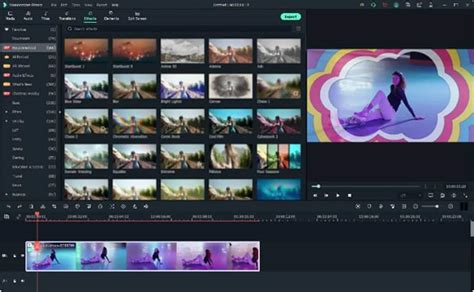
Filmora boasts a vast library of creative assets, accessible directly within the software. This includes over 300 special effects, objects, overlays, sound effects, music tracks, and transitions. Specifically, the software comes equipped with:
- 51 audio samples (25 sound effects and 26 music tracks).
- 137 adjustable Title presets.
- 178 Transitions, many of which offer customization options.
- 158 Filters.
- 87 Overlays.
- 191 Mask elements.
Additionally, there are dedicated features for Pan and Zoom, allowing users to add and customize animations for still images, as well as animate text. The inclusion of motion elements enables users to drag and drop moving graphics onto their videos, and a separate motion tracking module further enhances the dynamic possibilities.
Advanced Features and AI Integration
In line with industry trends, Filmora has integrated several Artificial Intelligence (AI) features, aiming to streamline complex editing tasks and introduce new creative possibilities.
AI Text-Based Editor
This AI-powered module transcribes dialogue from video footage into text. Users can then edit the transcript as if it were a word processing document, with changes and cuts automatically reflected in the video. This is particularly beneficial for dialogue-heavy content, significantly reducing editing time, especially when combined with tools like Silence Detection. The module also offers translation capabilities into multiple languages.
AI Music Generation and Vocal Remover
Finding suitable background music can be a time-consuming process. Filmora's AI Music Generation module allows users to select a mood and duration, and the AI creates royalty-free music accordingly. This feature, introduced in earlier versions, has been expanded to analyze projects and suggest fitting music. The AI Vocal Remover is another notable tool, capable of accurately removing vocals from music tracks with a simple right-click command.
AI Text to Video
This feature functions similarly to other generative AI models. Users provide a prompt (or have the AI generate a script), and the AI creates a video montage using its library of footage. While it incorporates AI-generated voiceovers, user feedback suggests that the current implementation can be somewhat clunky, with unnatural-sounding voices and generic stock footage, making it less compelling for professional use at present, but a feature to watch for future development.
AI Smart Masking and Planar Tracking
Filmora's AI-driven masking tool has been significantly enhanced with advanced 3D tracking technology. This allows users to attach image, graphic, text, or video elements not just to single tracked points, but to entire flat surfaces within the footage. This planar tracking capability is praised for its ability to automate the laborious process of attaching objects to moving targets or fine-tuning corrections to moving elements, making it a powerful tool for many projects.
Exporting and Platform Versatility
Filmora offers a comprehensive export module with a wide array of format options. Users can choose from:
- Local: For creating common video file formats.
- Device: With presets optimized for popular viewing devices like iPhones, iPads, and smartphones.
- YouTube and Vimeo: Tailored settings to adhere to the latest best practices for uploading to these platforms.
- DVD: For creating standard MPEG2 files suitable for burning to DVD discs, with the option to directly burn discs.
Each of these export options comes with default parameters, but users have full control to adjust settings as needed.
Beyond desktop versions for Windows and Mac, Wondershare Filmora also offers mobile applications for phones and tablets. These mobile editors are designed with simplicity in mind, offering touch-friendly controls for editing. However, the free version on mobile is notably limited, often exporting at a maximum resolution of 720p, a significant drawback compared to other mobile editors that support 1080p or higher.
User Experiences: The Good, The Bad, and The Unexpected
While Filmora's feature set is extensive, user experiences shared online paint a more nuanced picture, with recurring themes of both satisfaction and significant frustration.
Positives Highlighted by Users:
- Ease of Use for Beginners: Many users, especially those new to video editing, find Filmora to be an accessible and non-intimidating software. Its intuitive interface and readily available tutorials contribute to a gentle learning curve.
- Professional-Looking Effects and Titles: The quality of Filmora's effects, filters, transitions, and especially its titles, are frequently praised. These elements are often cited as a key reason why users choose Filmora, even over other free or built-in options.
- Flexible UI and Customization: The ability to adjust the user interface to personal preferences is appreciated, allowing for a more comfortable editing experience.
- Value for Money (with caveats): For those who utilize its features effectively and avoid unexpected charges, Filmora can be seen as a cost-effective solution, especially with options for perpetual licenses.
Recurring Criticisms and Concerns:
- Unexpected Charges and Billing Practices: This is perhaps the most prominent and damaging criticism. Numerous users report being automatically enrolled in trials for "Creative Assets" or other premium services without clear consent or obvious warnings. These trials then auto-renew, leading to unexpected charges. The inability to easily cancel these subscriptions or obtain refunds is a significant point of contention. Phrases like "hidden auto-trial trap," "deceptive dark pattern," and "fraudulent advertising" appear frequently in user reviews.
- Unsatisfactory Customer Service: When users encounter billing issues or technical problems, they often find customer service to be difficult to reach and unhelpful. Many report interactions being handled by AI chatbots that are not empowered to make decisions, making it nearly impossible to resolve issues like refund requests. The lack of direct human interaction is a major pain point.
- Performance Issues and Software Bloat: Some long-time users have noted a decline in performance with newer versions of Filmora. What was once a program that ran smoothly even on less powerful hardware has, for some, become cumbersome and prone to crashing or freezing, even on new, high-spec computers. This is often attributed to an increase in features, leading to a feeling of software "bloat."
- Watermark Restrictions: A common complaint is that the free trial version exports videos with a prominent watermark, which is only removed upon purchase of a subscription or license. Users feel this limitation should be more clearly disclosed before investing significant time in editing.
- Licensing Limitations: The concept of a "lifetime license" has also come under scrutiny, with some users reporting that perpetual licenses are tied to a specific operating system. Switching from Windows to Mac, for example, required purchasing a new license, which contradicts the expectation of a truly "lifetime" product.
- Privacy Concerns: The mobile version of Filmora has raised privacy flags, with users questioning why the app requests extensive access to media and device information, and whether it tracks user activity outside of the app.
CapCut VS Filmora: Which Video Editor is ACTUALLY Better in 2025?
Wondershare's Response: A Standardized Approach
Wondershare's customer service responses, as seen in the provided text, often follow a similar pattern. They express regret for the user's experience, explain the terms of service (particularly regarding auto-renewals of trials), and consistently direct users to contact their official support channels for further assistance. While this is a standard procedure, the repeated nature of these responses, coupled with user reports of unresponsiveness from those channels, suggests a disconnect between the company's stated commitment to user experience and the reality faced by many customers.
Conclusion: A Powerful Tool with Significant Caveats
Wondershare Filmora offers a compelling package for aspiring video editors, boasting a user-friendly interface, a rich library of effects, and increasingly sophisticated AI tools. For beginners and intermediate users looking to create visually engaging content without a steep learning curve, it can be an excellent choice. The software's ability to simplify complex tasks and offer professional-looking results is a definite strength.
However, potential users must proceed with caution. The recurring issues with unexpected charges, the difficulty in obtaining refunds, and the often-criticized customer support system are significant drawbacks. Users who value transparency in billing and a straightforward, responsive customer service experience might find themselves frustrated. Furthermore, those requiring top-tier performance for highly complex projects or those who are wary of subscription models and potential privacy intrusions may need to explore alternative solutions. The value proposition of Filmora is thus heavily dependent on the user's ability to navigate its billing structure and their tolerance for its customer service limitations.