Procreate has firmly established itself as a leading digital art application, captivating aspiring artists and seasoned professionals alike. Praised by younger users as a "fantastic tool for aspiring digital artists of all ages," Procreate offers a robust and intuitive platform for creative expression directly on the iPad. This review delves into what makes Procreate so compelling, examining its features, user experience, pricing, and overall value for a diverse range of artists.
What is Procreate?
At its core, Procreate is a professional-grade digital art medium designed exclusively for iOS devices. It transcends the notion of a mere "app to use on the go," presenting an impressive suite of tools that can rival many desktop programs. Its power lies in its comprehensive brush library, advanced layering system, and capacity for high-resolution work, all accessible through a user-friendly interface.
The Brush Engine: Limitless Creative Potential
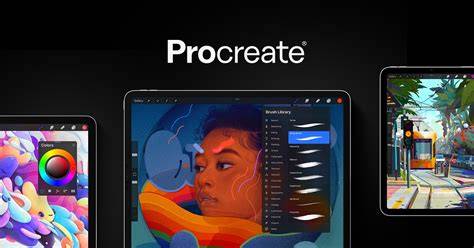
Procreate boasts an impressive arsenal of 48 included brushes, encompassing a wide spectrum of artistic tools such as pencils, inks, and paint brushes. However, the true magic of Procreate's brush system lies in its unparalleled customizability. Artists can not only create their own unique brushes from scratch but also import and purchase additional brush packs from a bustling third-party market. This extensibility means the brush options are virtually limitless, catering to every conceivable artistic style and need. The ability to fine-tune brush properties, such as shape, texture, and dynamics, allows for an unprecedented level of control, making it possible to replicate traditional media or invent entirely new digital effects.
Layers and Canvas: Building Complexity with Ease
Working with layers is fundamental to digital art, and Procreate makes this process remarkably intuitive. Users can effortlessly move between layers with a simple tap, enabling complex compositions and non-destructive editing. The app supports the creation of incredibly high-resolution work, capable of producing images up to 16 megapixels, significantly exceeding the resolution capabilities of early iPads. Artists can choose their canvas size and shape, further enhancing the flexibility of the platform. For those accustomed to desktop software, the ease of managing layers in Procreate is a standout feature, allowing for efficient organization and manipulation of artistic elements.
Key Features and Functionality
Procreate is packed with features that enhance the creative process, from basic drawing aids to advanced artistic tools. The developers, Savage Interactive, consistently update the app, introducing new functionalities and refining existing ones.
Drawing Guides and Assist: Precision at Your Fingertips
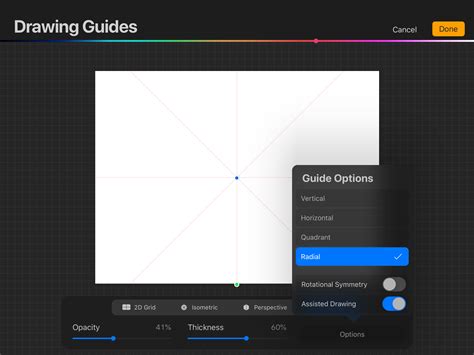
Procreate offers features designed to aid artists in achieving greater precision and consistency. Drawing Guides provide visual aids to help maintain perspective and alignment. The Drawing Assist feature is particularly valuable, allowing users to draw perfect horizontal or vertical lines when activated. Furthermore, the Symmetry option enables the creation of mirrored artwork, with advanced modes like Quadrant, Radial, and Rotational Symmetry providing sophisticated tools for complex patterns and designs.
Animation and 3D Painting: Expanding Creative Horizons
The introduction of Animation mode and 3D painting in recent updates has significantly broadened Procreate's capabilities. Animation Assist simplifies the creation of animations and GIFs, allowing artists to bring their creations to life with ease. While Procreate's animation mode may lack a persistent save state and some advanced layer features found in dedicated animation software, it provides an accessible entry point for creating short, dynamic sequences. The 3D painting features, further enhanced by the M1 chip, open up new avenues for texture, lighting, and modeling, appealing to a wider range of digital artists.
Unique Tools for Enhanced Workflow
Beyond the standard features, Procreate includes several unique tools that streamline the artistic workflow:
- Importing Palettes from Images: This allows artists to easily sample colors from photographs or other artwork, creating cohesive and inspired color schemes.
- Reference Interface: The ability to display a reference image alongside your canvas without it taking up valuable drawing space is invaluable for artists working from photos or external inspiration.
- Quick Shape: This ingenious tool automatically refines hand-drawn shapes into perfect geometric forms, saving time and ensuring clean lines.
- Alpha Lock: This feature confines drawing to the existing artwork on a layer, allowing for detailed additions or modifications without affecting other parts of the canvas. It functions similarly to a clipping mask but operates within the same layer.
How to get smooth lines in Procreate! Procreate Tips for Beginners
Adjustments and Effects: Polishing Your Masterpiece
Procreate offers a comprehensive suite of adjustment tools, including familiar options like Color Balance, Curves, Hue, Saturation, and Brightness. It also includes various blurring effects like Gaussian Blur, Motion Blur, and Perspective Blur. Two particularly noteworthy adjustment features are:
- Bloom: This creates a "glow" effect, perfect for adding atmospheric lighting or highlighting celestial bodies.
- Liquify: This powerful tool allows artists to manipulate pixels in a fluid, marble-like manner, adding depth and unique textures to artwork or text.
Time-lapse Replay and Recording: Documenting the Creative Journey
One of Procreate's most celebrated features is its Time-lapse Replay and Recording. The app automatically records the entire drawing process, allowing users to watch their artwork evolve from start to finish. This feature is not only a fascinating way to review one's own creative progress and identify areas for improvement but also an excellent tool for sharing the artistic journey on social media platforms like Instagram Reels. It provides a visual narrative of the iteration and evolution that defines the creation of digital art.
User Interface and Accessibility
Procreate's user interface (UI) is often described as simple, which can be a double-edged sword. While its minimalist design contributes to a clean aesthetic, some new users might find it challenging to locate specific tools and understand their functions initially. The app does prompt users to watch video tutorials, but their length can sometimes deter newcomers. Procreate also provides a comprehensive digital handbook that is highly recommended for those looking to master the platform.
However, Procreate makes a significant effort in terms of accessibility. Recognizing the importance of inclusivity, the app features:
- A dyslexic-friendly font.
- High contrast options for improved readability.
- Simple menus that support VoiceOver for visually impaired users.
- An uncommon feature that displays the color of the current swatch at an enlarged size and an eyedropper tool that compares the selected color to the current swatch, aiding in color matching.
This focus on accessibility ensures that Procreate is not just a powerful tool but also a welcoming one for a broader range of users.
Pricing and Value Proposition
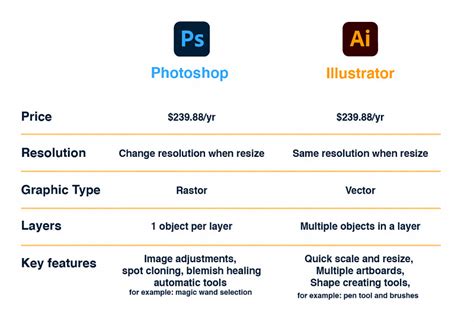
A significant factor in Procreate's appeal is its pricing model. Unlike many professional creative applications that rely on a monthly subscription, Procreate requires a single, one-time payment of $9.99 USD (or equivalent in other regions). This makes it an exceptionally affordable option, especially when compared to industry giants like Adobe Photoshop, which can cost upwards of $20.99 USD per month. This one-time purchase grants users access to all current and future updates for the lifetime of their use of the app on their iPad.
While Procreate itself is an affordable investment, it's crucial to remember that it is an iPad-only application. Therefore, users will also need to own an iPad and potentially an Apple Pencil to fully utilize its capabilities, which can represent a more substantial initial investment, ranging from $400 to $900 USD. Despite this hardware requirement, the overall value proposition of Procreate remains exceptionally high, offering professional-grade features at a fraction of the cost of comparable desktop software.
Limitations and Considerations
Despite its many strengths, Procreate does have certain limitations that artists should be aware of:
- Platform Exclusivity: Procreate is exclusively available on iOS devices, leaving Android users unable to access its features. While Procreate Pocket exists for the iPhone, it offers a more limited experience compared to the iPad version.
- Learning Curve: While the interface is generally intuitive, the sheer depth of features can be overwhelming for absolute beginners. The app's reliance on external tutorials and a handbook, while helpful, can also present a barrier for some.
- Missing Features for Some Workflows: Artists accustomed to specific tools in other software, such as Sketchbook Pro, might miss features like flood fill or a dedicated clone brush. Similarly, those working with vector graphics might find Procreate's raster-based approach less suited for precise vector manipulation.
- Gradient Tools: Procreate lacks dedicated gradient tools, requiring users to employ techniques like Gaussian Blur to achieve smooth color transitions.
- Layer Masks: While clipping masks are present, simple layer masks are more basic, and users cannot create a mask directly from a selection, necessitating manual painting of masked areas.
- Battery Life and Performance: Like any demanding application on a tablet, prolonged use of Procreate can drain the battery of both the iPad and Apple Pencil. In some instances, charging the iPad while drawing can lead to overheating, potentially affecting Apple Pencil performance.
The Procreate Community and Beyond
One of the most significant, albeit less tangible, benefits of Procreate is the strong sense of community it fosters. The vast user base means artists can easily connect with like-minded individuals, share tips and tricks, and even collaborate on projects. For many, Procreate has been a gateway to building connections, collaborating with brands, and even establishing a digital art business. The app has given many users, including those who were previously intimidated by digital art, the confidence to pursue their creative passions.
Research has also highlighted the positive impact of digital art platforms like Procreate on children's self-esteem, particularly when coupled with positive portrayals in media. This underscores the importance of accessible and empowering creative tools for younger generations.
Conclusion: Is Procreate Worth It?
For first-time digital artists, self-taught creators, and even seasoned professionals looking for a portable and powerful art solution, Procreate is an exceptionally worthwhile investment. Its combination of an extensive feature set, intuitive design, unparalleled customizability, and a highly accessible price point makes it a standout application in the digital art landscape. While it may not replace every aspect of complex desktop software for every workflow, its strengths in sketching, illustration, and on-the-go creation are undeniable. The continuous development by Savage Interactive, coupled with a vibrant user community, ensures that Procreate will remain a relevant and essential tool for digital artists for years to come. The "$10 decision" to purchase Procreate has, for many, unlocked a world of creative possibilities, brand collaborations, and opportunities that were once unimaginable.