Serif Affinity Designer 2 represents a significant evolution for a tool that already showed immense promise. The latest iteration introduces new features that integrate seamlessly, aiming to empower users in their creative endeavors, from drawing and slicing to warping shapes for the creation of truly impressive artworks. The commitment to rigorous testing for every product reviewed ensures that users can be confident in selecting the best available options. Crafting compelling visual assets, whether they be intricate artworks, distinctive logos, or even simple icons, can be a surprisingly intricate process. Consequently, the most capable graphic design software often carries a price tag that reflects its complexity. However, exceptions to this rule exist, and one such notable exception is the subscription-free Affinity Designer. With the advent of the substantial version 2.0 update, it's time to explore the inner workings of this versatile creative design tool.
Affinity Designer 2: Pricing and Plans
Affinity Designer stands out as an affordable, cross-platform solution that operates without a subscription model, presenting a compelling proposition for creative professionals and hobbyists alike. The software is readily available across multiple platforms, with dedicated versions for both macOS and Windows. While an iPad version is also part of the ecosystem, this review will primarily focus on the desktop applications.
For optimal performance, Affinity Designer requires a 64-bit processor on Windows and is compatible with both Intel and Apple M-based chips on macOS. A minimum of 8GB of RAM is recommended, though more is always beneficial for smoother operation, as is typical with most demanding applications. Installation requires between 1GB and 3GB of storage space.
The pricing structure is exceptionally attractive. The standard desktop version is available for a one-time purchase of $70 / £60. To commemorate the release of version 2.0, a special introductory price of $41 / £36 was offered. Crucially, this is not a recurring subscription but a single purchase, offering significant long-term savings when compared to subscription-based alternatives like Adobe Photoshop or Illustrator, which typically cost around $21 / £20 per month.
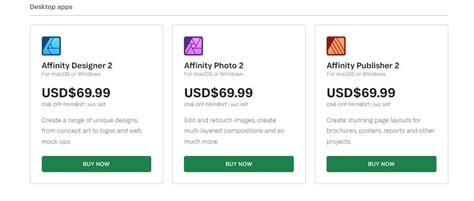
For those seeking a comprehensive suite of creative tools, Serif also offers a 'Universal Licence'. This bundle integrates Designer with Affinity Photo and Affinity Publisher, allowing users to access all three applications across their Mac and Windows devices. The Universal Licence also extends to the iPad versions of Serif's graphic design, photo editing, and DTP software. This all-encompassing package is available for $170, or a discounted $100 / £90 during the celebratory period. A minor point of contention for existing users is the absence of a discounted upgrade path for previous versions. For individuals curious to explore the software's capabilities before committing to a purchase, Serif provides a complimentary 30-day trial for both Mac and Windows versions.
An Enhanced and Polished Interface with Numerous New Features
The fresh release of Affinity Designer 2 naturally invites a focus on its novel additions and enhancements. A key improvement is the revamped Document Dialog Box, a central hub for accessing templates, sample projects, and pre-defined canvas dimensions. The addition of a 'Recent' section further streamlines workflow by providing quick access to recently worked-on documents.
A particularly useful feature is the live preview functionality within the Document Dialog Box. Whether selecting a standard template or defining a custom canvas size, users can observe a real-time representation of their document, complete with margins and bleeds, displayed in the upper right corner of the window.
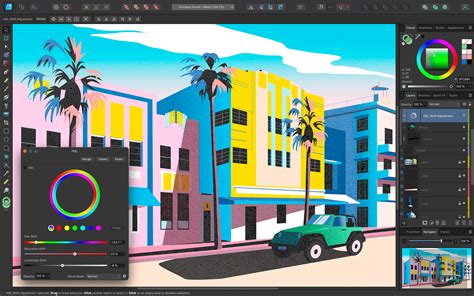
While the overall interface maintains a familiar aesthetic to the previous version, it has undergone significant polishing. The icons for all tools have been meticulously redrawn, ensuring a fresh and modern look. Despite these changes, users accustomed to earlier versions will find the transition intuitive and require minimal time to reacquaint themselves with the layout.
One notable enhancement is within the Layers panel, which now defaults to displaying the object type for each layer. This allows for immediate identification of layer content, whether it be a curve, raster image, group, adjustment layer, or another element. This visual cue greatly aids in managing complex projects.
Affinity Designer 2 also introduces a suite of powerful new tools, several of which stand out for their innovative approach and utility.
Affinity Designer 2: Mastering Vectors and Rasters
Affinity Designer distinguishes itself by adeptly merging vector and raster graphics within a single application, creating a powerful hybrid environment. This is achieved through its innovative 'Personas' system, which effectively provides distinct interface modes optimized for different types of work.
The Versatile and Powerful Shape Builder Tool
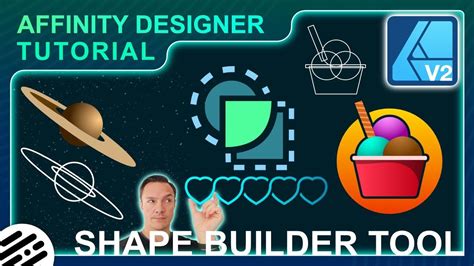
A highly anticipated addition, the Shape Builder tool addresses a long-standing request from users. This elegant and straightforward tool allows for the creation of complex shapes by combining, subtracting, and merging simpler overlapping shapes. By activating the tool and defining the desired operations, users can sculpt intricate forms with remarkable ease.
A Fantastic Array of Warping Tools
Perhaps even more impactful than the Shape Builder are the new Warp tools. This highly requested feature empowers users to distort shapes or groups of layers using vector-based manipulation, offering an intuitive and remarkably easy-to-use experience.
Creating curved text, which was previously a more involved process, is now significantly simplified. Complex alterations and adjustments to text and shapes can be achieved with simple clicks and slider movements.
The Mesh Warp tool is a particular highlight. Upon activation, a grid is overlaid onto the selected object. Users can then manipulate the points on this grid to distort the underlying object. The ability to add more points to the grid allows for increasingly refined and precise warping. When applying these warping transformations to a group of layers, any subsequent object added to that group will automatically inherit the applied distortion, ensuring consistency across complex designs.
Enhancing Workflow and Creativity with Numerous Additions
This latest upgrade is replete with new and improved features designed to significantly boost user workflow and creative output. Among the most impactful are:
- X-Ray Mode: A new variation of the Wireframe view, X-Ray mode offers an alternative way to visualize complex designs. It does not replace the traditional Wireframe view but serves as a valuable addition, making it easier to distinguish between individual curves and elements within intricate images.
Knife Tool: This intuitive tool allows users to "slice" through objects by dragging across them, enabling rapid customization of generic shapes into more complex forms using vector points.
Style Picker: Located alongside the Colour Picker, the Style Picker is a significant time-saver. It allows users to effortlessly copy the styling of an existing object and apply it to another. Users can also select which specific style attributes (e.g., fill, stroke, effects) they wish to transfer, offering granular control.
Quick Grid: This feature enables the rapid creation of multiple copies of a shape arranged in a grid pattern across the canvas, proving to be an invaluable time-saving tool for repetitive design tasks.
AutoCad File Compatibility: Affinity Designer now supports AutoCad file formats, converting the data into editable vector shapes, which can then be manipulated within the application.
While the focus of this version is clearly on its vector capabilities, the raster side of Designer has not been overlooked. Significant improvements have been made to the Brush Tools within the 'Pixel Persona', including enhanced tip accuracy, support for wet edges, and the option to view brushes as either strokes or thumbnail previews.
A surprising omission on the Mac version is the lack of support for the operating system's Autosave feature. This was noted as a puzzling absence upon the release of version 1.0 and remains a frustrating omission in the current iteration.
Affinity Designer Tutorial: Warp Tool
Affinity Designer 2: Scorecard
| Feature | Rating | Description |
|---|---|---|
| Pricing & Plans | 4.5/5 | Affordable one-time purchase, no subscriptions. |
| Interface & Tools | 4.5/5 | Polished interface with a wealth of new and improved tools. |
| Vectors & Rasters | 4/5 | Seamless integration of vector and raster capabilities, akin to a Photoshop and Illustrator hybrid. |
| Shape-building | 5/5 | Versatile and powerful tool for creating complex shapes from simpler elements. |
| Mesh & Warp | 5/5 | Excellent range of warping tools for intuitive and powerful distortions. |
| Creative Workflow | 4.5/5 | Numerous additions that significantly enhance workflows and boost creativity. |
Should You Buy Affinity Designer 2?
Buy It If…
Affinity Designer 2 is an excellent choice for individuals seeking a creative application that robustly supports both vector and raster design work. Its impressive array of powerful tools, combined with a budget-friendly, one-time purchase price, makes it an outstanding value proposition. Whether you are a seasoned professional or an aspiring artist, the software offers the capabilities to bring your creative visions to life.
Don't Buy It If…
This retooled graphic design software might not be the ideal fit if your primary focus isn't on creating professional-looking artwork or if you feel compelled to use the software that is most widely adopted by others in the industry. While Affinity Designer offers professional-grade features, its appeal is strongest for those who value its unique blend of power, affordability, and subscription-free model.
The acquisition of Affinity by Canva has transformed a competent and already reasonably priced suite of applications into a must-have resource for creative professionals. Even for those already invested in a Creative Cloud subscription, exploring Affinity Designer is highly recommended, as it presents a compelling alternative or complementary tool. The rigorous testing methodology employed by expert reviewers ensures that users can make informed decisions when selecting the best creative software for their needs.
The concept of "completely free" software is undeniably appealing, and this sentiment extends to creative applications as much as it does to enjoyable experiences like ice cream or puppies. In this context, the transition of Affinity's suite of apps under the Canva umbrella has made them an even more accessible and desirable option for a broad spectrum of users.
What was once a collection of three distinct applications (Designer, Photo, and Publisher) now operates with a heightened sense of integration. Serif's original "StudioLink" technology already facilitated seamless switching between these applications within a document, and this synergy has been further enhanced. Users can now effortlessly navigate between the Vector, Pixel, and Layout personas with simple button clicks at the top left of the interface. A fourth persona, Canva AI, has also been introduced, though its advanced features require a Canva Premium plan. The key difference prior to this integration was the necessity to purchase each application individually. However, with cost now less of a barrier, users have the flexibility to fluidly switch between personas or concentrate on the one that best aligns with their specific skill set and project requirements.
The setup process for Affinity by Canva is remarkably straightforward. Users are required to sign up for a Canva account to gain access. Upon logging in, they are presented with choices for either Mac or Windows versions. The installers are tailored for different system architectures, including separate options for x64 and ARM Windows machines (for those utilizing Snapdragon processors) and a universal application for Mac.
Once launched, the application presents a new document screen that prompts users to select their desired paper size. While it may not offer an extensive library of pre-designed templates, this is not the primary focus of the application. Instead, Affinity excels in providing a wealth of tutorials, a long-standing strength of the Serif suite. These tutorials often include example documents, offering practical guidance for users.
For long-time Affinity users or those considering a switch due to the attractive new pricing, the available tutorials provide an excellent starting point. The new application is capable of opening documents from older versions of the suite, such as .afpub files. However, saving a creation in the new .af file format means it will no longer be compatible with legacy applications.
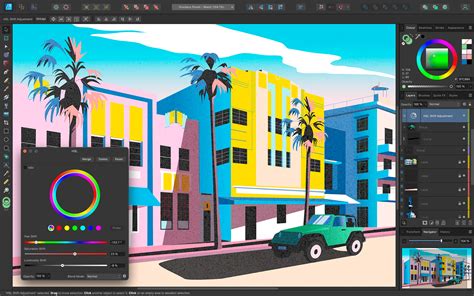
Features of Affinity by Canva
Affinity by Canva appears to have retained all the core functionalities and distinctive characteristics from its previous iterations, despite its rebranding. While the webpage may describe it as a "brand-new product," its fundamental nature remains largely unchanged. This includes the recognizable color picker, shaped like a triangle within a circle, and the workflow for raw image files, which pass through a 'develop' persona before opening in the main application, mirroring the process in Adobe Camera Raw.
Unless users opt for the Canva AI features, which necessitate an additional subscription, there are no integrated AI tools available, including denoising capabilities. For those who choose to subscribe to the AI features, the application processes data locally on the user's machine. Users can also download individual machine learning models within the Settings panel to manage application size on machines that may not utilize all AI functionalities.
An exception to this is the object selection tool, which allows users to download the necessary model without any cost. This enables the object selection tool within the photo-editing persona, a highly valuable feature. However, it's worth noting that its performance is not always perfect; in comparative tests, Photoshop's object selection tool demonstrated superior accuracy in distinguishing a bird against a blue sky.
The vector drawing capabilities, formerly the core of Affinity Designer, exhibit significant overlap with the layout features of Affinity Publisher. This integration allows for a fluid workflow, enabling users to seamlessly transition between applications when specific functionalities are required. The updated tooltips provide more detailed information about each tool's purpose beyond just its name. Furthermore, some tools, such as vector image tracing, are accompanied by dedicated tutorials. PDF export options are comprehensive, offering the ability to rasterize the entire document while preserving its CMYK color values.
Most photo editing operations within Affinity are non-destructive, and the layer-based editing process closely resembles that of Adobe applications. Filters can be applied as 'live' filters, meaning they function as editable layers that can be adjusted, repositioned, or deleted, offering a flexible approach to image enhancement that is close to one-shot edits. This contrasts with the original Canva, which often automates much of the design process, particularly with its AI integrations.
A notable absence, which has persisted for some time and continues to be a point of discussion, is the lack of built-in photo organizing or cataloging features. While not aiming to directly compete with dominant solutions like Adobe Lightroom, the inclusion of such capabilities would streamline the management of large image collections and encourage users to remain within the Affinity ecosystem rather than requiring additional software.
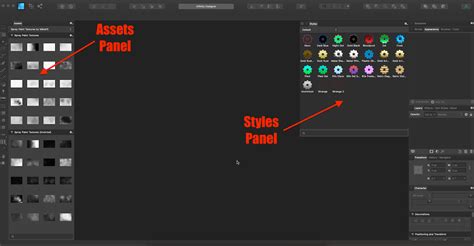
Who is Affinity Designer 2 For?
Literally Everybody
Affinity Designer is now free to use and runs on all Mac and PC computers. It is an ideal tool for students, while simultaneously offering enough professional-grade features to captivate working creatives. The availability of such a competent suite of applications at no cost, especially following Canva's acquisition, positions it as essential software for creative professionals. Even individuals who are deeply integrated into a Creative Cloud subscription would benefit from installing Affinity Designer, given its power and versatility.
Steve, who has been writing about technology since 2003, has contributed his expertise to numerous publications including iCreate, MacFormat, MacWorld, MacLife, and TechRadar. He actively uses many of the applications he reviews in both his personal and professional life.
Ian Evenden, a journalist with over two decades of experience, began his career during the era of QuarkXpress 4 and Photoshop 5. He now primarily works with Creative Cloud and Google Docs but maintains a keen interest in powerful computing hardware.
For graphic designers who may not yet be familiar with Affinity, it's a significant omission not to be aware of its capabilities. While perhaps not the primary intention of its developers, the design world recognizes Affinity as a powerful, Adobe-compatible designer software that is remarkably affordable. This affordability was less of a critical factor when standalone software suites from Adobe cost between $400 and $1,000. However, Adobe's shift to the Creative Cloud subscription model, with monthly fees around $50, understandably alienated many users. While dedicated, everyday designers might tolerate this cost, it prompted a search for viable alternatives.
Affinity Photo is frequently described as an incredible graphics design tool that functions very similarly to Adobe Photoshop. Its user interface, particularly the arrangement of tool windows on the left and right sides, bears a strong resemblance to Photoshop, making it easy to learn and use with virtually no learning curve. Although the top menus are organized differently, they remain highly intuitive. The software is compatible with the PSD format. Many users have reported being highly satisfied with Affinity Photo for over three years, attesting to its reliability and performance. It is often praised for its speed, smooth operation, and lack of bugs or crashes, frequently outperforming Photoshop in load and run times.
A noted drawback, however, concerns image compression. When exporting images at less than 100% quality, Photoshop is reported to produce a better-looking image with a smaller file size. The primary workaround for this limitation is to export at 100% quality and then compress the image using a separate tool. The pricing for Affinity Photo was exceptionally competitive, often around $50 for a one-time purchase. While the reviewer had not personally tested Affinity Designer or Publisher at the time of writing, the high quality and great performance of Affinity Photo suggested that the other applications in the suite would be of a similar caliber. Further reviews and comparisons are readily available for those seeking more information.
Supporting the Creative Community
The profound global impact of the COVID-19 pandemic necessitated support for individuals worldwide. In response, Serif offered an extended 90-day free trial for all Mac and Windows versions of the entire Affinity suite, providing crucial assistance during a challenging period.
Affinity Designer for iPad Pro
The arrival of Affinity Designer for iPad Pro marked a significant moment for mobile creative workflows. The anticipation for this app was high, with some users, like the reviewer, purchasing an iPad with the express intention of using Affinity Designer on it, even before its official release. During the waiting period, the reviewer had become accustomed to Procreate, appreciating its pixel-based format for looser, more informal drawings. However, as a primary vector user accustomed to the comprehensive toolset of Affinity Designer, Procreate left a void, particularly for commissioned work, due to its limitations with shapes and text.
Fortunately, any anxieties regarding Affinity Designer's iPad capabilities were quickly dispelled. The app fulfills all expectations and offers a vast array of functionalities, many of which may still be undiscovered by the user. A key advantage of Affinity Designer is its sheer breadth of capabilities, far surpassing tools like Adobe Draw and significantly outperforming Procreate for tasks beyond digital painting.
A standout feature is Affinity Designer's seamless transition between raster and vector layers, a critical requirement for many artists. This allows for the incorporation of "natural" textures and the creative freedom associated with pixel-based drawing. Unlike screen mirroring apps, which often introduce lag and pressure sensitivity issues, Affinity Designer was developed with native iPad use and the Apple Pencil in mind, effectively eliminating these problems. The app also provides extensive customization options, including the easy integration of custom fonts and the creation of unique vector and pixel brushes, features typically found in desktop applications.
One area where the iPad version requires a learning curve is its User Interface (UI) functionality. While the desktop version of Affinity Designer was praised for simplifying the complexities of Adobe Illustrator, presenting only the essential functionalities in expected locations, the iPad UI can feel somewhat fiddly. Even after several weeks of dedicated use, the reviewer found themselves frequently opening and reopening sidebar menus to navigate its features. Users transitioning from the desktop version will find familiar elements, but achieving the same level of workflow smoothness may take time. For those entirely new to Designer, or who primarily use Procreate, a dedicated period of learning the application's intricacies is advised. Serif provides a series of helpful tutorials to guide users through the initial stages or assist when encountering difficulties. However, the reviewer emphasizes that hands-on experimentation and working out how to achieve desired outcomes remains a highly effective learning method.
Affinity Designer is presented as the definitive application for anyone looking to utilize their iPad as a serious graphics tool, whether for illustration, lettering (with its robust typography tools), vector work, or a combination thereof. For casual sketching, Procreate might suffice, but for anything more advanced-especially involving shapes and text-Affinity Designer stands virtually unmatched in its iPad capabilities. The experience of using a native app that fulfills all creative needs, in contrast to the frustrations of screen mirroring tools, is described as "heavenly." At £19.99 for a one-time purchase without a subscription, Affinity Designer for iPad offers exceptional value.