In the dynamic and visually saturated world of Instagram, a single photograph often struggles to convey the depth of a story or the breadth of an experience. To truly capture attention and foster engagement, creators are increasingly turning to photo collages. These dynamic arrangements of images and even videos transform a simple post into a compelling visual narrative, essential for anyone aiming to make their content stand out. This guide delves into the most effective and user-friendly collage applications available, empowering you to craft captivating content that resonates with your audience.
The Allure of the Collage: Beyond a Single Image
Collages offer a creative advantage over single images, allowing for a richer and more multifaceted presentation. They are instrumental in showcasing a range of products, summarizing travel adventures, or presenting impactful before-and-after comparisons. For creators focused on boosting engagement, mastering the art of visual storytelling through collages is a crucial step. While finding professionally designed templates might once have seemed daunting, requiring expert skills, the advent of advanced collage apps has democratized this creative process. The best free photo collage makers now come equipped with designer-made templates, enabling users to simply edit, download, and share their creations across any device or platform with ease.
Streamlined Creation: Apps with Intuitive Interfaces
For those seeking immediate results and a hassle-free experience, several apps prioritize a clean and easy-to-navigate interface. These platforms are designed to allow users to quickly create collage pictures without a steep learning curve.
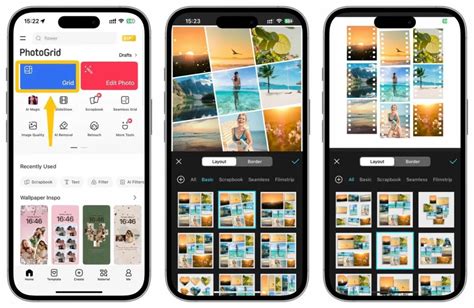
PhotoGrid stands out as a prime example, living up to its name with a prominent "Grid" button as its primary function. Upon opening the app, users are presented with a multitude of grid layouts, facilitating rapid collage creation. The process is remarkably efficient: simply upload your images (up to 16 at a time), and PhotoGrid automatically generates previews with various grid and collage layout options. This app is lauded for its ability to make collages dynamic and vivid, offering an extensive library of over 20,000 collage templates, alongside 1,000 filters, 5,000 stickers, and 2,000 backgrounds. Its AI-powered templates can even generate AI Hug videos and compile them into live photo collage wallpapers. PhotoGrid also boasts nearly 40 preset resizers for social media stories and feeds, including options for posters, live photos, and phone wallpapers. The app is regularly updated and is available for both iPhone and Android, holding a 4.9-star rating on iOS with over 100,000 reviews.
Pic Stitch is another excellent choice for those who want to make picture collages quickly. Unlike apps that require searching for a specific button, Pic Stitch displays all its grid options (over 400) upfront upon opening. These layouts are thoughtfully organized into classic standard designs and more stylized shapes like stars or flowers. While the process of adding images is step-by-step, requiring manual dragging into collage cells, the sheer volume of options makes it a great tool for basic grid needs. The app features a sleek, black interface that is highly intuitive, and it includes a built-in camera for instant collage creation, akin to making Instagram Stories. Although it may lack the extensive themed templates found in apps like PhotoGrid, its core grid functionality remains robust, even after years without an update. Downloadable formats include JPG (customizable) and PNG, with basic but free editing tools.
MOLDIV presents a clean and simple interface, showcasing a prominent "Grid" button on its homepage. Tapping this reveals the total number of available templates. It's important to note that MOLDIV categorizes collage templates under the "Magazine" option, with many of the more advanced live photo and video templates reserved for Pro users, offering fewer options for standard phone collages. Despite this, its straightforward design makes it accessible for users who prefer a less cluttered experience.
PiZap offers a super easy way to create grids. After opening the app, simply tap on "Collage Templates." It's highly user-friendly for beginners who just want to group photos. While PiZap's templates are described as basic grids organized by shape and designed for social media, tapping "see all" provides full grid versions. A significant advantage is the ability to save time by not having to finish a grid before choosing social media ratios. However, PiZap does not offer the creative, versatile collage templates found in apps like PhotoGrid, which continuously updates a vast collection for various festive events, including video collages and live wallpapers.
Expanding Creative Horizons: Customization and Advanced Features
Beyond basic grids, the most powerful collage apps offer extensive customization options, allowing users to truly personalize their creations. This includes incorporating videos, music, animated elements, and even AI-driven features.
Collageable places a strong emphasis on collages rather than just grids, primarily offering themed templates. Users first select images and preview the collage at the top. Collageable then presents options for the number of images, allowing users to switch between different layout options and continue adding images to explore further variations. While standard text and stickers can be added, the app requires users to exit the editing interface each time a sticker is added, which can disrupt the workflow.
Live Collage is recognized as a powerful video collage app. It enables users to save their final creations as videos, GIFs, or still images without any watermarks, providing a versatile output for various platforms.
PicCollage is an exceptionally versatile tool, suitable for everyday tasks like sending festive greeting cards and professional needs such as designing flyers and invitations. A key feature is its flexibility in handling image uploads; users can upload more images than a template technically allows, rearranging and dragging them freely for a more DIY experience. While this can sometimes lead to hidden images if not managed carefully, it offers a high degree of creative control. The app also allows for the addition of short videos and the search for online memes, GIFs, or PNGs, enhancing the collage's engagement potential.
PicsArt operates as a comprehensive image community with a strong focus on social media, meaning its collage tools might not be as immediately prominent as in dedicated collage apps. However, its integration into a broader creative ecosystem is a significant advantage. Unlike apps where the grid option appears instantly, PicsArt requires users to navigate to its collage functions. It stands out for its professional offering of five downloadable formats, although only JPG export is free, with PNG, PDF, GIF, and MP4 videos requiring payment. PicsArt provides detailed explanations of each format's use, aiding users in making informed choices. For free usage, users must watch full ads and wait, which is presented as a money-saving option.
PhotoGrid excels in providing professional sticker and text options, allowing users to easily browse and select elements that match their style. For efficient image swapping, users can utilize a long-press gesture to drag and drop images into different grid positions, a quicker alternative to the basic swap button. PhotoGrid is considered a perfect pic collage maker due to its versatile and expert-designed options, offering both grid layouts and an expansive library of over 20,000 collage templates that are easy to find and use. Its AI-powered templates are particularly noteworthy, enabling the creation of unique and dynamic collages.
Advanced AI and Professional Design Tools
The integration of Artificial Intelligence (AI) and professional design capabilities is rapidly transforming the collage-making landscape, offering unprecedented efficiency and creative possibilities.
PhotoGrid is highlighted as the best all-in-one collage maker, powered by state-of-the-art AI collage templates. It enables users to generate AI Hug videos and compile them into live photo collage wallpapers. All templates are clearly organized and searchable, and users can add video and music to their collages. The app is regularly updated, ensuring access to the latest features and design trends. PhotoGridâs AI tools can automatically generate collage photography from uploaded images in seconds, simplifying the creative process for users of all skill levels.
Adobe Express, formerly known as Adobe Spark, is praised for its simplicity and ease of use, welcoming all skill levels. It allows users to upload photos and watch as the collage maker combines them into a stunning collage. Adobe Express offers extensive customization options, including direct photo editing within projects, with effects like Duotone filters, adjustments to contrast and brightness, and cropping. Its free plan provides access to thousands of templates, photo editing tools, effects, animation, and 2GB of storage.
Canva is recognized not just as a collage app but as a complete design ecosystem. It offers a vast library of professionally designed templates optimized for Instagram's various formats, eliminating the guesswork of sizing. Canva operates on a generous freemium model, providing a powerful and versatile solution for creators needing more than just simple photo grids.
Picsart, with its AI-enhanced editing ecosystem, allows creators to perfect their images before incorporating them into collages. Its massive library of grids, freestyle templates, and robust editing tools make it a one-stop-shop for both editing and composing. The integration of AI tools simplifies complex edits, ensuring high-quality input that elevates the final output.
Web-Based and Desktop Solutions
While mobile apps dominate the collage creation space, several powerful web-based and downloadable software options cater to users who prefer working on a larger screen or require more advanced features.
Icecream Photo Editor is a desktop application that offers a dedicated photo collage section with various template options, including classic grid styles. Users can click and drag photos to swap positions and adjust frame border sizes and colors. Beyond collage creation, it provides a decent range of editing tools for individual photos.
Canva also functions as a highly popular web-based editor, allowing users to create content for marketing, social media, or personal use. Its "See All" option leads to a dedicated section for combining images. While the array of tools might initially seem overwhelming for beginners, the editor is generally easy to use, with the ability to edit positions and sizes of elements. It also supports the incorporation of graphics and background removal.
Adobe Express (web-based) is similar to Canva, offering a vast array of templates and photo options. While finding a dedicated picture collage section can be challenging, collage layouts can be found within categories that allow for multiple photos. The web browser editor is a significant advantage for accessibility.
Google Photos offers a surprisingly simple collage maker integrated with its photo storage service. Users select photos, and the platform automatically creates a square photo grid with borders. However, its limitations include a fixed layout and no editing capabilities for the generated collage.
Shape Collage is a unique program that creates collages by scattering photos like a heap of polaroid images. While it requires some time to get used to its parameters, it produces visually striking results. However, the free version lacks editing options for the final collage, requiring an upgrade to premium.
Fotor is available as both a web-based program and downloadable software. It offers a good variety of collage templates, from simple grids to heart-shaped designs, and features a drag-and-drop interface. Users can adjust spacing, margins, and add corner radius to photos.
Fotojet is a free, web-based editor with a dedicated collage feature, providing extensive control over individual photo positioning. Its collage templates are categorized for easier navigation, and users can add text, clipart, and change backgrounds after completing the basic layout.
PhotoPad may have a dated interface, but its collage functionality is robust. It offers a wide range of preset collage layouts, including circular and freehand options, alongside standard grids. Users can add photos individually to each box and apply impressive filters, including old-school, retro effects.
Pixlr is a popular online service known for its user-friendly interface and comprehensive editing tools, including a collage maker. It allows users to choose from 6 different templates, adjust aspect, space, color, and corner settings, with the resulting file saved in PNG format. Its web-first approach offers flexibility, allowing work from any computer.
Mobile-First Solutions for On-the-Go Creation
For users who primarily create content on their smartphones, a range of mobile-first apps provide powerful and intuitive collage-making capabilities.
InCollage is a user-friendly mobile app that offers a great range of standard grid layouts. Users can add PNG and other image formats, along with graphics like stickers and freestyle items. Its interface is designed for ease of use, even for those with no prior editing experience.
Layout from Instagram is a free mobile app specifically designed for creating photo collages with ease. It features a straightforward interface with drag-and-drop functionality, allowing users to combine multiple pictures into various collage layouts. Users can select images from their gallery or capture new ones within the app and adjust preset grid templates by resizing and rearranging.
SCRL is a game-changer for Instagram creators focused on the swipe-able carousel format. It's built to create seamless, panoramic, and aesthetically pleasing multi-panel posts, allowing single images or collages to span across multiple frames. Its intuitive freeform canvas enables effortless dragging of photos and text across slide boundaries, and it supports adding more than 10 photos in a single post.
Unfold, now part of Squarespace, offers a clean, modern, and editorial aesthetic. It provides magazine-style templates that elevate Instagram Stories and posts, focusing on curated collections of templates that encourage consistent brand storytelling.
Diptic has long been a strong player in the collage space, focusing on classic, clean grids and robust frame customization. This iOS-exclusive app prioritizes simplicity and control, offering over 190 layouts and support for video collages, allowing the combination of photos and video clips.
MOLDIV positions itself as a professional, all-in-one photo editor with collage creation as a central feature. It excels at producing stylish, editorial-looking content with unique "Magazine" presets. It integrates a complete editing suite, including a pro-level camera and beauty tools.
InCollage, from the creators of InShot, is designed for speed and simplicity on mobile. It excels at classic photo grids and freestyle collages, integrating useful AI tools like object remover and photo enhancers directly within the collage-making process.
Key Considerations When Choosing a Collage App
When selecting the best photo collage app, several factors come into play:
- Design Versatility and Presentation: Look for apps that offer a variety of template frames, grids, and magazine or greeting card layouts.
- Extra Features: Consider apps that provide valuable extras such as in-camera shooting, editing tools, filters, text options, backgrounds, and stickers.
- Ease of Use: A user-friendly interface is crucial, especially for beginners. Apps that automatically suggest templates based on selected photos can be very helpful.
- AI Capabilities: For advanced editing and unique creations, apps with AI-powered features for image enhancement, object removal, or template generation are increasingly valuable.
- Platform Availability: Ensure the app is available on your preferred operating system (iOS or Android) or as a web-based application.
- Watermarks and Ads: Many free apps include watermarks or intrusive ads. Check if the app offers a way to remove these, either through a premium subscription or by watching ads.
- Cost: While many excellent free options exist, premium versions often unlock more features, templates, and an ad-free experience. Evaluate whether the cost aligns with the value provided.
Making the Right Choice for Your Creative Workflow
Navigating the diverse landscape of collage apps can seem overwhelming, but understanding the unique strengths of each can help you build a customized toolkit. The ideal app for you depends on your specific creative vision, workflow, and content goals.
For the All-in-One Power User, platforms like Canva and Adobe Express are unparalleled, offering comprehensive solutions that extend beyond collages to video editing and social media scheduling.
If your brand is built on a distinct visual identity, Aesthetic-Driven Storytellers will find specialized apps like Unfold invaluable for their clean, minimalist, and editorial-style templates.
For those focused on mastering the Instagram Carousel format, a purpose-built tool like SCRL is essential for creating seamless, swipe-through posts.
Mobile-First Creators on a Budget will find a wealth of features in free versions of apps like InCollage, PhotoGrid, and Picsart, offering powerful tools without a significant financial commitment.
Ultimately, the goal is not just to create beautiful content but to present it cohesively and professionally. By leveraging the capabilities of the best collage apps for Instagram, you can elevate your visual storytelling, foster deeper audience engagement, and build a more impactful online presence.