In the ever-evolving digital landscape, the choice of image format is far more than a superficial design decision. It directly impacts how swiftly your web pages load, the amount of bandwidth consumed, and the overall performance of your site across various devices. When comparing WebP vs. JPEG, your selection can significantly influence both speed and image quality. Large image files are notorious for slowing down page load times, which in turn can negatively affect your search engine optimization (SEO) rankings.
The Dominance and Limitations of JPEG
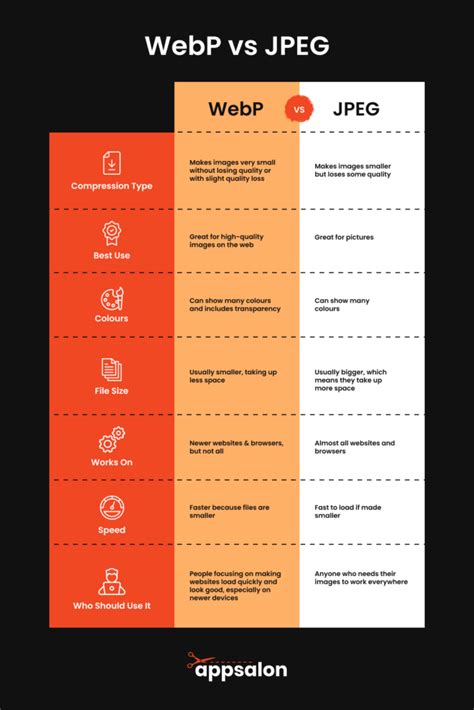
The JPEG (Joint Photographic Experts Group) image format is one of the most commonly used formats, particularly for photographic images. Introduced in 1992, JPEG is known for its ability to compress photographic images efficiently while maintaining a reasonable level of image quality. This is achieved through lossy compression, a method that reduces file sizes by discarding some image data that is less perceptible to the human eye. Its broad compatibility across virtually all platforms and devices is a primary reason for its widespread adoption.
However, while JPEG's file compression is beneficial for reducing load times, the format still has limitations when it comes to achieving significantly smaller file sizes without sacrificing too much quality. JPEG uses lossy compression, which means it reduces file size by analyzing and discarding subtle pixel details. The compression quality can be adjusted on a scale from 1 to 100. A setting between 85 and 95 generally strikes a good balance between quality and file size. However, going below 70 can lead to visible quality loss.
For example, a high-resolution photo that starts as a 50 MB uncompressed file can be reduced to just 2-5 MB in JPG format, with minimal visible quality loss. Despite this, repeated editing and saving of a JPG file can progressively degrade its quality. One major limitation of JPG is its lack of transparency support. It can only handle opaque images with solid backgrounds. If your project requires transparent areas-like logos or graphics that need to blend seamlessly with different backgrounds-JPG won't meet your needs.
Furthermore, while JPEG files are compatible with AI upscaling, there's a caveat: the compression artifacts present in lower-quality JPGs can become more noticeable when upscaled. To achieve the best results with AI upscaling, it's recommended to use high-quality JPGs (85 or above).
The Rise of WebP: A Modern Solution
WebP is a modern image format developed by Google, designed specifically to provide better compression without compromising image quality. In addition to its compression capabilities, WebP supports features that make it more versatile than JPEG. For instance, WebP supports transparency (similar to PNG) and animation (similar to GIF), allowing developers to use it in a broader range of applications.
WebP supports two types of compression: lossy and lossless. In lossy mode, it functions much like JPEG, reducing image data to shrink file sizes. However, the quality loss is often so minimal that it's barely noticeable. The format uses advanced compression techniques to eliminate redundant data more effectively than older formats.
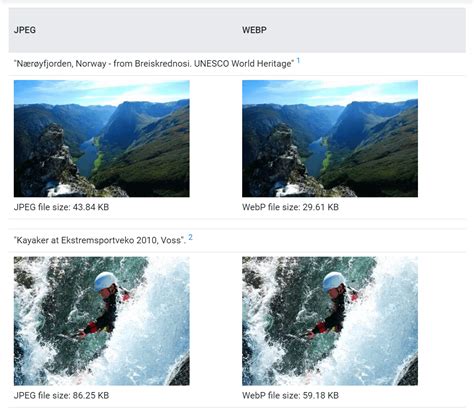
When it comes to file size, WebP is a game-changer. Lossy WebP files are typically 25%-34% smaller than JPEGs of similar quality, while lossless WebP files are about 26% smaller than PNGs. For example, a 2 MB high-quality JPG photograph could be reduced to 1.3-1.5 MB in WebP, with no noticeable drop in quality. Research indicates that WebP achieves an average of 30% better compression than JPEG, without compromising image quality.
Unlike JPEG, WebP fully supports transparency through its alpha channel, and it does so in both lossy and lossless modes. For instance, a transparent logo that is 300 KB as a PNG could be reduced to 220 KB as a lossless WEBP, or even less if lossy compression is suitable. WebP is also well-suited for AI upscaling. Lossless WebP files retain all image data, much like PNGs, but at reduced file sizes. Its transparency support remains intact during AI upscaling, making WebP an excellent choice for logos, graphics, and interface elements that require transparent backgrounds.
Impact on SEO and User Experience
Google prioritizes page speed and user experience as critical ranking factors, meaning how quickly your images load plays a key role in your site’s search rankings. Page load speed is one of the most critical factors in Google’s ranking algorithm, and image file size is one of the most significant contributors to slow load times. JPEG, while already compressed, can still result in relatively large file sizes, especially for high-quality images. On the other hand, WebP’s advanced compression capabilities allow it to produce smaller file sizes without compromising image quality.
As mobile-first indexing continues to dominate SEO practices, optimizing images for mobile users is crucial. Since WebP images are smaller, they load faster on mobile devices, which often have slower internet connections than desktops. While still widely supported, JPEG doesn’t offer the same compression benefits as WebP, making WebP a better option for mobile optimization.
Google also considers user experience metrics when determining search rankings, including bounce rates and time spent on a page. WebP’s faster load times directly contribute to a smoother user experience. Images load quickly, reducing the likelihood that users will abandon the page before it finishes loading. This can decrease bounce rates and encourage users to spend more time on your site, improving SEO metrics.
One of these metrics, Cumulative Layout Shift (CLS), refers to how much the page layout shifts during loading. Optimizing images using formats like WebP, which reduces file sizes and improves load times, can help minimize layout shifts and create a smoother user experience.
Browser Compatibility and Fallback Strategies
JPEG enjoys universal browser support, meaning you can rely on it to display correctly across almost every platform and device. However, WebP has growing support among modern browsers, including Chrome, Firefox, Edge, and Opera.
Modern browsers have excellent WebP support, but older and less common browsers, especially versions of Internet Explorer, might not fully support the format. Certain editing tools or older software also might not open or save WebP files. To avoid problems, always provide fallback options. Tools like HTML’s <picture> element or plugins like WebP Express can help set this up easily.
By serving the best image format to each user’s browser, you can maximize your site’s performance without sacrificing compatibility. For instance, Cloudinary offers automatic image format selection and optimization for both JPEG and WebP. For browsers that support WebP, Cloudinary will serve WebP images, providing superior compression and fast load times. For older browsers that don’t natively support WebP, Cloudinary provides a fallback to JPEG, ensuring that your images load quickly and display correctly across all devices and platforms.
JPG vs WEBP
When to Choose Which Format
Each image format has its own strengths and limitations.
- JPEG: Ideal for photographs and images with complex color gradients where file size is a priority. Its universal compatibility makes it a reliable choice for broad accessibility. However, it lacks transparency and can suffer quality degradation with repeated edits.
- PNG: Best for graphics, logos, icons, and images requiring transparency or sharp, pixel-perfect detail. It uses lossless compression, preserving all image data, but this results in larger file sizes compared to JPEG.
- WebP: A modern format that aims to combine the best of both worlds. It offers superior compression (both lossy and lossless) over JPEG and PNG, supports transparency and animation, and generally results in smaller file sizes with comparable or better quality. It is particularly beneficial for web performance and SEO.
Your choice ultimately depends on your specific goals. For photos on social media or general web use where speed is paramount, JPEG's smaller file sizes can be a practical option, even with minor quality loss. When working with professional graphics or images requiring transparency, PNG’s lossless compression is worth the larger file size. For optimal web performance and modern designs, WebP is often the preferred choice, especially when implemented with fallback options for older browsers.
Considerations for Image Editing and Conversion
When working with images, the choice of software and conversion methods can also play a role. While JPEG has been around for decades and is supported by almost every image-editing software, WebP is newer. Most modern image editors, such as GIMP and Adobe Photoshop (often through plugins), now support WebP.
For developers and content creators looking to leverage WebP, several tools and services can assist with conversion and optimization. Online tools like Tinify, CloudConvert, and Image Resizer allow you to upload JPEG and PNG images, convert them to WebP, and compress them to smaller file sizes. Some tools offer a live preview of the quality to help you fine-tune settings.
Cloudinary is a comprehensive media management platform that simplifies the optimization, transformation, and delivery of both JPEG and WebP images. It offers real-time image compression and optimization, applying advanced compression techniques to reduce file sizes without compromising image quality. Developers can fine-tune compression settings to find the ideal balance between visual quality and performance. Cloudinary also offers responsive image delivery, automatically adjusting image size and quality based on the user's device and screen resolution.
Beyond WebP: Emerging Formats
While WebP represents a significant advancement, the landscape of image formats continues to evolve. Formats like AVIF (AV1 Image File Format) are emerging, built on the open AV1 video codec. AVIF promises even better compression ratios than WebP, potentially offering about 30% better compression compared to libjpeg. However, AVIF is still in its earlier stages of adoption, with tooling and browser support still developing. Encoding AVIF files can also be more computationally intensive and slower than WebP. As these newer formats mature and gain wider support, they may offer further opportunities for image optimization.
Regardless of the format chosen, the overarching goal remains to balance image quality with file size to ensure fast loading times, excellent user experience, and improved SEO performance. The strategic use of modern formats like WebP, coupled with robust fallback strategies, is key to achieving these objectives in today's competitive digital environment.