The XPPen Magic Drawing Pad emerges as a significant contender in the portable digital art market, offering a compelling blend of features and affordability that challenges established players. This 12.2-inch Android-powered tablet aims to provide digital artists, students, and beginners with a high-quality, standalone drawing experience without the need for a tethered computer. With its robust specifications, thoughtful design touches, and competitive price point, the Magic Drawing Pad carves out a distinct niche for itself.
A Standalone Creative Hub
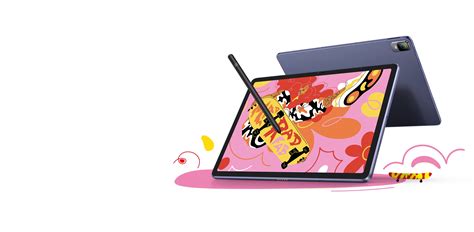
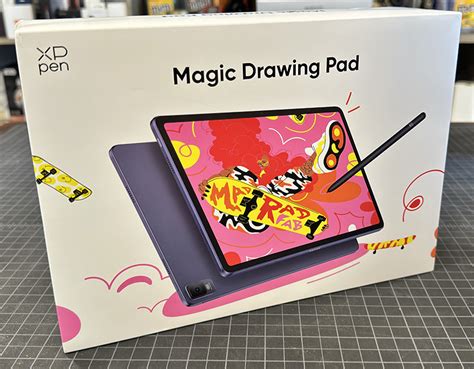
XPPen, a brand that has steadily built a reputation for delivering high-quality, accessible digital art tools, takes a bold step with the Magic Drawing Pad. Positioned as their first fully portable, standalone device for artists, it directly competes with premium offerings like the iPad Pro, Surface Pro, and Galaxy Pro. Retailing at $499.99, it presents a strong value proposition, offering specifications that rival devices costing considerably more.
At its core, the Magic Drawing Pad is an Android tablet powered by a midrange 8-core MT8771 processor coupled with an ARM G57 MC2 GPU. This configuration is complemented by 8GB of RAM and a generous 256GB of internal storage, expandable by up to 512GB via a MicroSD card slot. This hardware combination ensures smooth performance for a wide array of drawing applications and general multitasking.
Design Tailored for Artists
Several design choices elevate the Magic Drawing Pad beyond a standard tablet. The 12.2-inch touchscreen offers ample drawing real estate, but it's the 3:2 aspect ratio that truly makes a difference. This proportion proves advantageous in landscape mode, providing sufficient space for both the drawing canvas and application interfaces. In portrait mode, it transforms into an ideally shaped drawing slate. The display boasts a resolution of 2160×1440 at a 60Hz refresh rate, with a maximum brightness of 300 nits. This ensures sharp, clear visuals, making it not only suitable for creative work but also an excellent device for reading prose books, magazines, comics, and displaying reference images.
A standout feature for artists is the stylus, which offers an impressive 16,384 levels of pressure sensitivity. This allows for incredibly precise capture of even the most subtle nuances in an artist's hand. The stylus utilizes EMR technology, meaning it's battery-free, requires no charging, and does not need a Bluetooth connection, simplifying the user experience. A single button on the stylus barrel can be configured to function as an eraser, further streamlining the workflow.
The "Paperlike" Advantage
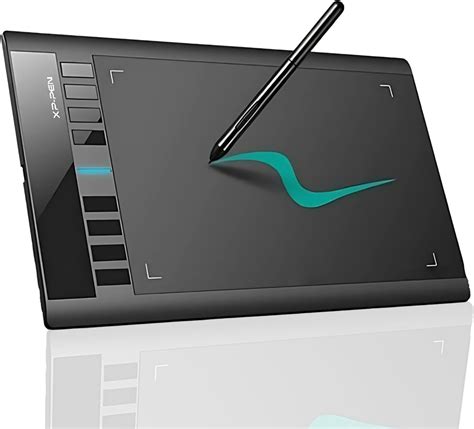
The matte surface of the Magic Drawing Pad's screen is a significant boon for digital artists. It strikes an effective balance, providing sufficient friction for the stylus tip while simultaneously mitigating screen glare. This "paperlike" feel is often something artists have to add to devices like iPads or Surfaces through screen protectors or specialized pen tips. While some artists might prefer a more textured drawing surface, the XPPen's offering strikes a good compromise. Combined with the display's brightness and resolution, the Magic Drawing Pad delivers an excellent drawing experience, particularly for outdoor use, though it’s important to note that no tablet performs perfectly in direct sunlight.
The device also includes a suite of other integrated features. Four speakers provide audio, a microphone is present for recording, and dual 8MP front-facing cameras alongside a 13MP rear-facing camera perform above expectations, adding to the device's versatility.
Performance Beyond Art
While the XPPen Magic Drawing Pad isn't engineered for hardcore gaming, its performance is more than adequate for everyday multimedia consumption, productivity tasks, and entertainment applications. Connectivity is handled via WiFi and Bluetooth 5.1, with a USB-C 2.0 port for charging and data transfer. The entire unit weighs a mere 499 grams (1.1 lbs), with a slight increase when the included case and pen holder are attached. Its slim profile of just 0.69 cm makes it easily portable, fitting snugly into bags and briefcases. Even under demanding workloads, the device exhibits no noticeable heating effects, contributing to a comfortable user experience.
Software and Ecosystem
The Magic Drawing Pad runs a custom implementation of Android, providing access to the vast ecosystem of applications available through the Google Play Store. For users new to Android, the interface might require a brief adjustment period compared to Windows or iOS. The device comes pre-loaded with IbisPaint and MediaBang Paint, two art applications. However, for professional artists, particularly those working with comics, the Android version of Clip Studio Paint ($26/year subscription) is often considered the premier choice, and it allows the Magic Drawing Pad to truly shine. Other popular art applications like Krita, Sketchbook Pro, and ArtRage also have Android versions available.
Using Clip Studio Paint on the Magic Drawing Pad proved to be a seamless and enjoyable experience, with minimal lag or performance issues even on reasonably sized drawings. The combination of the device's form factor, battery life, design features, and performance makes it a highly capable portable tool for a variety of artistic scenarios.
Portability and Outdoor Use
The Magic Drawing Pad stands out as an exceptional tool for drawing outdoors, largely due to its bright, matte-finished, less-reflective display. While finding a shaded spot is always beneficial for screen visibility, the tablet's screen is remarkably adept at handling ambient light. It's also a convenient option for art classes and figure drawing sessions, though it comes with a significant caveat.
The Tilt Support Conundrum
A notable limitation of the XPPen Magic Drawing Pad is the lack of tilt support for its stylus. This feature is crucial for quick, gestural drawings where artists often use the side of the pencil for controlled shading and edge work. In this regard, the Apple Pencil paired with Procreate or Fresco, and even high-end Wacom pens with tilt and rotation support, offer a more natural and satisfying experience. While it's still possible to create excellent artwork without tilt support, it does limit the stylus's ability to fully replicate certain traditional drawing techniques.
Tilt Function for XP-Pen Artist 15 6 Pro
Value Proposition for All Levels
Despite the absence of tilt support, the XPPen Magic Drawing Pad delivers performance that is remarkably close to devices costing twice its price, especially for digital artwork. For art professionals who primarily work on Macs or PCs with larger display tablets but require a capable secondary device for travel, the Magic Drawing Pad, when used with Clip Studio Paint, can offer 95-98% of the functionality of an iPad Pro, Wacom Studio, or Surface Pro at a significantly lower cost for comparable specifications. Its light weight, long battery life, and ease of use make it an ideal companion for vacations, trips, or conventions, enabling professional work or simple sketching on the go. The extended battery life ensures it can last through long journeys, and the bright screen facilitates outdoor work.
Addressing Software and Calibration Concerns
The software ecosystem on Android tablets, including the Magic Drawing Pad, presents a potential challenge, particularly regarding calibration. While the review unit tested in early May showed no noticeable issues with pen alignment, the lack of a dedicated calibration tool is a drawback. For beginners, developing muscle memory to compensate for misalignment can make transitioning to more precisely calibrated equipment at school or in a studio more difficult. While professional software like Clip Studio Paint offers cursor position adjustments, this feature is typically utilized by experienced users, not novices.
The stylus's inability to support tilt and the OS's lack of a calibration utility or a way to assign different functions to the stylus button are recurring points of concern. However, these are offset by the device's overall superior features, build quality, and performance for both art and general-purpose use, with its form factor, battery life, and stylus sensitivity being particularly noteworthy.
Comparing with the Artist 12
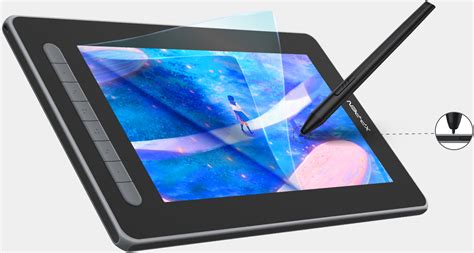
The XPPen Magic Drawing Pad is not the only notable offering from the company. The XPPen Artist 12, for instance, is a display drawing tablet monitor that offers a fully laminated textured screen, 72% NTSC color gamut, and a battery-free pen with tilt functionality. While the Artist 12 is a display monitor that requires a connection to a computer, it shares some core strengths with the Magic Drawing Pad, such as a competitive price and a focus on providing a natural drawing experience. The Artist 12 features an 11.6-inch diagonal active area with a 1920x1080 resolution, 8192 levels of pressure sensitivity, and also lacks multi-touch capabilities. Its slim form factor makes it portable, and it comes with programmable express keys for shortcut customization.
Key Considerations for Drawing Tablets
When evaluating drawing tablets, several factors are paramount. The screen quality is crucial, with IPS panels generally offering superior color reproduction and accuracy. Higher resolutions like 2.5K or 4K are essential for detailed work, minimizing pixelation. The stylus is the primary input tool; EMR technology offers a natural feel without the need for charging. High pressure sensitivity levels, such as 8,192 or 16,384, ensure precise lines, and tilt sensitivity enhances shading capabilities. Compatibility with various operating systems and popular art software like Photoshop, Illustrator, and Clip Studio Paint is vital for a seamless workflow. Accessories such as drawing gloves, stands, and shortcut remotes can significantly enhance user experience and productivity. Finally, reliable after-sales service, including warranties and customer support, provides peace of mind. XPPen distinguishes itself with an 18-month warranty, which is longer than many competitors.
XPPen's Expanding Portfolio
XPPen's commitment to innovation is evident across its product line. The Artist Pro 24 (Gen2) 4K boasts a 24-inch Calman-certified 4K display with 99% Adobe RGB color gamut and supports the X3 Pro Smart Chip stylus with 16K pressure levels. The Artist Pro 22 (Gen2) offers a 22-inch 2.5K display with similar color accuracy capabilities. For portability, the Artist 15.6 Pro V2 is a slim, lightweight option with customizable shortcut keys. For budget-conscious users, the Deco Mini7W provides a wireless drawing experience with high pressure sensitivity.
The XPPen Magic Note Pad, a distinct device from the Magic Drawing Pad, focuses on note-taking and reading with its unique X-Paper display offering three modes: Ink Paper, Color Paper, and Regular. It features a 10.95-inch display, the X3 Pro Pencil 2 with 16,384 pressure levels, and runs on Android 14. While it excels in writing and reading, its performance in heavy multitasking is more moderate.
Conclusion
The XPPen Magic Drawing Pad represents a significant stride in portable digital art creation. It successfully balances a robust feature set, a user-centric design, and an accessible price point. While the absence of stylus tilt support is a compromise for certain artistic workflows, its strengths in portability, display quality, and overall performance make it a highly recommendable device for a broad spectrum of digital artists, from beginners taking their first steps to seasoned professionals seeking a capable on-the-go solution. The device's ability to function as a standalone Android tablet further enhances its versatility, making it more than just a drawing tool but a comprehensive digital companion.