Kapwing has emerged as a popular online platform for content creators, small businesses, and startups due to its user-friendly interface and a comprehensive suite of video editing, image editing, and meme generation tools. The platform's drag-and-drop functionality simplifies the content creation process, allowing users to easily upload media, add text, apply filters, and export their work for various social media platforms. While Kapwing offers a robust free version, users seeking enhanced capabilities and a more professional output often turn to its paid plans, particularly the Pro plan, which caters to individuals and teams looking to elevate their content creation game.
Understanding Kapwing's Core Functionality
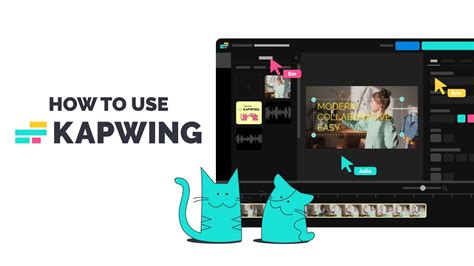
At its heart, Kapwing is an accessible online video editor that aims to democratize content creation. The platform provides a wide array of features designed to cater to diverse needs. These include essential video editing functions like trimming, cutting, and merging clips, alongside more specialized tools such as image editing, GIF creation, and meme generation. For those looking to enhance viewer engagement and accessibility, Kapwing offers automatic transcription and subtitle generation, which can be a significant time-saver compared to manual captioning. Additionally, advanced features like green screen and chroma key tools are available, allowing for more sophisticated visual effects.
The user experience on Kapwing is designed with simplicity in mind. A typical workflow begins with creating an account, after which users can select their desired editing tool. From there, uploading content, incorporating text overlays, applying filters, and experimenting with various effects is a straightforward process. Once the creative vision is realized, users can export their projects and distribute them across their preferred social media channels or other platforms.
Kapwing's Pricing Structure: From Free to Enterprise
Kapwing employs a subscription-based pricing model, offering a tiered approach to accommodate different user needs and budgets.
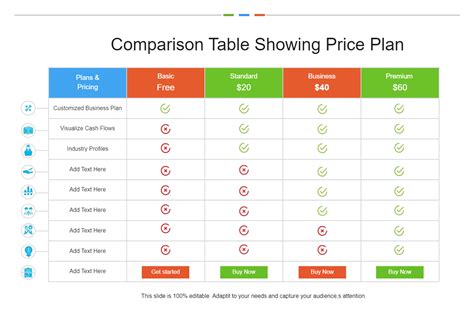
Free Version: This entry-level option provides access to basic editing tools and a limited set of features. While it allows for unlimited exports, content created on the Free plan will include a Kapwing watermark. Video length is capped at 7 minutes, and auto-subtitling is limited to 10 minutes per month. Video quality is restricted to 720p.
Pro Plan: Positioned for serious content creators and video professionals, the Pro plan unlocks a significantly expanded feature set. This plan is ideal for those who regularly produce long-form content and require advanced editing capabilities and special effects. The Pro plan addresses many of the limitations of the free tier, offering a more robust and professional environment for content creation.
Enterprise Plan: This plan is tailored for larger organizations and businesses that require custom controls, dedicated support, and scalable solutions. It encompasses all Pro plan features and adds advanced administrative and support functionalities.
Users can opt for either monthly or annual subscriptions. Monthly plans offer greater flexibility for short-term projects, while annual plans provide substantial cost savings for long-term users.
Delving into the Kapwing Pro Plan: Features and Benefits
The Kapwing Pro plan is designed to empower content creators with advanced tools and a professional output. For a monthly fee of $24 or an annual subscription of $192, users gain access to a wealth of features that streamline the editing process and enhance the quality of their creations.
Key Features of the Kapwing Pro Plan:
- No Kapwing Watermark: A significant advantage for professionals, the Pro plan removes the Kapwing watermark from all exported creations, ensuring a clean and branded final product.
- Extended Video Length: Users can create and export videos of up to 120 minutes, a substantial increase from the 7-minute limit on the free plan, catering to longer-form content such as tutorials, webinars, or documentaries.
- Unlimited Auto-Subtitling: The Pro plan offers unlimited minutes for the auto-subtitler, a crucial feature for accessibility and engagement, eliminating the previous monthly cap.
- 4K Video Quality: Content creators can export their videos in stunning 4K resolution, providing a professional-grade visual experience for their audience.
- Unlimited Cloud Storage: All projects are automatically saved and backed up within the user's workspace, allowing for indefinite storage and easy access to older projects.
- Access to All AI Editing Tools: Pro users gain unrestricted access to Kapwing's suite of AI-powered editing tools, which automate many time-consuming tasks.
- Brand Kit and Custom Fonts: This feature allows users to store their brand assets, colors, and custom fonts within a dedicated Brand Kit, ensuring consistent branding across all projects. Custom templates can also be created and saved within the workspace.
- Collaborative Shared Workspace: Teams can work together in a shared workspace with unlimited storage, facilitating real-time collaboration and efficient project management.
- Consolidated Billing: For teams, consolidated billing simplifies financial management, with group invoices for easier tracking of expenses.
- Priority Customer Support: Pro plan subscribers receive priority access to customer support, ensuring quicker resolution of any issues.
The Pro plan also includes features related to file handling. For instance, the upload limit for individual files increases to 6GB for Pro users, compared to 250MB for free users. Link uploads are also supported up to 120 minutes.
Understanding Credits and Their Role in Kapwing
Kapwing utilizes a credit system for its Smart and AI tools, which are designed to automate various aspects of the editing process.
- Free Users: Receive a lifetime allocation of 10 credits.
- Pro Users: Are granted 1000 credits per month.
- Business Users: Receive 4000 credits per month.
- Enterprise Users: Pricing and credit allocation are custom-made.
These credits are cumulative, meaning unused credits roll over to the next month, providing flexibility in how users leverage these advanced features. The cost of each tool varies, with every tool consuming at least one credit, even for very short inputs. For Text-to-Speech (TTS), the credit cost is displayed before processing, allowing users to estimate their usage. AI tools like Kai, while not directly consuming credits for generation, have their credit usage displayed, and free users may have limited access to some of these AI features. Paid users, however, generally have unlimited access to these AI tools, irrespective of their tier.
Team and Seat Management in Kapwing
Kapwing's collaborative features are a significant draw for teams. Creating a team is straightforward: users can create an account and then invite teammates to join their workspace. Upon accepting an invitation, team members gain access to the shared workspace, where they can collaborate on projects, provide feedback, utilize shared brand assets, and edit in real-time.
It's important to note that adding members to a Pro or Business workspace incurs costs, as these Team Workspaces are billed per member. When a new member is added mid-billing cycle, they are charged a prorated amount for the remainder of that cycle. The subscription then renews with the updated number of members.
Removing a team member is also possible, but Kapwing's policy states that refunds are not issued for members removed mid-billing cycle. However, users can add new members before the cycle ends without additional immediate cost. Unused seats will continue to be billed unless explicitly removed from the billing settings. Every person in a Workspace requires a paid seat, and if a user does not wish to pay for a seat for every member, they must be removed from the Workspace.
Subscription Details and Policies
Kapwing's paid plans operate on a recurring subscription basis, with both monthly and annual options available. The annual plans offer a more economical choice for users committed to the platform long-term. Users can cancel their subscription at any time, and premium features will remain accessible until the end of the current billing cycle.
Kapwing does not offer refunds for subscriptions once a user has decided to upgrade. This policy is in place because the platform provides a generous free version, and revenue from paid plans is essential for its continued operation and development. Users are strongly encouraged to thoroughly test the Free Plan before committing to a paid subscription.
Auto-renewal is enabled by default to ensure continuous access to premium features. Users can disable this renewal at the end of their current billing cycle.
Plan Access and Cancellation
Kapwing does not offer free trials for its Pro and Business plans. Instead, users are encouraged to explore the majority of Kapwing's features through its comprehensive Free Plan, inviting teammates to test the tools before making a purchase decision. For Enterprise customers requiring more than seven licenses, a week-long free trial may be arranged after contacting the sales team.
Upgrading to a Pro or Business Plan can be done at any time through the "Billing" tab in the Workspace settings. While users can upgrade from monthly to annual billing, or from Pro to Business, switching from annual to monthly or Business to Pro typically requires canceling the existing subscription and re-subscribing to the desired plan once the current billing cycle concludes.
Which Kapwing Plan is Right for You?
The choice between Kapwing's plans depends heavily on individual or team needs:
- Free Plan: Ideal for beginners, casual users, or those with occasional, simple editing needs. It's a great way to explore the platform's core functionalities.
- Pro Plan: Suited for individual content creators, freelancers, and small teams who require advanced features, higher export quality, longer video lengths, and watermark-free output. The unlimited auto-subtitling and access to all AI tools are significant draws.
- Business Plan: Designed for larger teams and businesses needing more extensive credit allowances for AI tools, enhanced collaboration features, and a more streamlined workflow for multiple users.
- Enterprise Plan: For large organizations with specific requirements for custom controls, dedicated support, advanced security features like SSO, and tailored training.
The Pro plan, at $24/month or $192/annually, offers a compelling balance of features and affordability for many content creators. The Business plan, priced at $64/month or $600/annually, scales up the resources for teams with higher content demands.
User Feedback and Reviews: A Mixed Bag
User reviews for Kapwing present a nuanced picture. Many users praise the platform's ease of use, intuitive interface, and the wide array of editing tools available, especially for social media content. Features like the automatic subtitle generator and the ability to integrate memes are frequently highlighted as significant benefits. The affordability, particularly when compared to more professional-grade software, is also a recurring positive point.
However, some users have reported encountering issues with the platform's functionality, particularly concerning export errors and slow export times for larger projects. The auto-subtitling feature, while convenient, has also been criticized by some for accuracy issues, especially with less common languages or accents. Customer support response times have also been a point of contention for a subset of users.
Despite these criticisms, the overall sentiment leans positive, with many users appreciating Kapwing's ability to democratize video editing and empower creators of all skill levels. The continuous innovation and addition of new AI-powered features are also viewed favorably, suggesting Kapwing's commitment to staying relevant in the evolving digital landscape.
Kapwing for Education: Fostering Digital Storytelling
Kapwing also extends its capabilities to the education sector, recognizing the importance of digital storytelling as a core skill. The platform provides teachers and students with accessible and safe tools for multimedia content creation. Students can use Kapwing to demonstrate their understanding, collaborate on group projects, and bring their ideas to life. Teachers can leverage it to create engaging learning materials quickly. The absence of ads and spam ensures that the focus remains on learning. Kapwing for Education is designed to be safe, with a strong emphasis on user data privacy. While the program is currently pausing new applications, interested parties can join a waitlist for future opportunities.
In summary, Kapwing's Pro plan offers a robust set of features that significantly enhance the content creation process for individuals and teams. Its blend of user-friendliness, powerful AI tools, and collaborative capabilities makes it a strong contender in the online video editing market, catering to a wide spectrum of users from beginners to seasoned professionals.