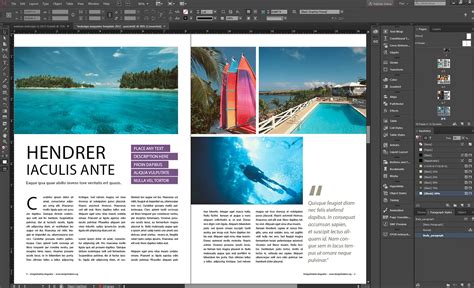
When embarking on the journey of professional layout and design, Adobe InDesign stands out as a powerful and indispensable tool for designers and publishers globally. Its robust features cater to a wide array of creative needs, from crafting compelling posters and intricate books to designing engaging digital magazines and interactive PDFs. However, like many professional-grade software solutions, InDesign comes with a price tag that warrants careful consideration. Understanding the various pricing structures and subscription models is crucial for making an informed decision that aligns with your specific requirements and budget.
Flexible Subscription Options: Standalone vs. Creative Cloud
Adobe InDesign is not typically offered as a one-time purchase but rather through flexible subscription models. This approach ensures users always have access to the latest features and updates. Adobe presents InDesign in two primary ways: as a standalone application or as part of a comprehensive Creative Cloud plan.
For individuals who require InDesign and perhaps a focused selection of other creative tools, a standalone subscription is available. This plan often includes the full InDesign software alongside the Adobe Express Premium plan. This particular package is generally priced around US$22.99 per month, contingent upon opting for an annual commitment billed on a monthly basis. This offers a cost-effective solution for those who need InDesign's core functionalities without the broader scope of the entire Creative Cloud suite.
Alternatively, for users who need access to a wider array of Adobe's creative applications, the Creative Cloud All Apps plan is the most comprehensive option. This plan grants access to InDesign and over 20 other powerful Adobe applications, providing a complete creative powerhouse. While the regular price for this extensive suite might be higher, Adobe frequently offers introductory promotions. New subscribers, for instance, might benefit from substantial savings, such as 50% off for the initial three months, significantly reducing the cost during that introductory period.
Educational and Business Advantages: Unlocking Savings
Students and educators often find themselves in a favorable position when it comes to the cost of Adobe software. Adobe typically extends significant discounts to the educational community, making professional design tools like InDesign much more accessible. These educational pricing structures can lead to substantial savings, putting InDesign and a vast collection of other Creative Cloud applications within easier financial reach.
For instance, Adobe offers InDesign as part of the Creative Cloud All Apps plan to students and teachers at a remarkable 60% discount. This comprehensive plan, which includes more than 20 Adobe applications, access to tutorials, 100GB of cloud storage, and 1000 monthly generative credits, is available for as little as $19.99 per month or $239.88 per year. This represents a considerable value proposition for academic users needing a full suite of creative tools.
Beyond individual educational users, Adobe also caters to businesses and teams with tailored subscription plans. The Creative Cloud All Apps for Businesses & Teams subscription includes InDesign along with over 20 other applications. These plans are designed to meet the collaborative and professional demands of organizations, offering features and support suited for team environments.
Understanding the Value Beyond the Software
When you subscribe to Adobe InDesign, you are investing in more than just the software itself. The subscription model unlocks a host of additional benefits that enhance the overall value proposition. These include continuous updates that introduce new features and performance improvements, ensuring your software remains cutting-edge.
Furthermore, subscribers gain access to 100GB of cloud storage. This feature facilitates seamless file syncing across devices and enables effortless file sharing with collaborators, streamlining workflows and improving project management. The integration with other Adobe services also means that your InDesign projects can easily connect with other Adobe applications, creating a cohesive and efficient creative ecosystem.
Learn Adobe InDesign in 11 MINUTES! | Formatting, Tools, Layout, Text Etc. | 2023 Beginner Basics
Navigating Pricing Structures and Subscription Terms
Adobe InDesign is available at various price points, with single-app subscriptions typically costing around $20.99 per month or $239.88 per year. The Creative Cloud All Apps plan, offering a more extensive collection of software, naturally comes at a higher price point, though introductory offers and educational discounts can significantly alter the perceived cost.
It is important to understand the nuances of Adobe's subscription terms to avoid unexpected charges. Annual plans are commonly billed on a monthly basis and automatically renew at the end of the term unless actively canceled. Adobe generally offers a full refund if a subscription is canceled within 14 days of purchase. However, if cancellation occurs after this initial 14-day window, the payment is typically non-refundable, and the service will continue until the end of the contracted subscription period. This policy underscores the importance of carefully reviewing subscription agreements before committing.
Free Trials: A Risk-Free Exploration
For those uncertain about committing to a subscription, Adobe provides a valuable solution: a 7-day free trial for InDesign. This trial period offers unrestricted access to the full software, allowing users to thoroughly explore its features, test its capabilities within their specific workflow, and determine if it meets their design needs before making any financial commitment. This risk-free exploration is an excellent way to ensure that InDesign is the right tool for the job.
Maximizing Value: Cost-Effective Strategies
Securing Adobe InDesign at the most economical price is achievable through strategic planning and by taking advantage of available offers. For students and teachers, Adobe's educational discounts are undoubtedly the most significant avenue for savings, offering access to professional tools at a fraction of the standard cost.
For individuals who only require InDesign and no other Adobe applications, opting for a single-app subscription remains the most cost-effective choice. This approach avoids paying for features or software that will not be utilized. Furthermore, keeping an eye out for introductory offers and promotional discounts, especially when subscribing to the Creative Cloud All Apps plan, can lead to substantial savings, particularly in the initial stages of a subscription.
Ultimately, navigating Adobe InDesign's pricing structure requires a clear understanding of individual needs. Whether you are an individual designer, a student, an educator, or part of a business team, Adobe offers a range of options designed to deliver the right tools at a competitive price. By carefully evaluating the available plans, considering educational or business discounts, and leveraging free trials, users can make a well-informed decision that maximizes the value derived from their Adobe InDesign investment. The flexibility of subscription models, coupled with the continuous stream of updates and cloud-based services, ensures that subscribing to InDesign offers ongoing value and access to a constantly evolving suite of professional design capabilities.