The digital art landscape is populated by powerful tools, and among the most prominent are Clip Studio Paint (CSP) and Adobe Photoshop. Both programs have carved out significant niches, catering to a wide spectrum of creative professionals, from beginner illustrators and comic artists to seasoned designers and animators. The perennial question for many artists is: which one is better? This article aims to dissect the features, functionalities, and philosophies of these two titans of digital creation, providing a comprehensive comparison to help you navigate your artistic journey. Say goodbye to limitations and hello to endless artistic exploration. Whether you're a seasoned artist or just starting out, the world of computer drawing awaits.
Understanding the Core Focus: Drawing & Illustration vs. All-Encompassing Creative Suite
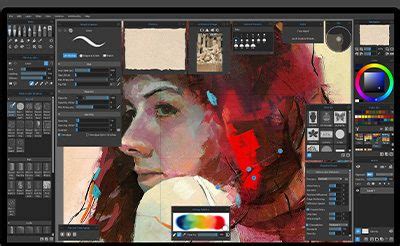
At its heart, Clip Studio Paint is a program meticulously crafted for artists, with a particular emphasis on drawing, illustration, manga, comics, and animation. It was initially launched by the graphic software company Celsys in Japan as Comic Studio in 2001, reflecting its strong roots in sequential art. This specialized focus translates into a suite of tools and features that are highly intuitive and efficient for these specific workflows. You may think of Clip Studio Paint as a program focusing on painting and animating based on its key features and tools. It is best used mainly for sketching and drawing, as well as painting and animating designs. This is why it's a popular among artists and comic illustrators.
Adobe Photoshop, on the other hand, is a much broader creative suite. It's one of the most popular design software globally and for good reason. While it's undeniably capable of digital painting and illustration, its origins lie in photo editing and manipulation. This means Photoshop is a versatile powerhouse suitable for a variety of creative projects, including picture editing and compositing, digital painting, animation, and graphic design. Many digital artists actually use Photoshop for digital painting. However, its vast array of functionalities can sometimes make it feel less streamlined for artists whose primary focus is drawing and painting.
User Interface and Workflow: Simplicity vs. Feature-Rich Complexity
The interface of a digital art program significantly impacts the user experience, and here, Clip Studio Paint and Photoshop present distinct philosophies.
Clip Studio Paint's user interface is entirely white. The software's user interface is tailored to artists, with an emphasis on simplicity and customization. It offers a simple and straightforward layout, with tools and panels easily accessible. With its easy-to-use interface, the Clip Studio Paint tutorial is simple. This clean aesthetic is designed to minimize distractions and keep the focus squarely on the artwork. Tools and panels are logically organized, and the ability to customize workspaces means artists can arrange their preferred tools for maximum efficiency. Brushes, tools, and workspaces can all be customized in Clip Studio Paint.
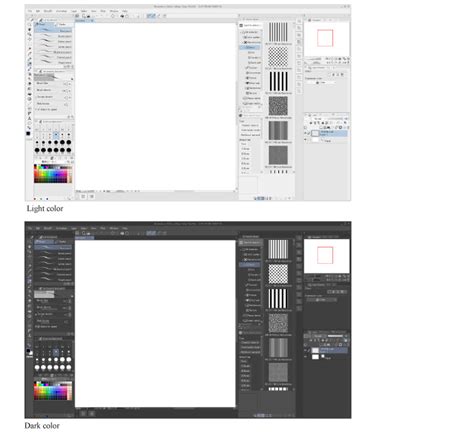
Photoshop, conversely, features a more traditional black interface. The program offers a fairly traditional black interface that displays all of your saved documents and folders. Photoshop's interface is more complicated and feature-rich. It provides a large range of tools and options, which might be overwhelming for novices. While this density of options offers immense power, it can also present a steeper learning curve for newcomers. However, Photoshop's interface is highly customizable, allowing users to select and arrange palettes and toolbars to suit their workflow. You can create and save different workspaces for different types of art, e.g. graphic design vs illustration, and re-use the workspaces. The left side of the screen is where you'll see the Photoshop toolbar.
Drawing and Painting Tools: Brushes and Beyond
The quality and versatility of brushes are paramount for any digital artist. Both CSP and Photoshop offer extensive brush engines, but they cater to different preferences.
Clip Studio Paint is renowned for its exceptional brush engine, particularly for emulating traditional media. Its specialized tools, such as the Real Pencil and G-Pen, are designed to mimic the feel and behavior of physical drawing instruments. Clip Studio Paint has numerous brush kinds and customization options. The default brushes from Photoshop don't look appealing to me. I personally prefer brushes with textured edges and those are lacking with Photoshop. I prefer the brushes from CSP because the strokes you get look closer to traditional media. If you need even more brushes, you can download them from the CSP asset library. The app categorizes its brushes into six main groups: Brushes, Dry Media, Painting Brushes, Airbrushes, Effects, and Blenders. CSP's brush engine is capable of producing distinctive and lifelike brush strokes, making it a popular choice among digital painters.
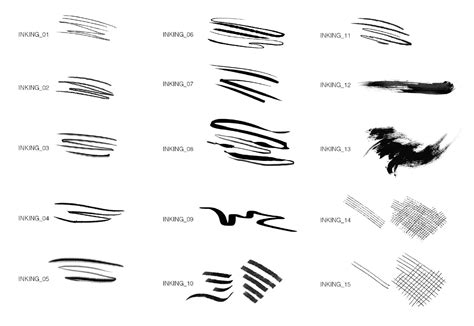
Photoshop's brush engine is incredibly powerful and flexible, capable of creating a vast array of effects. While its default brushes might be perceived as less "painterly" by some artists compared to CSP, its strength lies in its deep customization and the sheer volume of third-party brushes available. Photoshop also offers advanced features like brush smoothing and stabilization.
Vector Capabilities: Flexibility and Scalability
While the majority of work in Photoshop is raster-based by default, it does offer robust vector tools. Photoshop is useful for a variety of creative projects, including picture editing and compositing, digital painting, animation, and graphic design. The majority of Photoshop work is raster files by default. However, you may also use Photoshop to produce vector files and convert raster files to vectors. Photoshop provides adequate functionality for basic vector editing.
Clip Studio Paint, on the other hand, excels at creating vector-based illustrations with its extensive selection of vector tools. This makes it an excellent choice for projects that require scalability without loss of quality, such as logos, icons, or illustrations destined for print.
Animation: From Basic GIFs to Full Productions
For animators, Clip Studio Paint offers a significant advantage. Clip Studio Paint has powerful animation tools, including onion skinning, timeline-based animation, and a dedicated animation workspace. Clip Studio Paint PRO and Clip Studio Paint EX are the two programs available in Clip Studio Paint. The PRO edition allows for up to 24 frames per animation, while the EX version allows for an unlimited number of frames. When you're through with the animation, you can select an export format. This comprehensive animation suite makes it a strong contender for serious animation work.
Photoshop does possess animation capabilities, but its functions are more limited compared to Clip Studio Paint. It is focused mostly on creating GIFs and basic animations. If you're aiming for simple animations and GIF creation, Photoshop can suffice, but for more complex, frame-by-frame animation, CSP is generally the preferred tool.
File Formats and Compatibility: Working with Your Art
File format compatibility is crucial for collaboration and long-term archiving. Photoshop uses the PSD file format, which is an industry standard that can be opened by many other software. However, if you use another software to open a PSD file, some of the features/data may be lost. For example, text layout may not display properly.
Clip Studio Paint uses the CLIP file format, which is not as popular compared to PSD. However, CLIP files can still be opened by some other apps, including Photoshop and Photopea. The important takeaway is that if you switch to a different drawing app in the future, you can still open your PSD or CLIP files, ensuring a degree of future-proofing for your work.
Pricing and Licensing: Subscription vs. One-Time Purchase
The pricing models for Clip Studio Paint and Photoshop are a significant differentiator.
Clip Studio Paint comes in two versions: Pro and EX. The Pro version is less expensive, with a one-time cost. Clip Studio Paint Pro Ver. 2.0 one-time purchase is $49.99. The EX edition contains more capabilities such as animation and 3D modeling but is more expensive. Clip Studio Paint EX Ver. 2.0 one-time purchase is US$219. CSP also offers subscription-based plans. The one-time purchase of CSP PRO is USD 49.99 at the time of review. For macOS or Windows users, the one-time purchase includes most tools needed for creating digital art. CSP licenses are tied to the hardware; using two devices requires a dual-device license, and upgrading devices necessitates de-activating the old license to transfer it.
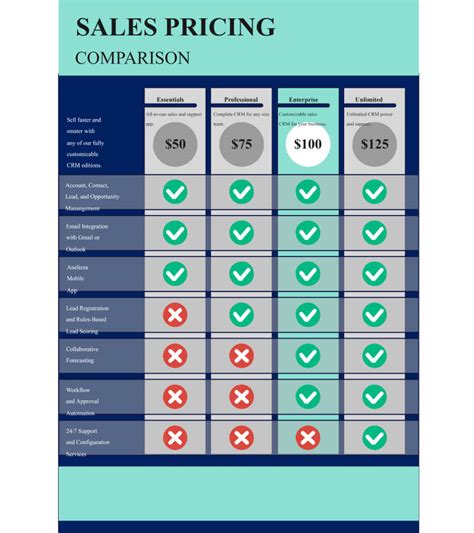
Photoshop is primarily accessible on a subscription basis, with monthly or annual pricing. You can get the Photoshop Plan for $20.99/month; the Photography Plan (1TB) for $19.99/month; or the All Apps Plan for $54.99/month. The main advantage of a subscription is continuous access to the latest updates and features, but the downside is the recurring cost. The Adobe license is tied to your username and can be used on any computer or iPad, with the previous session being signed out upon login on a new device.
Platform Availability and Tablet Integration
Clip Studio Paint is available on MacOS, Windows, iPad, and Android tablets. The app generally maintains the same feature set across all platforms. In July 2023, CSP released a Simple Mode with a user interface designed for tablets, which can be easily switched to and from the full Studio (desktop) mode. All keyboard shortcuts are supported on computer and tablet.
The tablet version of Photoshop on the iPad, while functional, does not include the full feature set of the desktop version. Its user interface is designed for Apple Pencil and finger use. While you can open Photoshop files on the iPad, certain tasks might not be performable due to missing features.
Cloud Storage and Backup
Photoshop users benefit from cloud storage integrated with their subscription plans, offering 100GB or 1TB of online storage depending on the plan. Additional storage can be purchased by contacting Adobe. Clip Studio Paint users receive 10GB of storage with the standard version, and CSP EX users get 100GB. There doesn't appear to be an option to increase cloud storage capacity beyond this. For robust backup strategies, it's often recommended to save files locally and utilize third-party cloud storage services like Google Drive, Microsoft OneDrive, or Dropbox, supplemented by external hard drives.
Conclusion: Which Software Reigns Supreme?
Deciding between Clip Studio Paint and Photoshop depends heavily on your personal needs and creative preferences.
If your main focus revolves around drawing, illustration, manga, comics, and animation, Clip Studio Paint presents a range of potent tools designed precisely for those purposes. Its specialized brushes, intuitive interface for drawing, and robust animation features make it an exceptional choice for artists in these fields. For those seeking a more traditional drawing feel and a more affordable one-time purchase option, CSP is often the preferred path.
Photoshop, with its broader capabilities in photo editing, graphic design, and compositing, remains an indispensable tool for many creative professionals. Its versatility means it can handle a vast array of tasks, and for designers or artists who need to integrate illustration with other media, Photoshop's comprehensive feature set is invaluable. While its subscription model can be a drawback for some, the continuous updates and industry-standard file format are significant advantages.
Ultimately, the "better" software is the one that best aligns with your artistic workflow, budget, and specific project requirements. Many artists find value in using both programs, leveraging Clip Studio Paint for its drawing and illustration strengths and Photoshop for its editing and design capabilities. The world of digital art is vast, and both Clip Studio Paint and Photoshop offer pathways to unlock your creative potential.