The realm of digital art offers unparalleled flexibility and creative control, and at the heart of this lies the power of Photoshop brushes. Among the vast array of tools available, the custom brushes developed by Kyle T. Webster have emerged as a cornerstone for artists seeking to elevate their work. These meticulously crafted brushes, many of which are freely available through Adobe's Creative Cloud program, provide a gateway to achieving precise linework, nuanced shading, and a myriad of artistic effects that can transform digital paintings and illustrations.
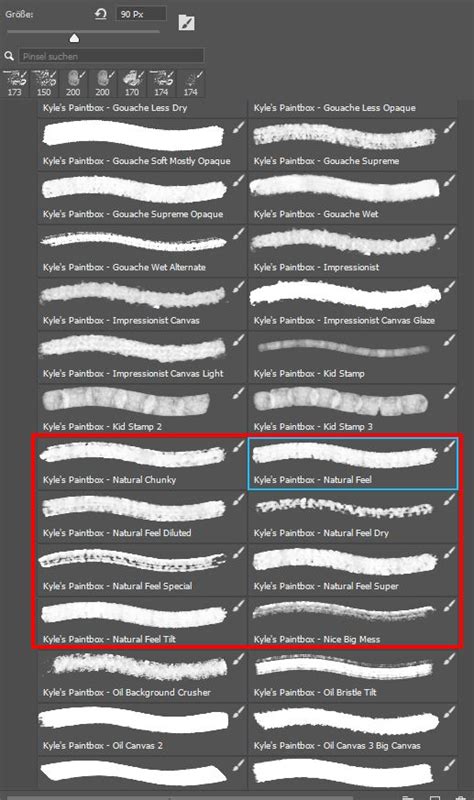
The evolution of digital painting in Photoshop has seen significant advancements, particularly with the introduction of features like the Mixer Brush, which first appeared in Photoshop CS5, and the broader brush engine that has remained relatively consistent since CS6. While many users primarily focus on "Regular" and "Mixer" brushes for painting, the utility of "Smudge" and "Pattern Stamp" brushes should not be overlooked, as they offer unique capabilities for achieving specific textures and blending effects. The accessibility of brushes has increased dramatically over the years, with many now included directly within Photoshop, making it easier than ever for beginners to experiment and develop their digital art skills.
The Genesis of Custom Brushes: Beyond Presets
A truly remarkable aspect of working with brushes in Photoshop is the inherent ability to create and share your own custom brush presets. This empowers artists to move beyond the limitations of pre-existing tools and craft bespoke instruments that perfectly align with their artistic vision. If the ideal brush for a particular effect isn't readily available within Photoshop's extensive library or in a downloaded brush pack, the good news is that you possess the capability to design and implement your own. The process begins with a clear conceptualization of the desired aesthetic and an understanding of the brush characteristics that will best facilitate its realization. Once a new brush is created, it can be saved for future use by selecting "New Brush Preset" from the contextual menu, often found within the brush settings or options panel. This iterative process of creation and refinement is fundamental to developing a personalized and efficient digital art workflow.
Kyle T. Webster's Brush Ecosystem: A Comprehensive Overview
Kyle T. Webster has become synonymous with high-quality, versatile Photoshop brushes, offering a vast collection that caters to a wide spectrum of artistic needs. His brushes are broadly categorized into distinct sets, each designed to emulate specific traditional media or achieve particular visual outcomes. These sets are often made available for free to Adobe Creative Cloud subscribers, representing an invaluable resource for digital artists.
The Megapack: A Foundation for Diverse Styles
The "Megapack" is a monumental collection that forms the bedrock of Kyle T. Webster's brush offerings. Within this expansive pack, artists can discover a wealth of options, organized into several key subfolders:
- Erasers (6 brushes): Essential for refining and correcting artwork, these brushes offer a range of softening and sharpening effects for precise editing.
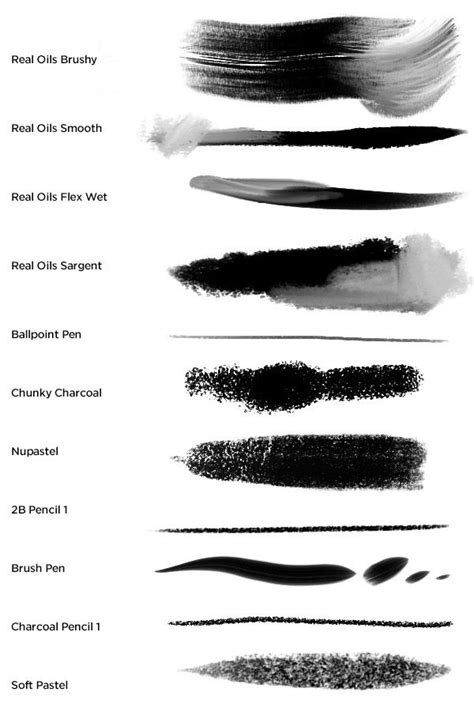
- Drawing Box (74 brushes): This comprehensive section houses brushes designed to mimic traditional drawing tools. It includes a wide array of Charcoal, Markers, Crayons, and Pencil brushes, offering distinct textures and line qualities. Furthermore, it provides Colored Pencil and Sketch brushes for preliminary work and detailed rendering. A significant portion of this box is dedicated to Mixer brushes, which excel at blending colors and creating smooth transitions, alongside brushes that actively add color to the canvas. The inclusion of Pastels/Oil Pastels/Pastel Smudge brushes allows for the simulation of chalky textures and soft blending.
- Inkbox (157 brushes): This extensive collection focuses on simulating various inking techniques. It offers a diverse range of brushes for creating crisp lines, textured strokes, and expressive ink washes, indispensable for illustrators and comic artists.
- FX Box (27 brushes): This set is dedicated to special effects, featuring Grains, Noise, and Canvas brushes. These are invaluable for adding texture, atmospheric effects, and simulating the tactile feel of traditional surfaces.
- Paintbox (53 brushes): Emulating the feel of traditional painting mediums, the Paintbox includes a variety of brushes such as Smudge (8 brushes), Acrylic (2 brushes), Bristle Brushes, Gesso brushes, Gouache (10 brushes), and Watercolor (8 brushes). This section is crucial for achieving painterly effects and mimicking the behavior of different paints.
- Real Oils (44 brushes): This set provides a robust selection of brushes designed to replicate the nuances of oil painting, including the specific Sargent brushes (6 brushes), known for their rich impasto and expressive strokes.
- Classic Group (19 brushes): This collection comprises a curated selection of versatile and foundational brushes that are useful across many digital art disciplines.
- Bonus (1 brush): A single, yet notable, Chunky Charcoal brush offering a distinct textural quality for bold mark-making.
- Tech Pens (5 brushes): These brushes are designed for clean, precise linework, ideal for technical illustrations, drafting, and graphic design applications.
The Impressionist Set: Capturing Masters' Techniques
Beyond the Megapack, Kyle T. Webster offers specialized sets, such as the "Impressionist Brushes." This set, containing 24 brushes and blenders, is particularly noteworthy for its inclusion of brushes like the Seurat brush (emulating pointillism) and the Cezanne2 brush, both designed to capture the essence of renowned Impressionist painters. This set is a testament to the power of digital tools in emulating historical artistic movements and techniques.
Other Notable Brush Sets
Kyle T. Webster's output extends to numerous other thematic brush sets, each offering unique possibilities:
- Keith Haring-Inspired Brushes: For dynamic, graphic linework.
- Watercolor: For achieving fluid and translucent effects.
- Dry Media: Mimicking charcoal, pastels, and graphite.
- Gouache: For opaque, flat color applications.
- Spatter: For creating textured, dispersed marks.
- Runny Inkers: For dynamic, expressive inking.
- Manga Brushes: Tailored for the aesthetics of Japanese comics.
- Crosshatchers: For creating tonal values through linework.
- Rake Brushes: Producing textured, sweeping strokes.
- Letterers: For specialized typography and hand-lettering.
- Halftones: For creating graduated tones and comic book shading.
- Copier: For a retro, photocopy-like aesthetic.
- Concept: General-purpose brushes for concept art.
- Art Markers: Simulating the look and feel of alcohol-based markers.
- Charcoal: For expressive, smudgy charcoal effects.
- Yearly Collections (e.g., Summer 2018, Winter 2019, Spring 2020, Summer 2020, Winter 2020): These dated sets often contain a diverse mix of brush types, reflecting ongoing experimentation and new creations. Kyle T. Webster has also indicated plans for future releases, such as a Spring 2021 group featuring leaf shapes, demonstrating a continuous commitment to expanding his brush library.
Each of these sets provides a specific set of tools, and a brief description of their contents is usually available, aiding artists in selecting the most appropriate brushes for their projects.
Integrating Kyle T. Webster Brushes into Your Workflow
The process of acquiring and utilizing Kyle T. Webster's brushes is designed for ease of access and integration.
Downloading and Loading Brushes
To access the extensive "Megapack" and other brush groups, artists typically need to download them. A common method is to navigate to the Brushes Panel in Photoshop, open the pop-out menu (usually in the upper right corner), and select "Get More Brushes." From there, Kyle's brush groups will be listed for download.
Once downloaded, brushes often come in .abr (Adobe Brush) or .tpl (Tool Presets) file formats. The most straightforward way to load these is by opening Photoshop and then double-clicking the .abr or .tpl files from their download location on your computer. This action will automatically install them as new folders at the bottom of your brush list within Photoshop. Alternatively, Kyle's brushes can often be added directly into Photoshop without the need for manual file management, offering a quicker integration.
How to import photoshop brushes into clip studio paint.#howto #clipstudiopaint #photoshop
Navigating and Finding Specific Brushes
The sheer volume of brushes within sets like the Megapack can be daunting. Fortunately, modern versions of Photoshop incorporate a powerful search mechanism within the Brushes Panel. After loading the brushes, artists can utilize the search field, located conveniently under the Size slider, to type in keywords or partial names of the desired brush. This feature is a significant time-saver, especially for users with extensive brush libraries, quickly filtering and displaying all loaded brushes that match the search query. For instance, searching for "Hatch Soft" or "Shady Graphite" will efficiently locate those specific brushes from the Drawing Box.
Advanced Techniques and Artistic Inspiration
Kyle T. Webster's brushes are not merely tools for replication; they are catalysts for creative exploration. The provided information highlights how these brushes can be used to achieve unique artistic outcomes, as demonstrated in several examples.
Painting with Custom Brushes: Case Studies
One compelling example involves the creation of a painted rendition of a Common Kingfisher. This process began with a downloaded image from Unsplash. The artist duplicated the image and then isolated the bird using Photoshop's "Quick Selection Tool" and "Select Subject" features. A layer mask was applied to refine the selection, ensuring clean edges. A white "Solid Color Fill Adjustment Layer" was placed beneath the isolated bird to provide a clean background. The painting itself utilized brushes from Kyle T. Webster's "Munch brushes" set, specifically created to emulate the expressive style of Edvard Munch. The "Munch â Filbert brush," set to a very small size, was used for rendering intricate details. A texture was then applied beneath the bird, and finally, a "Romantic English Garden Pattern Stamp Brushes and Patterns" set by Jessica Johnson was employed to add subtle color scattering at the bottom.
Another illustration showcases a Goldfinch, also sourced from Unsplash. This artwork employed a combination of brushes from different Kyle T. Webster sets:
- Kyleâs Drawing Box â Hatch Soft Mixer brush: Likely used for foundational textures or subtle blending.
- Kyleâs Drawing Box â Shady Graphite Damp brush: Ideal for creating shaded areas with a graphite-like feel.
- Kyleâs Paintbox â Big Rough 880 Smudge brush: Used for blending and creating softer, more painterly transitions.
- Kyleâs Inkbox â Spatter 1 brush: Applied for adding textured, dispersed marks, perhaps for background elements or atmospheric effects.
- Kyleâs Spatter brushes â Wet Splat brush: Used at the bottom behind the bird to add a dynamic, wet spatter effect.
Furthermore, the "Paintbox" collection contains specific brushes like the Seurat brush and the Cezanne2 brush, which are housed within the "Impressionist" download. These are distinct from the "Megapack Paintbox" folder and are invaluable for achieving pointillist and painterly effects reminiscent of master artists.
The "Munch" Brushes: Emulating Artistic Legends
The "Munch brushes" offer a unique opportunity to experiment with the iconic style of Edvard Munch, the master behind "The Scream." A short introductory video at the brush download site is recommended for learning their proper application. This set includes 7 brushes, and even a single brush like the "Munch â Filbert," when used with careful control over size and pressure, can yield remarkable results, as seen in the Kingfisher example.
Understanding the Brush Engine and Customization
The power of Photoshop's brush engine lies not just in the variety of available brushes but also in the ability to customize them. Kyle T. Webster himself emphasizes that artists don't necessarily need to create brushes from scratch; instead, they can experiment with the vast selection he provides and modify them on the fly.
Leveraging Brush Settings
The "Brush Settings Panel" in Photoshop is a treasure trove of customization options. Kyle T. Webster often dedicates time to explaining the various sections within this panel, empowering artists to fine-tune brush behavior. Understanding how to adjust parameters such as shape dynamics, scattering, texture, dual brush, color dynamics, transfer, and build-up allows for the creation of unique brush variations tailored to specific needs. This deep dive into brush settings enables artists to achieve precise control over aspects like brush tip shape, spacing, jitter, opacity, flow, and color blending, all of which are critical for achieving desired artistic effects.
The Role of Kyle T. Webster's Educational Content
Kyle T. Webster actively supports the artistic community through educational resources. He produces a series of Adobe Creative Cloud videos that delve into the intricacies of the Photoshop brush engine and the diverse types of brushes he has created. These include:
- Photoshop Masterclass: Brushes
- Photoshop Brush Top Tips and Tricks with Kyle T. Webster
- Brush Hour with Kyle T. Webster: Episode 1-Spatter Time (and subsequent episodes focusing on different brush types)
These videos are invaluable for gaining a deeper understanding of brush functionality, customization, and application. Kyle's approach is to demystify the brush engine, encouraging experimentation and discovery. As a designer and illustrator, he possesses an innate understanding of the tools required for various painting media, translating this expertise into practical and accessible brushes.
The continuous expansion of his brush library, with plans for new sets and thematic collections, ensures that artists always have fresh tools to explore. The sentiment that "you can never have too many brushes" resonates deeply within the digital art community, and Kyle T. Webster's contributions have significantly enriched this landscape, making sophisticated artistic expression more attainable than ever before.