Adobe Photoshop has long been the undisputed king of image editing software, a powerful tool that has evolved dramatically since its inception. From its humble beginnings as a program to adjust grayscale images, it has transformed into a comprehensive suite for professional photo editing, graphic design, and digital art. This article delves into the rich history and recent advancements of Photoshop, exploring its key features and the continuous innovation that keeps it at the forefront of the industry.
The Genesis of a Digital Icon
The story of Photoshop begins in 1987 with two brothers, Thomas and John Knoll. Thomas, a Ph.D. student at the University of Michigan, initially developed a program called "Display" for his Macintosh Plus to render grayscale images on a monochrome screen. His brother, John, an employee at Industrial Light & Magic, recognized the potential and encouraged Thomas to expand it into a full-fledged image editing program. In 1988, they took a six-month break from their studies to collaborate, and John traveled to Silicon Valley, demonstrating the program to engineers at Apple Computer and Adobe's art director, Russell Brown. These successful showings led Adobe Systems Incorporated to purchase the distribution license in September 1988.

Photoshop 1.0 was released exclusively for Macintosh on February 19, 1990. While the initial Adobe-shipped version had some color editing features stripped compared to the Barneyscan version it was distributed with, the handling of color progressively improved with each release. This meticulous development quickly established Photoshop as the industry standard for digital color editing. At a time when dedicated high-end systems charged around $300 per hour for basic photo retouching, Photoshop offered an accessible and powerful alternative. The software's reach expanded significantly when Adobe chief architect Seetharaman Narayanan ported Photoshop to Microsoft Windows in 1993.
Milestones in Feature Development: From Layers to AI
The evolution of Photoshop is marked by a series of groundbreaking features that have consistently redefined the possibilities of digital image manipulation.
Early Innovations: The Foundation of Layers and Precision
- Photoshop 2.0 (June 1991): This version introduced essential tools like path and pen tools, along with CMYK color support and EPS rasterization, laying crucial groundwork for professional print workflows.
- Photoshop 2.5: This version was notable for being one of the first software programs available for both Macintosh and Windows, establishing crucial cross-platform compatibility.
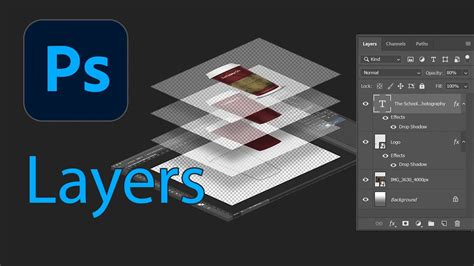
- Photoshop 3.0 (Autumn 1994): A truly pivotal release, Photoshop 3.0 introduced the concept of layers. This revolutionary feature made creating complex designs and editing images significantly easier by allowing elements to be stacked and manipulated independently.
- Photoshop 4.0: Building on the success of layers, this version introduced adjustment layers. This provided unprecedented flexibility, allowing users to tweak adjustments non-destructively by simply returning to the adjustment layer.
- Photoshop 5.0 (May 1998): This release brought several important additions, including the magnetic lasso tool for precise selections of irregular shapes, and the ability to edit type after it was placed, a significant improvement for text-based design.
- Photoshop 5.5 (1999): Recognizing the growing importance of the internet, Photoshop 5.5 introduced the "Save for Web" feature, optimizing images for faster online uploads with minimal quality loss.
The Creative Suite Era: Expanding Capabilities and Workflow
The early 2000s saw Photoshop adopt the "CS" (Creative Suite) moniker, signaling a broader integration with Adobe's expanding product line and a more professional focus.
- Photoshop .87 (later known as Barneyscan XP): This was the very first publicly available version, distributed with Barneyscan scanners, and already featured advanced color editing capabilities.
- Photoshop 7.0 (2002): This version welcomed the addition of a Camera RAW plugin, a critical development for photographers working with RAW image files, offering greater control over image data.
- Photoshop CS (8.0) (October 2003): The introduction of the "CS" branding brought more than just a name change. A real-time histogram was added for immediate feedback on image tonal values, alongside improvements to the slice tool, commands for shadows, highlights, and color matching. The type on a path tool and an updated Camera RAW (version 2) further enhanced its capabilities. Image support was also extended to files over two gigabytes, and layers could now be grouped.
- Photoshop CS2 (May 2005): This iteration built upon CS with an upgraded spot healing brush for retouching imperfections, and introduced non-destructive editing and support for 32-bit High Dynamic Range (HDR) images, crucial for advanced compositing and 3D rendering. The vanishing point and image warping tools were also significant additions, simplifying perspective-based edits. Camera Raw version 3.0 allowed simultaneous editing of multiple RAW files.
- Photoshop CS3 (April 2007): A major leap in performance and speed was a key highlight. Improvements were made to existing tools like Vanishing Point, Brightness, Contrast, and Curves. The quick selection wand was also introduced, streamlining the selection process. CS3 Extended offered additional features for 3D graphics, video enhancement, and scientific imaging.
- Photoshop CS4 (October 2008): This version focused on a more simplified and intuitive user interface with a tab-based design. Smoother panning and zooming at high magnifications enhanced the editing experience. A new 3D engine allowed for the conversion of gradient maps to 3D objects, adding depth to layers and text with a new ray-tracing rendering engine. CS4 Extended catered to specialized fields like scientific imaging and motion graphics.
- Photoshop CS5.1 (May 2011): This release introduced powerful new tools such as Content-Aware Fill, Refine Edge, Mixer Brush, Bristle Tips, and Puppet Warp. Many of these additions were based on user feedback, including automatic image straightening and a Rule-of-Thirds cropping tool. Saving a 16-bit image as a JPEG was also made possible. CS5 Extended further enhanced 3D and video editing capabilities.
- Photoshop CS6 (May 2012): CS6 brought a redesigned interface with a focus on enhanced performance and a suite of tools for video editing, including color and exposure adjustments. The "straighten" tool allowed for quick canvas reorientation, and background saving enabled simultaneous editing while another document compiled. Notably, this was the last version to fully support Windows XP.
The Creative Cloud Era: Subscription, Cloud Integration, and AI
The transition to the Creative Cloud (CC) in 2013 marked a significant shift in Adobe's business model and Photoshop's delivery.
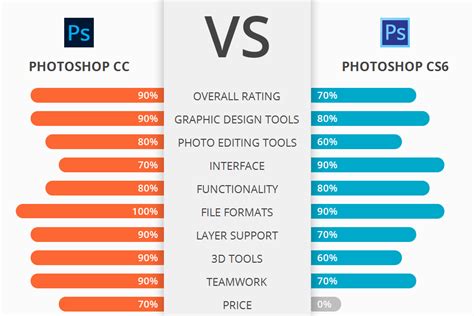
- Photoshop CC (June 2013): This version moved to a subscription-only model, which, despite initial opposition, ensured users always had access to the latest features. Key additions included new Smart Sharpen, Intelligent Upsampling, and Camera Shake Reduction. The Creative Cloud ecosystem also allowed for seamless syncing across multiple devices and cloud storage. Subsequent updates, like version 14.1, introduced Adobe Generator for creating plug-ins.
- Photoshop CC 2014 (June 2014): This release brought improvements to content-aware tools, new blur tools (spin blur and path blur), and a focus mask feature for selecting parts of an image based on their in-focus status.
- Photoshop CC 2015 (June 2015): A major highlight was the integrated Adobe Stock Marketplace, allowing users to browse and purchase stock images without leaving Photoshop. The ability to apply multiple layer styles (e.g., up to ten shadows on a single layer) offered greater creative control. Features like "Export As" also streamlined workflows.
- Photoshop CC 2017 (November 2016): New document templates, an enhanced search function for tools and help articles, and support for SVG OpenType fonts were introduced.
- Photoshop CC 2018 (October 2017): This version featured an overhaul of the brush organization system, allowing for more properties to be saved per brush and better categorization. Brush stroke smoothing and over 1000 new brushes were added. The Curvature Pen tool, similar to Illustrator's, facilitated faster Bézier path creation.
- Photoshop CC 2019 (October 2018): The 32-bit Windows version was discontinued. New features included the Frame Tool for placeholder images, multiple undo mode, auto-commitment, and a locked workspace to prevent accidental panel moves. Live blend mode previews accelerated the process of experimenting with blend modes.
- Photoshop 2020 (November 2019): This version introduced an improved Object Selection tool for more automated complex selections, a new Properties panel, enhanced Transform Warp, and a background image removal option. Improvements were made to Content-Aware Fill and the document tab. Animated GIF support, improved lens blur performance, and one-click zoom to layer contents were also added.
- Photoshop 2021 (October 2020): This version brought significant advancements, including the ability to create custom brushes, enhanced retouching tools for removing and recoloring objects, and new AI-powered filters powered by Adobe Sensei. These filters, controlled by user-friendly sliders, allow for changes to facial expressions, age, gaze, and even pose. A powerful sky replacement feature enables quick and easy sky selection and replacement, with built-in sky visuals and the option to upload custom designs. A new pattern preview mode allows users to visualize designs as patterns directly on their monitor, eliminating the need for external tools. The ability to create shapes directly on the canvas was also introduced, simplifying shape manipulation.
- Photoshop 2021 Patch (22.4.3) (July 20, 2021): This patch focused on fixing minor issues and further stabilizing the program.
- Subsequent Updates (2021-2023): Further updates have continued to refine the user experience and introduce cutting-edge features. These include organizing and collaborating with Projects, refining Adobe Firefly generations, enhanced typing for CJK languages, and the creation of perfect star shapes. Fixes have addressed issues with font search bars, info panel values, droplet commands, color settings, hue ranges, file name length errors, and crashes related to tool resets, gradient layers, and the Object Selection tool. Improvements have also been made to selections of people and their attributes, on-canvas color adjustments, and content variation generation. Users also gained the option for cloud processing with Select Subject and Remove Background features.
- Version 23.0 (October 2021): Introduced Content Credentials (Beta), capturing editing information in a tamper-evident form.
- Version 23.5 (August 2022): Marked the final version with built-in support for basic Pantone colors (CMYK, Metallics, and Solid as Legacy Swatches).
- Version 24.0 (October 2022): Removed all built-in Pantone colors as of August 16, 2022.
- Version 25.0 (September 2023): Continued the ongoing evolution of the software.

The Photoshop File Formats: PSD and PSB
Photoshop's proprietary file formats are central to its power and flexibility.
- PSD (.PSD): Stands for "Photoshop Document." A PSD file stores an image with full support for all Photoshop features, including layers, masks, transparency, text, alpha channels, spot colors, clipping paths, and duotone settings. This rich feature set contrasts with formats like JPG or GIF, which are streamlined for specific uses but lack editable layers. PSD files are generally larger than other formats due to the preservation of editing information.
- PSB (.PSB): Known as "Photoshop Big" or the "large document format." A PSB file extends the PSD format, supporting significantly larger image dimensions (up to 300,000 pixels in height and width) and file sizes (up to 4 exabytes). This is essential for extremely large-format projects or high-resolution imagery.
Due to Photoshop's widespread adoption, PSD files are broadly supported by most competing software, including GIMP, Affinity Photo, and Clip Studio Paint, to varying degrees.
Extending Photoshop's Power: Plugins
The functionality of Photoshop can be further expanded through add-on programs called plugins. Adobe develops some, such as Adobe Camera Raw, but a vast number are created by third-party developers. These plugins come in various types, including filter, export, import, selection, color correction, and automation plugins. Filter plugins, often referred to as 8bf plugins, are particularly popular and can be found under the Filter menu, allowing users to modify existing images or generate new content.
Photoshop as a Verb: Cultural Impact
The immense popularity and influence of Photoshop have led to its name becoming a verb. "Photoshopped" (or simply "Shopped") is often used to describe images that have been edited using Photoshop, or indeed, any form of image manipulation. This linguistic phenomenon extends beyond English, with similar verb forms appearing in other languages, highlighting Photoshop's profound impact on visual culture.
From 1.0 to AI: 30 Years of Photoshop in 6 Minutes
Photoshop remains an indispensable tool for anyone regularly involved in image editing, graphic design, and digital art, continually pushing the boundaries of what's possible with digital imagery. Its ongoing development, driven by user needs and technological advancements, ensures its continued relevance and dominance in the creative landscape.