In the ever-evolving landscape of digital art and photography, a prominent trend has emerged: the strategic integration of lighting effects to elevate the visual impact of creative works. These techniques, ranging from subtle enhancements to dramatic transformations, allow artists to imbue their images with depth, mood, and a captivating sparkle. This article delves into the multifaceted world of Photoshop lighting effects, exploring a diverse array of methods and tools that can be harnessed to achieve professional-grade results. From the ethereal glow of bokeh to the dynamic streaks of energy, understanding and applying these effects can profoundly transform your digital creations.
Engulfing Subjects with Expressive Lighting
A fundamental application of lighting effects in Photoshop is to surround or engulf photo subjects with glowing lights, creating a sense of atmosphere and drawing attention to the focal point. This technique can be achieved through various methods, often involving a combination of brushes, layer styles, and blending modes. By carefully controlling the color, intensity, and spread of the light, artists can create a surreal or dreamlike quality, making subjects appear as if they are illuminated by an otherworldly source. This approach is particularly effective for portraits and fantasy-themed imagery, where the added light can enhance the narrative and emotional resonance of the piece.
Crafting Dynamic Light Streaks
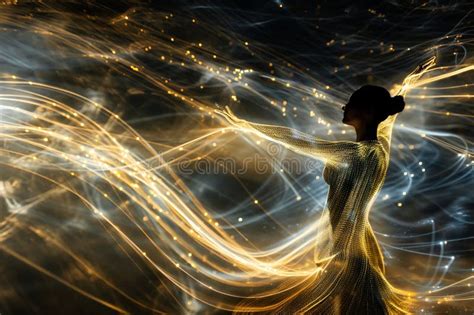
The creation of light streaks is a popular and versatile lighting effect in Photoshop. These streaks can be added to photos using the Pen Tool in conjunction with simple Layer styles. The Pen Tool offers precise control over the path of the light, allowing for sharp, defined lines or smooth, flowing curves. Layer styles, such as "Outer Glow" or "Inner Glow," can then be applied to give these lines a luminous appearance. Alternatively, the Brush Tool can be leveraged to paint luminous light streaks directly onto the canvas, offering a more organic and painterly feel. This technique is excellent for introducing a sense of motion, speed, or energy into an image, making it feel more dynamic and engaging. For those seeking to introduce light streaks around artwork’s subjects, specific tutorials guide users through the process, ensuring the light appears to emanate from or interact with the subject matter naturally.
Achieving Surreal and Dreamy Ambiance
Beyond simple streaks, Photoshop offers powerful tools to create more complex and surreal lighting effects, transforming ordinary photos into dreamlike scenes. The Liquify and Gaussian Blur Filters, for instance, can be instrumental in achieving this. Liquify allows for the manipulation of pixels, enabling the creation of fluid, ethereal light forms, while Gaussian Blur can soften edges and create subtle glows, contributing to a dreamy, atmospheric quality. The "Ocean Girl Photo Effect" tutorial exemplifies this, showing how to conjure a brilliant and dreamy scene, perfect for fantasy and conceptual art. Such effects are not just about adding light; they are about shaping perception and evoking specific emotions, making the viewer feel as though they are stepping into another reality.
Adding Depth with Abstract Light and Energy
Abstract light patterns and energy lines can add a unique dimension to digital artwork, serving as captivating backgrounds or intricate design elements. These can range from the subtle shimmer of abstract energy lines, as demonstrated in tutorials from sources like Tutorial9, to the more intense and dynamic interplay of abstract light streaks. By using Photoshop’s Brush Tool and Layer styles, artists can generate glowing lines that convey a sense of power, movement, or even a mystical aura. These effects are incredibly versatile, capable of energizing graphics and adding a futuristic or high-tech feel to any design.
Recreating Iconic Visual Styles
Photoshop's lighting effects are not limited to generic enhancements; they can also be used to emulate specific artistic styles. For example, the "Coldplay/Apple Inspired Portrait" tutorial demonstrates how to recreate the distinctive visual aesthetic often associated with the band Coldplay and Apple's branding, which frequently incorporates dramatic and stylized lighting. This involves mastering techniques that can produce a polished, almost cinematic look, often characterized by strong contrasts and carefully placed highlights.
The Power of Glow Effects
The concept of "glow" is central to many lighting effects in Photoshop. Advanced glow effects can add a radiant aura to subjects, making them appear to emit light. This can be achieved through various methods, including the use of layer styles, blending modes, and specialized brushes. The "Advanced Glow Effects" tutorial specifically addresses these techniques, enabling users to imbue their images with a magical or ethereal luminescence. This is distinct from simple brightness adjustments; it’s about creating a palpable sense of light radiating from an object or area.
Simulating Natural and Celestial Phenomena
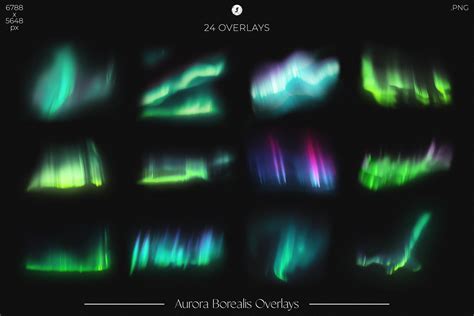
Photoshop can also be used to simulate natural and celestial lighting phenomena, adding a touch of realism or wonder to digital art. The "Windows Vista Aurora Effect" tutorial, for instance, shows how to recreate the mesmerizing visual of the aurora borealis, a natural light display characterized by vibrant, dancing colors. Similarly, the "Eclipse Effect" tutorial guides users in replicating the dramatic visual of an eclipse, often utilizing Photoshop's Lens Flare Filter and other adjustment layers to mimic the intense light and shadow play of such an event. These effects bring a sense of awe and grandeur to digital compositions.
Emulating Fiery and Explosive Elements
For more dramatic and impactful visuals, Photoshop can be employed to create fiery and explosive lighting effects. The "Fiery Photoshop Space Explosion Tutorial" demonstrates how to generate an out-of-this-world space explosion, complete with dynamic bursts of light and energy. This often involves combining multiple techniques, such as using custom brushes to create flames and smoke, and applying layer styles to simulate intense heat and light. Similarly, "Fire Lines V2" teaches how to add fiery trails into images, giving them a sense of intense energy and heat.
Creating Dynamic Motion Trails and Sparks
To imbue artwork with a sense of dynamism and action, creating light motion trails and glowing sparks is an effective technique. These effects can make artwork feel alive and energetic, perfect for action-oriented scenes or futuristic designs. Tutorials on this topic guide users in generating these dynamic elements, which can be used to represent speed, energy transfer, or magical effects. The result is artwork that doesn't just sit static on the screen but appears to be in constant motion.
Harnessing Light Overlays for Instant Impact
Beyond manual creation, a powerful and efficient method for applying lighting effects involves the use of light overlays. These are pre-designed graphic elements, typically in PNG format, that can be layered onto an image to instantly enhance its lighting. These overlays are incredibly versatile and can instantly fix lighting issues, eliminate harsh shadows, and add artistic flair. They are compatible with most image editing programs that support layers, including Adobe Photoshop and GIMP, and run smoothly on both Mac and Windows computers.
Build Creative Light Overlays & Presets in Photoshop!
The collection of light overlays often includes a wide variety of effects designed for different scenarios. Some are intended to bring warmth to outdoor images, making them more charming and inviting, especially during times when natural light is scarce, such as sunset. Others are designed to create specific accents within a picture, drawing the viewer's eye to key elements. The results from using light overlays are impressive in both digital and printed forms.
Enhancing Outdoor and Portrait Photography
Light overlays are particularly beneficial for enhancing outdoor photography. They can help to emulate natural lighting or compensate for the absence of it, improving photos taken at any time of the day. This is invaluable for wedding, portrait, newborn, landscape, and travel photography. For instance, if a photograph taken during a sunset lacks sufficient warmth, a suitable light overlay can seamlessly introduce that golden hour glow. While many free light overlays work effectively without modification, some situations, particularly with very bright original shots, might require minor adjustments to the overlay's settings.
Expanding Your Toolkit with Free Overlays
Free Photoshop light overlays can become an indispensable addition to any photographer's or digital artist's toolkit, regardless of their specialization. Whether engaged in wedding, landscape, newborn, engagement, or portrait genres, these overlays offer a way to bring balance to the lighting in photos without drastically altering other image parameters. A well-chosen overlay can subtly enhance the mood and aesthetic of an image, making it more visually appealing.
A comprehensive collection of light overlays can feature hundreds of premium-quality options that function flawlessly across various versions of Photoshop. The diversity within these collections is remarkable, assisting users in their most ambitious creative experiments. Some overlays are designed to simulate light rays reaching a scene from above, while others gently frame the main subjects. The intensity of these effects can vary, with some offering a more pronounced impact and others providing a subtle infusion of sunlight. Access to a bundle containing many cool free light overlays for Photoshop is a valuable opportunity for any creative professional or enthusiast looking to elevate their work.
Understanding the Underlying Principles
At its core, creating effective lighting effects in Photoshop involves understanding the principles of light itself. This includes how light interacts with surfaces, the behavior of shadows, the concept of highlights, and the different qualities of light (hard vs. soft, warm vs. cool). By mastering these fundamentals, artists can move beyond simply applying presets and instead create lighting that feels natural, intentional, and artistically cohesive. This involves considering the direction of the light source, its intensity, and its color temperature, and then using Photoshop's tools to accurately simulate these characteristics.
The Role of Blending Modes and Layer Styles
Blending modes are critical for integrating lighting effects seamlessly into an image. Modes like "Screen," "Add," or "Overlay" are commonly used to simulate the additive nature of light, allowing the effect to blend realistically with the underlying pixels. Layer styles, such as "Outer Glow," "Inner Glow," and "Drop Shadow," provide quick and customizable ways to add luminous qualities and depth. Experimenting with different combinations of blending modes and layer styles is key to achieving unique and sophisticated lighting results.
Utilizing Custom Brushes for Organic Effects
Custom brushes in Photoshop can be invaluable for creating organic and unique lighting effects. Artists can find or create brushes that mimic natural light phenomena like dust motes, lens flares, or ethereal glows. These brushes, when used with appropriate colors and layer settings, can add a personalized touch that sets their work apart. For instance, a brush designed to look like light particles can be used to create a magical, sparkling effect, or a brush simulating soft light diffusion can add a gentle, atmospheric haze.
The Importance of Composition and Context
While technical skill in applying lighting effects is crucial, their effectiveness is ultimately tied to their integration within the overall composition of the image. Lighting should serve the subject matter and enhance the intended mood or narrative. A dramatic lighting effect might be perfect for a fantasy portrait but out of place in a documentary-style photograph. Therefore, considering the context of the image and how the lighting contributes to its message is paramount. The goal is not just to add light, but to use light to tell a story and evoke a response from the viewer.
Iterative Refinement and Experimentation
The process of creating compelling lighting effects in Photoshop is often iterative. It involves experimenting with different tools, techniques, and settings, and then refining the results based on what looks most effective. This might mean adjusting the opacity of a layer, tweaking the color of a glow, or repositioning a light streak. Encouraging a spirit of experimentation is vital, as it often leads to unexpected and innovative solutions. The vast array of possibilities within Photoshop means that there is always something new to discover and master.
Bridging the Gap Between Natural and Digital Light
Ultimately, the most successful lighting effects in Photoshop are those that either convincingly emulate natural light or intentionally create an artificial, artistic effect that enhances the image's impact. Whether aiming for photorealism or abstract expression, the ability to manipulate light within Photoshop opens up a universe of creative possibilities, allowing artists to shape the visual experience and communicate their artistic vision with greater power and precision.