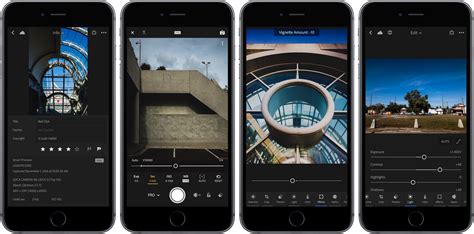
Adobe Lightroom stands as a cornerstone for photographers and social media enthusiasts alike, offering a robust platform for image retouching and preparation for publication on platforms such as Instagram. The integration of presets into the Lightroom workflow can dramatically accelerate and simplify the editing process. When these presets are crafted by professional designers, they serve not only as time-saving tools but also as a powerful means to imbue photographs with a polished, professional aesthetic. For those seeking a clear understanding of how to incorporate these powerful tools into their editing arsenal, a comprehensive guide to installing and utilizing Lightroom presets is essential. This article delves into the world of Lightroom presets, with a particular focus on those available from Creative Market, designed to elevate your Instagram presence and achieve a cohesive visual narrative.
Designing a Cohesive Instagram Grid with Lightroom Presets
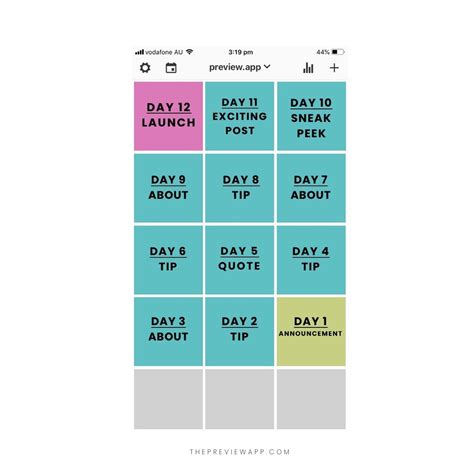
The visual consistency of an Instagram feed is paramount for brand recognition and audience engagement. Presets play a pivotal role in achieving this by ensuring that each image shares a similar tonal quality, color palette, and overall mood. Creative Market designers offer a vast array of presets specifically curated to address the diverse needs of Instagram users, from lifestyle bloggers to adventure photographers and food enthusiasts.
To aid in this endeavor, a free grid template is available, empowering users to quickly export Instagram shots that align perfectly with their established brand's visual style. This proactive approach to content planning, combined with the judicious application of presets, forms the bedrock of a compelling and unified Instagram grid.
Exploring a Spectrum of Creative Market Lightroom Presets
The diversity of presets available on Creative Market is a testament to the platform's commitment to catering to a wide range of photographic styles and thematic preferences. Each preset pack is designed with a specific aesthetic in mind, allowing users to find the perfect match for their unique vision.
For the intrepid lifestyle and adventure Instagrammers who document their travels and explorations, Catarina.pinto’s 350 Lifestyle/Adventure-Lr Presets offer a comprehensive suite of tools to enhance their dynamic imagery. These presets are tailored to capture the essence of exploration and the beauty of diverse landscapes.
If the allure of vintage photography and the distinctive look of film is what you seek, the VSCOCam M5 inspired Lightroom Preset by Straight, No Chaser Shop is an excellent choice. This preset aims to replicate the beloved aesthetic of classic film stocks, bringing a nostalgic charm to digital images.
Further exploring the VSCO-inspired aesthetic, emyself design presents VSCO A Series 02 Lightroom Presets, allowing users to achieve a specific, recognizable look. Similarly, Victoria Bee Photography’s BARBERRY VSCOCam A4 LR presets are meticulously crafted to emulate the characteristic tones and feel of the VSCO Cam A4 profile, offering a faithful rendition of that popular style.
For those whose passion lies in food photography, Filtercrave’s 55+ Food Blogger Lightroom Presets provide an extensive collection designed to make culinary creations look even more appealing. These presets are often characterized by their ability to enhance colors and textures, making food photography truly mouthwatering.
The VSCO M5 blogger Lightroom presets are another notable offering, specifically designed to evoke a vintage 70s feel. These presets are distinguished by their signature characteristics: “bright highlights, faded/dark shadows, pale green and blue hues, detailed and rich browns.” This specific combination creates a warm, retro ambiance that is highly sought after.
To achieve an exceptionally clear, bright, and professionally edited look for Instagram photos, Blogger Lightroom Presets by Lavinsky are a highly recommended option. These presets are engineered to deliver a polished and sophisticated output, ideal for those who prioritize a clean and professional aesthetic.
Victoria Bee Photography also offers COWBERRY Lifestyle Blogger Presets, a pack specifically curated for travel Instagrammers. These presets likely aim to capture the vibrant and diverse moods of travel photography, from bustling cityscapes to serene natural vistas.
A minimalist approach to editing can be powerfully realized with Minimal Blogger J Series Presets from FilterCollective. This set, inspired by the VSCOcam J Series Presets, contains 20 presets designed to impart a clean, understated, and modern look to images, focusing on subtlety and refined aesthetics.
For photographers seeking a more dramatic and atmospheric style, PhotographersHelper’s Moody Tones Wedding LR PS Filters deliver a rich, deep-toned edit. These filters are particularly effective for creating a sense of depth, emotion, and artistic intensity, often favored for wedding photography or portraiture with a darker, more intimate feel.
Filtercrave also presents Tropical Lightroom Presets Instagram, a comprehensive collection featuring 10 one-click premium presets, an impressive 95 free stackable presets, and a helpful guide file. This extensive pack is designed to bring the vibrant, sun-kissed feel of tropical destinations to your images.
The enchanting world of fantasy and imagination can be brought to life with WONDERLAND PRESETS LR//ACR by LOU&MARKS. This extensive set includes 30 pre-designed Lightroom Presets and 30 Photoshop ACR presets, inspired by the designer’s personal travel and family photographs, suggesting a blend of wanderlust and intimate moments.
Achieving a consistent and branded look across your Instagram feed is made significantly easier with Modern Blogger Lightroom Presets IG by Filtercrave. This collection of 15 Lightroom Presets is specifically designed to imbue your Instagram content with a cohesive and professional brand identity, ensuring a unified visual message.
For a softer, more delicate aesthetic, Gabi Wells Photography’s Golden Pastels Blogger Preset offers a set of Lightroom presets that are versatile enough to be applied to both JPEGs and RAW files, providing a gentle and aesthetically pleasing enhancement.
Travel bloggers seeking to capture the essence of their journeys will find value in 30 Instagram Blogger Travel Presets by Presetsh. Another excellent option for this niche is TRAVEL BLOGGER LIGHTROOM PRESET by KIIN, which features presets characterized by “dark brown shadows, turquoise blues, and bright whites,” creating a distinctive and appealing visual signature for travel content.
FilterAtelier’s Americana Lightroom Presets comprise a set of 30 presets intended for a broad range of photographic applications, including lifestyle photography, landscape shots, and portraits. These presets likely aim to capture a classic, perhaps patriotic or broadly appealing, aesthetic.
The Caramel Warm Golden Lightroom Preset is a collection of 12 unique presets that also includes a PDF installation guide, simplifying the process of incorporating these warm, inviting tones into your workflow.
For those looking to evoke the romantic allure of California, the Cali Blogger romantic presets by Best Lightroom Presets offer a thematic collection designed to capture the sun-drenched, picturesque beauty associated with the Golden State.
When utilizing Instagram for business growth or brand promotion, the professional appearance of your photographs is non-negotiable. Lightroom presets from Creative Market provide an accessible and effective means to ensure your images not only look great but also align seamlessly with your brand's unique aesthetic. The availability of PSD and AI files, along with mood boards to showcase brand assets, further enhances the utility of these creative resources.
How I edit photos after using Lightroom for 10 years
Installing Lightroom Presets: A Step-by-Step Guide for Desktop and Mobile
The process of installing Lightroom presets can vary slightly depending on whether you are working on a desktop computer or a mobile device. Understanding these different formats and installation procedures is crucial for a smooth workflow.
Installing Presets on Your Desktop Computer
For users working on a desktop computer, Lightroom presets are typically available in XMP or LRTEMPLATE formats. The installation process involves placing these files into specific folders within your Lightroom directory.
For LRTEMPLATE presets:
Navigate to the following path: ~/Library/Application Support/Adobe/Lightroom CC/Develop Presets/User Presets on macOS.On Windows, the path is: C:/Users/[your user name]/AppData/Roaming/Adobe/Lightroom CC/Develop Presets/User Presets.
For XMP presets:
On macOS, the path is: ~/Library/Application Support/Adobe/CameraRaw/Settings.On Windows, the path is: C:/Users/[your user name]/AppData/Roaming/Adobe/CameraRaw/Settings.
After downloading and unzipping your presets, locate the folder where the LRTEMPLATE or XMP files are stored. Then, open Adobe Lightroom CC on your desktop. To import these presets, go to File > Import Profiles & Presets…. Navigate to the folder containing your downloaded presets and select them for import. Once imported, these presets should begin to sync with your Adobe Creative Cloud account, making them accessible across your devices.
Installing Presets on Your Mobile Device (Lightroom CC Mobile)
Lightroom presets offered in DNG format are particularly well-suited for Lightroom CC Mobile and often do not require an Adobe Creative Cloud subscription for basic use. The Lightroom CC Mobile app itself is free to download and use, though a free Adobe account is necessary.
For DNG presets (Mobile Device Only):
- Download and Unzip: Download your Lightroom presets and unzip them on your computer.
- Transfer to Phone: Transfer these DNG files from your computer to your phone's Camera Roll. This can often be done via cloud storage services (like Google Drive, Dropbox, iCloud) or by connecting your phone to your computer.
- Open Lightroom Mobile: Launch the Lightroom mobile app on your iPhone or iPad.
- Create Albums: Tap the '+' icon beside "Albums" to create a couple of albums. Designate one album to store your presets and another to hold your photos.
- Import DNG Files: Select all the DNG files you've transferred to your phone's camera roll.
- Save as Presets: For each DNG file, tap the '(i)' icon and then tap "Save Image" to save it to your Camera Roll. This step is crucial for making them accessible within Lightroom Mobile.
- Apply Presets: When you are ready to apply a preset to a photo, navigate to the album containing your photos. Select a photo, and at the very bottom of the screen, find the "Presets" option on the far right. Tap on it to access your imported presets.
Alternative Mobile Installation (for unzipping on device):
- Download and Unzip on Phone: Download your presets and unzip them directly on your mobile device. You can often do this by tapping on the .zip file and using a file manager app or a dedicated unzipping app. If using a tool like ZipApp, tap the .zip file, then click the small […] icon, and click "Export." Tap "Open In…" and then "Copy to ZipApp" (or your preferred unzipping app).
- Locate DNG Files: After unzipping, locate the files ending in .DNG.
- Save to Camera Roll: On each .DNG file, tap the (i) icon and then tap "Save Image" to save it to your Camera Roll.
- Open Lightroom Mobile: Open your Lightroom mobile app.
- Create Albums: Create albums for your presets and your photos.
- Select Photos: Select the DNG files from your Camera Roll and add them to your presets album.
- Apply Presets: When you're ready to apply a preset, go to your photos album, tap on a photo, and then access the "Presets" option at the bottom right of the screen.
Note: For DNG presets, this method of syncing and application applies directly. For other formats or more advanced syncing features, a subscription to Adobe Lightroom CC might be required.
Leveraging Presets for Professional-Quality Edits
Adobe Lightroom is an undeniably powerful tool for photo editing, allowing for intricate adjustments to colors, settings, and more before any further manipulation in Photoshop. The true magic of Lightroom, however, is amplified by the use of presets. These are pre-packaged sets of editing instructions that, when applied, instantly transform an image by adjusting parameters such as saturation, sharpness, colors, and tones. With thousands of options available, finding the right presets can seem daunting, but Creative Market offers a curated selection that simplifies this discovery process.
Finding and Applying Presets on Creative Market
Creative Market is an excellent resource for discovering high-quality Lightroom presets. To find them:
- Navigate to Add-ons: Go to the "Add Ons" section of the Creative Market website, then select "Plug-ins."
- Search for Lightroom: You can type "Lightroom" into the search field for a comprehensive list of Lightroom-related products, including presets. Alternatively, follow direct links provided by designers or curated collections.
Once you have purchased and downloaded a preset pack, the installation process, as outlined above, will make them available within your Lightroom software.
The Editing Workflow with Presets
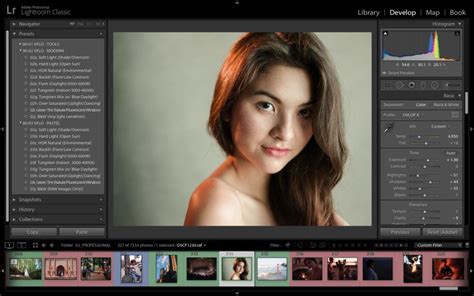
The core process of applying a preset begins within Lightroom's Develop module. On the left-hand side of the interface (which may vary based on your layout customization), you'll find the "Presets" field. This is where all your imported presets will be listed.
To apply a preset, simply click on the desired preset from the list. You will immediately see the changes reflected in your photo. This allows for rapid experimentation with different looks. Once you are satisfied with the result, you can proceed to save your file as you normally would.
While some photographers may lean heavily on Photoshop for their editing needs, it’s important to recognize Lightroom's significant capabilities. Though it possesses a learning curve and is not without its limitations, a deeper engagement with Lightroom reveals its extensive potential for efficient and impactful photo processing.
Presets for Every Niche: From Travel to Food and Beyond
The breadth of presets available caters to an incredibly diverse range of photographic genres and personal styles. Whether you are documenting global adventures, showcasing culinary creations, or crafting a sophisticated brand identity, there is a preset designed to elevate your work.
For instance, the Tropical Lightroom Presets Instagram pack, with its 10 premium and 95 free stackable presets, is ideal for capturing the vibrant essence of exotic locales. Conversely, the 55+ Food Blogger Lightroom Presets are specifically engineered to make food photography pop, enhancing colors and textures to create mouthwatering visuals.
The Minimal Blogger J Series Presets offer a clean, understated aesthetic, perfect for brands or individuals who prefer a more refined and less saturated look. On the other hand, presets like Moody Tones Wedding LR PS Filters provide a dramatic, rich, and deep-toned edit, lending a sense of atmosphere and emotion, particularly suited for artistic portraits or significant events.
The VSCO-inspired presets, such as those mimicking VSCOCam M5, A4, or the J Series, tap into a well-established and popular aesthetic that many users find appealing for its consistent and recognizable look. These are often characterized by specific color shifts, contrast levels, and grain effects.
For those focusing on lifestyle and travel, presets like 350 Lifestyle/Adventure-Lr Presets, COWBERRY Lifestyle Blogger Presets, and TRAVEL BLOGGER LIGHTROOM PRESET are invaluable. They are designed to complement diverse environments, from bustling city streets to serene natural landscapes, and to imbue images with a sense of place and experience.
The Modern Blogger Lightroom Presets IG and Golden Pastels Blogger Preset are excellent examples of how presets can be used to establish a strong brand identity. They offer a consistent visual language that helps in building recognition and trust with an audience.
Even for personal projects, like documenting a visit to Fenway Park to see a personalized brick, presets can add a professional touch. Applying a carefully chosen preset can transform a collection of snapshots into a cohesive visual narrative, enhancing the overall impact of the photographs.
The Caramel Warm Golden Lightroom Preset and the Cali Blogger romantic presets demonstrate how presets can be thematically curated to evoke specific moods and settings. These collections are perfect for adding a signature warmth or a romantic glow to images, enhancing their emotional resonance.
Ultimately, Lightroom presets are not just about applying filters; they are about developing a consistent visual style and streamlining the editing process. By utilizing the vast and varied offerings from Creative Market, photographers and content creators can achieve professional-level results, ensuring their images stand out and effectively communicate their intended message. This approach not only saves time but also empowers users to express their unique artistic vision with greater ease and impact.