Blender's Material Preview Mode is a cornerstone feature for any 3D artist working with materials and textures. This powerful mode, integrated directly into the 3D Viewport, offers a real-time, interactive visualization of your materials without the need for intricate lighting setups or lengthy render times. By leveraging Blender's Eevee real-time rendering engine, Material Preview Mode provides swift and accurate feedback, making it an indispensable tool for artists engaged in the meticulous process of tweaking shaders and textures.
Understanding the Core Functionality of Material Preview Mode
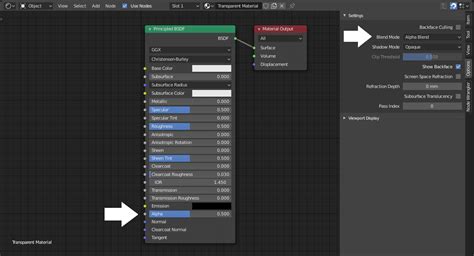
At its heart, Material Preview Mode is designed to accelerate the material creation and refinement workflow. It bypasses the traditional render pipeline, instead utilizing the highly optimized Eevee engine to display your materials as they would appear under a standardized lighting environment. This immediate visual feedback is crucial for making informed decisions about color, reflectivity, roughness, and other material properties. The mode is particularly beneficial when working with complex shader networks, allowing artists to see the cumulative effect of various nodes and adjustments in real-time. This significantly reduces the iteration cycle, transforming what could be a time-consuming process into a fluid and responsive experience.
Leveraging Scene Lights and World Settings for Enhanced Previews
While Material Preview Mode offers a convenient default lighting setup, Blender provides the flexibility to incorporate your existing scene lighting and world settings for a more contextually accurate preview. By enabling "Use Scene Lights" and "Use World" options within the Material Preview settings, you can observe how your materials interact with the specific illumination and environmental lighting of your scene. This is invaluable for ensuring that your materials not only look good in isolation but also function harmoniously within the broader context of your 3D environment.
Furthermore, the ability to render images directly from the viewport using the current shading mode, including Material Preview, adds another layer of utility. This feature is a boon for quick visual checks or for generating animatics before committing to a full, resource-intensive render. It allows for rapid capture of specific material states or shader variations, serving as a practical intermediate step in the asset creation pipeline. To access this functionality, navigate to the 3D Viewport menu and select View → Viewport Render Image.
Four awesome rendering updates in Blender 5.0!
Expanding Your Material Creation Toolkit with Add-ons and Resources
The power of Material Preview Mode is further amplified by the vast ecosystem of Blender add-ons and external resources that cater to material creation and management. These tools streamline various aspects of the workflow, from generating procedural textures to importing and organizing PBR materials.
Character and Asset Generation Tools
For character artists, tools like CharMorph and MPFB2 offer open-source solutions for generating realistic 3D human models. CharMorph is a rewrite of the now unmaintained MB-Lab, while MPFB2 is a complete rewrite of MakeHuman as a Blender add-on, providing a robust foundation for character creation. For photorealistic face and head models, FaceBuilder is a powerful, albeit commercial, add-on that utilizes photographs to create detailed 3D representations.
Beyond characters, procedural generation plays a significant role in creating diverse assets. Auto-Terrainer transforms low-poly meshes into realistic, customizable terrain. Blenderesse's Generators, Curtis Holt's Generators, Industrial Geonodes, Nino DefoQ's Generators, and Pleebs Generators offer a variety of free geometry nodes generators for creating procedural assets across different themes. Post USSR Builder specifically focuses on generating buildings in a post-Soviet style. For more specific asset types, the Random Book Generator randomizes book assets, and Sprytile aids in building tile-based low-poly scenes with a paint/map editor-like interface. Infinigen stands out as a procedural generator of 3D scenes capable of generating infinite photorealistic worlds optimized for computer vision research and diverse training data. SceneCity excels at generating large road networks and populating them with numerous buildings, while The Grove 3D is dedicated to growing natural 3D trees for visualization and film.
Workflow Enhancement and Utility Add-ons
Numerous add-ons enhance the general modeling, texturing, and scene management workflows. BagaPie Modifier provides a collection of modifier and geometry nodes presets for tasks like booleans, scattering, and curve-based arrays. Machin3tools offers a free, continuously evolving suite of customizable Blender tools and pie menus. fspy is an invaluable open-source camera matching application for precise modeling from reference images. PolyQuilt simplifies mesh editing with intuitive left-mouse-button functions for face creation, knife tools, and edge loops, eliminating the need for menus or shortcuts. Array Tools facilitates the creation of translation, scale, and rotation arrays with offset or global parameters. Drop It offers a quick and simple way to place objects onto ground or surface meshes. Easy Align and Blign provide robust tools for aligning and distributing mesh objects in both edit and object modes. BY-GEN simplifies the creation of non-destructive, generative modeling workflows.
For animation and motion graphics, Animation Nodes provides a node-based visual scripting system. Animax is a procedural animation system, and COA Tools offers a comprehensive 2D animation suite.
Material and Texture Creation and Management
The creation and management of materials and textures are significantly aided by specialized add-ons. Layer Painter enables a layer-based system for creating materials with painting and procedural elements, supporting PBR workflows and stylized painting alike. TexTools is a free add-on packed with professional UV and texturing tools. EasyBake and EZ Baker offer user-friendly interfaces for texture baking, with EasyBake integrating directly into the 3D Viewport. Flow Map Painter provides a dedicated brush tool for flow map painting. Grungit automates the addition of wear and tear to models, offering full control over the level of damage. Magic UV and Parallax UV Mapping address common UV manipulation limitations and introduce parallax mapping techniques.
For asset acquisition, the Poliigon Blender Addon allows seamless browsing, purchasing, and importing of Poliigon assets directly within Blender. Texel Density Checker provides tools for calculating, setting, and copying texel density, ensuring consistent texture resolution.
Game Development and Interoperability
Several tools bridge the gap between Blender and game engines, improving the game development workflow. MeshSync provides a live link plugin for Unity. Blender Tools by Epic Games offers add-ons that enhance the workflow between Blender and Unreal Engine. V-HACD decomposes 3D surfaces into near-convex parts for physics simulations. Godot Game Tools simplify the import of Mixamo animations. Embark Blender Tools provide a standardized import/export workflow, 3D modeling tools, and new object types for game development. MeshLab is an open-source system for processing and editing 3D triangular meshes, useful for optimizing game assets. Goxel is a tool for creating voxel graphics.
Rendering and Scene Management
For rendering, AI Render integrates Stable Diffusion directly into Blender. NodeToPython converts Geometry, Shader, and Compositing nodes into Python scripts and add-ons, facilitating automation and custom tool development. Blender-Colab enables rendering on Google Colab. Lodify provides a Level of Detail (LOD) and Proxy system for optimizing scene performance. Multi-user enables real-time collaborative workflows within Blender.
Organization and Utility
Tools for organizing and managing assets are also abundant. Modifier List offers an enhanced UI for modifiers with convenient features. PresetterProfessional manages view, 3D cursor, and snap presets. Array Tools assist in creating arrays with precise control over transformations. Drop It simplifies object placement onto surfaces. Easy Align and Blign are essential for precise object alignment and distribution. fspy aids in accurate modeling by matching camera perspectives from reference images. PolyQuilt streamlines mesh editing. BY-GEN promotes non-destructive, generative modeling.
Sourcing Assets: Models, Materials, and Textures
The availability of high-quality assets is crucial for efficient 3D production. Blender's Material Preview Mode shines when applied to a vast array of readily available resources.
Free 3D Model Repositories
A wealth of free 3D models can be found across various platforms. Poly Haven/Models offers high-quality, CC0 licensed models. Quixel Megascans provides access to the world's largest photogrammetry 2D and 3D asset library. Scan the World is a community initiative sharing 3D printable sculptures and cultural artifacts. Artec 3D, Three D Scans, and 3D Digitization Smithsonian offer high-resolution 3D scans, many of which are free to download and use with minimal or no copyright restrictions. Blender Boom is a repository of free, ready-to-use 3D models. Free3D is a popular platform for sharing and downloading free 3D assets. TheBaseMesh.com provides a library of over 600 base meshes, all at real-world scale and unwrapped. Chocofur/Free offers premium quality 3D models and scenes for free.
Material and Texture Libraries
The Material Preview Mode is most effective when applied to physically based rendering (PBR) materials and high-resolution textures. ambientCG provides hundreds of PBR materials and textures under a Public Domain license. cgbookcase offers a library of high-quality PBR textures, free for all purposes. 3DTextures.me provides free seamless PBR textures. ShareTextures is a free, high-quality material archive. Texture.Ninja offers public domain photographic textures and reference images. Texture Box provides free textures for 3D artists. The IES Library allows for the download of free IES lighting files, crucial for realistic lighting simulations. AMD's MaterialX Library offers a MaterialX-based material library. LotPixel provides free scan-based textures of interior and exterior materials up to 8K resolution. Blendermada is a free Blender Material Database. 3d-wolf/materials is an add-on featuring physically based materials. BlenderKit allows users to download assets, materials, and alpha brushes directly into Blender for free.
Curated Image and Art Resources
Beyond dedicated 3D asset sites, numerous platforms offer high-quality images and art that can be repurposed or used as references. Dezoomify allows downloading zoomable images from various cultural institutions. Museums like the Birmingham Museums Trust, The Art Institute of Chicago, Paris Musées Collections, National Gallery of Art Images, J. Paul Getty Museum, and the Smithsonian Open Access initiative provide vast collections of public domain artworks and images for free use. The Biodiversity Heritage Library and the Natural History Museum, Data Portal offer extensive collections of botanical, animal illustrations, and scientific data. Old Maps Online is a resource for historical cartography. Solar Textures provides planetary maps based on NASA data, and NASA-3D-Resources offers free 3D models, textures, and images from NASA. Wikimedia Commons/Art is a repository of freely usable media files.
Sound and Music Resources
For projects requiring audio, resources like Freesound.org, GameAudioGDC, SoundBible.com, MusOpen.org, ccMixter.org, Unminus, and Bensound offer a wide range of creative commons licensed sound effects, music, and audio clips.
Advanced Techniques and Workflow Integrations
Material Preview Mode is not just for static material adjustments; it integrates seamlessly into more complex workflows.
Procedural Generation and Scripting
The power of proceduralism is a cornerstone of modern 3D asset creation. Nodevember promotes procedural art through yearly challenges. The ability to convert node setups to Python scripts using NodeToPython opens doors for custom tool development and automation. Programming Add-ons for Blender 2.8 and Blender 2.8 Python Scripting Superpowers for Non-Programmers offer pathways for users to delve into scripting and create their own tools. The principles of Computer Graphics from scratch provide a foundational understanding of how rendering engines and graphics pipelines work.
Terrain and Environment Generation
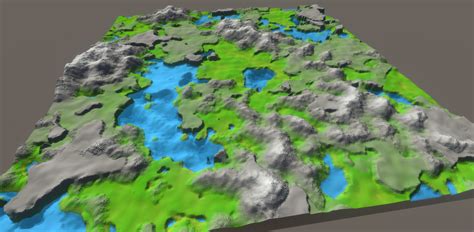
Creating realistic environments often begins with terrain. Auto-Terrainer automates this process. TerreSculptor, World Machine, Terragen, Gaea, and Instant Terra are sophisticated software solutions for generating detailed terrain heightmaps, meshes, and textures. OpenTopography/datasets provides access to high-resolution topography data.
Sculpting and Modeling Tools
For organic modeling and detail work, Dust3D is a cross-platform open-source modeling software. Cascadeur focuses on keyframe animation of 3D characters. Sculptron is a GPU-based tool for sculpting animation caches. Sweet Home 3D is an interior design application. Make Human is an open-source tool for character creation. V-HACD aids in creating convex decompositions for physics.
Texturing and Painting Workflows
Beyond static PBR materials, dynamic texturing workflows are supported by tools like Layer Painter and Grungit. Flow Map Painter is essential for specific shader effects. TexTools and Magic UV enhance UV unwrapping and manipulation. Parallax UV Mapping introduces depth illusions.
VFX and Compositing
For visual effects and post-production, Natron is an open-source compositing software. DJV is professional image sequence review software. Exr-IO handles multi-layer EXR images. CineShader visualizes shaders in real-time.
Conclusion: Material Preview Mode as an Indispensable Tool
Material Preview Mode in Blender is far more than a simple viewport setting; it's a fundamental component of an efficient and enjoyable 3D workflow. By offering real-time visualization powered by the Eevee engine, it allows artists to rapidly iterate on materials, shaders, and textures. When combined with the vast array of add-ons, free asset libraries, and advanced techniques available to the Blender community, Material Preview Mode becomes an indispensable tool for creating compelling 3D art, from characters and props to entire environments. Its speed, accuracy, and ease of use make material creation and adjustment a smooth, enjoyable, and highly productive process.