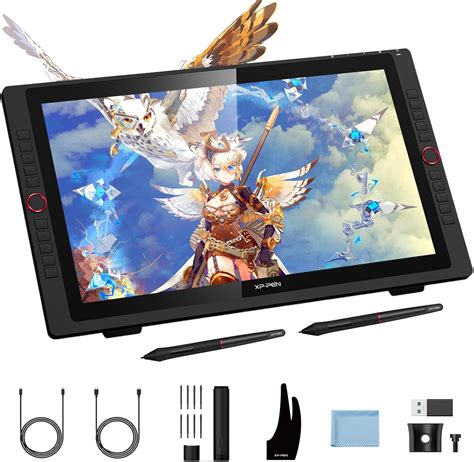
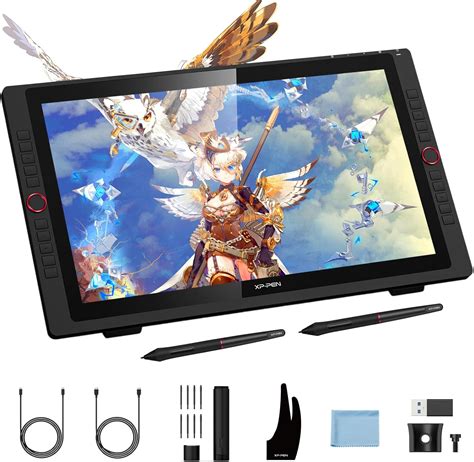
The XP-PEN Artist 22R Pro 21.5 Inch Professional Screen Tablet has emerged as a significant contender in the digital art hardware market, attracting the attention of digital artists and illustrators seeking a blend of professional functionality and accessible pricing. This device aims to bridge the gap between enthusiast-grade equipment and the more expensive, professional-level tools, offering a compelling option for those looking to elevate their digital creative process. As a UK-based illustrator and illustrator agent, Jamie Conner, with extensive experience in character-focused and expressive artwork, I've had the opportunity to evaluate this tablet, and this review will delve into its capabilities, features, and overall value proposition.
Understanding the Nuances of Professional Drawing Tablets
Before diving into the specifics of the XP-Pen Artist 22R Pro, it's crucial to understand what makes a drawing tablet suitable for professional use. Graphic tablets, also known as drawing pads or tablets, are designed to translate hand movements into digital input. The selection of the most adequate tablet for a particular user boils down to several key considerations:
Display and Visual Fidelity
While drawing pads with large LCD displays are generally more expensive, they offer a significant advantage by allowing artists to draw directly on the screen. This direct interaction can feel more intuitive and natural, closely mimicking the experience of traditional media. The resolution, color accuracy, and brightness of the display are paramount. The XP-PEN Artist 22R Pro boasts a 21.5-inch high-definition display, aiming to provide a vivid and accurate visual experience. A color gamut up to 120% in sRGB and 16.7 million colors are designed to ensure that the nuances of color are faithfully represented. Adjustable brightness further enhances the viewing experience, allowing users to adapt to different lighting conditions and personal preferences.
Performance and Responsiveness
The core of any drawing tablet's performance lies in its ability to accurately and seamlessly track the artist's input. Precision is the most pressing matter, regardless of whether one opts for a display tablet or a simpler, non-screen model. The resolution, sensitivity, and accuracy need to be professional-grade to be considered worthwhile. The tablet's tracking must keep up with the artist's strokes to avoid losing the natural flow of handmade lines, a critical aspect for expressive artwork. Higher resolutions, rapid response and report rates, adequate sensitivity, and a responsive stylus contribute significantly to capturing subtle nuances. Furthermore, tablets that register pen tilt offer greater control and a more natural drawing experience, allowing for varied line weights and shading effects. The XP-Pen Artist 22R Pro features 8,192 levels of pressure sensitivity and 60° degrees of tilt tracking, coupled with a 200 RPS report rate and a 14ms response time, all contributing to its claim of outstanding responsiveness.
Ergonomics and Workspace Integration
The physical design and usability of a drawing tablet are as important as its technical specifications. The stylus, the primary tool for interaction, should feel natural in hand, with excellent weight distribution to minimize fatigue during long drawing sessions. The tablet itself should be designed with considerable attention to ergonomics. This includes the angle of the screen and the overall form factor. Moreover, a desktop setup can easily become cluttered, making workspace integration a significant consideration. A large tablet with a display can often double as a monitor, thereby saving valuable desk space. However, for users with smaller workstations, a more compact tablet might be necessary, potentially leading to compromises in screen size. The XP-Pen Artist 22R Pro, with its 21.5-inch display, is designed to be a central hub for creative work, and its integration with the workspace is a key aspect of its design.
Ease of Use and Compatibility
While some drawing pads can be notoriously difficult to set up and use, professional-grade alternatives generally offer a much smoother experience. It's essential to ensure that the tablet is compatible with your operating system and the creative software you intend to use. Checking the manufacturer's website for system requirements and software compatibility is a prudent step before making a purchase. The XP-Pen Artist 22R Pro is designed for easy installation and is compatible with a wide range of systems and creative tools, including Windows versions from 7 through 10 and Mac OS X 10.10 and higher. It also works well with most professional design software, with particular compatibility with Adobe products.
In-Depth XP-Pen Artist 22R Pro Review
Having considered the general criteria for professional drawing tablets, let's now focus on the specific experience of using the XP-Pen Artist 22R Pro.
Visual Experience and Color Accuracy
The Artist 22R Pro's 21.5-inch high-definition display is indeed a standout feature. It presents a surprisingly accurate and vivid color representation, crucial for digital illustration work where color fidelity is paramount. The color gamut extends up to 120% in sRGB, allowing the 16.7 million colors to be displayed with impressive depth and vibrancy. The adjustable brightness ensures that the display can be optimized for various lighting conditions, preventing eye strain and ensuring that colors appear true to life. The package also includes a textured protective sheet, which not only guards the screen but also provides a tactile surface that mimics drawing on natural materials like paper, enhancing the drawing experience.
Unparalleled Responsiveness and Precision
This tablet truly takes digital drawing to a higher level, largely due to its outstanding responsiveness. The IPS panel is equipped with 8,192 levels of pressure sensitivity, enabling incredibly fine control over line weight and opacity. The 60° degrees of tilt tracking further enhance this control, allowing for natural-feeling brush strokes and shading techniques. However, it's the combination of the 200 RPS report rate and the 14ms response time that truly sets the Artist 22R Pro apart from many lesser alternatives. This rapid reporting and quick response minimize lag, ensuring that the digital ink appears on the screen almost instantaneously as the stylus moves. The pleasant texture of the screen, combined with this seamless tracking, creates an immersive experience where one can almost forget they are working on a computer. The nearly flawless accuracy of the input further contributes to this, making the drawing process feel intuitive and fluid.
XP-PEN Artist 22R Pro Drawing Display Review by Ross Draws
Ergonomics and Workspace Integration
While the Artist 22R Pro looks impressive, its substantial 21.5-inch display does occupy a notable amount of desktop real estate. However, this can be a strategic advantage, as the tablet effectively doubles as a monitor. Furthermore, it includes a USB port that can be used to charge your phone, adding a layer of convenience. The design thoughtfully addresses cable management, with the required cables being well-disguised and positioned to stay out of the way, contributing to a tidier workspace. Connecting the tablet via HDMI, as was done during testing, still allowed for a tidy and welcoming workspace. The ability to use the existing monitor as a secondary screen further enhanced the workflow, proving to be even better than initially envisioned. This clever integration of functionality helps to mitigate the space requirements.
Key Features at a Glance:
- Big 21.5-inch display: Provides ample drawing space and doubles as a monitor.
- Smooth drawing experience: Achieved through high pressure sensitivity, tilt support, and fast report/response rates.
- 20 programmable hot-keys: Allow for quick access to frequently used functions, streamlining the workflow.
- Easy installation: Designed for a straightforward setup process.
- Included textured protective sheet: Enhances drawing feel and protects the screen.
- USB phone charging: Added convenience for keeping devices powered.
Potential Considerations:
- Slightly pricey: While offering excellent value, the initial investment might be a consideration for some.
- Cords are a bit short: Depending on the user's desk setup, the length of the included cables might be a limiting factor.
Frequently Asked Questions About the XP-Pen Artist 22R Pro
What is compatible with the XP-Pen Artist 22R Pro?
The XP-Pen Artist 22R Pro is compatible with a broad spectrum of systems and creative software. It supports Windows operating systems from version 7 through 10, as well as Mac OS X version 10.10 and higher. Critically, it integrates seamlessly with most professional design software applications, demonstrating particularly strong compatibility with Adobe products, a staple in the industry.
What is XP-Pen as a brand?
XP-Pen is a Japanese brand with over a decade of experience in manufacturing both consumer-grade and professional graphic tablets. They have established a strong reputation for offering competitive alternatives across low, middle, and high price ranges. While their entry-level products may not always impress, their higher-end models are consistently recognized for their outstanding performance and value.
Is the XP-Pen Artist 22R Pro a good choice for graphic design?
All things considered, the XP-Pen Artist 22R Pro is a highly commendable option for graphic design and digital illustration in general. It successfully packs a multitude of professional-level features into a mid-range price bracket, making it a solid choice for a wide array of users. Its expansive screen, fluid drawing response, and uncomplicated setup process contribute to a positive user experience, making it difficult to go wrong with this model.
Is the XP-Pen Artist 22R Pro worth the investment?
Although the XP-Pen Artist 22R Pro represents a significant investment, the return in terms of features, performance, and creative potential is substantial. For working professionals, the value proposition at £599.99 is excellent, offering professional features at a competitive price point. It is certainly worth considering if its capabilities align with your specific needs, workflow requirements, and budget. A careful evaluation of your individual creative process is recommended to ensure it meets and exceeds your expectations.
The XP-Pen Artist 22R Pro 21.5 Inch Professional Screen Tablet delivers reliable performance for digital illustration work and is a testament to XP-Pen's commitment to providing high-quality tools for digital artists. It is a device that, when chosen thoughtfully, can undoubtedly unleash your imagination's full potential.