DaVinci Resolve has evolved from its origins as a high-end color grading tool into a comprehensive, all-in-one post-production suite. While the free version offers an astonishing array of features, DaVinci Resolve Studio elevates the workflow with advanced tools, enhanced performance, and exclusive capabilities designed for demanding professional environments. This article delves into the key features that distinguish DaVinci Resolve Studio, exploring how it empowers users to achieve unparalleled creative and technical results.
The Foundation: DaVinci Resolve Free vs. Studio
The free version of DaVinci Resolve is remarkably robust, providing extensive editing, color grading, visual effects, and audio post-production tools. It supports up to 60 frames per second (fps) in resolutions as high as Ultra HD (3840 x 2160) and includes a comprehensive set of color grading tools. Furthermore, it enables collaboration, allowing multiple users to work on a single project concurrently. This foundation alone makes it a powerful solution for many content creators.
However, DaVinci Resolve Studio builds upon this solid base, unlocking a higher tier of performance and functionality. This progression is crucial for professionals working on feature films, television shows, and other high-end productions where absolute control, maximum efficiency, and cutting-edge technology are paramount. The Studio version is not merely an incremental upgrade; it represents a significant leap in capabilities, transforming the software into a true powerhouse for any post-production workflow.
Enhanced Resolution and Frame Rate Support
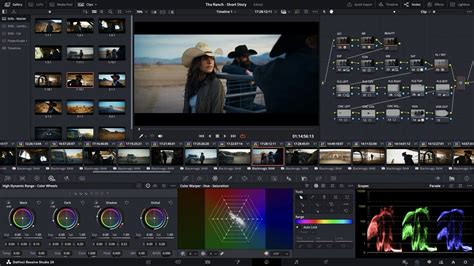
One of the most immediate distinctions between the free and Studio versions lies in their support for resolution and frame rates. While the free version is capable of handling up to 4K UHD at 60fps, DaVinci Resolve Studio dramatically expands these boundaries. It supports an astonishing 120fps at a massive 32K resolution. This capability is vital for high-end productions requiring extreme detail, smooth motion at high frame rates, and the ability to output for future-proof archival or specialized cinematic experiences. The ability to work with such vast resolutions and frame rates ensures that users are not limited by their software, even when dealing with the most demanding visual material.
Performance Powerhouse: GPU Acceleration and Codecs
DaVinci Resolve Studio turbocharges your system's GPU performance by including support for multiple GPUs. This allows for real-time playback of professional 10-bit formats and significantly accelerates demanding tasks such as rendering and effects processing. Furthermore, Studio offers accelerated H.264 and H.265 hardware decoding and encoding, drastically reducing render times for these widely used codecs.
Beyond broad codec support, DaVinci Resolve Studio acts as a Swiss army knife for professional post-production. Except for ProRes RAW, there isn’t a codec or camera format that DaVinci Resolve Studio can’t handle. This extensive codec compatibility has made it a staple for on-set dailies work for over a decade, ensuring that users can confidently work with files from the newest and most advanced cameras right out of the box, without the need for complex transcoding workflows.
Advanced Color Grading and HDR Capabilities
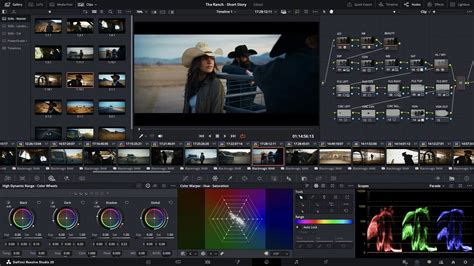
The color page in DaVinci Resolve is renowned for its power, and the Studio version further enhances its capabilities. It includes advanced color grading tools such as luma, HSL, and 3D keyers, along with the sophisticated Color Warper and HDR tools. DaVinci Resolve Studio provides full HDR support, including Dolby Vision and HDR10+ grading and rendering. The HDR scopes are capable of measuring and providing detailed information about ST.2084 and HLG images, offering precise control over high dynamic range content.
Unlike LUTs, which rely on simple lookup tables, DaVinci color transformation scripts are GPU-accelerated bits of code that directly transform images using combinations of mathematical functions. This script-based approach, exclusive to Studio, offers a level of precision and flexibility far beyond traditional methods.
The DaVinci Neural Engine: AI-Powered Features
A cornerstone of DaVinci Resolve Studio's advanced features is the DaVinci Neural Engine. This engine utilizes state-of-the-art deep neural networks and machine learning to power a suite of exclusive tools that automate complex and time-consuming tasks.
Among these AI-driven features are:
- Magic Mask: This AI-assisted, motion vector-based tracker helps isolate foregrounds from backgrounds, creating quick garbage mattes. It’s incredibly effective for making targeted adjustments to specific elements within a shot.
- Face Refinement: This tool is designed to smooth skin tones or enhance facial features, offering subtle yet impactful improvements for character work.
- Object Removal and Patch Replacer: These tools allow for the seamless removal of unwanted objects or elements from a scene, leveraging AI to intelligently fill in the background.
- Super Scale: This feature enables high-quality image uprezzing, allowing users to create 4K and 8K images from HD sources with exceptional detail preservation.
- Speed Warp Retiming: This advanced optical flow technology provides crystal-clear, smooth speed changes, even for very slow or fast motion, without introducing artifacts.
- IntelliTrack AI: This allows the software to track movement and automatically pan audio, or even recognize objects to memorize them for match moving.
- Voice Isolation and Music Remixer: These audio tools leverage AI to separate dialogue from background noise, isolate specific instruments in music, or even remix tracks.
- Dialogue Separator: This FX can rebalance dialogue against background sounds and the reverberant sound of the room.
- Scene Cut Detection: This function can analyze footage and automatically detect scene cuts, simplifying the process of color grading footage without an EDL.
- Smart Reframe: This intelligent tool repurposes footage for dramatically different aspect ratios by recognizing the action in a scene and panning within it to keep the subject in frame.
- AI Audio Assistant: This analyzes audio and intelligently creates a professional audio mix, automating much of the balancing and processing.
- AI Animated Subtitles: These animate words as they are spoken, adding a dynamic visual element to dialogue.
- AI Multicam SmartSwitch: This assembles a timeline with camera angles based on speaker detection, streamlining multi-camera editing.
- Text-Based Editing: This feature allows users to edit their video by simply editing the transcribed text, making it incredibly fast to rearrange or cut dialogue.
- Dialogue Matcher: This powerful tool automatically matches the tone, level, and room environment of dialogue from different clips, ensuring audio consistency.
- Music Remixer FX: This allows users to adjust music to fit the style of their show, with controls for muting and adjusting levels for voice, drums, bass, guitar, and more.
- AI Set Extender: This creates a scene extension to fill an entire frame based on a simple text prompt, filling missing regions caused by limited clip angles or cropping.
Davinci Resolve 16 - All Neural Engine Features -Studio Only
Sophisticated Noise Reduction and Image Restoration
DaVinci Resolve Studio includes some of the most powerful and sophisticated noise reduction tools available. This includes GPU-accelerated temporal and AI spatial noise reduction algorithms that effectively remove digital noise while preserving image detail. Beyond general noise reduction, Studio offers specialized image restoration tools for tasks such as dirt removal, dust busting, and de-flickering, ensuring pristine image quality even from challenging source material.
Advanced Visual Effects and Compositing
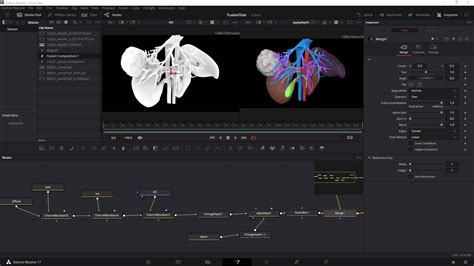
The Fusion page, DaVinci Resolve's node-based visual effects and motion graphics environment, is significantly enhanced in the Studio version. It offers hundreds of 2D and 3D tools for creating complex visual effects and animations. Studio unlocks additional Resolve FX, bringing the total to over 40 extra GPU and CPU accelerated effects. These include tools for adding lens flares and reflections, analog damage, sharpening, and more.
Specific Studio-exclusive Fusion capabilities include:
- Lens Correction: Analyze a clip and correct for spherical lens distortion or other aberrations.
- Stereoscopic 3D Tools: A complete set of tools for editing and grading stereoscopic 3D projects.
- Advanced Resolve FX: Such as AI UltraNR noise reduction, SuperScale, and sophisticated de-interlacing.
- Deep Image Compositing: Tools to access and manipulate depth data from deep image EXR files.
- Multi-layer Compositing: Support for multi-layer images across all nodes, allowing for the manipulation of layers from EXRs or Photoshop files.
- Vector Warp, Transform, and Denoise: Optical flow vector tools leveraging motion vectors for intricate temporal effects.
- PanoMap and VR Tools: Updates to support 180-degree angle of view for immersive content creation.
- uVolume: Direct import of volumetric VDB files for effects like smoke, fire, and explosions.
- MultiPoly: Displays all masks in a single list for faster rotoscoping.
Immersive Audio Post-Production with Fairlight
The Fairlight page in DaVinci Resolve Studio provides a professional digital audio workstation experience. It offers advanced tools for audio post-production, including support for up to 2,000 tracks with real-time effects and processing. Studio unlocks advanced features like immersive audio support, including Dolby Atmos and Auro-3D, along with 5th order Ambisonics.
Key Fairlight Studio features include:
- Object-Based Audio: Support for object-based formats like Dolby Atmos and MPEG-H, which use panning automation to move audio objects for a realistic aural experience.
- High-Resolution 3D Audio: Work with spatial formats and import/export the latest IAB and ADM files.
- Dolby Atmos Master Production Import: Import from immersive .damf, .wav, and .mxf files.
- IntelliTrack AI for Panning: Automatically generate precision audio panning by tracking people or objects.
- Dialogue Separator FX: Rebalance dialogue against background sound and room reverberation.
- Music Remixer FX: Adjust music to fit the style of a show.
- Ducker Track FX: Allows one track to automatically adjust the level of another.
- Voice Convert Tool: Applies a pre-generated voice model to an existing recording while retaining inflections and emotion.
- EQ Match: Match a target clip's audio to a reference clip's level or tonal spectrum.
- Chain FX: Build custom FX chains with customized settings and save them as presets.
- Per-Channel Automation Mode Selection: Enhanced flexibility and creative control during mixing.
Workflow Integration and Collaboration
DaVinci Resolve Studio offers robust workflow and media asset management integration. It supports remote scripting APIs for Python and LUA, allowing developers to add custom encoding options and workflow integrations. Workflow integration plug-ins can connect to local and remote asset management and automation systems.
Collaboration is a key strength, with project libraries built for real-time local and remote collaboration. Editors, colorists, VFX artists, and sound engineers can work together simultaneously on the same project without the need for importing/exporting files or managing complex project translations. Blackmagic Cloud further enhances this, allowing for project hosting and media syncing, with guest access for client reviews via shared URLs. The Organizations web app simplifies license management and project sharing within large teams.
Specialized Hardware and Control Surfaces
To complement its powerful software, DaVinci Resolve integrates seamlessly with a range of specialized hardware control surfaces. These include:
- DaVinci Resolve Editor Keyboard: A full-sized QWERTY keyboard with color-coded shortcut keys designed for rapid editing.
- DaVinci Speed Editor: Features dedicated edit function keys and a high-quality search dial for fast navigation and editing.
- DaVinci Resolve Replay Editor: Builds upon the Speed Editor with live camera selection and slow-motion replay capabilities.
- DaVinci Resolve Color Panels (Micro, Mini, Advanced): These panels offer tactile control over color grading parameters, from basic adjustments to intricate node manipulation, allowing for intuitive and precise color work.
- Fairlight Studio Consoles: Professional mixing consoles designed in collaboration with sound engineers, providing streamlined access to Fairlight's extensive audio features.
These hardware solutions are not merely accessories; they are extensions of the software, designed to accelerate workflows, enhance precision, and foster a more intuitive creative process.
Conclusion: Unleashing Professional Potential
While the free version of DaVinci Resolve is an exceptional tool, DaVinci Resolve Studio unlocks the full potential of this all-in-one post-production suite. From its support for higher resolutions and frame rates to its advanced AI-powered features, sophisticated noise reduction, immersive audio tools, and seamless workflow integrations, Studio provides the critical edge needed for professional-grade results. For those pushing the boundaries of visual storytelling and audio design, DaVinci Resolve Studio is an indispensable investment, offering unparalleled creative freedom and technical prowess.