In the dynamic world of digital art and photo editing, the pursuit of a natural and cinematic glow effect has become a hallmark of professional-grade work. Advanced tools have emerged to simplify this process, and among them, the mobGlow Photoshop Plugin stands out as a leading solution. Designed to cater to both seasoned professionals and aspiring enthusiasts, mobGlow is widely regarded as one of the premier Photoshop glow tools available. This innovative plugin is engineered to enhance creative work by delivering a photorealistic glow experience that integrates seamlessly into digital compositions, offering a level of sophistication previously difficult to achieve.

Whether the artistic endeavor involves refining portraits or crafting intricate digital painting glow effects, mobGlow empowers users to introduce light and depth without compromising the integrity of their original layers. Its non-destructive Photoshop plugin architecture is a key feature, encouraging artists to experiment freely and precisely control the nuances of their desired cinematic glow effect. This approach ensures that creative exploration is not hampered by the fear of irreversible changes, allowing for a more fluid and iterative design process.
The plugin is equipped with a suite of intelligent tools that provide comprehensive control over light application. These include a sophisticated glow mask tool, a precise threshold slider plugin, and advanced diffusion filter Photoshop controls. These components work in concert to offer artists unparalleled flexibility in how light is rendered and integrated into their images.
The Science Behind the Glow: Mimicking Real-World Light
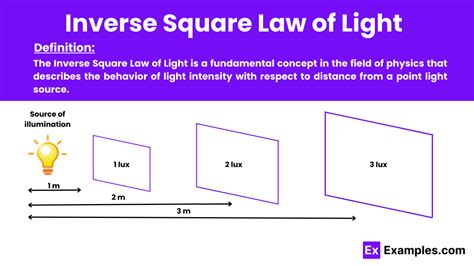
What sets mobGlow apart from standard Photoshop filters is its adherence to the principles of real-world light behavior. Unlike conventional methods that often rely on simplistic blur techniques, mobGlow employs an inverse-square falloff plugin. This scientifically grounded approach accurately mimics how light diminishes in intensity with distance, resulting in a more organic, immersive, and believable glow. This attention to physical accuracy is crucial for achieving a naturalistic look that resonates with viewers on a subconscious level.
Beyond its core glowing capabilities, mobGlow offers additional features that further enhance its utility. Users can leverage chromatic aberration Photoshop effects to introduce subtle color distortions along the edges of the glow, adding a layer of visual complexity and a distinct cinematic flair. The adjustable radiance control allows for fine-tuning the intensity and spread of the light, providing depth to both intimate close-up shots and expansive wide-angle landscapes. These features collectively contribute to a more polished and visually engaging final product.
The plugin is available in different versions to suit various workflow needs. Options such as mobGlow Mini and mobGlow Mini Creative Cloud are designed for lightweight workflows or for those who prefer a more streamlined experience within the Creative Cloud ecosystem. Conversely, the full version is tailored for more demanding, large-scale production setups. This adaptability ensures that mobGlow can be effectively integrated into a wide range of professional creative pipelines.
Learning and Integration: Tutorials and Workflow
For individuals eager to master the capabilities of this powerful tool, a wealth of detailed mobGlow tutorials are readily available. These resources demonstrate how to effectively utilize this Photoshop lighting plugin across a diverse array of creative projects, encompassing portraits, landscapes, and commercial compositions. Such tutorials are invaluable for understanding the practical application of mobGlow's features and for drawing inspiration for new creative directions.
Moody Cinematic Portrait Color Grading in Photoshop Camera Raw | Step by step Tutorial
In discussions among digital artists, a frequent point of comparison arises between mobGlow and other similar plugins, such as Oniric Glow. While Oniric Glow is recognized for delivering competent glow results, many users gravitate towards mobGlow, particularly the mobGlow Photoshop 2025 version, due to its intuitive user interface and finely tuned features. These elements are often attributed to its development by professionals, specifically for professionals, ensuring that the plugin addresses the practical needs and high standards of experienced creatives.
The plugin's accessibility is further enhanced by its availability through reputable vendors on platforms like aescripts. Vendors such as Doron Supply mobGlow and BangingJoints mobGlow have contributed to its growing popularity by offering it to a wider audience. This widespread availability, coupled with consistent, high-quality results, has solidified mobGlow's reputation in the creative community.
For those considering the plugin, a mobGlow Photoshop Plugin free trial is often an option. This allows potential users to explore its full feature set and assess its suitability for their specific needs before making a purchase. This trial period is a crucial step in the decision-making process, ensuring that the investment aligns with the user's workflow and creative aspirations.
It is important for users to be aware of unofficial sources that may offer what they claim to be a mobGlow plugin crack. Such sources often pose significant risks, including potential harm to computer systems due to malware or viruses, and they operate outside legal and supported channels. Opting for the official mobGlow download guarantees access to crucial updates, dedicated customer support, and assurance of compatibility with the latest Adobe Photoshop versions, making it a secure and wise investment for serious creative professionals.
Versatility Across Creative Disciplines
The appeal of mobGlow extends across various creative fields. Whether one identifies as a Photoshop plugin for photographers, a digital painter, or an artist seeking to infuse their work with a dreamy glow plugin, mobGlow offers a compelling solution. It transcends mere brightness enhancement, focusing instead on the narrative power of light. Artists involved in creating cinematic posters, compelling advertising visuals, or evocative concept art often find the mobGlow Photoshop Plugin indispensable for imparting that subtle, ethereal glow that captivates viewers and draws them into the scene. Its ability to produce a glow that feels intrinsically natural, rather than artificially imposed, makes it an ideal Photoshop plugin for cinematic looks.
As a piece of glow effect software, mobGlow is designed to integrate smoothly into existing workflows and to complement other creative Photoshop plugins. Once installed, it quickly becomes a go-to tool for achieving a professional and consistent finish. Its high community ratings and strong search visibility indicate its growing influence, with search engines like Google rapidly indexing content related to the plugin, thereby increasing recognition for creators who effectively incorporate it into their projects.
Advanced Control and Customization Features
The threshold slider within mobGlow offers a remarkable degree of customization, operating in three distinct modes. This allows for the creation of glows that range from dense and concentrated to smooth and diffuse. Users can select any tonal range, from highlights to shadows, determining whether the glow affects only the brightest parts of an image or the entire composition. This granular control is fundamental to achieving nuanced lighting effects.
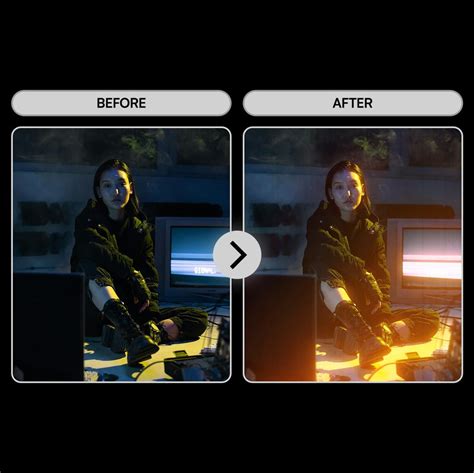
The color sampler tool is another powerful feature, enabling users to select a specific color within an image to drive the glow effect. This provides an exceptionally intuitive, efficient, and comfortable method for isolating the necessary image areas for glow application. This targeted approach ensures that the glow is applied precisely where it is intended, enhancing specific elements without affecting others.
For even greater precision, the quick mask tool allows users to apply the glow exclusively to areas that have been painted with a brush. The masks created by this tool are consistently stored in a channel slot, offering the flexibility to edit or reset them at any time. This non-destructive masking capability empowers artists to hide or reveal specific parts of the glow by employing complex masks created with selections, brush strokes, or gradient tools.
The color feature within mobGlow provides an option to tint the light effect with any desired color. This opens up possibilities for creating stunningly vivid and imaginative results, moving beyond naturalistic light to incorporate stylized or thematic color palettes.
Furthermore, the chromatic aberration controls offer an additional layer of refinement. Users can subtly enhance their glows with color distortion along the edges, mimicking the optical effects found in some lenses. The plugin allows for detailed control over the amount of color separation, the selection of individual color channels, their separation distance, and the degree of blur applied. This level of control ensures that the chromatic aberration adds to the aesthetic without becoming distracting.
mobGlow generates an alpha channel, which renders the black background transparent. This feature provides complete control over how the glow effect is composited with other layers in Photoshop. The inherent non-destructive nature of the plugin means that users can render multiple glows, edit them as needed, and revisit them later. By simply selecting a glow and hitting "Render," the plugin restores all the settings associated with that light effect, allowing users to resume editing precisely where they left off.
The plugin's support for 32-bit mode is a significant advantage, enabling the creation of super-smooth HDR glows that retain a wide dynamic range and subtle tonal transitions. The Highlight Cutoff feature offers yet another layer of control, allowing users to exclude the brightest spots from the glow calculation, thereby illuminating only the midtone parts of the image. This prevents blown-out highlights and ensures that the glow effect is applied judiciously.
Compatibility and Technical Specifications
mobGlow is designed for broad compatibility, supporting both Mac and PC operating systems, including newer M-chip Apple computers. It requires Adobe Photoshop version 24.2.0 or later. Users can easily check their Adobe Photoshop version by navigating to "Help" > "System Info" within the application. The plugin is designed to support any Photoshop language, ensuring a seamless experience for users worldwide, regardless of their system's language settings.
The included package typically consists of one .ccx Plugin file and one PDF Illustrated Guide. Installation is generally straightforward, involving downloading the plugin and following the provided instructions to integrate it into the Photoshop environment, where it will appear in the user's panel, ready for immediate use.
The core technology behind mobGlow is its ability to create physically accurate glow effects in Adobe Photoshop. This plugin brings professional-grade glow effects to Photoshop projects with remarkable ease. It is particularly beneficial for artists and designers aiming to replicate the soft, ethereal lighting characteristic of cinematic visuals. The plugin is engineered to be accessible, allowing individuals without extensive professional experience to achieve polished, movie-like results. It facilitates the application of soft glows that evoke the aesthetic of classic films, often achieved with diffusion filters.
Unlike many glow tools that rely on basic blur filters, mobGlow distinguishes itself by utilizing inverse-square falloff. This method more accurately simulates the natural behavior of light in the real world, leading to more convincing and nuanced glow effects. For digital artists who dedicate significant time to refining CG renders or digital paintings, this plugin acts as a transformative tool. It allows for the seamless integration of glowing effects directly into their creations, preventing an overdone or artificial appearance.
The installation process is designed to be user-friendly, ensuring that the plugin fits effortlessly into an existing Photoshop workflow. Upon successful installation, it becomes readily accessible within the Photoshop interface, available whenever a specific lighting effect is required. Users gain comprehensive command over various aspects of the glow, including its intensity, falloff rate, softness, and spread. This allows for the precise dialing in of the perfect glow, whether a subtle enhancement or a dramatic, cinematic luminescence is desired.
Performance is a key consideration in mobGlow's design. The plugin is optimized for efficiency, ensuring that it does not significantly slow down the system, even when working with large and complex files. This means that applying and adjusting effects can be done without experiencing lengthy delays, allowing for a fluid and productive workflow. mobGlow Photoshop Plugin is thus an essential tool for digital creatives seeking to attain professional-level glow effects without needing to engage in overly complex or time-consuming manual techniques.