The journey of digitizing photographic negatives has evolved significantly, moving beyond traditional darkroom techniques and even early digital workarounds. For photographers seeking to bridge the gap between analog heritage and digital workflow, the advent of specialized software has been a game-changer. One such powerful tool is the Negative Lab Pro (NLP) Lightroom plugin, which has rapidly become a preferred solution for converting film negatives into high-quality digital images. This comprehensive guide delves into the capabilities and practical application of Negative Lab Pro within the Adobe Lightroom ecosystem, offering insights for both novice and experienced users.
The Evolution of Negative Conversion in Lightroom
Historically, converting film negatives to digital format within Lightroom often involved a more manual and less intuitive approach. A common method, as outlined in resources like "Digitizing Your Photos," involved utilizing Lightroom's curve adjustments to invert the negative image. While this technique could yield satisfactory black and white conversions, the results for color negatives were often only moderately pleasing. This curve-flipping method, while functional, presented a significant hurdle: the adjustment tools did not work in reverse, meaning that once the inversion was applied, further fine-tuning could be cumbersome and less precise.
The introduction of Negative Lab Pro has fundamentally altered this landscape. Unlike the curve-flipping method, NLP's adjustment tools are designed to work intuitively with negative data. This means that the conversion process feels more akin to working with a digital file from the outset, offering a more streamlined and powerful editing experience.
Key Advantages of Negative Lab Pro
One of the most compelling aspects of Negative Lab Pro is its non-destructive workflow. This is a critical requirement for any digital asset management and editing process. With NLP, you can revisit and further optimize your converted files at any point in the future without degrading the original scanned data. This flexibility is invaluable, allowing for iterative improvements as your skills or software capabilities advance.
Furthermore, the ongoing development of Negative Lab Pro by its creator, Nate, is a significant draw. As the author of "Digitizing Your Photos" noted, "we know that it will be possible to make better conversions in the future than we can do today. (Still true, BTW)." This sentiment is echoed by the continuous improvement of NLP, ensuring that users benefit from advancements in conversion algorithms and features. This commitment to evolution means that the quality and efficiency of conversions are constantly on the rise.
Another crucial factor driving the migration to NLP for many users is the evolution of Adobe's Lightroom processing engine itself. Adobe has, in recent times, updated its engine in "pretty big ways," which can impact how image data is interpreted and processed. NLP is designed to leverage these updates, ensuring optimal compatibility and performance within the latest Lightroom versions.
The recent availability of the TV3 Lightroom plugin, even in its final preparation stages before a full release, has been a catalyst for many, including seasoned users who may have been on the fence about migrating. This anticipation for new versions and the integration of cutting-edge features further solidifies NLP's position as a leading solution. The author's own experience, involving the testing of "50,000 scans through the plugin," underscores the plugin's robustness and capability in handling large-scale projects. This extensive testing not only validates the plugin's performance but also signals a strong commitment to ensuring it can meet the demands of professional and enthusiast photographers alike.
The Workflow: Batch Processing and Beyond
Negative Lab Pro excels in its ability to handle conversions in batches. This feature is a significant time-saver for photographers who have accumulated a large archive of negatives. Instead of processing each file individually through a cumbersome manual workflow, NLP allows for efficient batch processing, streamlining the digitization of entire rolls of film.
The process typically involves scanning your negatives to a suitable file format (like TIFF or high-quality JPEG) and then importing them into Lightroom. Within Lightroom's Develop module, the Negative Lab Pro plugin panel provides all the necessary controls. Users can select multiple images, apply NLP settings, and initiate the conversion. The plugin intelligently analyzes the negative data and applies the appropriate adjustments to produce a positive image.
Understanding the Conversion Process
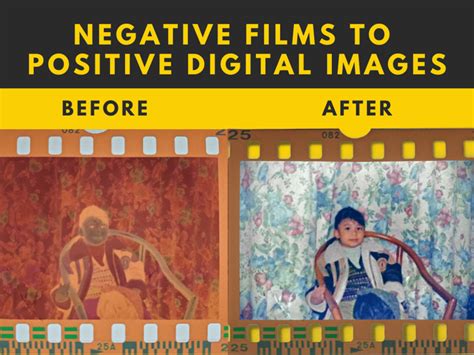
At its core, Negative Lab Pro works by analyzing the unique characteristics of film negatives. Unlike scanned positives or digital camera files, negatives contain inverted tonal and color information. The plugin employs sophisticated algorithms to interpret this data, effectively "flipping" the image to its positive representation. This involves not only inverting the tones but also correcting for the orange mask inherent in many color negative films (like C-41 and E-6 processes).
The plugin offers a range of controls that allow users to fine-tune the conversion beyond the initial automatic process. These might include adjustments for:
- White Balance: Precisely setting the white balance is crucial for accurate color rendition. NLP often provides tools to help neutralize color casts and achieve natural-looking colors.
- Exposure and Contrast: While the initial conversion aims for a balanced exposure, further adjustments can be made to fine-tune the overall brightness and contrast of the image.
- Color Saturation and Vibrancy: For those who wish to enhance the colors, controls for saturation and vibrancy allow for subtle or dramatic enhancements.
- Grain and Texture: Depending on the film stock and scanning method, some grain will be present. NLP may offer options to manage or even enhance this characteristic if desired.
- Crop and Straighten: Standard editing tools within Lightroom, accessible after the NLP conversion, allow for any necessary cropping or straightening.
The non-destructive nature of the plugin means that these adjustments can be made iteratively. You can apply an initial conversion, then refine it using NLP's controls, and subsequently use Lightroom's standard editing tools for further enhancements like sharpening, noise reduction, or local adjustments.
Video Guide to Negative Lab Pro for Lightroom
Beyond Basic Conversion: Advanced Techniques and Considerations
While Negative Lab Pro simplifies the conversion process significantly, achieving optimal results often involves understanding a few key principles and potential nuances.
1. Scan Quality is Paramount: The quality of your initial scan directly impacts the final output. High-resolution scans with good bit depth (e.g., 16-bit TIFF) provide the most data for NLP to work with, allowing for greater flexibility in post-conversion editing. Ensure your scanner is clean and properly calibrated.
2. Understanding Film Types: Different film stocks (e.g., Kodak Portra, Fujifilm Velvia, Ilford HP5) have unique characteristics, including color palettes, contrast curves, and grain structures. While NLP is designed to handle a wide range, understanding the specific film you're using can help you make more informed adjustments. For instance, some films might require slightly different white balance presets or contrast adjustments to achieve their characteristic look.
3. The Orange Mask: Color negative films typically have an orange mask that needs to be removed during conversion. NLP is highly effective at neutralizing this mask. However, in rare cases or with unusual film stocks, minor manual adjustments to color balance might be necessary.
4. Black and White Conversions: While NLP is primarily known for its color conversion capabilities, it also produces excellent black and white images from negatives. The plugin's ability to accurately invert tones and control contrast often results in richer and more nuanced monochrome images than traditional methods. Users can further enhance these B&W conversions using Lightroom's dedicated black and white editing tools.
5. Integration with Lightroom's Develop Module: It's important to remember that NLP is a plugin that works in conjunction with Lightroom. After the initial conversion, the resulting positive image can be further edited using all of Lightroom's powerful tools. This includes exposure, contrast, highlights, shadows, white balance, HSL adjustments, sharpening, noise reduction, and local adjustments. This seamless integration allows for a complete end-to-end workflow within a single application.
6. File Management: As you process a large number of negatives, maintaining an organized file structure within Lightroom is essential. Consistent naming conventions, the use of keywords, and the application of collections will help you manage your digitized archive effectively.
Addressing Common Misconceptions
One common misconception is that specialized plugins like Negative Lab Pro are only for professional photographers. In reality, NLP democratizes high-quality negative conversion, making it accessible to hobbyists and enthusiasts who want to bring their film archives back to life without investing in expensive dedicated hardware or complex software.
Another potential misunderstanding is that NLP replaces the need for good scanning practices. While NLP is incredibly powerful, it cannot magically fix a poorly scanned image. The adage "garbage in, garbage out" still holds true. Therefore, investing time in learning how to properly scan your negatives is a crucial first step.
Finally, some might believe that once converted, the image is "finished." However, digital editing is an art in itself. NLP provides an exceptional starting point, but the true artistry often comes from the subsequent refinements made within Lightroom's Develop module, tailored to your artistic vision.
The Future of Negative Conversion
The continuous development of Negative Lab Pro, coupled with advancements in scanning technology and Lightroom's processing capabilities, suggests a bright future for film digitization. The ability to achieve results that rival or even surpass traditional darkroom prints, all within a digital workflow, is a testament to the innovation in this field. As Nate and his team continue to refine NLP, we can anticipate even more sophisticated tools and improved conversion algorithms, further solidifying its role as an indispensable asset for film photographers in the digital age. The journey from a physical negative to a vibrant digital image has never been more accessible or more powerful.