Adobe Photoshop CC is an industry-standard software renowned for its powerful image editing and manipulation capabilities. For both aspiring newcomers and seasoned professionals, navigating its vast array of tools and features can seem daunting. However, the "Adobe Photoshop CC Classroom in a Book" series offers a structured and exceptionally effective pathway to mastering this sophisticated program. This series, developed with the direct support of Adobe product experts, provides an official training curriculum designed for hands-on learning.
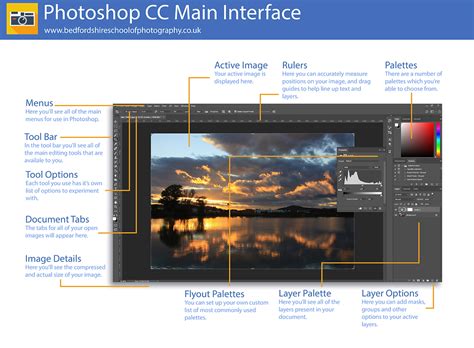
The "Classroom in a Book" approach is built upon a foundation of real-world, project-based learning. This methodology ensures that users not only grasp theoretical concepts but also gain practical experience by working through tangible examples. The books are meticulously crafted to allow individuals to follow the curriculum from beginning to end, ensuring a thorough understanding of Photoshop's core functionalities. Alternatively, users have the flexibility to select and focus on specific lessons that align with their immediate interests or professional needs, making it a versatile learning resource.
Core Competencies and Advanced Techniques
The "Adobe Photoshop CC Classroom in a Book" series equips users with the skills to perform a wide range of image editing tasks, from fundamental enhancements to complex manipulations. A significant focus is placed on creating and improving images using the professional-grade tools integrated within Adobe Photoshop. This includes learning to seamlessly remove unwanted backgrounds, a common requirement for many design projects, and the more intricate task of replacing skies to alter the mood or setting of a photograph.
A key area of instruction involves the precise selection of subjects, particularly those with complex outlines such as hair. This is a critical skill for compositing and achieving professional-looking results. The series also embraces the latest advancements in imaging technology by incorporating lessons on using Adobe Firefly generative AI. This cutting-edge tool allows users to retouch challenging images with unprecedented ease or to generate entirely new visuals from simple text prompts, opening up vast creative possibilities.
Learn How to Use Adobe Firefly | 5 Minute Tutorial | Adobe Creative Cloud
Furthermore, the "Classroom in a Book" delves into the art of image compositing, teaching users how to seamlessly blend multiple images with graphics and typography to create compelling visual narratives. For those interested in motion graphics and video, the curriculum extends to animating graphics and type using a timeline, and integrating these elements with video and audio tracks. This capability is essential for creating dynamic presentations, social media content, and short video productions.
The series also addresses the need for efficiency in professional workflows by teaching users how to automate repetitive tasks. This can significantly speed up the editing process and reduce the potential for human error. A dedicated module covers the editing of camera RAW images, a crucial step for photographers who shoot in this format, allowing for maximum flexibility and quality in post-processing. Finally, the book provides comprehensive guidance on exporting work for various platforms, including the web, mobile devices, video, and print, ensuring that final projects are optimized for their intended medium.
The "Classroom in a Book" Advantage
The "Classroom in a Book" series distinguishes itself from other training programs and publications due to its unique status as an official training series from Adobe. This direct association ensures that the content is accurate, up-to-date, and reflects the intended use and capabilities of the software as envisioned by its creators. The development process involves close collaboration with Adobe product experts, guaranteeing a high level of technical expertise and pedagogical soundness.
Purchasing a "Classroom in a Book" volume comes with valuable online extras designed to enhance the learning experience. Upon following the instructions in the book's "Getting Started" section, users gain access to downloadable lesson files, which are essential for working through the practical projects presented in each chapter. Additionally, access is granted to a Web Edition of the book. This online component includes the complete text, interactive quizzes for self-assessment, and supplementary videos that provide step-by-step visual guidance through the lessons, reinforcing the learning process.
Authorship and Expertise
The "Adobe Photoshop CC Classroom in a Book 2025 Release" benefits from the extensive experience of its authors. Andrew Faulkner, the founder and creative guru at Afstudio Design, brings over 20 years of experience in design and photo-illustration services to a diverse range of corporate clients. His long-standing relationship with Adobe Systems began in 1994 when he was invited to contribute to the development of the very first Adobe Classroom in a Book. Faulkner has since co-authored numerous editions of the Classroom in a Book series, covering not only Photoshop but also After Effects and Flash. His professional portfolio includes significant work in graphic design, and his digital collage illustration has been recognized in major publications such as The Wall Street Journal, The New York Times, The LA Times, and The Washington Post. His recent digital painting endeavors can be explored online at www.andrew-faulkner.com.
Conrad, a freelance writer and editor, complements Faulkner's expertise with his focus on creating books and videos that elucidate Adobe Photoshop and Adobe Creative Cloud workflows. His notable works include the last three editions of "Real World Adobe Photoshop for Photographers" and the video series "Color Management for Photographers and Designers." Conrad also contributes articles to prominent industry publications like CreativePro.com, InDesign Magazine, and Peachpit.com, further solidifying his authority in the field of digital design and imaging.
System Requirements and Accessibility
To fully utilize the "Adobe Photoshop CC Classroom in a Book 2015 Release," users will need access to Adobe Photoshop 2025 Release software, compatible with either Windows or macOS operating systems. The book is designed to be accessible, with a Web Edition that requires no passwords or activation for reading, ensuring a smooth and uninterrupted learning journey.
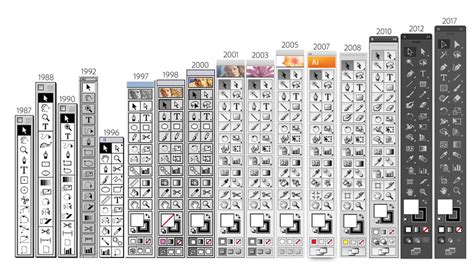
The structure of the "Classroom in a Book" series, with its 15 comprehensive lessons, is designed to be the fastest, easiest, and most comprehensive way to learn Adobe Photoshop. The project-based approach ensures that users are constantly engaged and applying what they learn. While the book covers the fundamentals and progresses to more advanced topics, it is acknowledged that Photoshop is an incredibly powerful and multifaceted program, and a single volume cannot possibly delve into every single aspect in exhaustive detail. However, the series effectively touches upon the vast majority of the program's capabilities, providing a solid foundation and a clear understanding of its potential.
Learning Experience and User Feedback
User experiences with the "Classroom in a Book" series often highlight its effectiveness. For instance, one user, a hobbyist wildlife photographer with a monthly subscription to Adobe Photoshop, found the "The Adobe Photoshop CC Classroom in a Book 2017 Release" to be an enjoyable and informative resource. Despite having little interest in certain areas like 3D work, they found all the lessons easy to follow for the most part. When clarification was needed, they found the accompanying videos in the softcopy to be very helpful. This underscores the blended learning approach that the series employs, catering to different learning styles.
While the book provides a thorough overview, it's important to note that it doesn't cover every minute detail of Photoshop; doing so would likely require multiple volumes. Nevertheless, it adeptly introduces most of the program's functionalities. The user found the book to be both informative and enjoyable, recognizing that while some specific techniques might be forgotten over time, the book serves as an invaluable reference for future consultation.
Minor issues encountered by users, such as fonts used in lessons not being available in their specific Photoshop version, are generally easy to work around, highlighting the adaptability required in software learning. Similarly, issues with video playback on certain devices, potentially due to Flash compatibility, are often external to the book's core content. The mention of units defaulting to centimeters instead of inches or pixels, even after resetting, points to the nuances of software settings and the importance of user awareness.
The "Classroom in a Book" series is lauded for its ability to cater to a broad audience. Whether you are a complete beginner taking your first steps into the world of digital imaging or an experienced user looking to refine your skills or explore new features, this series provides a structured and accessible learning path. The flexibility to work through the book sequentially or to cherry-pick individual lessons ensures that the training remains relevant and efficient for every user.
The inclusion of Adobe Bridge in some lessons, while useful, has been noted as potentially superfluous, with users finding that they can effectively navigate the projects without extensive use of this companion application. This observation emphasizes that while the book aims for completeness, users can adapt and tailor their learning based on their existing knowledge and preferences.
The overall consensus is that the "Adobe Photoshop CC Classroom in a Book" series is an indispensable tool for anyone serious about mastering Adobe Photoshop. Its official endorsement by Adobe, combined with expertly crafted lessons and supplementary digital resources, provides an unparalleled learning experience that bridges the gap between theoretical knowledge and practical application. The series empowers users to confidently create, edit, and manipulate images, pushing the boundaries of their creative potential.