In the dynamic world of digital design, understanding the fundamental differences between raster and vector graphics is paramount. Two of the most prominent tools in this arena, Adobe Photoshop and Adobe Illustrator, represent distinct approaches to image creation and manipulation. While both are indispensable for creative professionals, their underlying technologies and ideal use cases diverge significantly. Deciding which tool, or combination of tools, to employ hinges on the specific goals of a project. This article delves into the intricacies of Photoshop's pixel-based approach and Illustrator's vector-based methodology, exploring their strengths, weaknesses, and collaborative potential to empower informed design decisions.
The Foundation: Pixels vs. Mathematical Paths
At the heart of the distinction between Photoshop and vector graphics lies their fundamental building blocks. Pixels are the primary unit of measurement in the digital world, forming the basis of raster images. When working with raster images, you can be certain that your device can read and perform well with a relatively small file size. These images are composed of a grid of tiny squares, each assigned a specific color. When viewed collectively, these pixels form the complete picture. Digital cameras capture images as a series of pixels, making all photographs inherently raster images because that's how cameras work. Computers also display images as raster images.
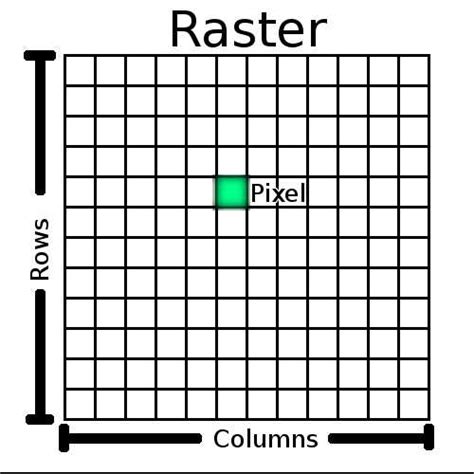
Vector graphics, on the other hand, are not built from pixels. Instead, they are created using mathematical equations that define points, lines, shapes, and curves. Adobe Illustrator is a prime example of software designed for vector graphics. When you create a shape or draw a path in Adobe Illustrator, the software stores this information as mathematical data rather than a fixed grid of pixels. This unique approach enables vector graphics to maintain their quality and sharpness regardless of scaling, all thanks to the underlying mathematical equations. Unlike raster images, vector graphics are resolution-independent.
Adobe Photoshop: The Pixel Powerhouse
Adobe Photoshop is the industry-standard software for raster-based image editing. Launched in 1988 as a tool for photographers to edit and manage their photos, it has evolved to encompass a vast array of capabilities. Everything in Photoshop is based on a series of pixels. If you scale something up or down in the program, it loses its quality quickly. This is because raster images have a fixed resolution; enlarging them beyond their native dimensions results in pixelation and a loss of detail.
Strengths of Photoshop
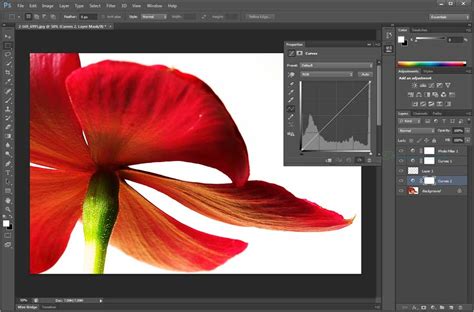
Photoshop excels at detailed photo editing and manipulation. Its comprehensive toolkit is specifically tailored for retouching photos, color correction, and overall enhancement. The software offers a wide range of tools for photo correction, including the Clone Stamp, Healing Brush, and various selection tools. Photoshop’s layer system allows users to stack images and elements, providing immense flexibility in design and editing. The program boasts many unique filters, special effects, and tools that make it an unparalleled resource when it comes to editing photos.
For instance, you might use Photoshop to enhance a product photo, or a photograph of a person or a landscape, such as making a dessert look tastier, or a person look slimmer, or a landscape look more inviting. It is also the go-to application for everything from small retouching changes to mind-bending photo art. Photoshop is where editors crop photos, adjust photo composition, correct lighting, and make any subject imaginable look its absolute best.
Use Cases for Photoshop
- Photography: Photoshop is the industry standard for photo editing, allowing photographers to enhance images through retouching and color correction.
- Digital Art: Many artists prefer Photoshop for creating detailed illustrations and concept art due to its powerful brush and painting tools.
- Web Design: Designers use Photoshop for creating web layouts, graphics, and UI elements, where pixel precision is vital.
- Mock-ups and Composites: When creating a layout or some other composite work, you might take a photo and bring it into Photoshop to combine it with other elements or apply effects.
Limitations of Photoshop
The primary limitation of Photoshop lies in its pixel-based nature. When scaling raster images up, they become blurry and pixelated. This makes Photoshop less ideal for creating graphics that need to be resized frequently or displayed at vastly different dimensions, such as logos or branding elements. Common file extensions for Photoshop files are .PSD (which preserves layers and allows for non-destructive editing, resulting in larger file sizes) and .JPG (a compressed format ideal for web use, but may lose quality with repeated saving). Other common formats include .TIFF (high-quality for printing, supports layers, but larger sizes) and .PNG (web-friendly, supports transparency, but larger than JPEG).
Adobe Illustrator: The Vector Virtuoso
Adobe Illustrator, released in 1987, was primarily used in the typesetting and logo areas of graphic design. It is a vector-based software that uses mathematical formulas to construct images. This means that within the program, you can shrink or enlarge an object as big or small as you want, and the edges will stay crystal clear and sharp. No matter how much you zoom in, the edges stay sharp as a razor. This is crucial when sending your design to your screen printer or manufacturer because they can resize it as much as they want in order to make it work for their printing process needs.
Strengths of Illustrator
The key advantage of Illustrator is its infinite scalability. Vector graphics are resolution-independent, meaning they can be scaled up or down without any loss of quality. This makes them perfect for logos, icons, illustrations, and any design that needs to be used across a variety of media, from business cards to billboards. Illustrator offers precise control over design elements, including anchor points and Bezier curves, allowing for intricate designs and clean lines.
Illustrator includes a wide array of tools for creating shapes, paths, and text, as well as features for coloring and styling graphics. Features like Live Paint and Image Tracing allow users to quickly fill areas with color and convert raster images into editable vector artwork. Because of this, Illustrator is most often used to create logos or anything needing to be printed or displayed at different sizes. It is also a much more effective tool for sketching and wireframes because of its ability to easily resize, manipulate, and reuse design elements.
Adobe Illustrator for Beginners: Get Started in 10 Minutes
Use Cases for Illustrator
- Branding and Identity: Illustrator is often used for creating brand identities, including logos, business cards, and stationery.
- Logos and Icons: Vector graphics are essential for creating logos that need to be resized for different media, ensuring they remain sharp and clear at any size.
- Illustrations: Artists can create detailed illustrations that can be easily modified and scaled for different applications, from book covers to social media posts.
- Print Media: Designers use Illustrator for print materials like brochures, posters, and flyers, where high resolution is crucial.
- Infographics: The software’s vector capabilities make it ideal for designing infographics that require clean lines and scalability.
- Game Assets: Vector images are used for games more likely. If you build a game for mobile, let's say iOS system, then you have pretty different sizes. If you use a vector image, it will be perfect in any size.
Limitations of Illustrator
While vector graphics are infinitely scalable, they may lose some detail on very complex designs and can have limited color gradients compared to raster images. Actual pictures taken with a camera are all raster images, because that's how cameras work. Until cameras are able to map out vector paths (which would be awesome), we're stuck with raster images in that respect. Converting a complex photographic image into a purely vector format can be challenging and may result in a loss of photographic realism. Common extensions for vector files include .AI (Adobe Illustrator), .EPS (Encapsulated PostScript, compatible with various design applications and used for sharing vector artwork), and .SVG (Scalable Vector Graphics, a web-friendly format ideal for graphics that require scalability and interactivity).
Photoshop vs. Illustrator: Key Distinctions
The main difference between Photoshop and vector graphics lies in their structure. Choosing between them depends on your project's requirements.
Resolution and Scalability
Photoshop images are raster-based, meaning they are composed of a finite grid of pixels. While Photoshop excels at editing and manipulating raster images, its scalability is limited by the resolution of the original image. Enlarging a raster image beyond its native resolution can result in pixelation and loss of detail. Illustrator utilizes vector graphics, which are based on mathematical equations rather than pixels. This allows Illustrator to create images that are infinitely scalable without loss of quality. Whether you’re designing a small logo or a large billboard, vector graphics in Illustrator maintain crispness and clarity at any size.
Graphics Creation and Editing Tools
Photoshop, with its raster foundation, excels in showcasing intricate details and subtle color gradations, making it ideal for creating images with these characteristics. It offers a comprehensive set of tools to cater to virtually any photo editing need, from basic retouching tasks like blemish removal and skin smoothing to more advanced techniques like photo compositing and digital painting. Its versatile selection tools, adjustment layers, and filters empower users to manipulate images with precision and creativity.
Illustrator, on the other hand, is primarily geared towards vector-based graphic design rather than photo editing. It offers basic image manipulation capabilities, such as incorporating raster images into vector artwork and applying simple effects, but lacks the extensive suite of photo editing tools found in Photoshop. Illustrator focuses on creating scalable vector graphics, such as logos, illustrations, and typography, with precise control over paths and shapes.
File Size and Format
In general, Photoshop file formats tend to result in larger file sizes compared to Illustrator. This is primarily because Photoshop primarily deals with raster-based images, which inherently contain more data compared to the vector-based artwork created in Illustrator. PSD files often include multiple layers, high-resolution images, and various adjustment layers, resulting in larger file sizes, especially for complex projects. Illustrator, dealing with mathematical data, typically produces smaller file sizes for its native formats like AI, EPS, and SVG. However, the actual file size can vary depending on factors such as the complexity of the artwork, the number of layers, image resolution, and compression settings.
Collaborative Power: Illustrator and Photoshop Working Together
For many creative professionals, Illustrator and Photoshop are not mutually exclusive but rather complementary tools used together in the same project, maximizing their respective strengths. Adobe Creative Cloud provides seamless integration between these applications.
For example, a designer might start a logo design in Illustrator, taking advantage of the vector tools to ensure scalability. Once the basic shape is perfected, they might transfer it to Photoshop for further enhancement, adding textures, shadows, or gradients to make it more dynamic. This workflow allows designers to maintain precision while enhancing creativity.
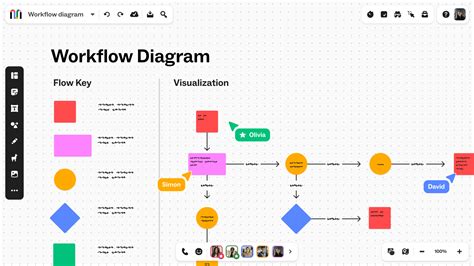
Another common use case is in the creation of user interface designs. Designers often create UI components in Illustrator, ensuring scalability across devices. They then move those assets into Photoshop for pixel-perfect adjustments, preparing the design for web developers or app creators. This synergy between the two programs helps produce more refined and flexible designs. Creators can link Illustrator files to Photoshop files; because the files are linked, a change to the Illustrator file will also show up in the Photoshop file referencing the vector. DIY store web pages, for instance, could show t-shirts, coffee mugs, stickers, and other merchandise, all displaying the same logo. The Photoshop images of the merchandise can all reference the same Illustrator file where the logo lives.
Industry Applications
The use of Illustrator and Photoshop spans various industries. Marketers rely heavily on visuals to capture consumer attention, and both are crucial. Illustrator is used to create clear, scalable logos and brand assets, while Photoshop is perfect for developing eye-catching advertisements that combine photos, typography, and effects. In fashion design, Illustrator is used for creating technical drawings and patterns, while Photoshop allows designers to add textures and colors to clothing mockups. In game design, Illustrator creates scalable assets like sprites and UI elements, while Photoshop is used for character design, scene creation, and texture application.
Conclusion: Choosing the Right Tool for the Job
In conclusion, both Adobe Illustrator and Photoshop are industry-leading tools, but their applications are very different. Understanding these differences is key to efficient and effective design.
Use Illustrator for precision, clean lines, scalable graphics, and branding elements like logos and icons. Its vector-based approach ensures that designs remain crisp and clear at any size, making it ideal for print and digital applications where resizing is a necessity.
Use Photoshop for image editing, pixel-level detail, rich visual effects, and photographic manipulation. Its pixel-based nature makes it the ultimate tool for enhancing photographs, creating digital paintings, and designing web graphics where pixel accuracy is paramount.
Many professionals use both together-Illustrator for structural design and Photoshop for visual enhancement. By understanding the unique features and capabilities of each software, you can select the right tool, or combination of tools, for your creative endeavors, ensuring your projects meet their visual objectives with optimal quality and flexibility.