The architectural industry, a field deeply rooted in tradition, has witnessed a profound digital transformation, with Procreate on the iPad emerging as a pivotal tool for creating compelling architectural renders. This shift, driven by the desire for faster iteration, enhanced artistic expression, and a more engaging client experience, has empowered architects and renderers to bridge the gap between traditional hand-drawing and modern digital capabilities. The journey of architectural visualization, from the meticulous strokes of pencil and watercolor to the dynamic possibilities of digital brushes, is a testament to the evolving landscape of design communication.
The Evolution of Architectural Visualization: From Pencil to Pixels
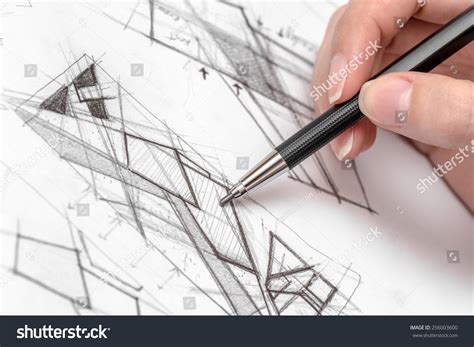
For decades, architectural rendering was synonymous with laborious handcraft. Architects and renderers painstakingly brought their visions to life using pencils, watercolors, markers, and other traditional media. This process, while rich in artistic nuance and individual expression, was inherently time-consuming and presented significant challenges when it came to making revisions. As James Akers, a registered architect, full-time architectural renderer, and professor of iPad Drawing at UCLAx, recounts from his early career in the 1980s, "Every time we had to make a change we would have to paint the proposed changes on small patches of paper, then either cut them in with an X-Acto knife and rubber cement." This method of iteration was not only tedious but also limited the scope for spontaneous adjustments during client presentations.
The advent of 3D modeling and rendering software in the late 1990s offered a new paradigm. Photorealistic renders became increasingly common, providing clients with highly detailed and accurate representations of proposed designs. However, this shift also brought its own set of challenges. While 3D software excelled at producing polished final images, it often sacrificed the immediacy and artisanal charm of hand-drawn work. The "costly and time-consuming nature of making changes and iterating by hand was giving digital a big edge," but the resulting images could sometimes feel sterile or overly finished, potentially stifling further design dialogue. As Akers notes, "Most rendering courses chase photorealism or offer scattered Procreate tricks. The problem is, photorealistic images often shut down the design conversation too early - they look ‘finished’ before ideas have had a chance to breathe."
The Procreate Revolution: A Direct Connection to the Design
The introduction of the Apple Pencil in 2005, and subsequently Procreate as a leading digital art application, marked a significant turning point for architectural rendering. For Akers, the combination of Procreate on the iPad with the Apple Pencil was a revelation. "When the Apple Pencil came out it was a game changer. I looked around for a digital drawing app that was best suited to my needs, and Procreate was the winner by far. So I made the switch and burned the bridge behind me." The directness of drawing on the iPad with a stylus offered an unparalleled sense of immediacy, closely replicating the tactile experience of drawing on paper. "It's the closest thing to drawing on paper. It really unlocks that other part of your brain that is sometimes dulled by technology," Akers explains.
This direct interaction with the digital canvas allowed renderers to leverage their years of traditional artistic skills while benefiting from the advantages of digital tools. The ability to "create multiple views of an imaginary building in an afternoon, plus make them engaging enough to actually help an architect get an important job" became a reality. Procreate's intuitive interface and robust feature set, including layers, blending modes, and a vast array of customizable brushes, provided a powerful platform for both rapid ideation and detailed refinement.
Leveraging Procreate for Speed, Artistry, and Client Engagement
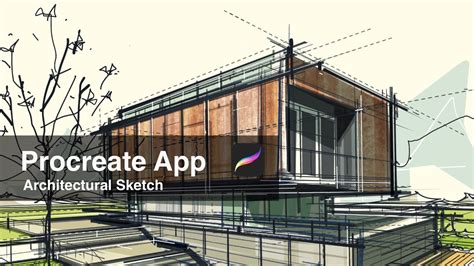
One of the most significant advantages of Procreate in architectural rendering is its capacity for "fast iteration and changes on the fly." This agility is crucial in a profession where client feedback and design evolution are constant. Unlike traditional methods or even some desktop software, Procreate allows for spontaneous adjustments, corrections, and explorations of different ideas without the need for laborious redrawing or complex file management.
Beyond speed, Procreate enables renderers to imbue their work with a distinct artistic character that resonates with a fundamental human appreciation for artisanal creations. Akers highlights this by stating, "By tapping into that ancient part of the human brain that will always loves artisanal objects and stories, you can't help but respond to the magic of drawing by hand. Especially the way drawing by hand leaves telltale traces of the process by which a drawing was created. That's something photorealistic rendering will never be able to match." This inherent "magic" is amplified in Procreate, where the digital brushstrokes, the layering of colors, and the subtle imperfections can all contribute to a narrative that draws viewers into the design.
The interactive nature of Procreate also enhances client engagement. The ability to "spontaneously sketch in front of a client" transforms a static presentation into a dynamic collaborative experience. Clients can witness ideas taking shape in real-time, fostering a deeper understanding and connection to the proposed design. This immediacy and transparency are invaluable in building trust and facilitating effective communication.
Innovative Brushwork and Custom Tools
The architectural community was an early adopter of Procreate, recognizing its potential for professional application. A notable collaboration was the creation of the Narinder brush by Narinder Sagoo, Senior Partner and Art Director at Fosters + Partners, for Procreate 4 in 2017. This early integration signaled the growing importance of Procreate within the industry and the demand for tools tailored to architectural visualization.
James Akers has further expanded the creative possibilities within Procreate by developing custom brushes and stencils. Realizing that brushes could function as more than just drawing tools, he experienced "a rush of what the potential of that could be, and just had a ball creating brushes that allowed you to instantly tap out a scale ruler to actual scale, or tap out people, trees, vegetation and cars or any other entourage element I could dream of." This innovative approach to brush creation allows for the rapid inclusion of entourage elements and the precise application of architectural conventions, such as dotted lines and property lines, significantly streamlining the rendering workflow. Akers describes this as "hacking Procreate as if it was a kind of open source program, and added these valuable tools for a world of Procreate users."
How to create a stamp brush in procreate (easy & simple)
Procreate as a Pedagogical Tool: Teaching the Art of Digital Rendering
The impact of Procreate has extended beyond professional practice into architectural education. James Akers' journey as a professor of iPad Drawing at UCLAx and his popular YouTube channel, "iPad For Architects," demonstrate the growing demand for instruction in these digital techniques. His online courses, such as "Procreate for iPad Architects," aim to equip architects with the skills to integrate Procreate into their entire workflow, "from concept design up to CAD."
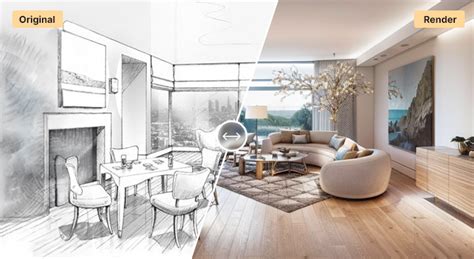
Akers' teaching philosophy centers on "combining the timeless interface of the pencil with modern digital editing tools." He emphasizes that the goal is not to replicate photorealism, but to create renderings that "carry mood, atmosphere, and life." His approach teaches students "how to sketch, layer, shade, and color in ways that keep options open, invite collaboration, and draw clients into your vision." This method empowers designers to create compelling visuals that tell a story and foster a deeper connection with their audience, moving away from the limitations of overly polished computer-generated imagery.
The testimonials from Akers' students highlight the transformative power of his courses. One student shares, "I started using the rendering tactics in your Rendering with Procreate course which are massively time-saving and optimize my work. Long story short, I’m now doing these quick, 2-to 5-hour color renderings-similar to what I learned in your course-for upcoming broadcast commercials and shows. My new clients love my Procreate hand renderings!" Another student, a former Disney Imagineer, found Akers' videos invaluable for growing their skills in vacation resort design, noting, "Love your videos because I’m using and learning the same tools. This course gives you a complete, story-driven rendering system - everything you need to turn SketchUp exports into hand renderings full of life and atmosphere."
Embracing Procreate for a Dynamic Design Process
The adoption of Procreate for architectural rendering represents a significant evolution in how designs are conceived, communicated, and appreciated. It offers a powerful synergy between the directness of hand-drawing and the efficiency of digital tools, allowing architects to express their creativity with unprecedented freedom and speed. As James Akers' extensive experience and teaching endeavors demonstrate, mastering Procreate is not merely about acquiring new software skills; it's about embracing a philosophy of design that values storytelling, artistic expression, and client engagement.
The ability to rapidly iterate, imbue work with a unique hand-drawn aesthetic, and actively involve clients in the creative process are all hallmarks of Procreate-driven architectural visualization. This approach moves beyond the limitations of rigid, overly-detailed computer images, instead favoring renderings that feel alive, inviting collaboration, and drawing clients into the architect's vision. In a world where design is increasingly about narrative and connection, Procreate provides the essential tools for architects to tell their stories with clarity, charm, and enduring impact. The future of architectural rendering is here, and it is being drawn, layered, and colored with the intuitive power of Procreate on the iPad.