Photoshop Elements stands as a streamlined, user-friendly counterpart to Adobe Photoshop, offering a robust suite of photo-editing tools within an intuitive interface. While Photoshop caters to professionals like photographers, designers, and artists, Photoshop Elements is ideally suited for beginners and hobbyists who seek powerful editing capabilities without the overwhelming complexity of the full professional version. It effectively bridges the gap between advanced editing potential and an easily navigable user experience.
The software is not offered for free. In contrast to Adobe’s subscription-based Creative Cloud suite, Photoshop Elements is available as a one-time purchase, granting perpetual ownership of the software. This represents a significant divergence from offerings such as Photoshop and Lightroom, which operate on a subscription model. The typical cost for Photoshop Elements hovers around £80-90, with Adobe occasionally providing discounts.
Key Features and Tools for Enhanced Editing
Photoshop Elements is equipped with a variety of standout tools designed to simplify and enhance the photo-editing process, covering a spectrum from basic adjustments to more intricate techniques.
Quick Edit Mode: Streamlined Adjustments for Immediate Improvement
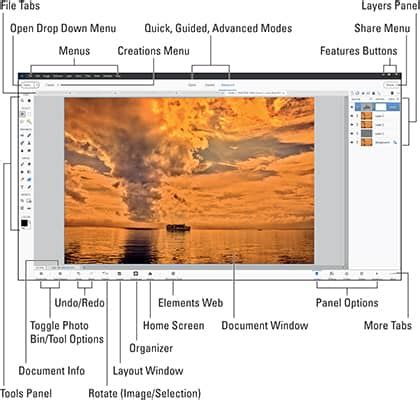
The Quick Edit Mode is a significant advantage for novices. It presents a straightforward, easy-to-use interface enabling fundamental adjustments to brightness, contrast, and sharpness. This mode is perfect for users who need to quickly improve a photograph without getting bogged down in excessive detail.
Guided Edits: Step-by-Step Creative Assistance
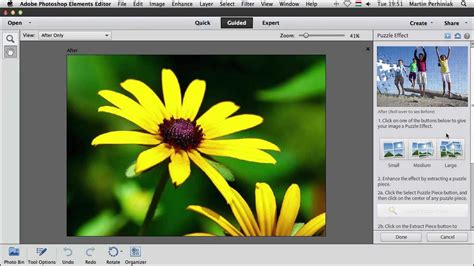
One of the most beneficial features for newcomers is the Guided Edits mode. This feature provides step-by-step instructions, guiding users through specific editing processes. This mode offers users the ability to create eye-catching special effects, from basic photo editing to impressive visual effects, and a video tutorial is available that walks users through the fundamentals of working in this mode, particularly for versions 10 and above.
Smart Brush: Precision Targeting of Effects
The Smart Brush tool allows for the application of effects or adjustments to specific areas of an image. For instance, a user can lighten a dark section or apply a texture to only a particular part of the photo. This tool is highly precise and contributes significantly to time savings.
Healing Brush: Effortless Object and Blemish Removal
For those aiming to remove blemishes or unwanted objects from photographs, the Healing Brush is an invaluable tool. It functions similarly to its more advanced counterpart in Photoshop but is simplified for ease of use. Users can refine portraits or eliminate distractions from landscape shots with just a few clicks.
Layers: Foundation for Advanced Manipulation
Layers are fundamental to more advanced editing, and Photoshop Elements makes them accessible to all users. The software includes all essential photo-editing tools, along with features that extend beyond the basics.
Beyond Basic Editing: Integrated Management and Automation
Photoshop Elements integrates features that enhance workflow and automate common tasks, making it a comprehensive solution for photo enthusiasts.
Photo Organizer: Efficient Library Management
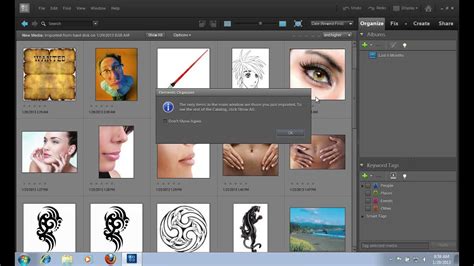
Photoshop Elements includes a built-in organizer that aids in sorting, tagging, and managing photo libraries. This is particularly useful for users with extensive image collections who need to locate specific shots rapidly. The organizer even incorporates facial recognition technology to group photos by the individuals present.
Automatic Features: AI-Powered Enhancements
The software boasts several AI-powered tools designed to automatically enhance images. Features such as Auto-Curate, which identifies the best photographs, and Auto-Colour Correction, which rectifies lighting and colour balance, can save considerable time and effortlessly make images more vibrant.
Slideshow Creator: Dynamic Photo Presentations
For users wishing to transform their photos into engaging presentations, the slideshow creator offers a swift and straightforward method for building custom slideshows.
Photoshop Elements vs. Professional Alternatives: Understanding the Distinctions
When evaluating Photoshop Elements against professional-grade software like Photoshop and Lightroom, understanding their respective target audiences and feature sets is crucial.
Photoshop Elements vs. Photoshop: Ease of Use vs. Professional Power
The primary distinction between Photoshop Elements and Photoshop lies in their intended users and the scope of their functionalities. Photoshop is engineered for professionals requiring potent tools for photo editing, graphic design, and digital art, offering an extensive range of functions and complete control over every facet of an image. Conversely, Photoshop Elements prioritizes user-friendliness.
The efficacy of Photoshop Elements compared to Photoshop is contingent upon individual editing needs. Professionals engaged in high-end retouching, graphic design, or commercial photography will likely find Photoshop's advanced features indispensable. However, for a vast number of users, particularly beginners, Photoshop Elements is more than adequate, providing all essential editing tools without the overwhelming complexity. For tasks such as photo retouching, colour enhancement, and even creating multi-layered images, Photoshop Elements performs exceptionally well.
Photoshop Elements vs Photoshop CC : Compare and Review Side by Side Tutorial
Photoshop Elements vs. Lightroom: Individual Editing vs. Library Management
Lightroom primarily functions as a photo management tool with advanced editing capabilities, excelling in the efficient handling of large volumes of photos and batch editing. It is ideal for organizing extensive photo libraries. Photoshop Elements, on the other hand, is more focused on individual photo editing. While not as adept at managing massive libraries, it offers greater control over creative editing. For users focused on enhancing individual images, Elements provides more flexibility. However, for those managing thousands of images simultaneously, Lightroom's batch processing capabilities offer substantial time savings. In essence, Lightroom is the preferred choice for managing large photo collections or when batch editing is a priority.
Accessing and Utilizing Photoshop Elements Tutorials
A wealth of Photoshop Elements tutorials are available, catering to various skill levels and editing needs, from basic operations to advanced effects. These resources are invaluable for users looking to maximize their proficiency with the software.
Essential Tutorials for Beginners
For those new to Photoshop Elements, a foundational understanding of its capabilities is paramount. Tutorials cover the main workspaces-eLive, Media, People, Places, and Events-and explain how to organize, edit, create, and share photos. A comprehensive guide can take users on a tour of the Elements Organizer, demonstrating how to view, organize, search, and tag photographs, alongside an explanation of the workspace, layout, views, and quick photo retrieval methods.
Specific beginner-focused tutorials include:
- Exploring Elements: Bob Gager’s Simple Editing
- Adobe Photoshop Elements Training Tutorial
- Easy Editing with Adobe Photoshop Elements
- Photoshop Elements Organizer
- Importing Images in Photoshop Elements
- Using Photoshop Elements to Edit Raw Images
- Making a Colored Pencil Sketch Effect
- Five-Fun Filters in Photoshop Elements
- Top Ten Best Guided Edits Tutorial
- How to Use Photoshop Elements Layers
Advanced Techniques and Special Effects Tutorials
Beyond basic enhancements, Photoshop Elements facilitates more sophisticated editing techniques and creative effects.
Restoration Tutorials
For those looking to breathe new life into old photographs, restoration tutorials are essential. These guides cover how to repair and restore old, damaged images, often utilizing tools like Content-Aware Fill to seamlessly remove unwanted elements and replace them with content from elsewhere in the photo.
Background Manipulation Tutorials
Tutorials on background manipulation offer insights into techniques for altering or enhancing the backgrounds of images, providing creative control over the scene.
Special Effects Tutorials
Photoshop Elements enables the creation of various artistic effects. Tutorials demonstrate how to:
- Create pop art effects using the dedicated Pop Art edit function (for versions 9 and above).
- Master sophisticated blur effects, such as tilt shift and lens blur.
- Develop a custom copyright watermark brush for protecting work, often a 20-minute tutorial guiding users through a one-click solution.
- Utilize the pen and ink filter to transform photographs into a drawn or cartoon-like appearance.
Video Tutorials: An Engaging Learning Medium
Many users find video tutorials to be particularly engaging and effective for learning Photoshop Elements. These visual guides offer dynamic demonstrations of techniques, making complex processes easier to follow. This format is especially beneficial for understanding the step-by-step nature of Guided Edits.
Understanding the User Community and Resources
When adopting new software, engaging with the user community is highly advisable. Online forums, user groups, and dedicated tutorial websites provide a wealth of shared knowledge, tips, and solutions to common challenges. This collaborative environment can significantly accelerate the learning curve.
Licensing and Future Updates
It is important to note the evolving licensing model for Photoshop Elements. While not requiring annual purchases like a subscription service, Adobe has transitioned to a model where newer versions, such as Photoshop Elements 2025, are licensed for a 3-year period. After this period, users will need to purchase access to the latest version to continue using the software with its updated features and improvements. Adobe typically releases a new version annually, incorporating new features and enhancements.
With the appropriate Photoshop Elements tutorials, users can achieve many of the results obtainable with the full version of Photoshop CC, but at a considerably lower cost. Photoshop Elements incorporates numerous features found in the professional version, making it an excellent selection for creative individuals who do not require all the advanced functionalities of the professional software. These tutorials, often covering versions from 7 upwards, guide users from fundamental tools to more advanced effects, empowering them to explore the full creative potential of Photoshop Elements.