Adobe Photoshop has long been the undisputed king of photo editing, so ubiquitous that its name has become a verb. For decades, it has set the industry standard, prompting many to say, "Just Photoshop it!" The experience of using Photoshop can be traced back over 25 years, even to a time when purchasing it involved buying a CD-ROM from a physical store. While its dominance is undeniable, the landscape of photo editing has evolved, and a wealth of powerful, free alternatives now exist, allowing users to achieve professional-grade results without the commitment of a subscription. This exploration delves into the best free Photoshop alternatives, examining their unique strengths, features, and suitability for various creative needs, from social media graphics to professional retouching and digital art.
What Defines the Best Free Photo Editor?
Selecting the best free photo editor involves evaluating several key criteria that mirror the capabilities expected from industry leaders like Photoshop. These criteria are essential for ensuring that a free alternative can genuinely meet user needs, whether for quick edits or complex projects.
AI-Powered Features and Workflow Acceleration
In today's rapidly advancing technological landscape, Artificial Intelligence (AI) features are no longer a luxury but a standard expectation in creative applications. While basic adjustments like brightness, contrast, cropping, and filter application are common to most editing tools, a truly competitive application must incorporate the latest AI advancements. These technologies are crucial for speeding up workflows, offering capabilities like generative AI for image creation and manipulation, intelligent object removal, and advanced photo enhancement. Photoshop itself continues to lead in this domain with its integrated suite of photo editing, art creation, and sophisticated AI features. Therefore, any free alternative aiming for a similar class must demonstrate a strong commitment to integrating and refining AI functionalities.
Intuitive User Experience and Ease of Use
The enduring success of Photoshop can be partly attributed to its intuitive design. The fundamental layout and user interface have remained remarkably consistent over many years, a testament to its effectiveness and ease of use. A truly exceptional free photo editor should strive for a similar level of intuitiveness. This means a clear, logical layout, accessible tools, and a design that allows both beginners and experienced users to navigate and utilize its features efficiently without a steep learning curve. The goal is to make the creative process as seamless and straightforward as possible, enabling users to focus on their vision rather than struggling with the software.
Non-Destructive Editing and Layer-Based Workflows
While a simple "undo" button is a fundamental feature, the true hallmark of professional photo editing software is non-destructive editing. This approach ensures that original image data remains unaltered, allowing for maximum flexibility and the ability to revisit and modify any edit at any stage. The gold standard for non-destructive editing is the implementation of layers. Layers enable users to stack different editing elements, adjustments, and graphic objects independently, controlling their visibility, blending, and opacity. This granular control is vital for complex compositions, intricate retouching, and maintaining the integrity of the original photograph.
Integrated Design Elements and Template Libraries
Beyond the core photo editing functionalities, modern creative tools are increasingly expected to offer a more comprehensive suite of design capabilities. This includes the ability to seamlessly add text with a variety of trending fonts, incorporate graphic elements, and utilize pre-designed templates. These features are particularly important for users creating content for social media, marketing materials, or presentations, where speed and visual appeal are paramount. A robust template library can significantly streamline the design process, providing a strong starting point and ensuring a polished, professional outcome.
The Promise of 100% Free Solutions
The primary motivation for seeking Photoshop alternatives is often to avoid its subscription-based pricing model. Therefore, the focus of this evaluation is on applications that are genuinely free to use, without hidden costs or limitations that significantly hinder functionality. While many high-end, paid alternatives exist, this roundup specifically highlights options that offer professional-level capabilities without requiring any financial outlay, making powerful creative tools accessible to a wider audience, including students and hobbyists.
Rigorous Testing and Evaluation Process
The selection of the best free photo editing software is the result of extensive research and hands-on testing. Over 35 hours of dedicated evaluation were invested in testing 58 different applications. The testing process involved using each app for typical Photoshop tasks, including color grading, toning, cropping, retouching, masking, and blending modes. Furthermore, the unique features of each app, such as AI capabilities, special effects, and their suitability for creating social media graphics and adding text, were thoroughly examined. This comprehensive approach ensures that the recommended alternatives are not just theoretically capable but have been practically proven to deliver on their promises.
The Top Free Photoshop Alternatives: A Detailed Look
Based on the rigorous testing and evaluation, several free applications stand out for their unique strengths and comprehensive feature sets. These tools cater to a diverse range of user needs, from casual social media users to professional artists and designers.
Canva: The Social Media Graphics Powerhouse
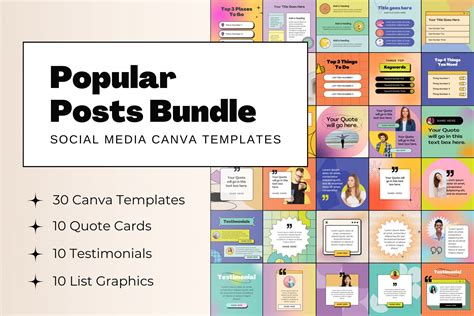
Canva has emerged as a leading platform for social media-first graphics and basic photo editing. Its strength lies in its massive library of high-quality templates for graphics, videos, presentations, and documents, making content creation incredibly accessible.
Canva Pros:
- Best Mix of Design Tools and AI: Offers an excellent blend of user-friendly design tools and integrated AI features suitable for various content types.
- Vast Template Library: Features an extensive collection of templates for social media posts, slide decks, logos, and more, catering to diverse needs.
- Seamless Collaboration: Designed with teams in mind, facilitating efficient collaboration through shared projects and feedback mechanisms.
Canva Cons:
- Not Purely for Photo Editing: While it offers essential photo editing tools like color and contrast adjustments, highlights, shadows, and cropping, it's primarily optimized for graphic design rather than in-depth photo manipulation.
- AI Features Tied to Premium: Some advanced AI features, like generative AI for images, are integrated but may require a premium subscription.
Canva's evolution has seen the incorporation of new AI features, including generative AI for image creation and template repurposing. Its acquisition and transformation of Affinity into a free, integrated app further enhances its value. Beyond static images, Canva even supports AI text-to-video generation, a significant advantage for social media content creators looking for affordable alternatives to stock media. Despite past criticisms regarding pricing changes for team plans, Canva remains a competitive and valuable option, offering substantial tools for both novice and advanced users. The "Brand Kit" feature is particularly beneficial for marketing teams, allowing them to maintain brand consistency across all content by saving logos, fonts, and custom templates. The web app is highly functional, and its mobile counterparts on phones and iPads provide a seamless creative experience. Furthermore, Zapier's integration with Canva allows for automation of design workflows, such as automatically generating designs from form submissions.
Canva Pricing: Free; Premium plan at $15/month for individuals or $20/month per user for teams. Discounts are available for non-profits and K-12 educators.
Fluer: Affordable Content Creation for Teams
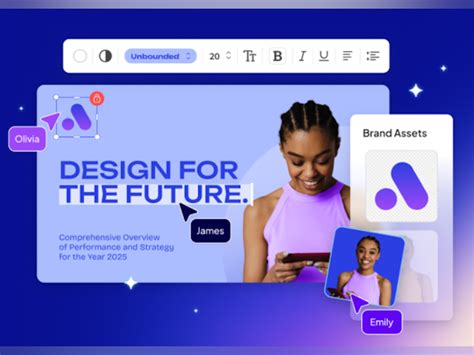
Fluer (formerly Desygner) is positioned as an excellent choice for affordable content creation and photo editing, especially for teams. It offers a web-based platform with accompanying mobile apps, similar to Canva, facilitating the creation of logos, social media graphics, presentations, and videos.
Fluer Pros:
- Team-Focused Affordability: Provides a cost-effective solution for teams, with plans accommodating up to 100 users.
- Rollover AI Credits: Unused monthly AI credits carry over, ensuring that paid features are not lost.
- Brand Consistency Tools: Features like "Brand Lock" help maintain brand guidelines by preventing accidental alterations to locked elements within templates.
Fluer Cons:
- Content Creation Focus: While capable of handling most graphic tasks and basic photo edits, its primary focus is on rapid content creation rather than specialized photo editing or complex artwork.
Fluer's AI capabilities extend to image, video, and slide deck generation, with future plans for AI-driven lead generation and customer support. The platform boasts professionally designed templates, and many users find Fluer's aesthetic quality to be consistently high, with fewer low-quality options compared to some competitors. Its comprehensive suite of PDF tools, including conversion, creation, compression, splitting, and editing, adds significant value. The standout feature for teams is "Brand Lock," which ensures brand consistency by allowing specific elements in templates to be locked, preventing unauthorized changes. For teams prioritizing cost-effectiveness while still requiring robust content creation and basic photo editing capabilities, Fluer is a top contender.
Fluer Pricing: Free; Pro plan at $9.95/month for individuals or $29.95/month for teams of up to 6 users.
Affinity: Professional Retouching and Editing Powerhouse
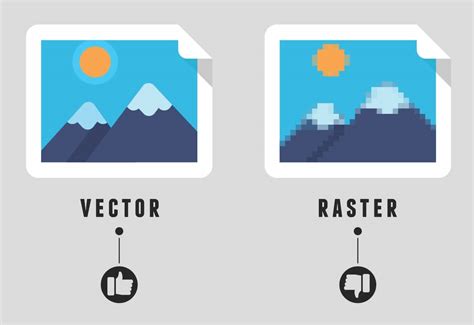
Affinity represents a significant new entry into the free Photoshop alternative space, though it's far from new to the world of professional photo editing. Once a popular paid application, Affinity was acquired by Canva and is now offered entirely free as a desktop application for Windows and Mac. The unified Affinity app integrates its previous offerings â Affinity Photo, Affinity Designer, and Affinity Publisher â into a single, powerful tool for photo editing, vector graphics, and publishing, complete with built-in Canva integrations and AI features.
Affinity Pros:
- Unparalleled Workflow Speed: Instantly switch between raster, vector, and publishing layout modes within the same file, a feature that significantly accelerates complex projects.
- Comprehensive Toolset: Offers every conceivable photo editing and graphics tool within one free application.
- Professional-Grade Capabilities: Delivers professional-level photo retouching and editing features comparable to industry standards.
Affinity Cons:
- AI Tools Require Canva Pro: Access to the most advanced AI features necessitates a Canva Pro subscription.
The ability to seamlessly switch between "Studios" (Affinity's term for its different modes) is a game-changer. Whether working with pixel-based images, vector graphics, or page layout, the transition is instantaneous and fluid, eliminating the need for cumbersome export and import processes common in other software. The app boasts a premium look and feel, with well-organized menus and an integrated video tutorial library. Users familiar with Photoshop will find the interface intuitive and welcoming. The integration of AI features for generative tasks and selections is particularly impressive, offering quick and high-quality results. Affinity has long been a strong competitor to Photoshop due to its professional-grade tools, and this new unified, free version elevates its standing even further. It supports direct import of common file formats like PSD and AI, preserving layers and settings. While some advanced AI functionalities require a Canva Pro subscription, the overall value proposition of Affinity, especially when considering the cost savings compared to Adobe's subscription plans, is exceptional. Affinity is setting a new benchmark for integrated creative software for both individuals and businesses.
Affinity Pricing: Free; Canva Pro subscription required for built-in Canva AI tools.
Pixlr: Conversational AI Photo Editing
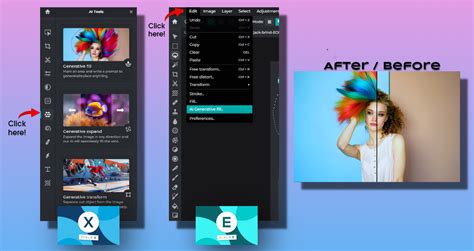
Pixlr offers a unique approach to photo editing with its conversational AI capabilities, making it accessible for beginners while retaining depth for experienced users. It is available as a web-based application and a Windows desktop app.
Pixlr Pros:
- Beginner-Friendly AI: AI features are designed for ease of use, allowing even novice users to achieve impressive results.
- Efficient Editing with Text Prompts: Enables photo editing through text prompts, streamlining the process and improving accuracy.
- Authentic Photoshop Experience: The user interface and workflow closely mimic Photoshop, providing a familiar environment for existing users.
Pixlr Cons:
- Confusing App Division: Features are split between two distinct apps, Pixlr E (for experienced users) and Pixlr X (for AI-focused beginners), which can be confusing.
Pixlr is split into two distinct applications: Pixlr E and Pixlr X. Pixlr E is designed for experienced users, offering a layout and feature set that closely mirrors Photoshop, including familiar icons, menu structures, and a right-side panel for editing history and layers. It supports advanced editing techniques like color balance, curves adjustments, and a wide array of filters and effects, including AI noise reduction. Pixlr X, on the other hand, simplifies the interface for beginners, providing basic color correction and cropping tools. Its primary draw is its advanced AI features, such as generative fill and expand. Notably, Pixlr now supports AI image and video generation via Nano Banana, alongside AI-powered photo sharpening, background removal, and object removal, making it a versatile tool. The platform also supports AI noise reduction, which requires AI credits. It's important to note that Adobe Photoshop Mix will be discontinued, and for mobile creative editing, Adobe Photoshop Express is recommended. Photoshop Mix focused on remixing images and allowed seamless movement of work to other Adobe mobile apps. Its core function was cutting out and combining photos, with features like Auto Fix, adjustment modes (Exposure, Contrast, Clarity, Saturation), and pre-defined "Looks" (filters) that could be applied selectively. Photoshop Mix also provided access to Content-Aware Fill for object removal and offered Shake Reduction and Upright tools. Projects created in Photoshop Mix could be automatically loaded as layered PSD files for further editing in Photoshop CC. Selective syncing was introduced to manage storage efficiently.
Pixlr Pricing: Free; individuals can opt for a premium plan at $2.49/month, and teams can get a plan for up to 5 users at $16.99/month.
Fotor: Easy AI Tools for Content Creation
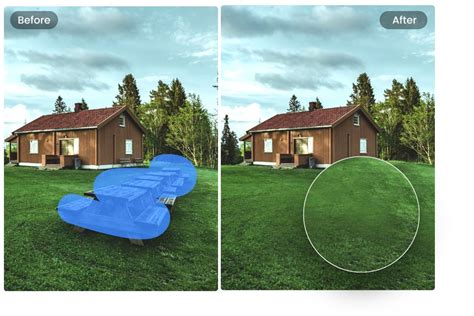
Fotor excels in providing easy-to-use AI tools that simplify content creation, making it an excellent choice for users who need quick, effective edits and enhancements.
Fotor Pros:
- Effortless Object Removal: Features an outstanding and user-friendly object removal tool.
- Generative AI Capabilities: Integrates generative AI for creative image manipulation and content generation.
- eCommerce-Specific Templates: Offers specialized templates tailored for online retail and eCommerce businesses.
Fotor Cons:
- Premium Features for Full Access: While a free version is available, many advanced features and additional AI credits require a premium subscription.
Fotor's AI-powered tools are designed to be intuitive, allowing users to enhance photos, remove unwanted objects, and generate new content with minimal effort. The object removal feature is particularly impressive, capable of cleanly erasing blemishes, distractions, or unwanted elements from images. The generative AI allows users to create unique visuals based on text prompts. For businesses involved in eCommerce, Fotor's specialized templates can significantly speed up the process of creating product listings, promotional materials, and social media content. The availability of daily AI credits in the free version provides a taste of its generative capabilities for occasional users.
Fotor Pricing: Free; Premium plans range from $10.99 to $23.99/month for additional features and AI credits.
Krita: The Artist's and Illustrator's Choice
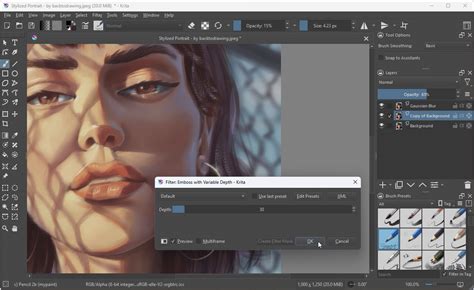
Krita is a professional, free, and open-source painting program designed primarily for artists and illustrators. It offers a powerful set of tools for digital painting, drawing, and concept art.
Krita Pros:
- Realistic Brush Simulation: Provides an incredibly detailed and accurate reproduction of traditional brushes for digital painters.
- Extensive Customization: Offers a highly customizable interface and brush engine, allowing artists to tailor the software to their specific workflow.
- Open-Source Community: Benefits from a dedicated open-source community, ensuring continuous development and support.
Krita Cons:
- Not a Photo Editor: Primarily focused on digital painting and illustration, it lacks the comprehensive photo manipulation tools found in dedicated photo editors.
Krita's strength lies in its sophisticated brush engine, which meticulously simulates the behavior of real-world painting tools like oils, watercolors, and charcoal. Artists can create custom brushes or modify existing ones to achieve precise effects. The software supports various color models, including CMYK, making it suitable for print projects. While it can open and edit raster images, its core functionality is geared towards creation rather than photographic retouching. For digital artists and illustrators seeking a free, professional-grade tool for their craft, Krita is an exceptional choice.
Krita Pricing: Free.
MyEdit: Fast AI Photo and Video Editing
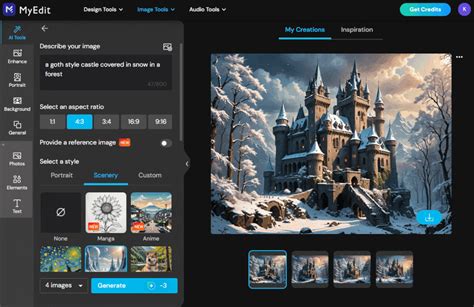
MyEdit offers a streamlined approach to photo and video editing, leveraging AI to provide fast and high-quality results, particularly for occasional users who need quick enhancements.
MyEdit Pros:
- High-Quality AI Effects: Delivers impressive AI-powered effects and enhancements for both photos and videos.
- Daily AI Credits: The free tier includes daily AI credits, which are useful for occasional generative AI needs.
- User-Friendly Interface: Designed for ease of use, making it accessible for users with minimal editing experience.
MyEdit Cons:
- Limited Free Usage: The free version is limited by daily AI credits, requiring premium plans for more extensive use.
MyEdit's suite of AI tools can quickly transform images and videos, applying artistic styles, removing backgrounds, enhancing resolution, and generating content. The daily AI credits provided in the free version allow users to experiment with its capabilities without immediate financial commitment. For tasks like quickly preparing social media visuals or enhancing personal photos, MyEdit offers an efficient and effective solution.
MyEdit Pricing: Free (3 AI credits daily); premium plans range from $10 to $18/month for additional AI credits and features.
Darktable: Totally Free RAW Photo Editing
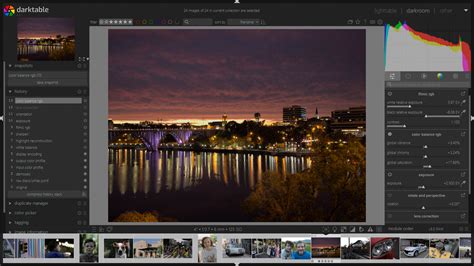
Darktable stands out as a completely free and open-source photography workflow application and RAW developer. It provides a powerful non-linear approach to photo editing, aimed at photographers who need professional-grade control over their RAW files.
Darktable Pros:
- Professional RAW Workflow: Offers a robust system for professional photo workflows, including organization, tethering, and batch exporting.
- Extensive Editing Modules: Provides a wide array of modules for detailed image manipulation, color correction, and enhancement.
- Completely Free and Open-Source: No cost and no limitations, making it an ideal choice for budget-conscious photographers.
Darktable Cons:
- Steeper Learning Curve: The interface and extensive feature set can be intimidating for beginners compared to more simplified editors.
- Not for Graphic Design: Primarily focused on photography, it does not include tools for graphic design or illustration.
Darktable is designed to complement a photographer's workflow, from initial import and organization to detailed editing and export. Its non-destructive editing capabilities are paramount, ensuring that the original RAW data is preserved. The software offers a vast array of modules that function similarly to adjustment layers, allowing for precise control over every aspect of an image, including exposure, color, tone, and detail. Its ability to handle tethered shooting, where photos are transferred directly from the camera to the computer during a shoot, is invaluable for studio professionals. For photographers committed to working with RAW files and seeking a powerful, free, and unrestricted editing solution, Darktable is an unparalleled option.
Darktable Pricing: Free.
[Darktable] Basics: Developing a photo from start to finish with Sigmoid
In conclusion, the era of subscription-only photo editing is far from the only option. The alternatives presented hereâCanva, Fluer, Affinity, Pixlr, Fotor, Krita, MyEdit, and Darktableâeach offer unique strengths that cater to a wide spectrum of creative needs. Whether you're a social media manager, a professional photographer, a digital artist, or a casual user looking to enhance your photos, there is a powerful, free tool available to help you achieve your creative vision without breaking the bank.
tags: #photoshop #mix #alternative