Photoshop plugins are powerful tools that extend the functionality of Adobe Photoshop, allowing users to automate tasks, apply complex effects, and streamline their creative workflows. Whether you're a seasoned professional photographer, a graphic designer, or an aspiring artist, the right plugins can significantly enhance your editing capabilities, turning ordinary images into extraordinary masterpieces. While the allure of "cracked" software is understandable, especially for those on a budget, it's crucial to recognize the risks associated with such downloads, including malware, legal repercussions, and a lack of updates and support. This article will explore the vast world of Photoshop plugins, focusing on their benefits, types, and how they can revolutionize your image editing process, while also touching upon the existence and value of legitimate free and paid options.
The Power of Plugins: Enhancing Your Photoshop Experience
Photographers and designers often invest heavily in their gear and software, and it's natural to seek ways to maximize their return on investment. Plugins act as essential add-ons, bridging gaps in Photoshop's native capabilities and offering specialized tools for specific tasks. They can automate repetitive processes, such as batch watermarking or applying consistent color grading, freeing up valuable time for more creative endeavors. Furthermore, plugins can introduce entirely new artistic styles and effects that would be difficult or impossible to achieve with Photoshop's built-in tools alone. For instance, some plugins are designed to create hyper-realistic textures, while others excel at generating intricate lighting effects or transforming images into painterly artworks.
The idea behind many plugins, both free and paid, is to democratize advanced editing techniques. Talented developers, often photographers themselves, create these tools with the intention of making professional-level results accessible to a wider audience. This means that beginners can achieve impressive effects with just a few clicks, while experienced users can leverage plugins to accelerate their workflow and explore new creative avenues.
Categorizing the Arsenal: A Spectrum of Plugin Functionality
The sheer volume of Photoshop plugins available can be overwhelming. However, they can broadly be categorized by their primary function:
Image Enhancement and Correction: These plugins focus on improving the technical quality of an image. This includes noise reduction, sharpening, color correction, exposure adjustments, and artifact removal. For example, XimagicDenoiser is designed to reduce photo noise, offering innovative approaches to achieve high-quality results. Similarly, plugins that automate contrast, saturation, and detail adjustments can save significant time.
Artistic Effects and Styles: This category encompasses plugins that transform images into different artistic mediums or apply unique visual styles. This can range from imitating traditional painting techniques, like watercolor or oil, to creating stylized effects such as cartoon looks, sketch effects, or vintage film simulations. Plugins like Impression can turn a regular photo into a sketch or painting with thousands of brushstrokes per second, while others aim to replicate the aesthetic of specific film stocks.
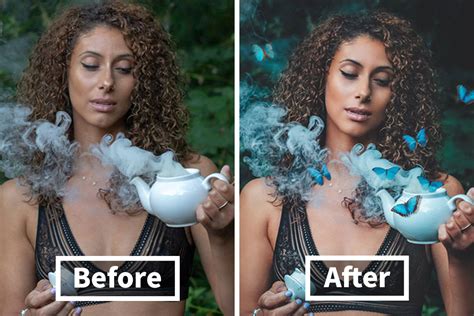
Texturing and Pattern Generation: For designers and artists working with textures, these plugins are invaluable. They can generate realistic seamless textures from photos, create organic patterns, smoke effects, or even complex fractal designs. Plugins like Texture Anarchy are known for their ability to produce grunge textures and dynamic lighting elements. Seamless Textures 2, for instance, excels at creating realistic seamless textures from existing images.
Specialized Tools: Beyond broad categories, many plugins cater to very specific needs. This includes tools for creating 3D objects and text, generating long shadows, adding realistic lighting effects like fire or lightning, creating frames and borders, or even managing project assets. The Long Shadow Generator plugin, for example, is a boon for designers needing to create modern, flat-style shadows for logos and icons. For those working with web design, plugins like Ink can export design specifications directly from Photoshop, streamlining the handoff process to developers.
Workflow and Automation: Some plugins are designed primarily to speed up the editing process. This can include automating tasks like batch watermarking, organizing layers, creating grids for layout purposes, or managing color palettes. Layrs, for instance, helps keep workspaces organized by deleting unused actions, removing empty layers, and flattening effects, thereby speeding up image editing, especially with complex files.
Exploring the Landscape: Free vs. Paid Plugins
The discussion around "photoshop plugins cracked download" often stems from a desire to access powerful tools without the associated cost. While free plugins exist and can be incredibly useful, it's important to understand their limitations and the risks of unofficial downloads.
The Appeal of Free Plugins
Many talented developers offer high-quality plugins free of charge. These are often created out of a passion for photography and design, with the goal of making advanced tools accessible. The provided text mentions several free options that extend Photoshop's capabilities:
- Pexels Plugin: Grants access to an extensive library of free stock photos directly within Photoshop, simplifying the search for inspiration and ideal images.
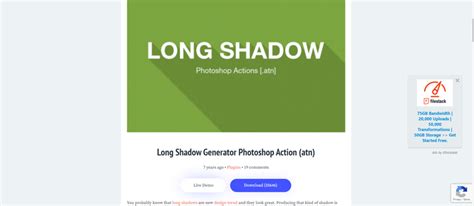
- Long Shadow Generator: A simple yet effective tool for creating realistic long shadows with a single click, ideal for modern design aesthetics.
- Watermark 3: Designed for batch watermarking, this plugin helps protect images for online publishing efficiently.
- Chroma Palette: Assists designers in saving, managing, and recalling color palettes, promoting consistency and speed in their work.
- Color Designer: Enables the creation and export of harmonious color schemes directly within Photoshop, useful for branding and design projects.
- Texture Anarchy: A robust plugin for generating organic textures, smoke effects, and creative lighting.
- Free Photo Fx: Offers a collection of ready-made, non-destructive photo effects for quick image enhancement.
- Ink Photoshop Plugin: Facilitates the export of design specifications like font styles, dimensions, and colors, crucial for web design workflows.
- Parametric Curves Plugin: Allows for the creation of advanced 3D curves and displacement-based effects.
These free plugins, when downloaded from legitimate sources, offer significant value and can dramatically improve a user's workflow without any financial outlay.
The Value of Paid Plugins
While free options abound, paid plugins often represent a higher tier of functionality, support, and ongoing development. These plugins typically offer:
- Advanced Features and AI Integration: Paid plugins frequently incorporate more sophisticated algorithms, AI-powered enhancements, and specialized tools that go beyond basic adjustments. For instance, plugins designed for professional skin retouching, like Portraiture 3, offer advanced algorithms to smooth skin while preserving texture.
- Regular Updates and Support: Developers of paid plugins are more likely to provide consistent updates to ensure compatibility with new Photoshop versions and to introduce new features. They also typically offer dedicated customer support, which can be invaluable when encountering issues.
- Comprehensive Toolsets: Many paid plugins are offered in collections or suites that bundle a wide array of powerful tools. For example, the AKVIS collection, while an investment, provides a vast range of post-production programs at a discounted price. Dream Suite Ultimate offers a comprehensive set of filters for superb photo post-processing.
- Professional-Grade Results: For professionals where time is money and image quality is paramount, the investment in paid plugins is often justified by the superior results and efficiency they enable. Plugins like Exposure are lauded for their film effect emulation, and Eye Candy 7 provides realistic effects like lightning and fire that are hard to replicate natively.
Some examples of powerful paid plugins mentioned include:
- AKVIS Plugins: A collection offering diverse post-production tools, with significant discounts available for bundles.
- Dream Suite Ultimate: A comprehensive pack of filters for advanced photo enhancement.
- Portraiture 3: Highly regarded for professional portrait retouching, focusing on skin smoothing and imperfection removal.
- 3D Invigorator: A tool for creating impressive 3D objects and logos within Photoshop.
- Exposure: Known for its realistic film effect simulations and image organization features.
- Eye Candy 7: Creates realistic effects like fire, lightning, and textures such as reptile skin and animal fur.
- Ink (mentioned as free, but some advanced versions might be paid or part of a suite): While a free version exists, professional design spec export tools can sometimes be part of paid offerings.
- PhotoMatix: For HDR effects and tone mapping, with a "Pro" version offering more advanced features.
- Impression: Transforms photos into digital paintings with a high number of brushstrokes.
- Blow Up: Specialized for high-quality image enlargement without loss of detail.
- Machine Wash Deluxe: Offers a vast library of presets for retro styles and rich textures.
- Noiseware: Advanced noise suppression with minimal detail loss.
- Fontself Maker: For creating custom fonts from vector or raster layers.
- Luminar: An AI-powered plugin that acts as a comprehensive photo editor within Photoshop.
- Nik Collection: A suite of professional-grade plugins for various editing tasks, compatible with multiple host applications.
The Perils of "Cracked" Plugins
The term "photoshop plugins cracked download" immediately raises red flags. While it may seem like a way to bypass costs, the reality is far more problematic:
- Security Risks: Cracked software is a prime vector for malware, viruses, and spyware. These malicious programs can steal your personal information, damage your computer, or even lock your files for ransom. The provided text explicitly warns against downloading from unofficial sources due to the risk of malware.
- Legal Ramifications: Downloading and using cracked software is illegal and infringes on copyright laws. This can lead to legal action from software developers and distributors.
- Lack of Functionality and Updates: Cracked plugins are often incomplete, buggy, and lack the features of their legitimate counterparts. Crucially, they will never receive updates, meaning they may quickly become incompatible with newer versions of Photoshop, rendering them useless.
- No Support: If you encounter issues with a cracked plugin, you have no recourse for support. You'll be left to troubleshoot problems on your own, often without success.
- Ethical Concerns: Using cracked software deprives developers of the compensation they deserve for their hard work and innovation. This can stifle the creation of new and improved tools in the future.

Installing and Integrating Plugins
For legitimate plugins, the installation process is generally straightforward. Most plugins come with an installer that guides you through the process, or they may require you to manually place files into Photoshop's designated "Plug-ins" folder.
To install free Photoshop plugins:
- Download Safely: Always download plugins from the official developer's website or reputable plugin marketplaces like Adobe Exchange.
- Run the Installer: If an installer is provided, run it and follow the on-screen instructions.
- Manual Installation: If manual installation is required, locate the plugin files and copy them into the Photoshop "Plug-ins" folder. The exact location can vary depending on your Photoshop version and operating system.
- Restart Photoshop: After installation, you'll typically need to restart Photoshop for the new plugin to appear.
- Locate the Plugin: Plugins can usually be found under the "Filter" menu, or sometimes under the "Window" menu, depending on their function.
How to Install Photoshop CCX Plugins Manually in Any Windows PC or Laptop
Making an Informed Choice
The world of Photoshop plugins is vast and offers incredible opportunities for creative expression and workflow enhancement. While the temptation to seek out "cracked" versions of paid plugins is understandable, the risks far outweigh any perceived benefits. Instead, photographers and designers should focus on exploring the wealth of legitimate free plugins available and consider investing in paid options when their workflows demand advanced features, reliability, and ongoing support. By prioritizing safe and legal downloads, users can harness the true power of Photoshop plugins to elevate their creative output without compromising their security or ethical standards. The journey of image editing is one of continuous learning and exploration, and with the right tools, both free and paid, the possibilities are virtually limitless.