For individuals who rely on powerful image editing capabilities but prefer or require a Linux operating system, the search for a true Photoshop alternative can be a nuanced journey. While Adobe's industry-standard Photoshop suite remains a dominant force, its native incompatibility with Linux has spurred the development and adoption of various other tools. This exploration delves into the most prominent options, examining their strengths, weaknesses, and suitability for different user needs, from casual users to seasoned professionals.
The GIMP: A Long-Standing Contender
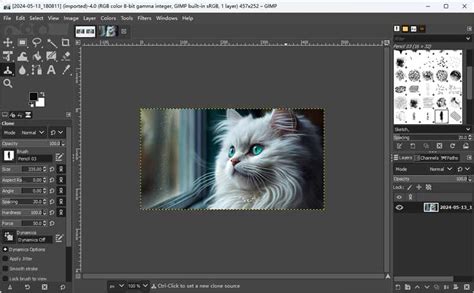
The GNU Image Manipulation Program, or GIMP, is frequently the first open-source solution suggested when the topic of Photoshop alternatives on Linux arises. For many, it represents the closest open-source contender to Photoshop in terms of raw power and feature set. However, the transition for long-time Photoshop users is often described as less than seamless.
Users accustomed to Photoshop's established workflow will find that GIMP's menus, sub-menus, and tool groupings are laid out differently. Functions are named distinctively and may reside in disparate locations compared to their Adobe counterparts. While these differences are characterized as "minor niggles," they necessitate a learning curve. The effort invested in familiarizing oneself with GIMP's unique organization is generally found to be worthwhile once the user becomes adept at locating desired functions.
The experience of using both Photoshop and GIMP concurrently for years highlights this dynamic. A user who acquired Photoshop CS2 in its era and utilized it for an extended period on Windows XP, later experimenting with GIMP on Windows, noted the initial limitations of the ported version compared to its native Linux counterpart. As technology has advanced, the ability to fluidly switch between applications mid-project without disruption has become achievable for proficient users. Despite Photoshop possessing certain exclusive features, GIMP counters with its own unique functionalities not present in Adobe's offering. For those seeking to maintain access to older Adobe software on Linux, CS2 is noted as one of the last Creative Suite versions that operates with near-perfect stability under WINE, a compatibility layer for running Windows applications on Linux. This allows for a dual-application environment within Linux, such as "Puppy" Linux, to coexist.
The Adobe Ecosystem and Linux: A Challenging Compatibility
For professionals who have dedicated two decades to using Photoshop and the broader Adobe Creative Suite, maintaining both Linux and Windows systems at their workstation has often been a necessity. This dual-system approach stems from the significant difficulty in achieving a stable installation of Photoshop on Linux. The challenge extends beyond Photoshop, making it nearly impossible to run other integral Adobe Creative Suite applications like Premiere and After Effects natively on the platform.
This persistent incompatibility leads many to the GIMP. While acknowledged as an "incredible tool," the transition from a 20-year mastery of Photoshop to GIMP can be a "painful" experience for seasoned users. The stark differences in the user interface significantly impact workflow, as users spend time searching for familiar tools. The reasoning behind Photoshop's status as the industry standard is often attributed to its superior feature set and a more mature, refined interface compared to GIMP. A review from Digital Trends is cited as a source that effectively encapsulates this disparity.
Following the GIMP vs. Photoshop discussion, the topic of WINE often emerges. While it's possible to run older versions of Photoshop, such as a two-decade-old release, through WINE, the performance and stability are frequently described as unsatisfactory, often running "like #*&$." Repeated attempts over the years to run Photoshop via WINE have yielded varying degrees of success, but the inherent complexity and subtle issues involved in getting Photoshop to function correctly are deemed "too painful" by many.
Photopea: The Browser-Based Solution
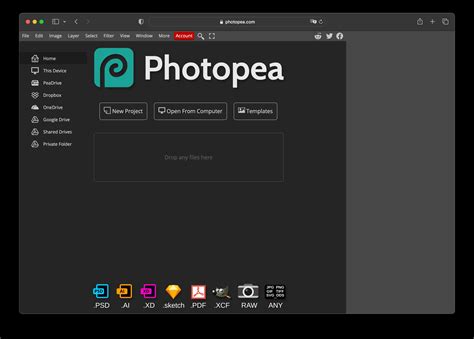
Photopea emerges as an advanced, entirely browser-based photo editing tool, offering a significant advantage in platform independence, making it an attractive option for Linux users. Its web-based nature means it operates within any modern browser, negating the need for a dedicated installation.
A key feature of Photopea is its support for a wide array of major image formats, including JPG, PNG, SVG, PSD (Photoshop files), RAW, and even Sketch files. Crucially, the processing and editing occur locally on the user's system; images are not uploaded to a server for manipulation. This local processing ensures privacy and can also contribute to faster operations for certain tasks.
For users familiar with Photoshop, transitioning to Photopea for quick edits is remarkably intuitive. The available tools function in a manner highly similar to their Photoshop counterparts. Core elements like layers, masks, brushes, and selection tools are "incredibly familiar," facilitating a smooth adoption curve. While not a comprehensive review, the experience of using Photopea for daily editing tasks mirrors that of Photoshop, with most frequently used tools readily accessible.
Photopea: Viability and Limitations
The question of Photopea's viability as a true Photoshop alternative elicits a nuanced response: "yes and no." The answer is highly dependent on the individual user's requirements. For professional photographers or even serious enthusiasts, the extended feature set of Photoshop is likely indispensable. Photopea has demonstrated some limitations when handling very large files, particularly those with numerous layers and adjustment layers, such as the 40+MB files generated by a Canon 5D. Instances of the software crashing when working with substantial layer counts have been reported by other users as well.
Photoshop Layer Masks Explained in 2 Minutes
Despite these limitations for high-end professional work, Photopea is an "incredible tool" for less demanding use cases. It proves exceptionally useful for tasks such as creating featured blog post images or resizing screenshots. Furthermore, Photopea presents a valuable opportunity for individuals looking to learn photo editing. It provides free access to all the fundamental tools, allowing aspiring editors to develop essential skills without any financial commitment. This accessibility makes Photopea a powerful educational resource and a practical tool for everyday graphic design needs that don't push the boundaries of complex, multi-layered professional projects. The platform's ability to open and edit PSD files directly is a significant draw, offering a seamless workflow for those who occasionally receive or need to modify Photoshop-created assets.
Exploring Other Linux-Native Options
Beyond GIMP and browser-based solutions like Photopea, the Linux ecosystem offers other image editing applications, each with its own niche and strengths. While they may not always match Photoshop's comprehensive feature set, they provide viable alternatives for specific workflows.
Krita: A Digital Painting Powerhouse
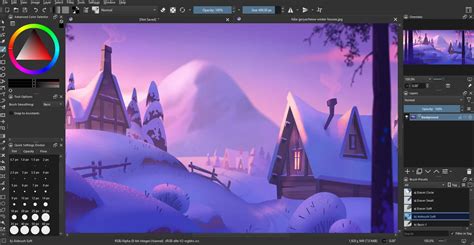
Krita is a powerful, open-source painting program that has garnered significant attention, particularly within the digital art and illustration communities. While its primary focus is on digital painting, Krita also possesses robust photo manipulation capabilities that make it a strong contender for many Photoshop tasks. Its interface is generally considered more modern and intuitive than GIMP's for users coming from a Windows background.
Krita excels in its brush engine, offering an unparalleled level of customization and a vast array of brush presets. This makes it ideal for artists who require sophisticated tools for creating digital paintings, concept art, and illustrations. For photo editing, Krita provides essential tools for color correction, layer management, and basic retouching. Its non-destructive editing capabilities, through features like filter layers and masks, are comparable to those found in Photoshop.
One of Krita's advantages is its active development community, which continually adds new features and refines existing ones. It supports a wide range of file formats, including PSD files, albeit with some limitations in full compatibility with complex Photoshop features. For users whose primary need is digital painting with some photo editing thrown in, Krita offers a compelling, integrated solution that avoids the steep learning curve sometimes associated with GIMP.
MyPaint: Simplicity for Artists
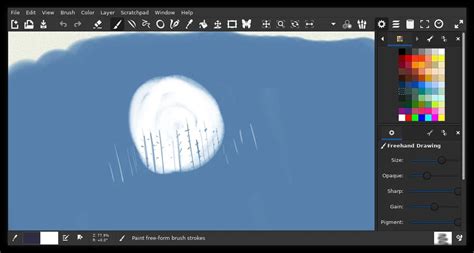
MyPaint is another open-source digital painting application, distinguished by its minimalistic and distraction-free interface. It is designed to be simple and easy to use, allowing artists to focus solely on their creative process. While not a direct Photoshop competitor for general image manipulation, MyPaint's extensive brush customization and smooth drawing experience make it a valuable tool for sketching and painting.
Its strength lies in its ability to simulate traditional painting media with remarkable fidelity. For Linux users who find GIMP or Krita overly complex for their artistic needs, MyPaint provides a streamlined environment. It supports layer functionality, but its emphasis is clearly on the artistic creation process rather than intricate photo manipulation.
Inkscape: Vector Graphics Alternative
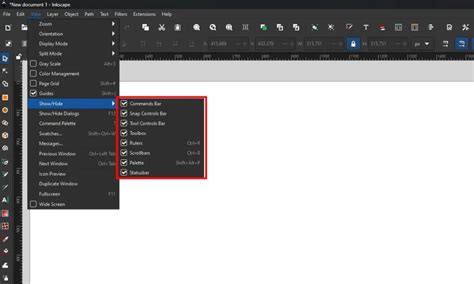
While not an image editor in the raster sense like Photoshop or GIMP, Inkscape is an essential open-source vector graphics editor that serves as an alternative for tasks traditionally handled by Adobe Illustrator. However, its capabilities in handling raster images, such as basic resizing, cropping, and format conversion, make it relevant in a broader discussion of Photoshop alternatives on Linux.
Inkscape's strength lies in its ability to create and edit scalable vector graphics, which are ideal for logos, illustrations, and designs that need to be resized without loss of quality. For users who primarily work with logos or vector-based designs and occasionally need to incorporate or manipulate raster images, Inkscape can be a part of a comprehensive Linux-based design workflow. Its integration with other Linux applications allows for seamless transitions between vector and raster editing workflows.
Photoshop Layer Masks Explained in 2 Minutes
Considerations for Workflow and User Experience
The choice of a Photoshop alternative on Linux is heavily influenced by individual workflow, prior experience, and the specific nature of the tasks at hand.
Learning Curve and Interface Familiarity
As highlighted by experienced users, the most significant hurdle when moving from Photoshop to an alternative like GIMP is the difference in user interface and workflow. While GIMP is powerful, its distinct layout requires time and patience to master. Photopea, by virtue of its design mirroring Photoshop's tools and functions, offers a much gentler introduction for those seeking a familiar environment. Krita, with its more contemporary interface, can also be more approachable for some users than GIMP.
Feature Set and Professional Demands
For professionals engaged in complex photo manipulation, extensive retouching, or demanding graphic design work, the comprehensive and mature feature set of Photoshop remains largely unmatched. Large files with numerous layers and advanced adjustment techniques can push the limits of even the most capable alternatives. Photopea, for instance, has shown limitations with very large, layered files. GIMP and Krita, while powerful, may require workarounds or additional plugins to replicate some of Photoshop's specialized functions. However, for a vast majority of common editing tasks, these alternatives offer more than sufficient capability.
Cost and Accessibility
A significant advantage of GIMP, Krita, and Inkscape is their open-source nature, meaning they are free to download, use, and distribute. This contrasts sharply with the subscription-based model of Adobe Creative Cloud. Photopea further enhances accessibility by being a free, browser-based tool, eliminating installation barriers and software costs. This cost-effectiveness makes powerful image editing accessible to a much wider audience, including students, hobbyists, and small businesses on a budget.
Performance and System Requirements
The performance of image editing software can be heavily dependent on the user's hardware. While Photoshop can be resource-intensive, its optimization for professional hardware is well-established. Open-source alternatives like GIMP and Krita are generally more efficient and can run effectively on a wider range of hardware, including older or less powerful machines. Photopea's performance is, to some extent, dependent on the user's internet connection and browser efficiency, though its local processing minimizes reliance on server-side resources.
Conclusion: A Diverse Landscape of Solutions
The search for a Photoshop alternative on Linux reveals a rich and diverse ecosystem of powerful image editing tools. While a single, direct, and universally perfect replacement for Photoshop may not exist, the available options cater to a wide spectrum of user needs and preferences.
GIMP stands as a testament to the capabilities of open-source software, offering a robust feature set that, with dedication, can rival Photoshop's power. Photopea provides an accessible, intuitive, and platform-independent solution, particularly for quick edits and users familiar with Adobe's interface. Krita emerges as a strong contender, especially for digital artists and illustrators, while also offering capable photo editing features. Inkscape, though a vector editor, plays a crucial role in a comprehensive Linux design workflow.
Ultimately, the "best" Photoshop alternative for Linux is a subjective determination. It hinges on a user's specific requirements, their tolerance for learning new interfaces, the complexity of their projects, and their budget. The continuous development and passionate communities behind these open-source and web-based tools ensure that Linux users have increasingly viable and powerful options for their image editing endeavors.
tags: #photoshop #replacement #linux