Winter photography presents a unique tapestry of challenges and rewards, inviting photographers to capture the ethereal beauty of frosted landscapes and the subtle, often magical, light of the winter sun. The crisp air and the serene stillness of a snow-covered world offer an unparalleled atmosphere. However, translating this visual poetry into compelling photographs demands more than just a keen eye; it requires meticulous planning during the shoot and, crucially, adept post-processing techniques. Among the most significant hurdles in winter photography is the accurate rendering of snow. Without careful attention, snowy scenes can appear flat, dull, or washed out, failing to convey the sparkle, texture, and vibrancy that define a true winter wonderland. This in-depth guide delves into a spectrum of Lightroom techniques, with a particular focus on the strategic application of specialized presets, to elevate your winter photographs from mere snapshots to breathtaking visual narratives.
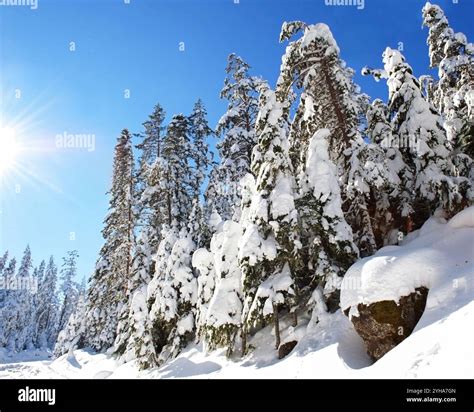
The highly reflective nature of snow poses a distinct challenge for camera sensors. Accurately determining optimal exposure can be a struggle, often resulting in images that are either overexposed - blowing out the delicate highlights in the snow, rendering it a featureless expanse of white - or underexposed, leading to dark, murky snow that lacks detail and vibrancy. Even with a technically sound exposure, snow can sometimes appear flat and lifeless, devoid of the subtle variations and textures that give a real snow scene its depth and character. The inherent stark contrast between brilliant snow and darker elements within the frame can further exacerbate this, leading to a loss of detail in the shadows and a less dynamic overall image. Furthermore, the dominant cool tones characteristic of winter scenes can often result in muted, less-vibrant colors throughout the photograph, contributing to a washed-out appearance.
The Foundation: Pre-Processing Essentials for Winter Shoots
Before even contemplating the application of Lightroom presets, establishing a strong foundation during the initial shoot is paramount. Proper exposure and white balance settings are the cornerstones of effective winter photography. Shooting in RAW format is highly recommended, as it offers significantly more flexibility and control during the post-processing phase. This allows for greater latitude in correcting errors and enhancing details that might otherwise be lost.
When it comes to exposure, utilizing your camera's various metering modes - evaluative, spot, or center-weighted - is crucial for accurately assessing the light. Pay meticulous attention to the brightest highlights within the snow to prevent overexposure, which can render the snow a uniform, featureless white. Employ exposure compensation to fine-tune the exposure as needed, ensuring that the snow appears bright but not entirely blown out, thereby preserving its inherent detail and texture.
Equally important is ensuring your white balance is correctly set. Incorrect white balance can drastically alter the overall color temperature and accuracy of the scene, leading to unnatural color casts. While auto white balance can sometimes suffice, for winter scenes, manually setting it or using a custom white balance based on the prevailing light conditions can yield more accurate and pleasing results.
Unlocking Potential: The Power of Lightroom Presets
Lightroom presets are pre-designed editing profiles that apply a specific set of adjustments to your photographs. They serve as powerful tools to streamline the editing process, enabling you to achieve consistent results across multiple images and saving considerable time and effort. A vast array of presets is available, many specifically tailored to enhance various aspects of winter photography.
For photographers aspiring to achieve a professional, cinematic aesthetic, the AI-Optimized Cinematic Winter Lightroom Presets present an exceptional solution. These presets leverage the power of Artificial Intelligence to deliver precise tonal enhancements and sophisticated color grading, making them ideally suited for accentuating the crisp, cool tones of winter landscapes and portraits. Their versatility extends to a broad range of photographic subjects, from expansive snowy vistas to intimate winter portraits and festive holiday scenes. The AI-powered adjustments are engineered to strike a perfect balance, enhancing the natural beauty of your winter scenes without compromising detail or realism.
The Snow & Winter Presets for Lightroom offer a comprehensive collection designed to elevate a wide spectrum of winter photography. Available in both DNG and XMP file formats, they ensure seamless compatibility with Lightroom across desktop and mobile devices, allowing for image enhancement regardless of your preferred editing platform. These presets are meticulously crafted to extract the best from your winter imagery, transforming ordinary shots into truly captivating winter wonderlands.
When focusing on the grandeur of winter landscapes, the Snow Landscape Presets For Lightroom emerge as an invaluable asset. These presets are specifically engineered to accentuate the intricate details and textures within snowy landscapes, rendering the snow as crisp, clear, and vibrantly alive. They offer a spectrum of effects, ranging from subtle enhancements to more dramatic transformations, empowering you to fine-tune the look of your images to perfectly align with your creative vision.
The Snow Winter Lightroom Presets provide a balanced and versatile collection suitable for a multitude of winter photography subjects. Designed with both mobile and desktop Lightroom users in mind, they guarantee that you can enhance your images irrespective of your editing platform. Similarly, the Winter Snow Lightroom Presets offer a collection focused on refining the subtle details and cool tones often prevalent in winter scenes. Compatible with both RAW and JPEG images and working seamlessly with desktop and mobile versions of Lightroom, they present a versatile and user-friendly solution for both winter photography enthusiasts and seasoned professionals.
Beyond the Preset: Fine-Tuning for Perfection
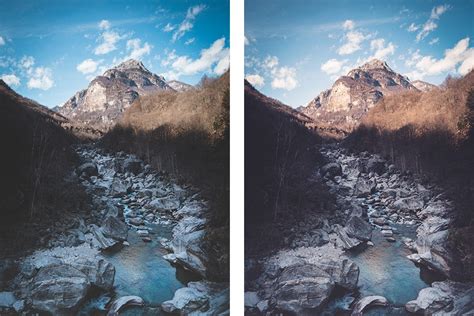
While presets offer an excellent starting point, remember that meticulous fine-tuning is essential for achieving truly exceptional results. After applying a preset, it is crucial to adjust various parameters to refine and perfect the image. Carefully consider adjustments to the exposure, contrast, highlights, shadows, whites, and blacks to ensure an optimal balance and maximum detail.
The clarity slider is your ally in enhancing details and textures, particularly within the snow itself. Use it judiciously to bring out subtle variations and prevent a flat, uninspired appearance. Experiment with the vibrance and saturation sliders to boost colors, but do so with restraint to avoid unnatural or over-saturated results.
Lightroom's localized adjustment tools are indispensable for targeted enhancements:
- Radial Filter: This tool can be used to selectively brighten specific areas of the snow, emphasizing highlights and imparting a sense of sparkle.
- Graduated Filter: Employ the graduated filter to brighten the snow in the foreground or background, thereby adding depth and dimension to your landscape photographs.
- Local Adjustments (Brush/Adjustment Brush): Utilize Lightroom's brush or adjustment brush tools to make precise adjustments to specific areas of your image, such as softening the snow in the foreground or enhancing the details of a subject.
- Split Toning: This powerful tool offers fine control over the color balance of highlights and shadows, allowing you to enhance the overall mood and vibrancy of your winter scenes.
- Noise Reduction: In low-light shooting conditions, which are common during winter, applying noise reduction is crucial to mitigate digital grain and maintain image clarity.
HOW TO EDIT SNOW PHOTOGRAPHY (Lightroom Tutorial)
Embracing the Winter Aesthetic: Specific Preset Collections and Philosophies
Winter photography is characterized by distinct light qualities and color palettes. The air feels sharper, shadows lengthen, and colors often appear cooler than expected, presenting unique editing challenges. Winter Lightroom presets are specifically designed to address these nuances, helping to balance cool winter light while preserving warmth, depth, and natural color rendition.
Winter photography is inherently full of contrast, featuring bright snow, low sun angles, cool ambient light, and soft shadows. Many preset collections are curated to address these specific elements. For instance, a collection might include presets like:
- Evergreen: Tailored for scenes featuring pines, evergreens, or Christmas tree farms, this preset enhances the rich greens and deep shadows often found in such environments.
- Bright & Merry: Designed for soft, bright winter edits with pastel tones, this preset keeps colors gentle and light, perfect for a cheerful, airy feel.
- Rustic Winter: If your photos appear too cool or lifeless, this preset adds warmth and depth instantly, creating a cozy, inviting atmosphere.
- White Christmas: When snow dominates the frame, this preset helps maintain clean, crisp whites without sacrificing detail or texture, preventing the snow from appearing blown out.
- December: This preset captures the heart of winter with sophisticated greens, deep contrast, and luminous whites, evoking a sense of classic winter elegance.
- Winter Mint: This preset adds a playful, luminous quality to your photos. Its mint-green undertones create a fresh, cool mood while still maintaining a balanced overall warmth.
These examples illustrate how presets can be tailored to specific moods and visual styles. The best winter Lightroom presets are often those that effectively balance clean whites with natural warmth, particularly crucial for snowy or overcast days. Many photographers find utility in using winter presets even for indoor shots, helping to maintain a consistent tonal palette across an entire gallery of images.
Key Considerations When Choosing and Using Presets
When searching for quality winter presets, certain features distinguish professional tools from amateur attempts. Professional-grade winter presets should offer a degree of customization while steadfastly maintaining their core aesthetic. This flexibility is key, allowing users to adapt presets to their unique shooting conditions and stylistic preferences.
Many photographers underestimate the importance of quality presets. However, professional-grade winter presets provide the consistency and refinement necessary for serious photographic work. Generic presets not specifically designed for winter conditions often fall short, failing to address the unique challenges of snow and low light.
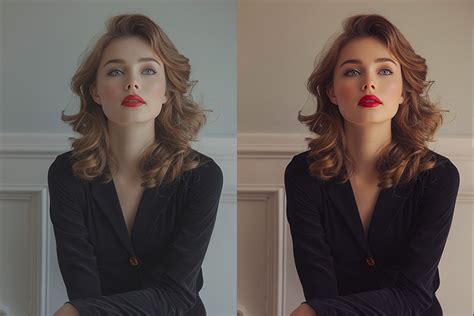
Investing in professional winter Lightroom presets offers significant dividends in both time saved and consistent results achieved. Instead of dedicating hours to mastering complex Lightroom techniques, users can achieve stunning winter photography results almost instantaneously. Winter presets excel at capturing specific emotional tones that resonate deeply with viewers. A well-designed preset collection should encompass a variety of moods, offering the creative flexibility to match any winter scene’s emotional tenor.
Beyond basic color correction, professional Lightroom presets for winter often incorporate advanced techniques that would typically demand extensive Lightroom knowledge. Learning these techniques manually can take months or even years, but presets provide immediate access to professional-level editing capabilities.
Practical Application and Workflow
For those new to Lightroom presets, a clear understanding of installation and application is beneficial. Many preset providers offer tutorials, such as the PHLEARN guide, which walks users through the process of installing and utilizing their Lightroom Presets within both Lightroom Classic and Lightroom Mobile. This installation process is generally applicable to most preset packs.
Lightroom Presets function by applying custom-made coloring and effects to images. They serve as an excellent method for finishing an edit by swiftly adding style and color. While a basic understanding of Lightroom Classic is suggested, many presets are designed for simplicity.
When applying a preset, remember these crucial fine-tuning steps:
- Adjust Temperature: After applying a preset, fine-tune the temperature to perfectly match the desired mood or the actual lighting conditions.
- Fine-tune Exposure: Presets can sometimes over or under-expose an image. Adjust the exposure slider to achieve the correct brightness.
- Use Masking for Balance: For more nuanced control, use masking tools (like radial or graduated filters, or the brush tool) to selectively apply or reduce the preset's effect in specific areas of the image.
- Keep White Balance Neutral (as a starting point): While presets alter white balance, understanding how to reset or adjust it can be vital for achieving accurate colors, especially for skin tones in portraits.
Ultimately, the right Winter Lightroom Presets do more than just enhance the visual appeal of photos; they imbue them with a feeling, a mood that resonates with the viewer. Whether the preference is for minimal whites, rich cinematic warmth, or soft, dreamy tones, professionally crafted winter presets are designed to help images tell the season’s story beautifully, effortlessly, and often, in just one click.
It's important to note that while free winter Lightroom presets are available online, they often lack the polish, tonal control, and balanced lighting that professional-grade options provide. Professional winter presets are meticulously crafted by photographers who possess a deep understanding of how light behaves and changes across seasons and settings. This expertise is embedded within each preset, ensuring a higher level of quality and consistency.
All professional Lou & Marks Winter Lightroom Presets, for example, work seamlessly with both Lightroom Mobile and Desktop versions, offering unparalleled flexibility. Each preset is designed by photographers who understand real light, how it changes by season, setting, and tone, ensuring that the presets are not just aesthetically pleasing but also technically sound.
When it comes to licensing, it's typical for presets to be purchased for personal or professional use by the single, individual purchaser. This license usually does not extend to companies or partnerships and may not be resold, loaned, or gifted to another individual or party. Redistribution, selling, or copying of these files is generally prohibited.
By understanding the unique challenges of winter photography and leveraging the power of well-designed Lightroom presets, photographers can consistently capture the magic of the season, transforming their images into evocative winter narratives.