Adobe Photoshop, a cornerstone of digital imaging and design, offers its powerful capabilities through a subscription model. Understanding how to manage this subscription, particularly how to cancel it, is crucial for users who wish to adjust their service or discontinue their use of the software. Adobe's subscription terms, while designed for convenience and continuous access, also necessitate a clear understanding of cancellation policies, potential fees, and the implications for your creative assets.
Understanding Your Adobe Subscription Terms
Your Adobe Photoshop subscription begins as soon as your initial payment is processed. This signifies the commencement of your access to the software and its associated services. Crucially, your subscription is set to automatically renew each month without prior notice until you explicitly cancel it. This auto-renewal feature is a common practice in subscription services, designed to ensure uninterrupted access for users who wish to continue their subscription. Adobe explicitly states that you authorize them to store your payment method(s) and to automatically charge these methods every month until you cancel.
Adobe also reserves the right to change your plan’s rate at each monthly renewal term. In such instances, you will be notified of any rate change, and this notification will typically include the option to cancel your subscription if the new rate is not agreeable. Furthermore, if your primary payment method fails, you are authorizing Adobe to attempt charging any other payment method you have on file. Should you not provide a backup payment method, or if all provided payment methods fail, Adobe may suspend your subscription. During a suspension, you might lose access to some subscription features and functionality, though you will retain access to your Adobe Account and content within free user storage limits. Adobe will continue to attempt charging your payment method(s) for the remainder of the term, and upon successful payment, your full subscription access will be restored.
Generative AI Features and Credits
Many Adobe subscriptions now include generative AI features, which may require generative credits. These credits allow you to generate outputs based on the inputs you provide to specific AI-powered features. The number of credits needed varies depending on the type of generative feature used and the complexity or quantity of outputs generated. It's important to note that the generative credits included in your subscription expire each month. Each month, your account will be reset with the same number of generative credits for the duration of your subscription.
For customers in the European Economic Area, your bank may require you to authenticate your initial purchase using methods like a password, a one-time code sent to your mobile number, or biometric recognition. Once authenticated, you also authorize Adobe to charge your payment method for additional purchases independently, without requiring further payment information or instructions each time.
How to Cancel Your Adobe Photoshop Subscription
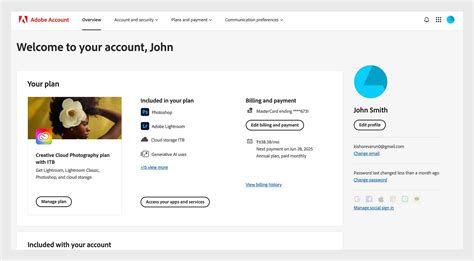
Adobe provides clear avenues for canceling your subscription. You can cancel your subscription anytime via your Adobe Account page or by contacting Customer Support. The method of cancellation might have specific nuances depending on your region or the specific plan you are enrolled in. For instance, specific countries require cancellations to be made only by contacting Customer Support.
The 14-Day Refund Policy
A significant aspect of Adobe's cancellation policy is the refund period. If you cancel within 14 days of your initial order, you will be fully refunded. This grace period allows users to test the service and ensure it meets their needs without financial commitment if they decide it's not the right fit. Your subscription begins as soon as your initial payment is processed, and this 14-day window starts from that point.
Free Trials and Cancellation
If you have signed up for a free trial, your trial period begins immediately after sign-up. If you cancel before the end of your free trial, your payment method will not be charged. Your eligibility to use an Adobe free trial offer is determined solely by Adobe.
Differentiating Between Subscription Plans: Monthly vs. Annual
Understanding the type of plan you have is paramount when considering cancellation, especially concerning potential fees. Adobe offers different subscription structures, each with distinct terms and conditions.
Monthly Plans
With a monthly plan, you are paying for the service on a month-to-month basis. If you decide you no longer need the app or plan, you can cancel, and you won't have to make any further payments. Your access to the service will continue until the end of the current month you have paid for, and there will be no cancellation fee. However, not all Adobe plans are available in a strictly month-to-month format, and those that are typically cost more per month compared to annual plans. For example, Photoshop might cost a higher monthly rate if purchased on a pure monthly basis, as opposed to an annual plan paid monthly.
Annual Plans
Annual plans are structured around a one-year commitment, offering a significant cost saving compared to monthly plans. There are two primary ways annual plans are offered:
Annual Plan, Paid Monthly: This is a very common structure for many Adobe subscriptions, including the Photography Plans. While you pay a fixed amount each month, you are actually committing to a full year of service. If you wish to cancel early, you will likely incur an early termination fee. This fee is typically calculated as 50% of the remaining balance of your contract. For instance, if you are on a standard monthly fee of US$69.99 and cancel partway through your annual term, you might be charged 50% of the remaining months' fees. The cancellation charges can vary; for example, one set of charges might be calculated based on a standard monthly fee of US$22.99 for North America. The Adobe Photography Plan, often cited as amazing value at $9.99 per month, also operates on this annual commitment, even though payments are made monthly.
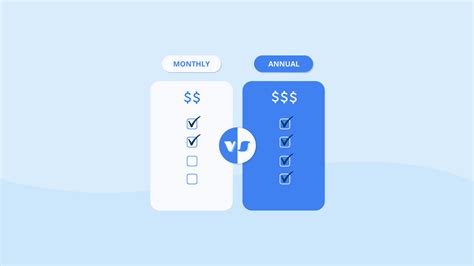
Annual Plan, Prepaid: In this model, you pay for the entire year upfront. This usually offers a slightly greater discount than the annual plan paid monthly. However, there is a significant proviso: if you cancel this type of plan, you will not receive any kind of refund for the unused portion of your subscription. You've paid for a full year, and that payment is non-refundable.
The Photography Plan Specifics
Many Adobe Photography Plan subscribers encounter a cancellation charge when they attempt to leave the service early. This is because the plan, despite being paid monthly, requires a one-year commitment. If you cancel partway through the year, you will face a cancellation fee. For a regular Photography Plan, the fee is calculated based on the remaining payments. Upon cancellation, your account reverts to a basic 'free' account with a reduced cloud storage limit, typically 20GB, allowing you to access any files stored in the cloud.
Navigating Early Termination Fees
The concept of an early termination fee for annual plans is rooted in the agreement you enter into. When you opt for an annual plan, you are securing a lower monthly rate in exchange for a year-long commitment. If you break this commitment early, Adobe applies a fee to compensate for the discount you received and the revenue they expected to receive for the full term. This is often likened to cancelling an annual insurance policy partway through; you do not receive a full refund of the remaining premium.
Adobe may be trying to offer a benefit by allowing monthly payments for annual commitments, but it's crucial for users to understand that this does not equate to a month-to-month contract without penalty.
What Happens After Cancellation?
When your paid subscription ends, your access to most Creative Cloud applications and services will cease. However, starter plans for some applications may still be available with a Creative Cloud free membership.
Cloud Storage and File Access
After cancellation, your allowed cloud storage is significantly reduced, typically to 5 GB. If your current usage exceeds this limit, you will have 30 days to reduce your online usage to comply with the new limit. Failure to do so may result in the loss of access to some or all of your files saved on the Creative Cloud servers. Files stored in free cloud storage may also be permanently deleted after a period of inactivity.
Lightroom and Local Files
For users of the Adobe Photography Plan, Adobe will continue to store your original images for one year after your membership lapses. Crucially, you can continue to access all your photos on your local hard drive through Lightroom for the desktop. You can still import and organize photos, and crucially, output your edited photos through Export, Publish, Print, Web, or Slideshow functions. This ensures that your creative work is not lost, even if your cloud access is limited.
How to claim Adobe Students and Teachers Discount Tutorial (2025) 👉All Adobe Apps for Just ₹638
Alternatives to Cancellation: Changing Your Plan
If your primary motivation for considering cancellation is that your current plan no longer meets your needs or is too expensive, Adobe offers an alternative: changing your plan. Annual Creative Cloud subscriptions generally cannot be paused or suspended. Therefore, if you wish to avoid cancellation fees and continue using Adobe services, changing your plan is a viable option.
You can switch to a different plan that might offer different applications or a different feature set, and it could cost more or less than your current plan. Typically, there is no charge or fee to change your plan. You will start on the new plan immediately, and a new 12-month term will begin, often accompanied by a new 14-day refund period for the new plan. This approach allows you to find a plan that better suits your needs while avoiding cancellation fees and allowing Adobe to retain you as a customer. Per Adobe, you can find instructions to manage your plan from the "Manage Plan" page.
Purchasing Through Third-Party Providers
It's important to distinguish where you purchased your subscription. If you purchased directly from Adobe, the cancellation procedures and terms outlined above apply. However, if you purchased your subscription through a third-party provider (such as Apple, Google, or Microsoft), your account is managed by them. In this scenario, their specific subscription and cancellation terms will apply. You will need to refer to the terms and conditions of that third-party vendor for managing and canceling your subscription.
Academic and Educational Pricing
Adobe offers educational pricing, but this eligibility is subject to verification. Adobe may verify your academic status at any time to confirm eligibility for education pricing. If it is determined that you are not eligible, Adobe reserves the right to suspend your account or move you to the then-current, non-education subscription pricing. This underscores the importance of ensuring you meet the criteria for any discounted pricing you are utilizing.
Contacting Adobe Customer Support
When in doubt, or if you encounter specific issues with your subscription or cancellation process, contacting Adobe Customer Support is the recommended course of action. For live online chat, which is often the primary way to get in touch, you can visit their dedicated support page. Remember that for specific countries, direct contact with Customer Support is the only way to initiate a cancellation.
The terms and policies regarding subscriptions and cancellations can be complex, varying by plan type, region, and purchase method. By understanding these nuances, users can make informed decisions about their Adobe Photoshop subscriptions, manage their accounts effectively, and avoid unexpected fees or loss of access to their valuable creative work.
tags: #photoshop #subscription #cancel