The world of digital image manipulation, epitomized by Adobe Photoshop, has become so ingrained in our culture that its tools are now appearing in our daily crosswords. Specifically, the clue "Photoshop tool" has surfaced in prominent puzzles, leading solvers to ponder its various iterations and meanings within the vast lexicon of graphic design. This article delves into the common answers for this clue, exploring the tools they represent and their significance in the realm of photo editing, aiming to provide a comprehensive understanding for both casual puzzlers and digital art enthusiasts.
The Four-Letter Solution: CROP
When faced with a four-letter constraint for the "Photoshop tool" clue, the most frequent and logical answer is CROP. This fundamental operation in image editing involves removing unwanted outer areas of an image, thereby changing its aspect ratio or dimensions.
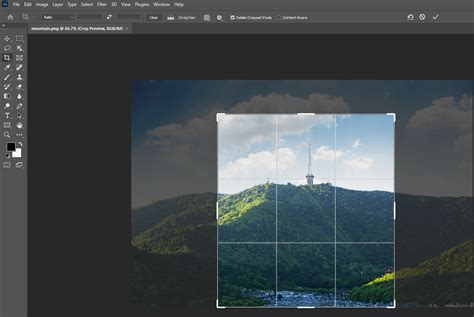
The CROP tool in Photoshop is indispensable for several reasons. It allows users to refine the composition of a photograph, focusing the viewer's attention on the subject by eliminating distracting elements. Photographers often use cropping to improve the framing of a shot, to adhere to specific aspect ratios for print or web display, or to create a more dynamic and engaging visual narrative. For instance, a wide landscape shot might be cropped to a narrower panoramic format to emphasize a sweeping vista, or a portrait might be cropped to a tighter square to highlight the subject's expression. Beyond aesthetics, cropping is also a practical tool for resizing images, ensuring they fit within specific dimensions for various applications, such as social media posts or website banners. The ability to precisely control the removal of pixels makes the CROP tool a cornerstone of post-processing workflows.
The Six-Letter Solution: ERASER
A more expansive answer to the "Photoshop tool" clue, particularly when a six-letter word is required, is ERASER. This refers to the Eraser tool within Photoshop, a powerful instrument for removing pixels from an image.
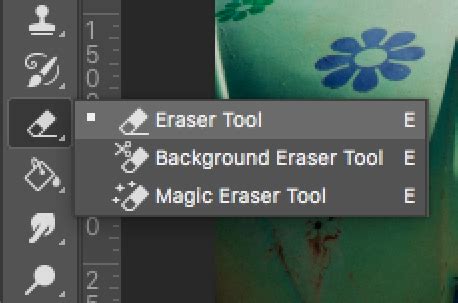
The ERASER tool in Photoshop is far more than just a digital rendition of a physical eraser. Its functionality extends to various modes and applications. The standard Eraser tool simply deletes pixels, making them transparent or filling them with the background color. However, Photoshop also offers specialized erasers, such as the Background Eraser tool, which attempts to preserve foreground detail while removing areas of similar color, and the Magic Eraser tool, which erases solid-colored areas with a single click, akin to a magic wand’s deletion capability. These variations allow for nuanced editing, from removing unwanted backgrounds in product photography to selectively deleting artifacts or blemishes from an image. The precise control offered by adjustable brush sizes, hardness, and opacity makes the ERASER tool a critical component for detailed retouching and compositing tasks. Its utility is paramount when blending multiple images or isolating elements for further manipulation.
Expanding the Lexicon: Other Photoshop Tools in Crossword Contexts
While CROP and ERASER are prominent answers, the vast array of tools within Photoshop means that other terms could potentially fit the "Photoshop tool" clue, depending on the puzzle's specific requirements and the setter's intent. These might include:
- BRUSH: The Brush tool is fundamental for painting, drawing, and applying effects. Its versatility allows for a wide range of artistic expressions, from soft airbrush effects to sharp, defined lines. The ability to customize brush tips, sizes, and opacities makes it an incredibly powerful instrument for digital painting, photo retouching, and creating complex textures.
- CLONE: The Clone Stamp tool is crucial for duplicating parts of an image. It works by sampling pixels from one area and painting them onto another, making it invaluable for removing imperfections, extending backgrounds, or replicating objects. This tool is particularly useful in retouching, where minor flaws can be seamlessly removed by cloning surrounding healthy skin or textures.
- SMUDGE: The Smudge tool simulates the effect of dragging a finger through wet paint. It's used to blend colors, soften edges, and create painterly effects. In portrait retouching, it can be used subtly to smooth skin textures or blend harsh transitions.
- DODGE: The Dodge tool lightens areas of an image, while its counterpart, the Burn tool, darkens them. These tools are essential for controlling tonal range and adding depth and dimension to a photograph. They mimic traditional darkroom techniques and are used to selectively enhance highlights or shadows, thereby guiding the viewer's eye and creating a more dramatic or realistic effect.
- PEN: The Pen tool is used to create precise paths and selections. These paths can then be converted into selections, masks, or used to draw vector shapes. It is indispensable for complex selections, intricate cutouts, and creating vector-based artwork within Photoshop. Its precision makes it a favorite among professionals for tasks requiring sharp, clean edges.
- GRADIENT: The Gradient tool creates a gradual blend between two or more colors. It's used for creating smooth color transitions, backgrounds, and special effects. Gradients can add depth, mood, and visual interest to an image, and are commonly used in web design, graphic design, and digital art.
- LASSO: The Lasso tool allows for freehand selections. While less precise than the Pen tool, it's useful for quick, rough selections or when organic shapes are needed. There are also variations like the Polygonal Lasso tool for straight-edged selections and the Magnetic Lasso tool, which attempts to snap to edges in an image.
The presence of a particular answer in a crossword puzzle often depends on the frequency of its use and recognition within the target audience. Given the ubiquity of Photoshop, it's no surprise that its core tools have become fodder for wordplay.
The Crossword Solver's Advantage: Leveraging Resources
For those frequently encountering such clues, online crossword solvers and databases have become invaluable resources. Websites specializing in crossword assistance often provide not only the direct answer but also contextual information, such as the date the clue last appeared, the publication (e.g., NYT Crossword, LA Times Daily), and even AI-generated hints. These platforms meticulously track clue-answer pairings across millions of puzzles, helping users to not only solve the immediate problem but also to expand their vocabulary and understanding of recurring themes. The ability to search by clue and answer length is a powerful tool for narrowing down possibilities, especially when multiple interpretations of a clue exist.
How To Fix The Crop Tool In Photoshop 2022-2024
The evolution of digital tools has, in turn, influenced our language and even our recreational pursuits. The "Photoshop tool" clue serves as a microcosm of this phenomenon, demonstrating how specialized knowledge can bleed into broader cultural contexts. As digital imaging continues to advance, we can expect to see even more nuanced and specific clues emerge, further testing the mettle of crossword enthusiasts and celebrating the tools that shape our visual world. The ongoing dialogue between technology and language ensures that puzzles remain a dynamic and engaging reflection of our times.