Clip Studio Paint, a powerful digital art software trusted by professionals and aspiring creators worldwide, offers flexible plans to accommodate various user needs, particularly for those looking to utilize the software across multiple devices. This guide delves into the specifics of Clip Studio Paint's dual device capabilities, subscription models, and licensing options, aiming to clarify the choices available to artists.
Understanding Clip Studio Paint Subscription Plans
Clip Studio Paint provides both monthly and annual payment plans, offering users flexibility in how they access the software. Regardless of the plan type chosen, any user with a Clip Studio account benefits from 10 GB of cloud storage. This cloud storage is a valuable asset for backing up work, syncing projects across devices, and accessing assets remotely.
To begin using Clip Studio Paint, users will need to register for a Clip Studio account. Once an account is established, accessing the software is straightforward. After launching the Clip Studio Start application, users can tap the icon in the upper right corner and select "Get Clip Studio Paint." This process is consistent across different versions of Clip Studio Paint, including Ver. 1, Ver. 2.0, Ver. 3.0, and beyond.
Monthly vs. Annual Payments
The choice between a monthly and an annual payment plan often comes down to cost-effectiveness and commitment. Annual plans typically offer significant savings, with the potential to save up to 51% compared to monthly payments. This makes the annual option a more economical choice for users who are confident in their continued use of the software.
When purchasing a monthly usage plan for the first time, users can often enjoy an introductory offer of an extra three months free. This offer is usually available when purchasing directly from within the Clip Studio application, though it may exclude smartphone-specific plans.
Managing and Changing Subscription Plans
Clip Studio Paint allows users to manage their subscriptions and even change their plans. If a user wishes to upgrade or downgrade their plan, the difference in cost is calculated on a pro-rated basis per second. This ensures that users are only charged for the exact usage difference between their current and new plan.
In scenarios where a plan change results in a negative amount (meaning the new plan is cheaper), this difference is granted as a free use period for the new plan. The final date of this allotted free use period then becomes the new regular payment date for the subscription.
Plan Changes and Billing
It's important to note that if a plan is changed within 25 days of the next scheduled payment date, users will need to pay the difference between plans calculated on a pro-rated basis by the second, along with the initial payment of the new plan. For example, if a user changes their plan on April 25th and their next payment is due May 1st, the calculation would involve the days between these dates. The difference in daily cost, multiplied by the number of days until the next payment, would be added to the first monthly payment of the new plan.
If the payment amount decreases due to a plan change, the difference between the amount paid before the change will be granted as a free use period. This free period extends the subscription until the next scheduled payment date.
Restrictions on Plan Changes
Plan changes cannot be made during a free use period that was granted due to a previous plan change. This prevents users from continuously cycling through free periods without making a payment.
Cancelling Clip Studio Paint Subscriptions
Plans cannot be canceled immediately. When a cancellation request is submitted, it takes effect from the next scheduled payment date. Users can continue to use Clip Studio Paint until their next payment date, even after initiating the cancellation. Cancellation requests can also be undone before they become effective.
If the final payment is not made by the scheduled payment date due to insufficient funds or other reasons, the plan will be automatically canceled.
Cancellation via App Stores
Users who subscribed through third-party app stores such as the App Store, Google Play, or Galaxy Store need to follow the specific cancellation procedures for those platforms. For instance, to cancel a plan from the Galaxy Store, users must follow the on-screen instructions provided by the store. Users who subscribed through these external app stores are generally not eligible for direct cancellations through Clip Studio's platform.
Dual Device Usage and Licensing
The concept of "dual device" usage in Clip Studio Paint can refer to different scenarios, primarily involving the One Time Purchase option and subscription plans.
One Time Purchase (Perpetual License)
The One Time Purchase of Clip Studio Paint (available for Windows/Mac only) allows users to register the software on up to two computers. However, a crucial condition is that both registered computers cannot have Clip Studio Paint open and running simultaneously. When attempting to register the software on a third device, the user will need to deactivate one of the previous two registrations. This action resets the registration count, allowing for two new registrations. It's important to note that Celsys (the developer of Clip Studio Paint) does keep track of how many times this deactivation and re-registration process is performed.
A common point of confusion is the "dual plan" for the One Time Purchase. There is no specific "dual plan" for the One Time Purchase itself; it inherently allows for two installations. The process involves installing and registering the software on the first computer, closing the program, then installing and registering it on the second computer, and closing it there. After this, the software can be launched on either computer without needing to "deactivate and start on this device" because both are registered. The limitation remains that both cannot be used concurrently.
If a user needs to reinstall Windows, get a new computer, or faces other situations requiring re-registration of their serial number, this counts as a third registration. In such cases, they must go through the deactivation process to reset their registration count. This ensures that users who purchase a one-time plan can register two devices without worrying about their account being locked, provided they do not use both devices simultaneously. The two registered devices will not prompt for a serial number as long as only one is in use at any given time.
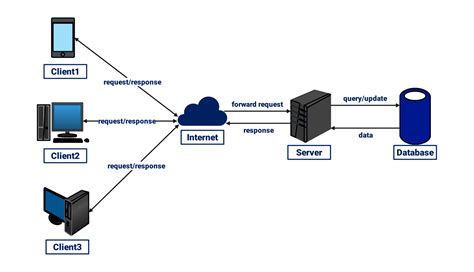
Once signed into a Clip Studio Account and the license is registered, managing the license or switching accounts/devices becomes seamless. The workflow typically involves working on one device, saving the project, closing Clip Studio Paint, transferring the file (via cloud storage, external drives, etc.), and then opening it on the second device.
Subscription Plans for Multiple Devices
For users who require more flexibility or want to use Clip Studio Paint on a wider range of devices, including iPads and iPhones, subscription plans are the way to go.
The "Duo Plan": If a user opts for a "Duo plan," they will have access to four devices. This usually means two devices are covered by a perpetual license (if applicable) and two more are covered by the subscription.
Transitioning from Perpetual License to Subscription: For users who currently have a perpetual license for one device and wish to use it on two devices with all the latest features, the situation requires careful consideration.
- Perpetual License Holders: If you have a perpetual license, it's often more cost-effective to purchase an "Update Pass" to gain access to the latest features (like Ver. 2.0 and Ver. 3.0 features) rather than switching to a new subscription. An Update Pass covers access to future versions, including Ver. 2, Ver. 3, and so on. For instance, the yearly price for an Update Pass might be around $10.
- Combining Licenses and Subscriptions: If you have a perpetual license for one device and a monthly subscription for another, it might be more economical to cancel the subscription and get two Update Passes if you intend to keep Pro. This is generally cheaper than a dual subscription.
- Switching Plans: If you have a perpetual license and want to use Clip Studio Paint on a second device with subscription features, you might need to get the Dual-device plan. However, if you have a perpetual license for Clip Studio Paint PRO, it's generally advisable to get an update pass instead to get the latest features. This combination (perpetual license + update pass) will be cheaper than a dual subscription and will grant access to all new features.
Important Distinction: It is crucial to understand the difference between a perpetual license and a subscription. Subscriptions are not perpetual licenses. If you believe you have a perpetual license but are unsure, verify your purchase history and license details. If you do not have a perpetual license, you may need to change your plan to a dual-device subscription rather than purchasing a new plan.
Device Allocation with Licenses: Each license, whether from a perpetual purchase or a subscription, can typically be used on two devices. This means with a perpetual license for two devices, you can install and use it on two computers. With a subscription plan that allows for multiple devices, the allocation can be flexible. For example, a ten-license contract could be used to run Clip Studio Paint on 5 iPads, 3 Windows computers, and 2 macOS devices.
Volume Licensing for Educational and Professional Teams
Clip Studio Paint also offers solutions for organizations, including educational institutions and professional teams.
Volume Licenses
For businesses or educational settings requiring multiple licenses, volume licensing plans are available. These plans allow for the addition of licenses at any time. Users, including license administrators and individual users, need to log in with their Clip Studio account to access the software.
Adding Licenses: If you need to add more licenses before the next contract renewal, the process depends on the payment method.
- Bank Transfer: Additional licenses can be added to an existing contract. The additional amount will be calculated on a monthly basis until the next contract renewal and can be paid together with the original contract amount from the next renewal onwards.
- Credit Card: Adding licenses via credit card might require a new contract, with each contract renewing separately.
Subtracting Licenses: Licenses can be subtracted from the plan during the contract renewal period.
Educational Use
Clip Studio Paint is a great tool for use in classes. Lesson plan ideas are available to assist educators in integrating the software into their curriculum. Western Digital has endorsed Clip Studio Paint as a go-to digital art suite for professionals and aspiring creators, highlighting its suitability for educational purposes.
Clip Studio Paint Features and User Testimonials
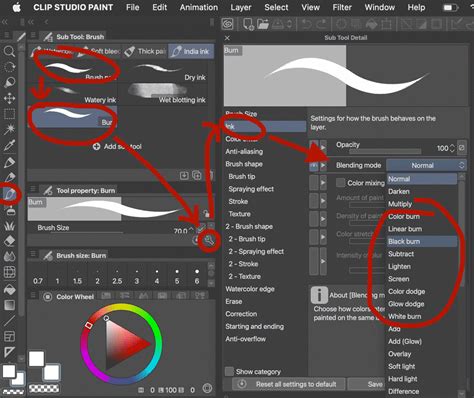
Clip Studio Paint is renowned for its highly customizable and versatile brushes, offering an authentic and natural drawing experience. It is designed for artistic professionals and creative teams who prioritize both efficiency and quality.
Key Features
Users often highlight several features that make Clip Studio Paint stand out:
- Highly customizable and versatile brushes
- Authentic, natural drawing experience
- Fill with closing gaps feature
- Reference layers
- Modifier hotkeys
- Quick Access palette
- Transform multiple layers
- Perspective rulers
- Exceptional capabilities in drawing and design
- Advanced layer management
- Comic-first tools for efficient production
- Clip Studio Assets library for inspiration and resources
Professional Endorsements and Use Cases
Numerous creative professionals and studios rely on Clip Studio Paint for their work:
- Animation: The tradigital 2D animation style is well-supported by Clip Studio Paint, which is based on classic animation techniques.
- Webtoon Production: Clip Studio Paint is considered the industry standard for webtoon production, providing all the necessary tools to create compelling content. Its features streamline the production process and help deliver high-quality art.
- Character Design and Comic Creation: The software is a fantastic tool for digital artists, particularly for character design and the creation of webtoons and comics. Its layer management and customizable brushes empower artists to create a diverse range of artwork.
- Creative Backbone for Studios: For studios like AKARTS Comics, Clip Studio Paint serves as their creative backbone, enabling them to move quickly from sketch to final art for preliminary pitches, stay inspired through the Assets library, and deliver high-quality visuals.
Major companies such as The Pokemon Company Int. and Warner Bros. have utilized Clip Studio Paint, underscoring its position as a leading software in the digital art industry. The software is praised for its user-friendly interface and the evident attention and respect developers have for artists.
Clip Studio Paint's commitment to providing flexible plans, robust features, and a supportive ecosystem makes it a preferred choice for digital artists across various disciplines and professional levels. Whether you are an individual artist managing multiple devices or a studio requiring a scalable solution, Clip Studio Paint offers options to meet your demands.