In the ever-evolving landscape of digital creativity, photo editing applications have become indispensable tools for self-expression and visual storytelling. Among these, Picsart stands out as a powerful and versatile platform, offering a vast array of features that cater to users of all skill levels. One of the most captivating and sought-after functionalities within Picsart is its ability to transform ordinary photographs into vibrant, stylized cartoons and anime-inspired creations. This article delves deep into the Picsart anime filter, exploring its various applications, the underlying technology, and how users can leverage it to achieve stunning artistic results.
Picsart, a globally recognized photo and video editing platform and creative community, has established itself as a top-tier app, consistently ranking among the top 20 most downloaded worldwide. With over 150 million monthly active users, its AI-powered tools empower creators of all levels to design, edit, draw, and share content seamlessly. The platform boasts one of the largest open-source content collections globally, encompassing an extensive library of photos, stickers, backgrounds, and templates. This rich resource pool, combined with its sophisticated editing capabilities, makes Picsart a go-to solution for both personal and professional design needs, utilized by consumers, marketers, and content creators alike.
Unveiling the Anime Aesthetic in Picsart
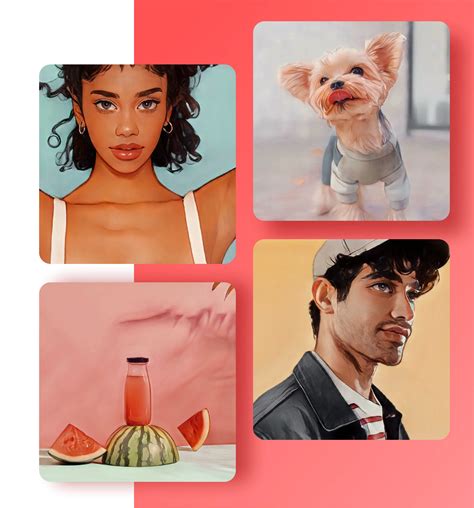
The allure of transforming oneself into a beloved cartoon or anime character has captivated imaginations for decades. Picsart makes this fantasy a tangible reality, offering a spectrum of effects that can imbue your photos with the distinct charm of animated artistry. Whether you're aiming for a classic cartoon look or the nuanced aesthetics of Japanese anime, Picsart provides the tools to achieve these transformations with remarkable ease.
The Mobile Experience: Cartoonizing on the Go
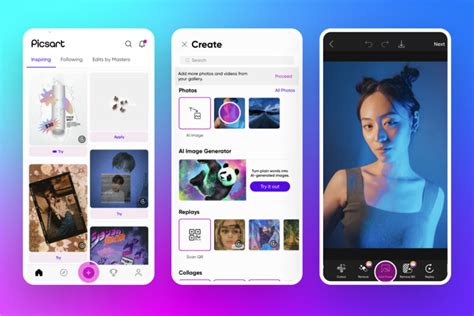
For users who prefer the convenience of mobile editing, Picsart offers an intuitive and accessible workflow. To begin your creative journey, simply open the Picsart app on your mobile device. The process starts by tapping the "+" sign at the bottom of the screen to add a photo you wish to edit. You can select an image from your device's Gallery or explore Picsart’s extensive stock photo library by clicking the magnifying glass symbol in the top right corner.
Once your photo is loaded into the editor, navigate to the "Effects" option in the toolbar situated at the bottom of the screen. Here, you'll find a diverse collection of filters. Swipe through these effects until you encounter the "Sketch" category. Within this section, Picsart presents two distinct cartoon effects: "Cartoon1" and "Cartoon2." "Cartoon1" is ideal for achieving a smooth, soft cartoon aesthetic, particularly effective on portraits and selfies. For a slightly more gritty and defined look, "Cartoon2" serves as an excellent choice. Both of these effects are completely free to use, remarkably easy to apply, and can transform your portraits into professionally crafted cartoons in mere seconds.
After selecting the effect that best complements your image, confirm your choice by tapping the checkmark in the top right corner of your screen. You then have the option to continue refining your photo with other editing tools or save this newly cartoonized version by clicking the downward-pointing arrow located in the top middle section of your screen.
The Desktop Advantage: Exploring Picsart's Web Editor
For those who prefer a larger canvas and more precise control, Picsart's web version offers a robust alternative. Access the Picsart web editor and begin by clicking "Uploads" on the left side of your screen. From there, select a photo from your previous uploads. If you haven't uploaded any images yet, the "Upload" button allows you to add pictures directly from your device.
With your chosen photo displayed, click "Effects" from the toolbar situated above the image. Within the effects menu, navigate to the "Magic" effects. This category houses a variety of filters designed to impart a cartoon or anime-like appearance to your images. These one-click cartoon filters offer a quick and effective way to achieve your desired aesthetic. Some of the standout options within the Magic effects that are particularly adept at creating a cartoon photo effect include "Soul," "Pow," "Animation," and "Neo Pop."
Beyond Basic Cartoonizing: Advanced Techniques and Creative Applications
While the core cartoon and anime filters are powerful on their own, Picsart offers a wealth of advanced features and creative approaches to further enhance these transformations.
The Art of the Sketch Effect
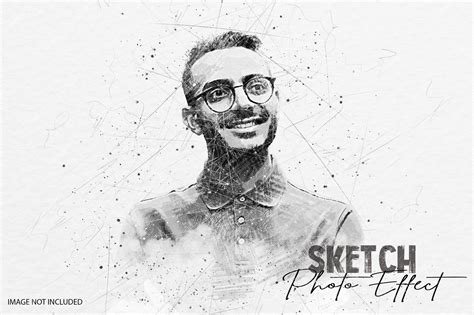
The "Sketch" effects in Picsart are a sophisticated yet accessible way to achieve a hand-drawn aesthetic. Creators have long been employing drawing tools to outline portraits, lending them a modern and refined feel. Picsart's Sketch effects simplify this process, allowing you to turn any portrait image into a sketched masterpiece with a single tap. These effects intelligently detect the outlines of your portrait, instantly transforming the image and saving considerable drawing time.
To utilize the Sketch effect, upload your image, then select "Effects" from the toolbar. Scroll to and tap on "Sketch" to reveal a diverse array of drawing effects. For more granular control, long-press (press and hold) on the chosen Sketch effect. This action unlocks additional editing options, enabling you to adjust the positioning of the sketched outline using horizontal and vertical sliders. You can also change the color of your outline by tapping on the colored circles, and further refine the appearance by modifying the line thickness and opacity.
Picsart offers six distinct outline drawing filters within the Sketch category:
- SKTCH1: Provides a classic, trendy sketch edit in just one tap.
- SKTCH2: Offers a more dramatic remix, closely resembling a typical sketch on paper. A pro tip for this effect is to enhance your remix by erasing parts of the effect or altering the background and line colors.
- SKTCH3: Allows for a double dose of sketch, applying multiple outlines to any portrait remix.
- SKTCH4: This is a "Shape Sketch" effect that uses geometric shapes to create sketch outlines, offering a unique artistic interpretation.
- SKTCH5: Takes outlined images and applies a mirror-style flip, adding a dynamic visual twist. This effect can be creatively paired with the "Glitch" effect for an enhanced sense of movement.
- SKTCH6: This effect provides an outline, but with the unique ability to swap the default white background for a background of your choice. You can select from a variety of pre-set backgrounds or upload your own, effectively taking your outline anywhere imaginable.
Infusing Anime Flair with Stickers and Color Adjustments
If a full image transformation isn't your goal, or if you wish to add a distinct anime touch, Picsart's sticker feature is an excellent alternative. You can add stickers in a cartoon or anime style to give your photos a bold, eye-catching appearance. To do this, open the photo editor, tap the "Sticker" icon, and search for cartoon-themed elements like "cartoon flower." Use a two-finger pinch to resize stickers and the Eraser Tool to remove any unwanted parts. Applying cartoon stickers can lend a multidimensional, pop-art-like quality to your images.
For a more immersive anime experience, Picsart's "Retouch" tools, particularly the "Face Tool," are invaluable. You can artificially enlarge eyes to mimic the characteristic large eyes of anime characters, shrink noses and lips, and add features like freckles. The "Hair Color" tool can also be used to experiment with vibrant, anime-inspired hair hues.
Furthermore, the "Colors" section within "Effects" offers filters that can dramatically alter the mood and aesthetic of your image. For a soft anime feel, try a pinkish filter, such as "Color 4." For a darker, more intense anime effect, explore options like "GRNG."
Crafting Caricatures and Exaggerated Features
Another popular trend enabled by Picsart is the creation of caricatures. This involves digitally drawing on top of an image or using specific tools to exaggerate facial features. To create a caricature, start by opening your image and navigating to the "Retouch" menu, then select the "Face Tool." Tools like "Face," "Nose," "Lips," "Eyes," and "Eyebrow" allow for precise manipulation of facial attributes. The "Reshape" tool is particularly useful for mimicking the scale discrepancies often seen in caricatures, allowing you to exaggerate or shrink elements of the image.
After adjusting facial features, you can further enhance the caricature effect by applying a Sketch effect like "Cartoon1" or "Cartoon2" from the "Effects" menu. This combination can yield a unique and often humorous artistic interpretation of your subject.
Free to Create: Accessibility and Watermarks
A significant advantage of utilizing Picsart's cartoon and sketch effects is their accessibility. While some advanced features on Picsart require an upgrade to the Premium version, the core cartoon effects are entirely free to use. Importantly, Picsart does not impose watermarks on photos when free effects like the cartoon or sketch filters are applied. Watermarks are typically associated with paid features, but even these can be bypassed temporarily by opting for Picsart's seven-day free trial, offering users a risk-free way to explore premium functionalities.
Versatile Applications: From Fun to Marketing
The utility of Picsart's cartoon and anime filters extends far beyond personal amusement. These effects offer a powerful means for creative expression and can be effectively integrated into various professional and marketing endeavors.
Social Media Enhancement
In the crowded digital space of social media, eye-catching visuals are paramount. Picsart's cartoon effects can instantly make your posts more share-worthy, injecting a dose of personality and creativity. Whether it's a humorous self-portrait or a stylized product image, these filters can help your content stand out and capture audience attention. The ability to turn every picture into a share-worthy cartoon provides a unique avenue for engaging followers and increasing visibility.
Brand Marketing and Identity
Businesses can leverage Picsart's cartoonizing capabilities to develop distinctive brand identities. A cartoon logo, for instance, can make a company appear more fun, approachable, and memorable. Even in traditionally serious industries like real estate, photo-to-cartoon effects can be used creatively, perhaps to present landscape images of properties for sale in a more engaging manner. For personal branding, a caricature drawing of oneself can serve as a unique and eye-catching byline image for articles or online profiles, offering a departure from standard press photos.
Artistic Exploration and Personal Expression
At its core, Picsart empowers users to explore their artistic side and express themselves creatively. The ability to "cartoonize" photos, whether it's a selfie or any other image, offers an accessible escape from reality and a playful way to reimagine the world. The platform encourages users to experiment, discover new editing styles, and ultimately, create content that is uniquely their own. The question "Have you already tried cartoonizing your photos? Were you happy with the results?" posed by Picsart itself, highlights the platform's commitment to fostering user engagement and creative exploration.
A Platform for Global Creativity
Picsart's influence extends beyond its editing tools. It functions as a vibrant creative community where users can share their work, discover inspiration, and connect with fellow creators. The platform has a history of significant collaborations with major artists and brands, including BLACKPINK, Taylor Swift, Lizzo, Ariana Grande, Warner Bros. Entertainment, iHeartMedia, and Condé Nast, underscoring its cultural relevance and impact. This collaborative spirit, coupled with its powerful yet accessible AI-driven tools, solidifies Picsart's position as a leading force in the digital creative landscape.
In conclusion, Picsart's anime and cartoon filters, along with its extensive suite of related editing tools, offer a compelling and accessible gateway to artistic transformation. Whether for personal enjoyment, social media engagement, or professional branding, these features empower users to reimagine their visual content with creativity and flair.