In today's visually driven digital landscape, understanding and utilizing the correct image dimensions is paramount for effective online branding and communication. Whether you're a social media enthusiast, a small business owner, or a digital artist, the Picsart canvas size guide will equip you with the knowledge to ensure your creations are displayed optimally across various platforms and applications. This comprehensive guide aims to demystify image sizing, helping you avoid common pitfalls like distortion, awkward cropping, and pixelation, ultimately allowing you to present your content with clarity and professionalism.
Understanding Image Sizing Basics
Before diving into specific platform dimensions, it's crucial to grasp the fundamental concepts of image sizing. When you have an image open in your browser and want to determine its size, you can right-click on it and select "Open Image in New Tab." Once the image is displayed in its own tab, right-clicking again and choosing "Inspect" will reveal detailed information. Within the inspector, ensure you've selected "elements," "img," and "style." This will present a diagram of the sizing, with the image's dimensions clearly outlined. On your desktop, whether using Mac or Windows, the process is similar: locate the image file, right-click while holding the Control key, and select "Get Info" (Mac) or "Properties" (Windows). Expanding the "General" or "Details" section will reveal the image's dimensions.
Ensuring correct image sizing for social media is vital. Incorrect dimensions can lead to images becoming distorted, stretched, awkwardly cropped, or unnecessarily pixelated once uploaded. This not only detracts from the visual appeal of your content but also impacts how your audience perceives your message. When fans see your images as intended, it enhances their engagement with your brand and the story you aim to tell. Conversely, poor sizing can obscure crucial elements, diminishing the overall impact.
Social Media Image Sizes: A Platform-by-Platform Breakdown
The ever-evolving nature of social media platforms means that image size requirements are constantly being updated. Fortunately, a well-compiled guide can significantly reduce the time spent resizing images, allowing you to focus more on building your online brand.
Facebook offers several opportunities for visual branding, including header images and cover photos.
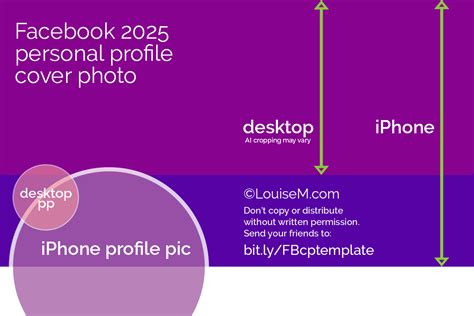
- Header Images: These images are displayed in multiple places across the site, appearing alongside your profile photo and offering a prime opportunity to personalize your page. Header images are cropped to an aspect ratio of 3:1. It's important to use the suggested dimensions and sizes, as they display differently depending on the monitor and browser being used.
- Cover Photos: Similar to header images, cover photos are another excellent way to showcase your personality. Their dimensions are crucial for a polished look.
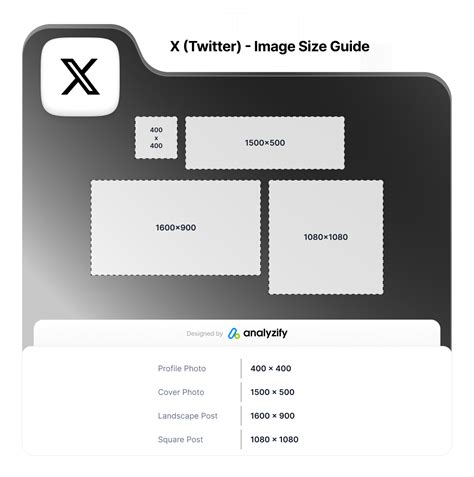
Twitter's visual presence is also significant, with specific requirements for tweet images.
- Tweet Images: Sharing multiple images in a single tweet can affect sizing, as they form a collage in the feed. In general, aim to post tweet images with a 2:1 ratio. If you upload a larger image, it will be optimized when users click to expand it.
- Header Images: These are seen not only on your profile but also alongside all your posts, in the newsfeed, search feeds, direct messages, and more, making them a critical branding element.
As one of the most visual social media platforms, Instagram places a high premium on image quality and size.
- Instagram Posts: Instagram favors high-resolution photos, particularly in a square format. If you upload an image with a different aspect ratio, the platform will crop it to fit a supported ratio. This is important to consider to avoid unwanted cropping of specific image parts. The recommended Instagram ads image size is 1080 x 1080 pixels.
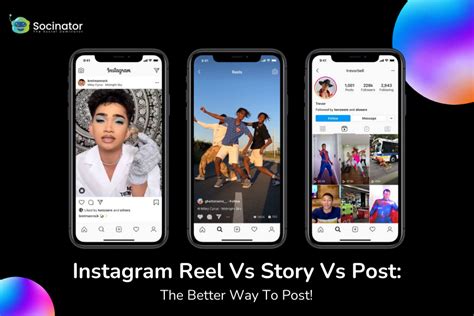
- Instagram Stories: Stories are a popular and widely seen feature on Instagram. If you create content directly within the app, it will automatically resize to the correct dimensions. When creating Stories content outside of Instagram, adhere to recommended size best practices to prevent strange cropping, a grainy or zoomed-in look, or large blank sections of the screen.
- Instagram Reels: When uploading Instagram Reels, aim for an aspect ratio between 1.91:1 and 9:16, with an ideal Instagram Reels size of 720 x 720 pixels.
- Highlight Covers: A memorable highlight cover is essential for making a first impression and presenting a polished brand.
LinkedIn is crucial for professional networking and personal branding.
- Profile Image: Your personal profile image size is important as it appears alongside all your posts. The same applies to your company avatar, which is typically your logo.
- Header Images: Ensure your LinkedIn header is creative, polished, and effectively communicates how you wish to be perceived by potential recruiters, clients, peers, and hiring managers. The recommended size for horizontal and landscape ads is 1200 x 628 pixels, with an aspect ratio of 1.91:1.

Tumblr
Tumblr is a platform where posts and images are frequently re-shared, making consistent visual presentation important.
- Profile Photos: Your profile photo appears on your page and alongside your posts.
- Header Images: Tumblr is highly customizable, and while post sizes can vary, your header is a prime opportunity to showcase your personal aesthetic or brand identity. On a desktop, your Tumblr header size will display at 3000 x 1055 pixels.

YouTube
While primarily a video platform, YouTube also utilizes still images effectively.
- Profile Images: You can choose different borders for your YouTube profile image, but its dimensions remain constant.
- Channel Banners (Cover Photos): YouTube cover pictures are vital for enticing viewers to stay on your page and explore more of your content. You can create custom YouTube banners using tools like the online YouTube Banner Maker. Accepted file formats include JPEG, GIF, BMP, or PNG.
- Video Thumbnails: Correct video dimensions are a key to success on YouTube, and this extends to compelling thumbnails.
Canva YouTube Banners: Perfect Fit Tutorial for Every Device
Pinterest is another highly visual platform, ideal for creatives, businesses, and influencers.
- Pins: Pins are relatively customizable, offering flexibility in choosing the right Pinterest Pin size. Pinterest recommends using an aspect ratio of 2:3, or 1000 x 1050 pixels, as larger images may be cut off in feeds.

Resizing Images for Social Media with Picsart
Once you understand the necessary social media image sizes, the next step is to resize your images efficiently. If you already have an image and need to adjust its dimensions, tools like Quicktools offer efficient resizing. Alternatively, within the Picsart Editor, resizing can be accomplished in just a few clicks. After editing, simply click "Download" to save your image in the desired format and size.
Understanding Poster Sizes
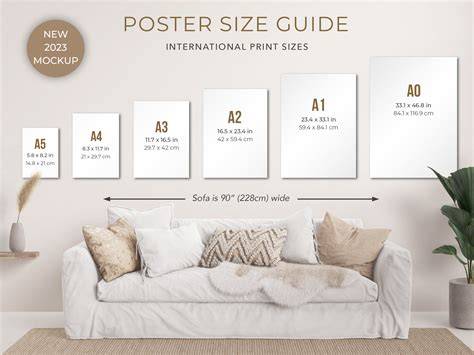
While not directly social media, understanding print dimensions is crucial for broader design applications. There are no official standard poster sizes, but the printing industry adheres to certain design dimensions.
- Standard Poster Size: This is the most common size encountered in public spaces like malls, festivals, and tradeshows.
- Large Posters: These are used by professional companies and for personal decoration or local promotions.
- Medium Poster Size: Ideal for smaller advertisements or designs with a minimalist aesthetic. These are also referred to as Architectural C Size.
- Small Posters: Great for conveying a message without taking up excessive space, often seen on bulletin boards.
- Smallest Poster Size: This is the smallest size before an item is considered more of a flyer. It's essentially the size of typical printer paper and suitable for home printing.
The best poster size depends on your project goals. More information generally requires a larger canvas. Before printing, always check with your printer regarding required print size, file size, and file format for optimal resolution.
Movie Poster Sizes
Movie posters differ from standard poster sizes.
- One Sheet: Typically 27â³ x 40â³ (686 x 1016 mm), universally used for official movie advertising.
- Bus Stop (or Subway Stop): Typically 40â³ x 60â³ (1016 mm x 1524 mm), used for promotional purposes.
When measuring poster sizes, always use the format Height x Width.
Designing with Picsart: Posters, Labels, and Shopify Stores
Picsart offers a robust ecosystem for creators, providing powerful tools to design various visual assets.
Designing Posters in Picsart
Picsart provides a range of poster templates or the option to create from scratch.
- Select Size: In the Fit tool panel, choose a poster size from presets or input custom dimensions.
- Add Elements: Utilize the Stickers tool to add visual elements.
- Add Text: Use the Text tool to input your information, styling the font, size, and color.
- Customize: Apply further customization touches to match your style and project goals.
The Picsart app also allows for mobile poster design:
- Start Design: Open the app and tap the purple '+' symbol.
- Choose Ratio: Tap "Ratio" and select your poster size.
- Add Text: Use the Text tool to add and stylize your words.
- Finishing Touches: Add any necessary final elements. Tap "Next" to save.
Branding and Label Design with Picsart
For small businesses, a consistent brand image is essential. This extends to product labels, ensuring they align with the overall aesthetic. Labels represent your product, so they must meet the right resolution and sizing parameters to avoid distortion.
- Avery Label Sizes: This brand offers labels ranging from small rectangular 1â³ x 4â³ to oval 2â³ x 3-1/3â³.
- Wine Label Sizes: Standard wine bottle labels typically measure 3.5â Ã 4â.
Designing labels in Picsart involves:
- Upload or Create: Upload your logo or use Text and Elements to add custom lettering.
- Export: Click "Export" to download your label design.
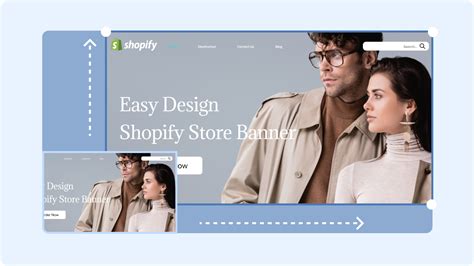
Shopify Store Design with Picsart
Creating visually appealing Shopify stores is crucial in the e-commerce landscape. High-quality images enhance customer perception of product quality.
- Image Spaces: Shopify offers various image spaces, including banners, backgrounds, and logos.
- Consistency: Maintain a coherent design theme with consistent colors, fonts, and visual elements aligned with your branding.
- Simplicity: Avoid overwhelming customers with too many images, which can negatively impact user experience.
Designing Shopify images in Picsart:
- Custom Size: Open the Picsart web application, choose "Custom Size," and enter your desired dimensions.
- Add Photos: Select the Photos tool from the left-hand menu.
- Add Elements: Use the Text and Stickers tools to add fonts and graphics.
- Export: Click "Export" and download using the correct image file type (.jpg or .png) and size.
Canvas Sizes for Digital Art
For digital artists, selecting the appropriate canvas size is critical to avoid issues with viewing or printing.
- Online and Social Media: A minimum of 2000 pixels on the long side and 1200 pixels on the short side will display well on most modern devices.
- Printing: For printing digital art, a canvas size of at least 3300 x 2550 pixels is recommended. Canvas sizes exceeding 6000 pixels on the long side are typically only needed for poster-sized prints.
Understanding Pixels, PPI, and DPI:
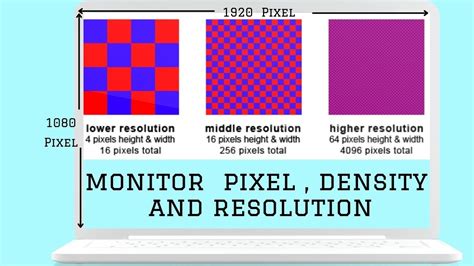
- Pixels: The basic unit of a digital image.
- PPI (Pixels Per Inch): The number of pixels in one inch when viewed on a screen.
- DPI (Dots Per Inch): The number of "pixels" in one inch when printed.
While often used interchangeably, 300 DPI is the standard for printing, and modern screens often operate at around 250 PPI. It's generally recommended to set your canvas at 300 DPI/PPI for versatility, unless you have a specific reason otherwise.
Why Canvas Size Matters:
- Too Small: Limits the size at which your art can be printed or viewed without scaling up, which can lead to blurring or artifacts. This can render the art unusable for commercial purposes.
- Too Big: Can cause software and hardware to run slowly, leading to lag, delayed brushstrokes, and longer processing times for filters and saving. Large canvases also result in very large file sizes.
Optimal Digital Painting Workflow:
Start with the largest canvas size your system can handle without performance issues. As you zoom in for details and use smaller brushstrokes, increase the canvas size incrementally up to your desired final target size. This approach allows for a smooth painting experience while achieving the desired resolution for printing or high-quality display. If you consistently struggle to reach your target size, consider optimizing your workflow, accepting a smaller print size, or upgrading your hardware, focusing on CPU and RAM.
Global Print Size Standards
Navigating global print sizes requires understanding variations in measurement systems and common dimensions.
- Business Cards: North America uses 3.5 x 2 inches (imperial), while Europe and Asia often use 85 x 55 millimeters (metric).
- Posters: North America favors 24 x 36 inches, while Europe and other regions frequently use A-series paper sizes, with A2 (420 x 594 millimeters) being popular.
- Flyers and Brochures: North America commonly uses the letter size (8.5 x 11 inches). Europe prefers A4 (210 x 297 millimeters), and Japan utilizes B-series sizes like B5 (182 x 257 millimeters).
Impact on Design:
- Adaptability: Designs must be adaptable to various sizes, ensuring key elements remain visible and strategically placed.
- Localization: Designs should resonate with regional aesthetics for greater effectiveness.
- Print Partner Collaboration: Working with printers familiar with regional standards is crucial for accurate execution.
Picsart supports global printing businesses, allowing users to design in the right formats and avoid print challenges by utilizing custom layout and size options.
Canvas Art Sizes and Placement
When choosing artwork for your home, canvas size and placement are key.
- Categories: Canvas sizes generally fall into Mini, Small, Medium, Large, Oversized, and Panoramic.
- Medium Canvas: Often a safe and stylish bet, large enough to be noticed but versatile for most rooms.
- Large Canvas: Best when you want art to be the room's focal point, ensuring adequate wall space for breathing room.
- Square Canvas Prints: (e.g., 12"x12", 16"x16") are perfect for Instagram-style photos or creating symmetrical grids.
- Panoramic Canvas Prints: (e.g., 10"x20", 16"x32") are ideal for dramatic landscapes or cityscapes.
Interior Design Rule of Thumb: Artwork should occupy roughly two-thirds (66%) of the available wall space.
Placement Tips:
- Wall Space: Measure the width of the wall where art will hang and multiply by 0.66.
- Sofa Placement: Measure your sofa's width and multiply by 0.6 and 0.75 to determine ideal artwork width.
- Paper Templates: Cut paper to canvas dimensions and tape to the wall to visualize the fit.
- Painter's Tape: Mark canvas corners directly on the wall with painter's tape to test size and placement.
Print Quality for Canvases: For sharp prints, ensure good photo resolution. For a 24x36 canvas, aim for at least 2400 x 3600 pixels. Most canvases come with hanging hardware. Popular canvas sizes include 16x20 and 24x36.
By understanding these dimensions and utilizing tools like Picsart, you can confidently create and present your visuals across all your digital and physical endeavors, ensuring they are seen as intended and make the desired impact.